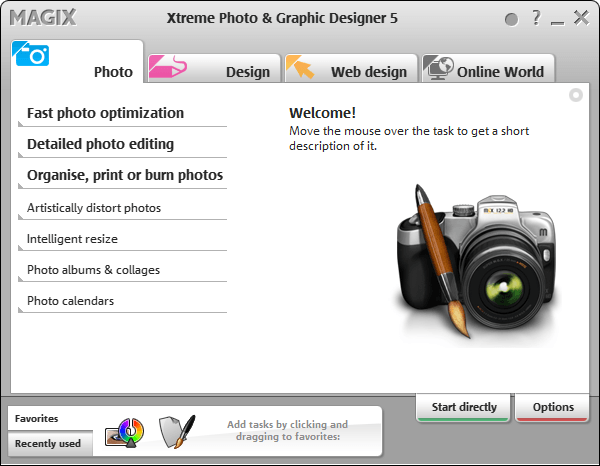
Free MAGIX Xtreme Photo & Graphic Designer 5 (Silver Edition)! [Limited time offer]

December 10, 2011 42 Email article | Print article

Note: This freebie was originally posted about in November 2011. That particular promotion of MAGIX Xtreme Photo & Graphic Designer 5 has ended but a new promotion for it is now live. So for those that missed it in November — this is your second chance. Sorry for any double notifications (e-mail/RSS/Twitter/Facebook/Google+)!

Software Description

The following is the description of MAGIX Xtreme Photo & Graphic Designer 5 as per the developer:

Image Editing

Enhance your pictures, enrich them with professional filters and effects, or design unique photo & graphics creations. Everything works on a non-destructive vector basis for professional results (original photos remain unchanged).

The integrated real-time image editing enables ultra-fast, loss-free editing of pictures – even for very large image files.

Creative Effects

Artistic image design: Painting, pencil drawing, canvas, crayon, pastel, wrinkled, television, fisheye, newspaper, waveform, shutters, and much more.

Photo caricatures: Use the “liquid paint” function to give cranky colleagues big ears, have a friend sport big muscles, or your boss look out from a frame with droopy eyes.

Turn your photos into graphics: The “Bitmap Tracer” vectorizes image files into lines and shapes that you can edit freely.

And much more

Illustrate, draw & paint

Discover the world’s fastest vector graphic engine and create graphic elements in real time. Enjoy next-generation graphic design throughout the entire process thanks to diverse drawing tools for freehand drawing (brush), shapes, graduated colors, fills, transitions, contour and relief effects, and easy drag & drop handling

  • Drawing tools & line gallery
  • Shadows & transparency
  • Color gradient & distortion

Text, layout & desktop publishing

Do you need nice titles on your photos for your album? Or would you like to design multi-page brochures to present your company? Take advantage of the unique design freedom and arrange elements any way you want.

Includes formatting, text flow around shapes and images, multilingual spell check, support for all installed fonts incl. live preview and find and replace function.

dotTech Advice

I am not very artistic person; for me to give advice on a photography/image editing program would be like an English professor teaching rocket science; yes, not pretty.

While I personally can’t evaluate this program, it has gotten some good reviews. However, when reading reviews, be sure to look up the reviews for v5 — the latest version of this program is v7 and many reviews are on that. v7 obviously has improvements over v5 so don’t be confuse the two.

Any right-brained dotTechies feel free to provide advice on this soft.

Freebie Details

MAGIX Xtreme Photo & Graphic Designer 5 (Silver Edition) is being given away in a promotion run by What Digital Camera. There is no information on if it is time limited offer nor is there information on if you can install/reinstall at a later date. My guess, however, is this is a time limited offer, hence why I marked this as a limited time offer in the title; I just don’t know how long this will be available. So grab this while you can, if you want it.

To get MAGIX Xtreme Photo & Graphic Designer 5 (Silver Edition) for free, do the following:

Version being given out for free: v5.0.406.1309

Free updates: No

Free technical support: Probably not

Supported OS: Not specified; it runs just fine on Windows 7 for me

Download size: 3.7 MB installation manager and 365 MB program

  • Download MAGIX Xtreme Photo & Graphic Designer 5. Take note you are downloading the MAGIX installation manager, not the actual MAGIX Xtreme Photo & Graphic Designer 5.
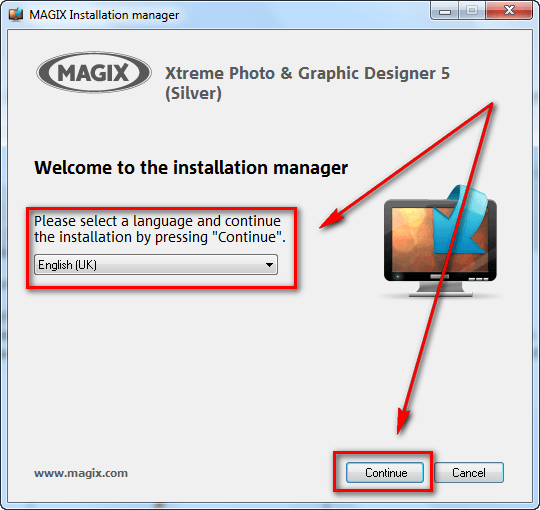
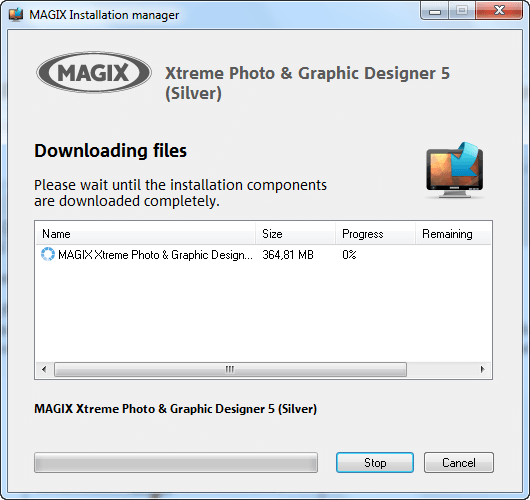
  • Once the download finishes, run the download manager. You will be asked to select a language, after which the download for the actual MAGIX Xtreme Photo & Graphic Designer 5 will begin:
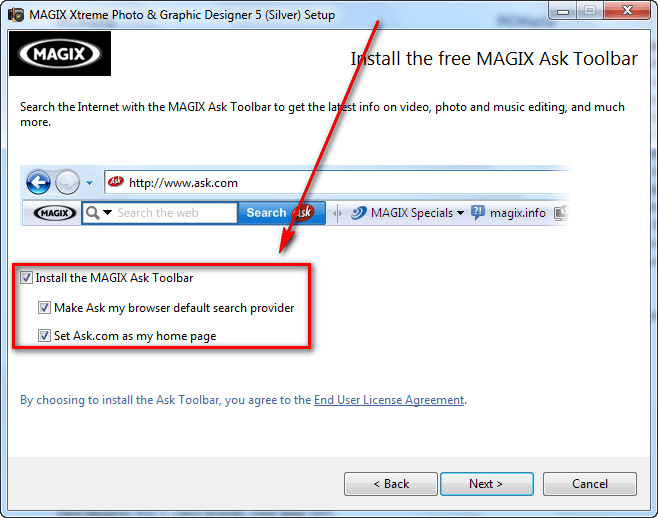
  • After the download finishes, install MAGIX Xtreme Photo & Graphic Designer 5. Take note it comes bundled with MAGIX Ask Toolbar, so be sure to unselect the toolbar during installation if you don’t want it (you probably don’t want it):
  • After installation MAGIX Xtreme Photo & Graphic Designer 5 should start automatically. If it doesn’t, run MAGIX Xtreme Photo & Graphic Designer 5 (Starter) from your start menu. When MAGIX Xtreme Photo & Graphic Designer 5 runs, you will be prompted to register the program. Click on the Register program button:
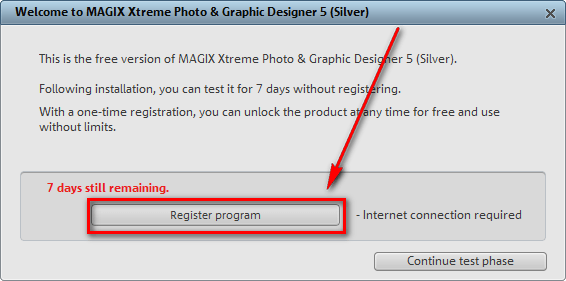
  • Once you click on the button, the registration page will open in your default browser:

If you have an account with MAGIX you can login with it. If you don’t, you will have to register a new account. If registering a new account, you will have to confirm it via e-mail before you can use it.

Follow on screen instructions until you are shown a confirmation message like the following:

  • Check the inbox of the e-mail address you registered with. Look for an e-mail from MAGIX register@magix.net with the subject of Your product registration at www.magix.com. In the e-mail you will find the registration code you need to use to register MAGIX Xtreme Photo & Graphic Designer 5:
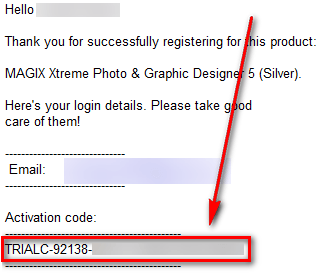
Copy the activation code.

  • Go back to MAGIX Xtreme Photo & Graphic Designer 5, paste the code in the registration box (it will automatically take out the TRIALC part if you copied that), and click the Continue to use program button:
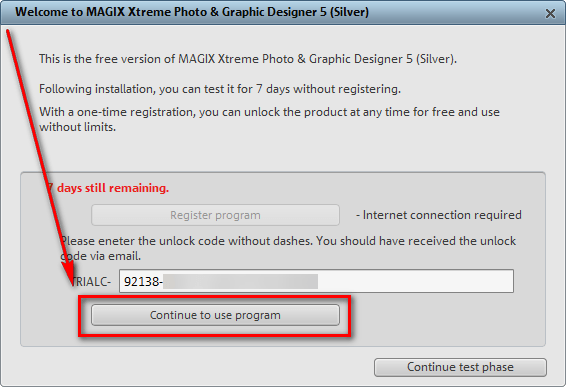
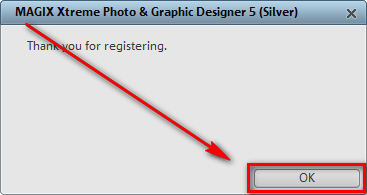
  • If you see the following success message, you are the proud new owner MAGIX Xtreme Photo & Graphic Designer 5:
If you have trouble getting MAGIX Xtreme Photo & Graphic Designer 5 (Silver Edition) post below and other dotTechies or I will try to help.

Enjoy!

42 Comments »

  1. hatman November 8, 2011 at 5:48 PM (comment permalink) -

    Huge File. Will try it. Thanks :-)

    1
  2. Ashraf November 8, 2011 at 5:49 PM (comment permalink) -
    Mr. Boss
  3. PCbasics November 8, 2011 at 7:09 PM (comment permalink) -

    Well…..in my opinion….very limited, cause its a silver edition. But their claim as being a “Photoshop Killer” is a bit of an over statement

    3
  4. david roper November 8, 2011 at 7:55 PM (comment permalink) -

    Took 37 minutes to DL. I wish it had a Beep at the completion so it could wake me up when it is finished. Thanks, Ashraf

    4
  5. Tex Jay November 8, 2011 at 8:03 PM (comment permalink) -

    Works well on XPsp3 and on Windows 8 X64 developer edition. Had to reregister as initial activation code did not work on second machine. Thanks, MAGIX. Took 10 minutes on turbo download. Will consider upgrading in the future to edition 7. Thanks, Ashraf

    5
  6. J-M November 8, 2011 at 11:06 PM (comment permalink) -

    http://pixlr.com/

    pixlr.com/editor/

    Virtually the online version of Photoshop.
    You can crop images, resize, blur or do to bring clarity.
    You can work with masks and layers. There are filters, color correction and editing history.

    Convenient free service, perfect for those who do not see any sense to put only Photoshop in order to reduce a couple of pictures:)
    Open files, edit, save.

    Interface in 29 languages.

    pixlr.com/o-matic/

    Another section on the same site.
    Adds to your photos ready filters and effects.
    Large selection of filters, frames and textures.

    pixlr.com/express/

    Another section from the same place.
    You can change the image size, crop or expand.
    But the main thing here – the effects.
    Part of the ready-made effects from the previous section are good tools for tsvetokorektsii, including red-eye and retracting teeth whitening:)

    Output

    3 tools with overlapping properties, but different in purpose, choose one that suits you:)
    Personally, I really appreciated the opportunity to edit the image in any computer, without installing Photoshop for some minor operations.

    6
  7. Andreas van de Voort November 9, 2011 at 12:05 AM (comment permalink) -

    Downloaded and checked with Outpost Pro for virus & malware. A packer [Packed/PECompact] was discovered and quarantained. Is this a real danger or is Outpost just too sensitive ?

    7
  8. jSwann0 November 9, 2011 at 12:58 AM (comment permalink) -

    Merci beaucoup Ashraf.

    8
  9. Andreas van de Voort November 9, 2011 at 12:59 AM (comment permalink) -

    @Andreas van de Voort:
    Sorry guys & girls, false alarm by Outpost. Checked it a second time and no packer was discovered !
    Magic as a company has a solid reputation so I wondered the first time to “find”a packer. My apologises.

    9
  10. KillNoise November 9, 2011 at 2:52 AM (comment permalink) -

    Not all happy:
    Looks like BLOATWARE (very large download); installs much scrap deep in your system e.g. annoying service FABS.exe “MAGIX File change And Backup Server”, which i cannot switch off (“access denied”). Had to remove it manually from [HKLM\SYSTEM\CurrentControlSet\Services\Fabs] !
    For alternatives take a look at
    - Paint.NET (free) [www.getpaint.net/download.html
    - Chasys Draw IES (free) [www.chachaslab.com/chasys_draw_ies.php]
    - PhotoFiltre (free) [http://photofiltre.free.fr/frames_en.htm]
    - Gimpshop (free) [www.gimpshop.com]
    - ZonerPhotoStudio: http://www.zoner.com/ww-en/products/zps-edition-comparison,
    http://www.zoner.com/registration/magazine.127

    10
  11. Kikki Kapoo November 9, 2011 at 4:58 AM (comment permalink) -

    Can they make it PORTABLE?

    11
  12. Jeoff Greenfield November 9, 2011 at 6:32 AM (comment permalink) -

    Enter the registration number and I’m informed that the trial has expired. Help….

    12
  13. George Valentine November 9, 2011 at 6:34 AM (comment permalink) -

    Won’t install on Win7 Home Premium 64

    13
  14. Jeoff Greenfield November 9, 2011 at 6:48 AM (comment permalink) -

    @George Valentine:
    I installed it on Win 7 Home Premium 64, it just won’t take the serial number. It just says trial expired.

    14
  15. Darcy November 9, 2011 at 10:15 AM (comment permalink) -

    One sentence in there jumped out at me and made this one a must try: “The “Bitmap Tracer” vectorizes image files into lines and shapes that you can edit freely.” That can be a huge advantage when working with graphics especially if you have to scale an image. As of the last time I checked it’s a function Photoshop doesn’t have.

    Though Adobe includes the ability to use vectored graphics in Photoshop it’s native vectored graphics program is Illustrator. Unless CS5 has added the ability, Illustrator can’t convert an image to vectored graphics easily. The conversion process basically is re-drawing the image over the existing image so thanks. I’m anxious to see if this will improve that one area at least. If so it’s a keeper.

    15
  16. fake91 November 9, 2011 at 11:23 AM (comment permalink) -

    Thrial key also don`t work for me (trial expired)

    16
  17. Ken November 9, 2011 at 11:43 AM (comment permalink) -

    Received email but no code. Email contains a $15.00 coupon code. Their website still has the free offer though. Anyone had any success with this?

    17
  18. Ashraf November 9, 2011 at 12:13 PM (comment permalink) -
    Mr. Boss

    @PCbasics: While I am not expert, I am always weary of “killer” comments.

    @david roper: I just downloaded it in the background while I wrote articles. Go figure.

    You are welcome!

    @Tex Jay: Cool, glad to hear it! You are welcome!

    @J-M: Have you read http://dottech.org/tipsntricks/12196/8-free-online-image-editors-photoshop-alternatives-and-photo-quick-fix-tools/?

    @Andreas van de Voort: False positive I believe.

    @jSwann0: You are very welcome my French-speaking friend.

    @Andreas van de Voort: No problem, I am sure you had the best intentions in mind.

    @Kikki Kapoo: I doubt it. But you never know.

    @Jeoff Greenfield: Hmmm… Can you show me a screenshot of what exactly you are seeing?

    @Darcy: English, please. :-P On a serious note, let us know how your test with this program goes.

    @fake91: Odd… have you installed the program before? Can you show me a screenshot of what you see?

    @Ken: Check your spam box, maybe the code e-mail went in there. I have done this myself so I know it works.

    18
  19. Ashraf November 9, 2011 at 12:50 PM (comment permalink) -
    Mr. Boss

    @KillNoise: Yep, this program does have quiet a few components…

    19
  20. Ken November 9, 2011 at 12:56 PM (comment permalink) -

    @Ashraf:

    I had already checked the spam folder after receiving the first email at 3.28pm. Re-checked inbox & found another email sent at 4.07 pm with the reg code. Entered the code without the hypens and it registered ok. Thanks for the response.

    20
  21. Ashraf November 9, 2011 at 12:57 PM (comment permalink) -
    Mr. Boss

    @Ken: No problem. Glad to hear you got it to work.

    21
  22. J-M November 9, 2011 at 1:04 PM (comment permalink) -
  23. fake91 November 9, 2011 at 2:02 PM (comment permalink) -

    @Asharaf
    I haven`t got any Maxix apps instaled before

    screenshots
    http://i42.tinypic.com/2icbrs0.png
    http://i41.tinypic.com/fvvhqd.png

    I have one more question. What for MAGIX instals:
    - Firebird SQL Server – magix edition
    - Magix online print server
    - Magix screenshare
    Are those apps normal in GRAPHICS APLICATION? (i think thay not)

    23
  24. JonathanP November 10, 2011 at 9:01 AM (comment permalink) -

    After passing the security screen (http://dl03.magix.net/xtrphogrades5_silver_en.exe), I get a 404 error where the download should start. This has been my experience since I first tried 20 hours ago.

    Has anybody been able to download this freebie rrecently?

    24
  25. jayesstee November 10, 2011 at 10:40 AM (comment permalink) -

    @JonathanP:
    I got the same 404 error, however when I switched off “AddBlock” and “NoScript” it worked and started to download.
    Don’t know which blocked it.
    Give it a try and let us know how you get on.

    25

Leave A Response »