
 Email article
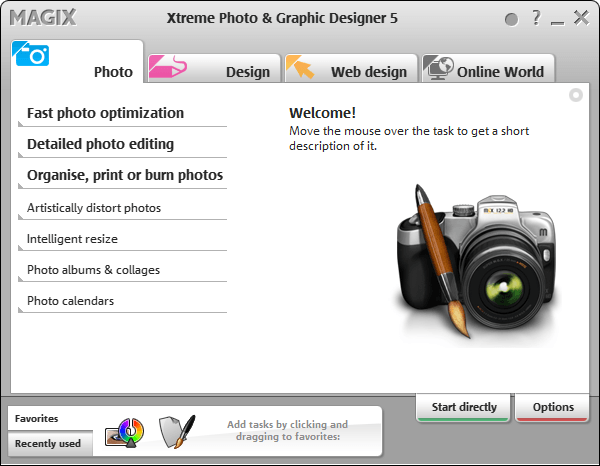 Note: This freebie was originally posted about in November 2011. That particular promotion of MAGIX Xtreme Photo & Graphic Designer 5 has ended but a new promotion for it is now live. So for those that missed it in November — this is your second chance. Sorry for any double notifications (e-mail/RSS/Twitter/Facebook/Google+)!
Software Description
The following is the description of MAGIX Xtreme Photo & Graphic Designer 5 as per the developer:
Image Editing
Enhance your pictures, enrich them with professional filters and effects, or design unique photo & graphics creations. Everything works on a non-destructive vector basis for professional results (original photos remain unchanged).
The integrated real-time image editing enables ultra-fast, loss-free editing of pictures – even for very large image files.
Creative Effects
Artistic image design: Painting, pencil drawing, canvas, crayon, pastel, wrinkled, television, fisheye, newspaper, waveform, shutters, and much more.
Photo caricatures: Use the “liquid paint” function to give cranky colleagues big ears, have a friend sport big muscles, or your boss look out from a frame with droopy eyes.
Turn your photos into graphics: The “Bitmap Tracer” vectorizes image files into lines and shapes that you can edit freely.
And much more
Illustrate, draw & paint
Discover the world’s fastest vector graphic engine and create graphic elements in real time. Enjoy next-generation graphic design throughout the entire process thanks to diverse drawing tools for freehand drawing (brush), shapes, graduated colors, fills, transitions, contour and relief effects, and easy drag & drop handling
- Drawing tools & line gallery
- Shadows & transparency
- Color gradient & distortion
Text, layout & desktop publishing
Do you need nice titles on your photos for your album? Or would you like to design multi-page brochures to present your company? Take advantage of the unique design freedom and arrange elements any way you want.
Includes formatting, text flow around shapes and images, multilingual spell check, support for all installed fonts incl. live preview and find and replace function.
dotTech Advice
I am not very artistic person; for me to give advice on a photography/image editing program would be like an English professor teaching rocket science; yes, not pretty.
While I personally can’t evaluate this program, it has gotten some good reviews. However, when reading reviews, be sure to look up the reviews for v5 — the latest version of this program is v7 and many reviews are on that. v7 obviously has improvements over v5 so don’t be confuse the two.
Any right-brained dotTechies feel free to provide advice on this soft.
Freebie Details
MAGIX Xtreme Photo & Graphic Designer 5 (Silver Edition) is being given away in a promotion run by What Digital Camera. There is no information on if it is time limited offer nor is there information on if you can install/reinstall at a later date. My guess, however, is this is a time limited offer, hence why I marked this as a limited time offer in the title; I just don’t know how long this will be available. So grab this while you can, if you want it.
To get MAGIX Xtreme Photo & Graphic Designer 5 (Silver Edition) for free, do the following:
Version being given out for free: v5.0.406.1309
Free updates: No
Free technical support: Probably not
Supported OS: Not specified; it runs just fine on Windows 7 for me
Download size: 3.7 MB installation manager and 365 MB program
- Download MAGIX Xtreme Photo & Graphic Designer 5. Take note you are downloading the MAGIX installation manager, not the actual MAGIX Xtreme Photo & Graphic Designer 5.
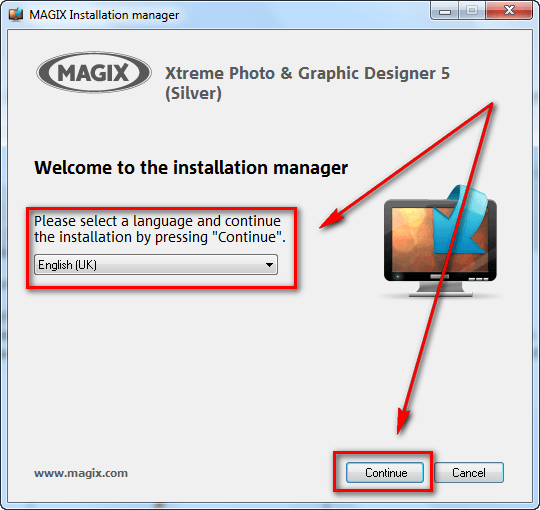
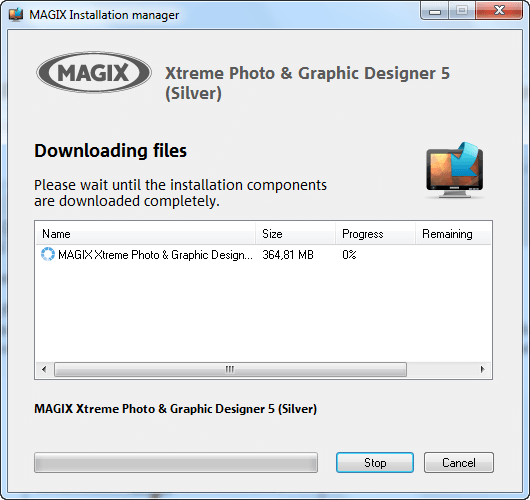
- Once the download finishes, run the download manager. You will be asked to select a language, after which the download for the actual MAGIX Xtreme Photo & Graphic Designer 5 will begin:
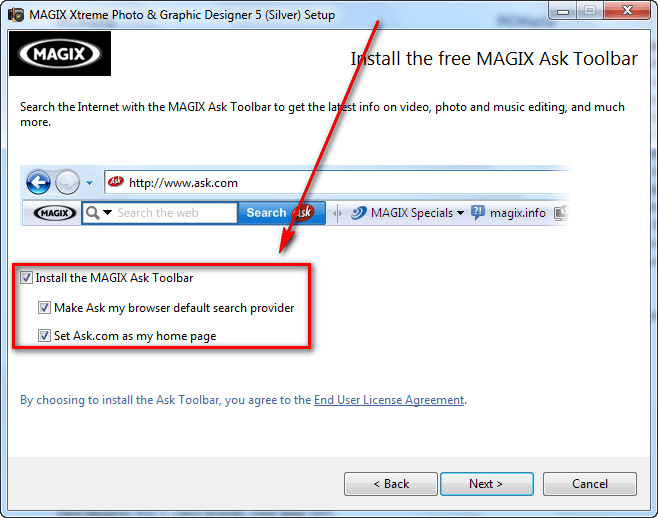
- After the download finishes, install MAGIX Xtreme Photo & Graphic Designer 5. Take note it comes bundled with MAGIX Ask Toolbar, so be sure to unselect the toolbar during installation if you don’t want it (you probably don’t want it):
- After installation MAGIX Xtreme Photo & Graphic Designer 5 should start automatically. If it doesn’t, run MAGIX Xtreme Photo & Graphic Designer 5 (Starter) from your start menu. When MAGIX Xtreme Photo & Graphic Designer 5 runs, you will be prompted to register the program. Click on the Register program button:
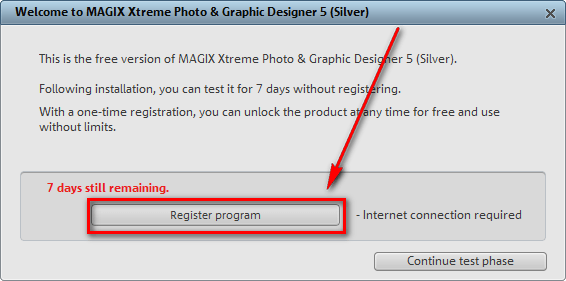
- Once you click on the button, the registration page will open in your default browser:

If you have an account with MAGIX you can login with it. If you don’t, you will have to register a new account. If registering a new account, you will have to confirm it via e-mail before you can use it.
Follow on screen instructions until you are shown a confirmation message like the following:

- Check the inbox of the e-mail address you registered with. Look for an e-mail from MAGIX register@magix.net with the subject of Your product registration at www.magix.com. In the e-mail you will find the registration code you need to use to register MAGIX Xtreme Photo & Graphic Designer 5:
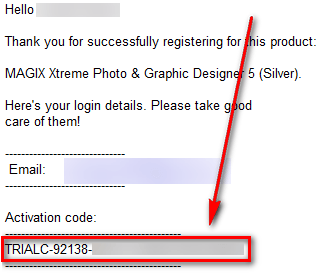
Copy the activation code.
- Go back to MAGIX Xtreme Photo & Graphic Designer 5, paste the code in the registration box (it will automatically take out the TRIALC part if you copied that), and click the Continue to use program button:
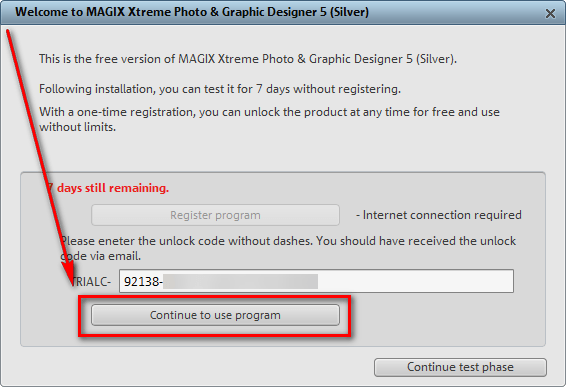
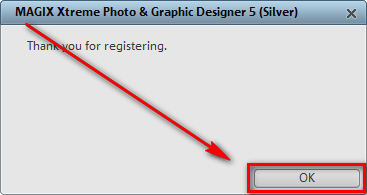
- If you see the following success message, you are the proud new owner MAGIX Xtreme Photo & Graphic Designer 5:
If you have trouble getting MAGIX Xtreme Photo & Graphic Designer 5 (Silver Edition) post below and other dotTechies or I will try to help.
Enjoy!
