Chrome now more popular than Firefox, Internet Explorer continues to decline
December 1, 2011 30
Email article | Print article
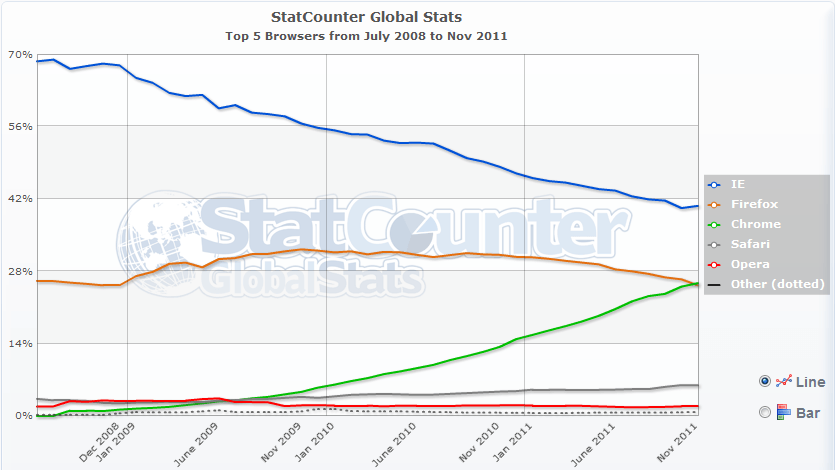
A few months ago in one of my classes a Chrome fanboy proclaimed how “popular” Chrome is and how “everyone must be using it”. At the time a friend and I scoffed at him, partly due to his fanboyism and partly due to the fact we knew Chrome wasn’t as popular as he claimed. Turns out the joke may be on us. According to StatCounter, a web analytics company, Google Chrome (25.69%) is now the second most popular Internet browser worldwide, recently surpassing Firefox (25.23%). Internet Explorer is still #1 but its market share is now 40.63% — a shadow of its dominating 70%+ a few years back.
It is important to note the above-stated statistics are a worldwide aggregate and are only from one source. In other words, actual usage may differ from country to country and region to region; and other analytics sources may show slightly different numbers. However, the general trends shown above – Chrome up and Firefox/IE down – will most likely be consistent across countries, regions, and sources.
Who would of thought just a few years after launch Chrome would rise to number 2? There’s the tech world for ya’. Feel free to reflect in the comments below.
Hit up the link below if you are interested in viewing the usage stats on your specific country or of a different time period.
[via Engadget]





![Internet Explorer is a little… slow [Image]](http://cdn.dottech.org/media/2013/06/slow_internet_explorer_comic-134x90.jpg)
![More Firefox love [Wallpaper]](http://cdn.dottech.org/media/2013/05/firefox_wallpaper_2560_1440-134x90.jpg)

![Firefox vs Chrome vs Internet Explorer [Wallpaper]](http://cdn.dottech.org/media/2013/05/chrome_vs_firefox_internetexplorer_wallpaper-134x90.jpg)
Just wanted to say part of the reason for this, is because Google Chrome is being bundled into almost every piece of software out there now. There are two pieces of software that are being bundled as extra addons now in loads ands loads of software:
1) Ask Toolbar 2) Google Chrome
If Opera or Firefox could afford to bundle their software into everything, I am sure they would do much better too. Oh and lets not forget the advertising boards and so forth….
And Google puts rootkits in Android. Good thing they’re “not evil”. Right?
@Justachump: This is very true. However, the above statistics are of active usage; the data is derived from active websites that record which browser is used every time someone visits. So sure Google’s bundleware tactics may get Chrome installed on computers and obviously that increases its chance of being used. However, people are not forced to use Chrome after when its installed (assuming it wasn’t made the default browser).
@Col. Panek: Google doesn’t put rootkits in Android. Carriers/manufacturers do that and its not just Android. Google can’t really stop anyone from installing CarrierIQ on devices without violating the open fundamentals Android has been built on, (aside from the Nexus line which Google is directly in control of the software with no interference from carriers or manufacturers)… I really need to write a post on CarrierIQ to clear up the air.
@Ashraf: Case in point: It has been confirmed no Verizon handsets have CarrierIQ — https://twitter.com/#!/VZWjeffrey/statuses/142206836832075777. (They may be using something else, though. Maybe something more homegrown.) CarrierIQ is installed at the carrier level, not at the OS level.
I would have to say I agree with justachump. As that “computer guy” for my friends and family I’m literally AMAZED sometimes at the amount, and types of, ‘ware’ ( opencandy,bloat, spy, mal, cr@p, etc.) they have on their computers. The “average” PC user doesn’t pay attention to EULA’s or other such “trivial” things. They just install a “free”/new program, and then wonder how a new browser/program “magically appeared” on their PC. [ Of course this does NOT happen to users of dot Tech. ;) I tip my hat to Ashraf. His articles are ALWAYS very clear and concise. ]
So even though StatsCounter shows the “active usage” of the type of browser in their stats, I would say that you could drop their Chrome usage stats by 7-10 percent. This percentage is just an educated guess on my part, based on my own past experiences with your “average” PC user.
@Ashraf AT&T, Sprint confirm use of Carrier IQ software on handsets. Can read the article at- http://www.computerworld.com/s/article/9222319/AT_T_Sprint_confirm_use_of_Carrier_IQ_software_on_handsets?taxonomyId=17
Hi,
Is there a right click “create shortcut” for a website to desktop from Chrome or Firefox like IE ?
While Google Chrome is OK,it is not really for me. It is just to minimalistic. Firefox just works the way I work and has all the extensions I need which Chrome does not. I hate the way bookmarks work on Chrome though with Xmarks I can have it in sync with Firefox for those few excursions where I try it out to see if it has improved enough to use more. So far it is still on my list to only use occasionally. I doubt that will change anytime soon. So they can spout statistics all they want but my preference will not change based on things like this. I am a real person who uses my browser to get things done. Firefox helps me do that better than Chrome at least for now…
@ Tony Mozilla’s help page:
http://support.mozilla.com/en-US/kb/Creating%20a%20desktop%20shortcut%20to%20a%20web%20page
Drag site icon (which is the Address bar symbol on left) to desktop then rename shortcut to the website.
Or can use Deskcut add-on: https://addons.mozilla.org/en-US/firefox/addon/deskcut/
Deskcut add-on does work BUT it needs to be tweaked in the Option section after installation.
DeskCut Options:
A. Name Tab 1. Filename Options: Generate filename from page title
B. Path Tab 1. Set path… Browse… Choose where to place the shortcut (generally the Desktop) [ In Win7, it's "C:Documents and SettingsUsernameDesktop ]
C. OK!
Now it should work.
Bit of a pain, as I feel Mozilla should already have Added a “Create Shortcut” right-click feature in Firefox long ago! ( I don’t know if it is in Firefox 8 or not? I’m still using Firefox 7.0.1 )
Though maybe not as simple as IE’s right click create shortcut. Firefox also has the right click “Save Page As”. You can then rename the “page” and after saving it you can right click it and “Send to Desktop ( create shortcut )
If there’s an easier way besides these options, I don’t know it.
@leland Well said!
I will repeat myself: I like OPERA and this for various reasons:
1) It’s not made in USA…so less NSA or other interferences.
2) It bundles emails and other softwares, FTP, Voice, Torrent and other nice features.
3) It’s fast
4) Almost nobody uses it, so less risk of having some attacks on it.
5) Opera claim is that the browser sticks with the directive of W3.
I’m with Opera since version 2 or 3.
Sea-monkey is going on this direction too, but less innovative that OPERA.
But I have all the main browsers installed on my PC, I test some web-design on all of them. But the one I don’t like beside IE is Safari.
For Chrome I use SRWare Iron. (Security and other)
@Tony:
@Tony Just drag the url icon to the desktop :-)
I am a big fan of Opera as well. And, it has the menu bar!
@WildCat: Yep, I read about that on Engadget. And Apple has confirmed it on iOS devices but they say “most” devices no longer support it in iOS 5 and they will remove it completely in further versions. From another post I read it looks like on the iPhone on iOS 5 Carrier IQ only works if you enable sending stats to Apple.
Hopefully I can get up an article on Carrier IQ by the end of the weekend, depending on how many other things I have to do.
@Tony: I don’t know if this is what you are looking for but dragging the icon next to a website URL in Firefox and placing it on your desktop creates a shortcut to it.
@leland: I am with you. Even though I have had my fair share of issues with Firefox since FF3, I find FF to be a better fit for me than Chrome, especially now since I got FF8 to work (!).
@Philippe: I’m actually finding myself using Opera more and Opera. It is a very smooth browser; I am surprised it has such low market share, probably due to the lackluster add-on support. Plus, as you mention, with its low market share it is less likely to be targeted by browser exploits. The downside, however, is Opera doesn’t generate all websites properly.
I actually found it annoying when FF copied Opera’s look. Keeps confusing me when I switch between browsers, lmao.
@dbareis: That.
@Mpad: Menu bar? I’m confused.
Google Chrome=Aol at this point in its development.
@WildCat: That Deskcut add-on is very interesting. Good tip!
@M.T.: By that do you mean it is dominating like AOL dominated in the 56k days or something less appreciative? :-P
I have used Opera too. It is a nice browser but it lacks most the extensions I use. Also, though it has FTP and BitTorrent included I find the use in Opera to limiting compared to full client software. The email program is ok though I do mostly web mail these days except at work. If Xmarks had a full version for Opera I would consider making the switch full time. However there is only a cut back Xmarks extension that does not support syncing but only viewing. At least Google Chrome has most of the extensions I use. My biggest problem with it is I can’t seem to configure it the way I want even with extensions.
chrome is overrated in my view
@Justachump: I agree. I can’t count how many times I had to uncheck the option ‘Install Chrome’ in every whatever freeware something…….
Hi,
Thank you for your advice about shortcut on desktop for Firefox, this board is just great esp. wildcat, bbareis and Ashraf
I am with IE forever…but recently tried out Chrome and Firefox, I do like Firefox 8, it’s more stable and speedy
on my aging computer, just miss the right click shortcut creation…will try out your advice Wildcat.
Thank you again.
periodically switch to Chrome to play Angry bird!
Nothing wrong with Opera. Can’t understand why more people are not using it! I experiment with Chrome with apps & Extensions but never use it. When I get Chrome to my liking I make the changes to SRWare Iron and use It. When the going gets tough though I pull out the big gun – Firefox! For shortcuts to links HTMtied is second to none. It’s tiny (28.5 Kb), portable & simple! Simply copy the URL,Activate HTMtied [DA DA], then paste to desktop or any folder. The shortcut will always open your default browser. http://www.toygrams.com/htmtied/ .
@Ashraf: I guess a little of both. Google Chrome just does not have enough umph for me. The browser is fast but I need more. I have used it to compare with Firefox and I will stay with Firefox for now.
Try switching the stat counter website to bar mode and it tells a different story.
@Anonjgofj’ghikrhk:
The bars are taking an average over an entire year. Change the date to Nov 2011 to Dec 2011 (the past month, the first in which Chrome showed more users), and the bars will show Chrome slightly ahead.
Hey Ashraf!!
It’s Giovanni…remember me??
Yes…Google Chrome looks like a great browser…and seems to be much quicker than Firefox to load webpages even though it’s also true that it doesn’t have the same number of extensions at the moment…
But how about this?
http://www.criminaljusticeusa.com/blog/2009/25-surprising-things-that-google-knows-about-you/
Are you not scared of the massive info GOOGLE know about us without anyone knowing??
@Ashraf: The menu bar is the File Edit View etc at the top right of the window.
@Mpad:I mean top left (I have that right/left problem). It is the menu bar I have used for 20+ years so why change now? I do not think it is well integrated into the browser page but that could be fixed.