*Updated* [Announcement] About the new SHARE bar on dotTech

December 3, 2011 64 Email article | Print article

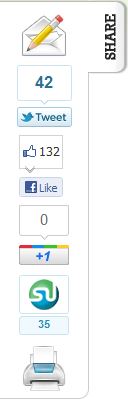
As I am sure most everyone has noticed by now, I have added a new SHARE bar to dotTech. This article is intended to ensure everyone is informed about what this bar is, what it is intended for, and what it is not.

Update: Listening to dotTechie feedback, I have modified the SHARE bar. It is no longer attached the left of the screen. It is now in the bottom-left corner and should not – in any circumstance – cover any content on the page. Please let me know if the bar is still obscuring your view of content and please, continue to provide the valuable feedback! (If the bar is obscuring your view of content it would be helpful if you could tell me the screen resolution and browser you are using).

What Is It?

The bar is based off the idea that Mashable popularized of having floating social media links. It facilitates the sharing of articles via e-mail, Twitter, Facebook, Google+, Stumbleupon, and printing.

What Is It Intended For?

As already mentioned, it is intended to facilitate the sharing of dotTech articles. Clicking on any of the buttons in the bar allows users to share the page/article they are on via e-mail, Twitter, Facebook, Google+, Stumbleupon, and printing.

The “Share/Save” bar at the top of every article wasn’t cutting it and I wanted to try something else.

How It Works

The bar is written in a mix of CSS, PHP, and JavaScript. It automatically appears on every page/article on dotTech (even the homepage). I wanted the bar to be an unobtrusive as possible so I set its location to be off-screen in the sense that it doesn’t show up on the main part of the website where the content is — it shows in the empty white space on the left. Furthermore, when that bar is open, it auto-hides itself when a user clicks anywhere on the page aside from the bar. (E.g. When you load an article if you click on the article text the bar autohides itself.) Users can open/close the bar by clicking on the SHARE button.

I am looking into being able to autohide the bar after X seconds and/or when the window is scrolled. This will help with the whole idea of being unobtrusive.

What It Is Not

It isn’t the root of all evil. It isn’t a get-rich-quick-scheme. It won’t do your laundry for you.

I understand some people may dislike this bar but you must understand sharing articles are a necessary way for a website to grow. Now, of course, if the bar really, really bothers you then that is a different story; but if you just dislike it because you won’t use it — please try to understand my point of view.

Is This Permanent?

It could be, yes. It really depends on a) dotTechie feedback and b) how many people are using it. At this moment in time consider this a beta trial of the SHARE bar. If it stays or if it goes really just depends.

Please Provide Feedback

As a webmaster, feedback is valuable to me. After all if my readers don’t like the changes I am making the changes are pointless. So please sound off in the comments below, stating your opinion about this new SHARE bar. However, please avoid any knee-jerk reactions. Before posting, I ask that you really think about

  • Is the bar obtrusive?
  • Will you use it?
  • If you won’t use it, does the bar really bother you?
  • How would you change it?
  • Do you want any other social media links in there?
  • [Any other feedback you can think of.]

If you find the bar to be covering content, such as text, please state your screen resolution and web browser so I can solve that issue.

Thanks everyone!

64 Comments »

  1. Seamus McSeamus December 4, 2011 at 6:29 AM (comment permalink) -

    @Ashraf:

    I don’t think No Script is a factor. I use it on all my computers and the Share Bar appears even before I allow the page.

    And, yes, Share Bar v2 is a very nice improvement.

    51
  2. Sundog December 4, 2011 at 7:08 AM (comment permalink) -

    @Sundog: Share bar gives satisfactory results on Opera 11.51 on 1920 x 1200 monitor. With Opera, 1600 x 1200 monitor now shows ~20% of left side of share bar.

    52
  3. Eddie Scheer December 4, 2011 at 7:18 AM (comment permalink) -

    I love your website and highly value and have used your advice for over a year now. I have availed myself of the freebies and promotions, much more so than GOTD. I always follow your advice on whether or not a freebie is what I need or not. BUT!!!!! the share options popup is extremely annoying to me. I have a Facebook acct., but hardly use it. I’m not into a lot of frivolous socializing.
    If the new share options are needed by a majority, then that is fine, but give me the option to disengage it when I go to your website. I would prefer an option to permanently disengage it, but if that is not possible, then at least give me the option to close it. Thanks for your consideration of this request.

    53
  4. Adrian December 4, 2011 at 7:25 AM (comment permalink) -

    I like the print link =]

    However I would have preferred that you move it a bit further to the left.. if you can =]

    You rock Ashraf

    54
  5. BeeGee December 4, 2011 at 9:13 AM (comment permalink) -

    The bar does not move out of sight no matter where on the page I click. It does not obscure content now (I think it did but also disappeared when I clicked near it but that was then and this is now).

    I am running XP SP3, Tosh A105, older 15.4 screen 1024 x 768

    It’s no a big deal but I have no use for it and wish it wasn’t there. I would rather there was a small tab that I could click to bring it into view if ever (do not hold your breath) I want to use the embedded functions.

    55
  6. jayesstee December 4, 2011 at 9:53 AM (comment permalink) -

    @BeeGee: I agree with you. The default should be “closed”, not “open”. When closed, it looks neat and matches the “up” button on the right.

    @Ashraf: I agree about the “share/save” bar at the top. Once it had scrolled of the top of the screen, I always forgot it was there.

    56
  7. Bob December 4, 2011 at 10:36 AM (comment permalink) -

    What you do on your web site is your business. That said, I like it. It’s clean and unobtrusive. Would you be willing to share your code, or point us to a web site that has it available?
    Thanks!

    57
  8. Ashraf December 4, 2011 at 11:35 AM (comment permalink) -
    Mr. Boss

    @hatman: This is true. However, a) I cannot do anything for people running 800×600 because at that point even the template of dotTech is “too big” and b) Anyone with a width of 1024 of lower will not see the bar, so there is no concern of covering text.

    @Jeanjean: Thanks for checking it on multiple resolutions!

    @hatman: I don’t think it will. Depending on ur netbook’s resolution, you will either see the bar on the side or you won’t see it at all.

    @Mardel: I’m sorry, I am confused as to your IE8 problem. Can you please clarify.

    @Sundog: admin [at] dottech [dot] org

    @Seamus McSeamus: Good to hear NoScript isn’t blocking it.

    @Sundog: I find this to be odd. I see no reason why you should be having problems on higher resolution screens.

    @Eddie Scheer: You can close the share bar. Just click “SHARE” or click anywhere on the page. I am looking into autohiding it after X seconds.

    @Adrian: Done! I moved it more to the left a little.

    @jayesstee: The reason why I have it default open as opposed to close is because if it were closed most people who ignore it — which defeats the purpose. The idea of default open with autohide was a compromise.

    @Everyone with 1024×768 resolution and lower: The SHARE bar resides in the white space on the left hand side. Because of your resolution there is no white space on the left side, therefore you should not see the bar at all. It appears previously a small portion of the bar was showing but I have moved it further left so now you should see no part of it.

    @Everyone: Thanks for all the feedback!

    58
  9. Philippe December 4, 2011 at 3:02 PM (comment permalink) -

    I find it a nice addition, but my eyes are train to not see what I do not need. So if you didn’t mention it…I wouldn’t see it. And when I want to share a link, I do it the old way. Copy and paste.

    60
  10. Anonymail December 5, 2011 at 2:39 AM (comment permalink) -

    I Love it! That is a great addition! Some of my friend on Facebook look to me for advice about programs or watch for me to post about “for everyone” freebies, this is a great way to get the word out about them and about Dottech, which I think everyone should know about!
    Thanks, also, for the link to the script!
    Ane

    61
  11. jayesstee December 6, 2011 at 10:46 AM (comment permalink) -

    @Ashraf:
    Ha Ha! One – nil to you, Ashraf!
    I tried “Noscript” to see if would block your new share gadget and found it did, it also blocked the “up” button on the right. (Shame)!
    Then I used the keyboard “End” button to get to the bottom of the page, and found it scrolled right past the “blue section” and copyright notice. There nestling at the very bottom the page, on a new white-ish area was some of the elements of the dreaded share gadget.
    I give in, I have removed the Noscript blocking and I will pretend to love the share gadget.

    62
  12. jayesstee December 7, 2011 at 11:50 AM (comment permalink) -

    @Ashraf: Further to above, Adblock Plus 1.3.10 (on FireFox 8.0) blocks the “twit-face” elements of the share gadget, leaving just print and email options.
    I can live with that! :=)

    63
  13. jayesstee December 11, 2011 at 8:54 AM (comment permalink) -

    @Ashraf:
    OK Ashraf, what have you done?
    Yesterday, the share gadget was as my post #63. Today, no share gadget and no RH up-arrow!
    Switching off Adblock Plus returns both, but with the share gadget in full all-options glory.
    Ah, I just remembered, yesterday I upped Firefox to 8.01. Could that be the cause?

    64

Leave A Response »