
 Email article
 Update: This promotion is now over. Sorry to those that missed it! To not miss freebies in the future, be sure to subscribe to dotTech: E-mail | RSS | Twitter | Facebook | Google+.
Software Description
The following is a description of iolo System Mechanic, as per the developer:
Has your PC slowed down?
Tired of bothering friends and family for help, or worse…hauling your PC to the local repair shop?
Get the most comprehensive diagnosis available, and enjoy that new PC feeling again!
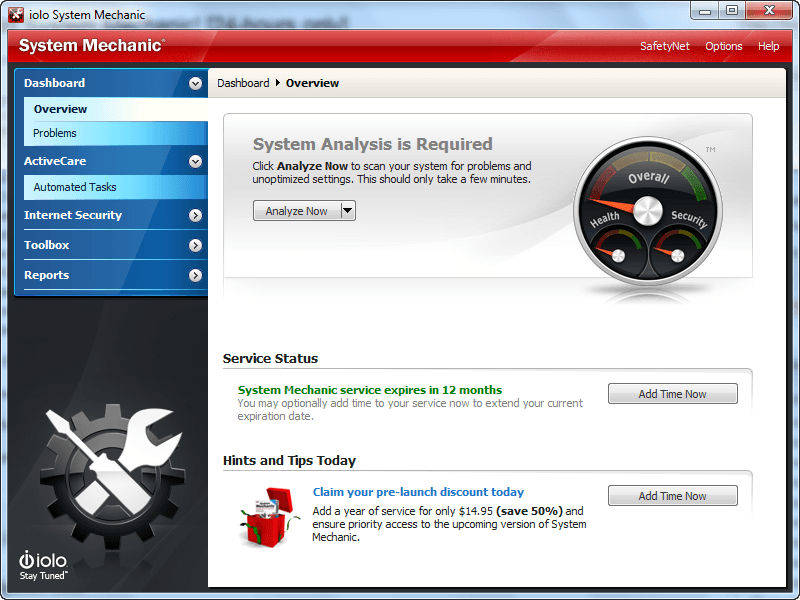
You don’t have to be an expert – it’s easy to let System Mechanic automatically run a full battery of over 200 critical tests in just a few minutes using over 50 tools to uncover why your PC is running so slowly. Here’s a quick look at the dashboard:
- Easy to understand system overview
- Quick or Deep analysis options
- Comprehensive status gauge
- Clear explanation of each problem
- Straightforward actions to fix all problems or only those you want
Automatically eliminate each and every root problem affecting your PC’s speed and stability
To achieve maximum PC performance, a solution with a comprehensive set of tools to address each of the 9 root causes of PC slowdowns is required. System Mechanic is the only product available that resolves each and every one.
Fixes Registry errors
Safely cleans & repairs the Registry to fix problems and free up memory.
Speeds up Windows Start Time
Unclogs speed-robbing bottlenecks for up to 800% better startup speed.
Restores Stability & Performance
Diagnoses and fixes hundreds of problems for like-new reliability.
Improves your gaming experience
Play the latest high-performance games at maximum speeds.
System Mechanic is able to provide the most complete approach to PC care because it integrates 50+ diagnostic, repair, and optimization features into one easy-to-use interface. Plus it leverages unique intelligence provided by iolo Labs’ continuously updated Tune-up Definitions™ to custom tailor its diagnosis and repair to your specific system configuration.
Speed up your PC… and more!
More than 50 features sounds like a lot – and it is! – but System Mechanic is designed so that you can quickly get to the repairs and optimizations you need, skip those you don’t, and explore as much or as little about your PC as you’d like. For example, use System Mechanic to find and remove junk and clutter, which is one of the most insidious factors in Windows performance degradation and a threat to your privacy.
System Mechanic provides complete ease and flexibility to help you speed up your PC no matter what your experience level.
What System Mechanic does to clean up Windows
- Cleans over 50 different types of junk files
- Removes invalid installers and programs
- Wipes internet history, clutter and cache
- Regains thousands of megabytes of hard disk space
Perform a complete cleanup in just three minutes.
What System Mechanic does to fix your PC
- Updates critical device drivers
- Repairs and compacts registry
- Eliminates memory leaks
- Fixes random crashes and restarts
- Revives unstartable systems
- Repairs and prevents corrupted drives
- Fixes security vulnerabilities
- Repairs broken internet connections
- Scans for and replaces out-of-date drivers
- Automatically maintains PC health with patented ActiveCare® technology
Automatically fixes hundreds of perplexing errors in just one step.
What System Mechanic does to ensure your privacy
Choose what traces of activity to permanently remove
- Employs multi-pass military-grade wiping to ensure complete removal of all deleted data
- Defeats forensics recovery techniques
- Permanently and completely removes internet history and cache
- Integrates Incinerator® technology with Windows Recycle Bin for high security
- Cleans up after all major web browsers, online chat, and web toolbars
dotTech Advice
Advice on this freebie isn’t hard. iolo System Mechanic is one of the most highly acclaimed system tune-up utilities out there. Sure no after-market tune-up utility is perfect; so it wouldn’t be fair for me to say System Mechanic will improve *all* computers. However, generally speaking, System Mechanic works very well.
That said, system tune-up utilities may sound like the type of program everyone needs, but that really isn’t the case. People with faster, more modern machines will feel little to no speed/performance increase after running a tune-up utility simply because their machines are powerful enough to handle baggage without any hiccups. In fact I recommend people with new machines to not use tune-up utilities (until you feel your computer is “slowing down” after long time use) simply because the risk of malfunction – and no mater how good, every third-party tune-up utility has some chance of causing problems – is not worth the reward of little to no benefit. On the other hand, people with older machines – ones in use for more than a year or so – can typically benefit from allowing tune-up utilities to clean out the junk they have accumulated in their computers.
In the end, it really just depends on you, your computer, and your computing habits if you need a tune-up utility. All I can say is iolo System Mechanic is one of the better ones — highly recommended.
Freebie Details
iolo System Mechanic is being given away in a promotion by Softpedia. The promotion is live for 24-hours only but the exact start/end times are not specified; my guess is the promotion ends December 12, 2011 14:00 GMT. Also, Softpedia does not mention this, but the freebie is for System Mechanic “1 year of service”. I am not sure if this means you can use System Mechanic for one year (in which case you would no longer be able to use it after the year has expired) or if you will get free updates for one year (in which case you could still continue to use System Mechanic after the year has expired but without updates). Furthermore, it looks like this promotion is being processed like a purchase (although you aren’t paying anything nor do you have to enter any payment details such as a credit card) so you should be able to install/reinstall whenever you want within the one year time-frame; each license is a 1-PC license so if you want it for more than one PCs you need to get multiple licenses.
To get iolo System Mechanic for free, do the following:
Version being given out for free: v10.5.4
Free updates and technical support: Yes, for one year
Supported OS: Windows XP/Vista/Win7
Download size: About 18 MB
- Visit the
promotion pageand click on the Start Download button:

- When you click the Start Download button, you will be taken to iolo’s shopping cart and asked to checkout. This freebie is processed just like a purchase so you need to enter your “shipping address”; however, since this is a freebie, you won’t be entering your billing details nor will you actually be shipped anything:
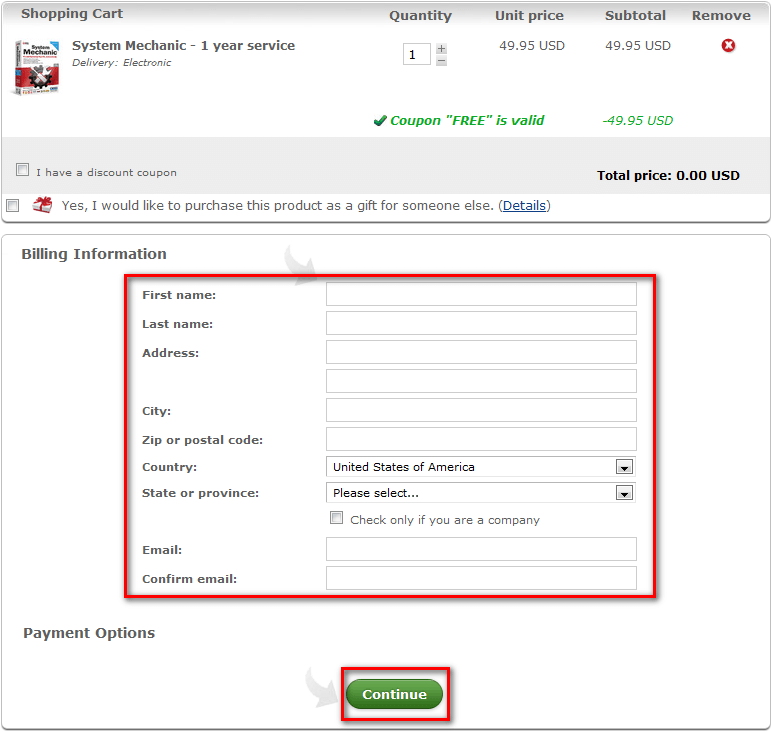
Hit Continue after you have filled out the form.
- After you hit Continue you will be asked for confirm the details:
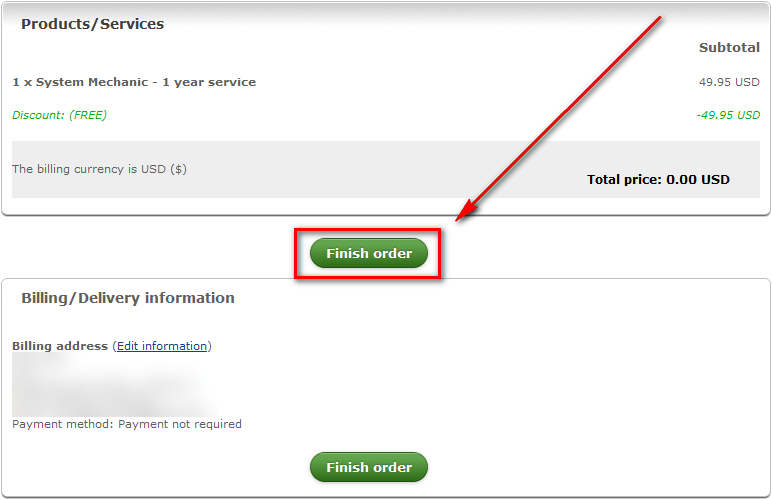
Hit the Finish order button.
- After you hit the Finish order button you will be given a download link and your registration key:
Update: iolo has changed how they process this freebie since I originally wrote this article earlier today. When I wrote this article, after you clicked the Finish order button iolo provided you with the download link and license key onscreen, as shown in this step. Now iolo is e-mailing users the download link and license key. So be patient and look for that e-mail. Once you get the e-mail, skip to the next step.
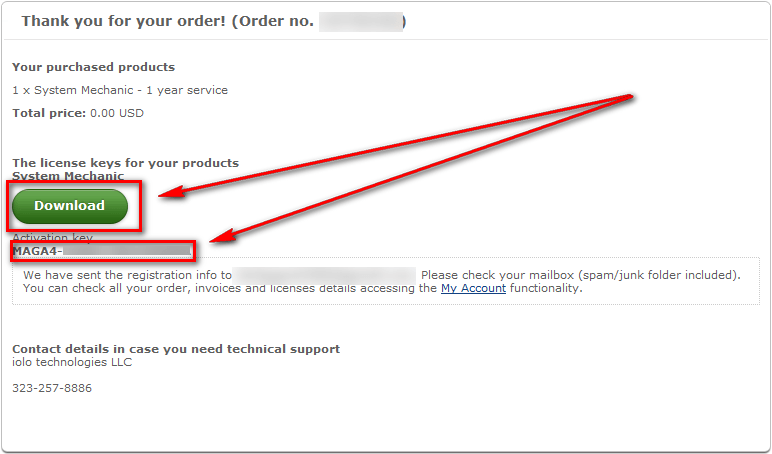
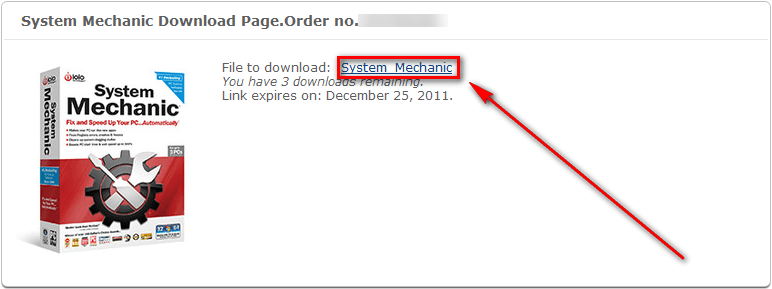
Copy the license key because you will need it very soon. Click on the Download button, which will take you to another page; at the next page you need to click on the System Mechanic link to begin the download:
- The download itself is only 416 KB because you aren’t downloading System Mechanic but rather iolo’s download manager. However, don’t worry — once the download manager finishes downloading, all you have to do is run it and System Mechanic is automatically start to download (you don’t have to install iolo’s download manager):
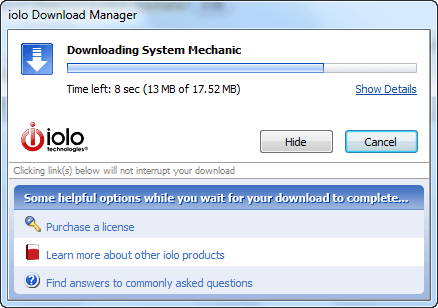
System Mechanic itself is 17.52 MB.
- Once System Mechanic finishes downloading, you will be asked if you want to store the installation file locally:
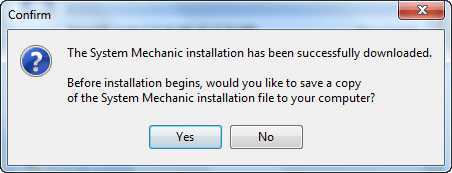
It is your choice if you want to save the installation file on your computer or not. If you are on a slow or bandwidth capped Internet connection, it is probably a good idea to save the installation file for easy re-install at a later date. If you are not, you can probably save yourself some space by not storing it.
In any case, whichever you decide, after you click Yes and pick a location to save the file or after you click No, the installation of System Mechanic will automatically start.
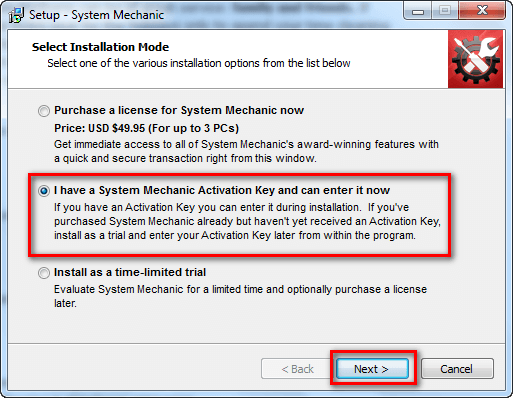
- Follow onscreen instructions to install System Mechanic. It installs just any other program except for one thing — you must enter your license key during installation. When you get to the window prompting you to select installation mode, select the I have a System Mechanic Activation Key and can enter it now option and click Next >:
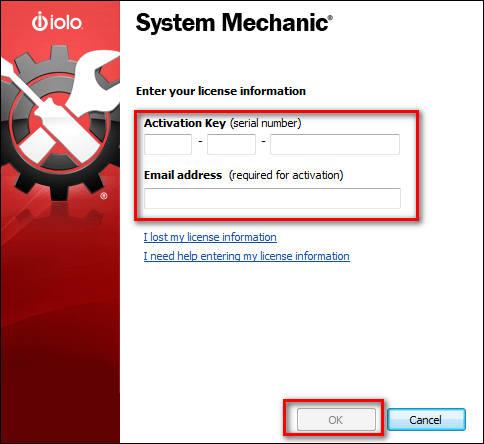
- Now paste in the registration key you copied earlier (if you don’t have it in your clipboard any longer check your e-mail inbox for it), enter the e-mail address you registered with iolo, and click OK:
- If everything goes well, the installation will continue as normal (no success message will be shown):
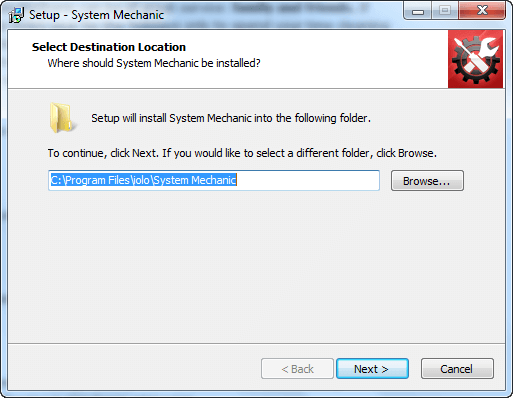
Continue to follow onscreen instructions and finish installing iolo System Mechanic.
- Enjoy!
If you have any trouble getting iolo System Mechanic for free, post below and other dotTechies or I will try to help.
