Create a portable version of any software with P-Apps

January 14, 2012 49 Email article | Print article

Nowadays more and more programs are coming in installer and portable versions, allowing users to select which version they want to use. However, still there are many programs that are available in installer form only. This is where P-Apps comes in.

What Is P-Apps And What Does It Do?

P-Apps is a freeware program that allows users to create a portable version of any software. Once P-Apps creates a portable version of a program, that program can be used on any Windows machine without requiring any installation — you don’t even need P-Apps installed.

Technically speaking P-Apps works with all Windows software that have installers. However, at the time of this writing P-Apps is a fairly new program (at v1.0 right now) so I’m sure there are still unknown bugs that users may run into; and I haven’t tested P-Apps with all Windows software (duh) so I can’t vouch if it really does work with all software or only works with some programs. My guess is P-Apps won’t work very well with programs that perform kernel changes, such as installing a driver.

Using P-Apps

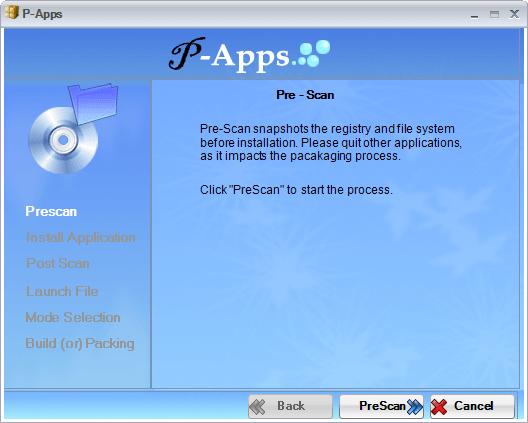
P-Apps works by taking a snapshot of your system before you install a program, taking a snapshot of your system after you install a program, comparing the two snapshots, and storing the differences (i.e. new files/registry entries) in the portable package of the software in question. P-Apps itself is a portable application so you don’t have to install it — all you do is run it before installing a program, do a pre-install scan, install the program you want to make portable (install like normal), do a post-install scan, and proceed from there.

The following demo video, created by the developer, shows P-Apps in action:

P-Apps Limitation

Because of the way it works – i.e. snapshot method – P-Apps has some inherent limitations.

The first limitation is in order to create a portable package of a program, you need to actually install that program on your computer so P-Apps can record what changes the program makes to create a portable version. This means you can’t create portable versions of software you already have installed; if you want to create portable versions of software you already have installed, you have to uninstall and reinstall those programs while using P-Apps.

The second limitation is you must ensure you have no other program running in the background making changes to your computer while you are using P-Apps. You see P-Apps’ snapshot comparison method is unable to determine what system changes are made by the software you are installing and what system changes are made by other third-party programs that were running in the background. All differences found by P-Apps between the pre-scan and post-scan snapshots are attributed to the software you are installing. So if you have background programs running and making changes to your computer while you are creating a portable package with P-Apps, those changes will be captured by P-Apps and forever embedded in the portable package you created.

Conclusion

P-Apps is a new program so without a doubt it has a way to go before we can call it “mature”; there are bound to be bugs and some software may not work properly with P-Apps. However, even in its current form P-Apps is an extremely useful program.

You can grab P-Apps from the links below:

Version reviewed: v1.0

Supported OS: All Windows

.NET Framework 3.5 required

Download size: 4.3 MB

Malware status: VirusTotal scan results (0/43)

P-Apps homepage [direct download]

[Thanks Giovanni!]

49 Comments »

  1. Janetb January 15, 2012 at 2:29 PM (comment permalink) -

    @Finell:

    Hmm….I have never had an update that did not automatically find the program (on D:)!

    Anyway, once all apps are portable (it won’t be long now), everyone will but all the apps on a separate apps partition….:-)….

    26
  2. Giovanni January 15, 2012 at 4:11 PM (comment permalink) -

    Hey Ashraf!

    Thanks for reviewing this little GEM I discovered last week by chance!!

    The video demo looks IMPRESSIVE, doesn’t it?

    As I already told you in my previous message, posted in the CAMEYO thread, I used this tool on many programs and it never failed so far….so it would be nice to make a comparison between this tool and its CAMEYO but I have a fancy that P-Apps, despite being a new program, is better than CAMEYO….what do you make of it??

    And it’s very useful indeed, especially during Windows OS Migration when users usually have to face compatibility issues between the new OS and the installed software.

    This means that, thanks to this tool, we won’t be forced to beg the support from software vendors anymore…LOL!!

    As for the limitations you mentioned in your article….what if we used a virtualization program like TOOLWIZ TIME FREEZE along with this tool? In such way I think we could avoid uninstalling a program to make it portable with P-Apps afterwards, couldn’t we??

    Finally a tricky questions for you: do you think that this free gem (or even Cameyo) could successfully be used AFTER THE OFFER DATE for limited time freebies like GAOTD or even for TRIAL Software after the trial period??

    And could it replace backup software after reformatting your computer ???

    Can’t wait to hear from you!

    Your Italian friend

    Ciao
    Giovanni

    P.S. By the way…you have already reviewed TOOLWIZ TIME FREEZE, right?? How about TOOLWIZ SYSTEM CARE?? I’ve just tried it and woh…to my great surprise it turns out to be an excellent free PC MAINTENANCE tool , as good as the award winning CCleaner (but maybe even better than CCleaner, taking into account the impressive number of options it can provide to users for FREE ).

    http://www.toolwiz.com/products/toolwiz-care

    Let’s give it a whirl and let me know your feedback about this gem made by the same amazing developer of TOOLWIZ TIME FREEZE. Of course a review of yours about it would be very much appreciated!!

    27
  3. Giovanni January 15, 2012 at 4:51 PM (comment permalink) -

    In my previous comment I mentioned TOOLWIZ TIME FREEZE as tool to use along with this gem….

    Well…this is a comprehensive list of FREE SOFTWARE made by the same developer of Toolwiz Time Freeze:

    http://www.toolwiz.com/products

    Since the first two FREE software listed there are simply amazing, I’m now curious to test the other ones mentioned there, because if they were as good as the first two ones…woh it would be absolutely fantastic !!!

    What do you make of it dudes??

    28
  4. darthyoda6 January 16, 2012 at 6:06 AM (comment permalink) -

    For the partitioning debate, on my desktop top I got 2 16gb ssd drives used from my brother. What I did was install Windows onto the ssd, then everything else on a tb hd. But what I did was used junction links, so Windows thinks that the 2 Program Files are on c drive, when they are actually on d. I also did this for the Users directory as well as the Winsxs directory.

    29
  5. darthyoda6 January 16, 2012 at 6:19 AM (comment permalink) -

    Looks like the voice they used in the computer was a text 2 speech program.

    30
  6. Janetb January 16, 2012 at 6:39 AM (comment permalink) -

    @darthyoda6:

    Your partitioning setup sounds great! How did you know how to do junction links? I need even heard the term until this post.

    Would it not speed up things to have the program files separated from personal data if the personal data is huge relative to the program files?

    31
  7. Janetb January 16, 2012 at 6:41 AM (comment permalink) -

    Ashraf:

    I looked at Cameyo as a result of the posts. I too would greatly appreciate a comparison of it to this program…..

    32
  8. Raj February 6, 2012 at 10:35 PM (comment permalink) -

    @Tommy Tutone:

    its a one time installation only so dont need to get worry i think so…

    33
  9. Raj February 6, 2012 at 10:48 PM (comment permalink) -

    @Tommy Tutone: @Janetb: 1. Actually its non usable place (%appdata%) so no need to care about the place where its extracted the data…There may be a chance to get user request where will be extract the installation or supportive files in next version..

    2.They will fetch the application written entries while the installation ..so it will not occupy any huge impact in sizes in all scenario…

    34
  10. Duane Moore February 9, 2012 at 10:10 PM (comment permalink) -

    I tried both P-Apps and Cameyo. I found Cameyo to be much more reliable than P-Apps. It also produced smaller executables in my testing. Cameyo is a winner!

    @Giovanni: Any installation that is lost can be replaced by copying the portable version in place of the old program. At least that is true for simple programs.

    35
  11. Rob (Down Under) February 9, 2012 at 11:18 PM (comment permalink) -

    Regarding P-Apps, I have good news and bad news.

    The good news is, they responded promptly to a request that I raised.
    I am in an XP forum, and someone wrote asking how to run an old program (32 bit with some 16 bit components) in his new 64 bit PC.
    Apparently choosing to run it in 32 bit compatibility mode, cannot handle the 16 bit components.
    I wrote to P-Apps, and asked if using their program would solve that need.
    They said they were working on it, and then emailed me a week later to say it could now handle it.

    The bad news is, some say beware it is dangerous.
    When I posted my good news on the XP forum, a couple of guys wrote that -

    scanned it with 10-Malware Fighter and it came up saying there was some kind of virus in it
    By the way, just scanned another download of it with Avast Free and that’s found a virus in it too.

    whois for that address: http://www.whois.net/whois/portable-app.com I would suggest you DON”T click on the link.

    36
  12. Alsonov February 18, 2012 at 10:22 AM (comment permalink) -

    @Rob (Down Under):
    This same file was scanned at VirusTotal.com by 43 anti-virus scanners, including Avast Antivirus, AVG, Eset NOD32, Kaspersky, Microsoft SE, Symantec, TrendMicro, and nothing was found:

    SHA256: b15f4c4f589cf56b757811d50b88a21cd373ac49f6828b81cdd8968c5141b714
    File name: P-Apps V1.0.exe
    Detection ratio: 0 / 43
    Analysis date: 2012-02-03 07:50:42 UTC

    So, I am assuming this is a case of a false detection.
    Please remember to thoroughly verify any detection before posting alerts on a forum that may cause unjustified damage to the reputation of a developer. VirusTotal has a free online service to do just that: https://www.virustotal.com

    37
  13. Alsonov February 18, 2012 at 10:36 AM (comment permalink) -

    @Alsonov: You say that they scanned the file with “10-Malware Fighter”. I Googled that name, and also several spelling variants. The results provided suggest that this may be a software you’d rather not have installed on your PC. If this is the case I would suggest they better consider to remove it and instead use a more main stream anti-virus program like Avast or AVG, possibly in combination with an anti-spyware software like Malwarebytes’ Antimalware and/or SUPERAntiSpyware. These are all freewares.

    38
  14. Duane Moore February 21, 2012 at 7:26 PM (comment permalink) -

    After using Cameyo for a couple of weeks, I think it is a real winner. I can install an application in a Virtual PC and use Cameyo to produce a single .exe file, which I transfer to my host PC. It works every time. The VPC is a Windows XP, and the host is Windows 7 64-bit. The virtualized programs run Just Fine on the W7-64.

    Before virtualizing a program, make sure to Google for

    portable

    To save some time. GOTD? Yes.

    39
  15. Rob (Down Under) February 22, 2012 at 4:28 AM (comment permalink) -

    Ashraf,
    I think some of the dottechies are hoping for a ‘cameo appearance’

    40
  16. Janetb February 22, 2012 at 6:30 AM (comment permalink) -

    Can anyone clear up my confuson….?

    1. From looking at the respective websites, it seems to me that P-Apps and Cameyo are completely different programs: the former creates portable programs, while the latter creates portable installers.
    My understanding is that Cameyo will only give you a portable PROGRAM if the recorded installation was to a virtual drive. Otherwise, it will have recorded changes to the registry which it will repeat in the new installation, no?

    2. This leaves me not understanding how P-Apps works. It specifically states that it creates an isolated app which does not affect the registry. But if it has recorded changes to the registry in the original installation, how does it change that to a setup that does not touch the registry when put in the new location???

    P-Apps seems to move an app to a new location, while Cameyo seems to install an app to a new location.That’s a big difference.

    3. Further, For both apps, how can you insure you have no other program running in the background making changes to your computer while you are running them??? It seems there would be an awful lot of stuff you have to turn off and then turn on again each time you try a new GAOTD or Dottech program……

    4. Finally, is there a program like InstallWatch Pro (=that lists all the changes made during the installation) which works on Win7 64-bit??

    Hope all these questions will get answered. Separately….:-)….

    [PS Can we not do underlines on this forum??]

    41
  17. Janetb February 22, 2012 at 6:43 AM (comment permalink) -

    In above comment, line:
    “P-Apps seems to move an app to a new location, while Cameyo seems to install an app to a new location.”

    ought to read:
    P-Apps seems to gather together and isolate all the needed files for an app in a way that you can move it to a new location without installation, while Cameyo seems to install an app to a new location.

    42
  18. Rob (Down Under) February 22, 2012 at 10:59 AM (comment permalink) -

    Hi Ashraf,
    I have read your earlier article on Cameyo.
    I believe the end result of both programs (Cameyo and P_Apps) is very similar, from the perspective of the final portable program they create.
    I have typed up a very lengthy article, where I conjecture how they work.
    I may submit it to you, if you have somewhere to display it.
    But here is my conclusion -
    A portable app created by either program will be capable of remembering some data (if stored in the user’s Documents and Settings folder in Windows XP), but will be incapable of remembering any changes, if they are stored in the Windows Registry.
    The amount of PIA that causes, will vary from program to program.
    Do those that have used these programs, agree with my conclusion ?

    Rob
    PS On reflection, I suppose the developer of Cameyo could snapshot the Registry for some stuff, and use the real Registry for remembering new settings/preferences.
    So maybe no PIA’s ? ? ?

    43
  19. Rod July 9, 2012 at 5:24 PM (comment permalink) -

    Even a bare Windows pc will make registry changes constantly !
    Also what is the suggested procedure when an app installs but you need to register it on the first run ?
    Should you run the tracker over both phases ?

    44
  20. Larry September 2, 2012 at 1:31 PM (comment permalink) -

    @Jim-1: The Comment that portable versions created on an XP system will not run on Win 7 is wrong. I’ve created dozens of portable applications on Xp and ran them all successfully on Windows 7 as well as 8. I never did create any on Windows 7 to run in XP so that may be true.

    45
  21. human resource solution international December 15, 2012 at 12:02 PM (comment permalink) -

    Hi there everyone, it’s my first go to see at this site, and paragraph is really fruitful in favor of me, keep up posting these content.

    46
  22. breast implant January 14, 2013 at 1:56 AM (comment permalink) -

    I have read so many content about the blogger lovers except this post is truly a good post, keep it up.

    47
  23. Chaotic-games.Com January 19, 2013 at 7:32 PM (comment permalink) -

    Way cool! Some very valid points! I appreciate you penning this
    post plus the rest of the site is really good.

    48
  24. Maxx February 6, 2013 at 10:37 PM (comment permalink) -

    Cameyo has some benefits over P-apps…
    I’m able to change the place where Cameyo extracts the app, default place with both is bad idea: users roaming profile apps-folder.
    On every Active Directory environment is must to restrict the size of roaming profile.
    Hope P-apps newer versions change this behaviour…

    49

Leave A Response »