Free FarStone TotalRecovery 7 Express!

February 22, 2012 54 Email article | Print article

Software Description

The following is a description of FarStone TotalRecovery 7 Express, as per the developer:

Express backup technology with No Installation Required!

FarStone’s TotalRecovery™ 7 Express is a “Green Application” that provides complete PC backup recovery with no installation required. Simply restart your system and boot into the TotalRecovery™ 7 Express built-in operating system to backup or restore your entire system or files. TotalRecovery™ Express is fast, easy and leaves no imprint on your hard drive!

  • Instant backup (disk imaging) recovery with no installation required
  • Seamlessly upgrade to a new hard drive or migrate to a new PC
  • Retrieve files from a crashed system with the built-in Recovery Manager
  • Powerful Universal Restore function restores to dissimilar hardware
  • Go Green! No installation Required!

Benefits & Features

  • Green application – Backup PCs with no installation required.
    • Don´t want the hassle of installing another program for backup? With TotalRecovery™ Express, you can execute all your backups and restoration procedures without installing any software!
  • Simply upgrade and migrate to a bigger hard drive!
    • Instead of spending hours or days to migrate your data and Windows to a newly purchased hard drive, it takes only minutes for TotalRecovery™ 7 to completely move everything including files, photos, music, application settings, and your operating system.
  • Save your backups ANYWHERE!
    • With TotalRecovery™ 7 Express, backups can be saved to almost any storage media device available to you! This includes hard disk drives, network attached storages (NAS), network share folders, CDs/DVDs, and USB hard drives.
  • Complete System Backup for Windows 7!
    • Back up everything on your new Windows 7 system with user-friendly User Interface. 
  • Easily Migrate your HDD to SSD!
    • Clone everything, including your personal files, Windows system files and all applications on your current hard drive to a Solid State Drive (SSD) in just one click.
  • Upgrade your Hard drive in a click!
    • If your current hard drive isn’t big enough, TotalRecovery™ 7 Express makes it easy to migrate all of your data, applications, and even your Operating System to a bigger device!
  • Handy data and file recovery tool to retrieve files from a crashed system! 
    • TotalRecovery™ 7′s Recovery Manager is a powerful utility allowing you to boot into a crashed system by its built-in pre-operating system to rescue your precious files from the non-operational drive. 
  • Max Speed with Solid State Drive (SSD)!
    • Total Backup Recovery 7 Workstation clones (moves) your hard drive to SSD drive in minutes so you can avoid spending hours or weeks on reinstalling all programs.
  • Bare Metal Recovery made easy! 
    • If Windows fails to start, you can still restore your PC to its previous working state in minutes!
  • Universal Restore/Dissimilar Restore
    • Restore to original or different computer (i.e. migrate to a newly purchased computer), or even to a virtual machine without any hassle.
  • Unique Total File Shredder™ included – securely remove data from outside of Windows
    • When it does become necessary to completely remove files (i.e, handing a PC off to a new user), any tool used in Windows still leaves traces on your drive – and tracing software can easily be hidden. FarStone’s unique Total File Shredder™ is compliant to the US DoD 5220.22-M Standard and securely deletes all traces of sensitive data (such as confidential emails, legal documents, financial data, etc.) from outside of the Windows environment.
  • Recovery CD/DVD or Restore Image File Creation 
    • After spending hours or days upgrading your system to Windows 7, capture your PC in perfect condition. You can make a recovery CD/DVD, or an image file for it with only a few clicks.
  • Built by hands, designed for the heart!
    • TotalRecovery™ 7 offers you total data disaster backup recovery solution with all the features you need. Some of the more advanced features include preview backup image and RAID supports.

dotTech Advice

Aside from downloading to make sure this freebie is valid, I did not test FarStone TotalRecovery 7 Express so I cannot comment on how good (or bad) it is or give any positive or negative recommendation. However, it is definitely an interesting program.

FarStone TotalRecovery is a a product line of backup software by FarStone Technology. FarStone TotalRecovery 7 Express is a system-level backup program that creates images of your hard drives and/or partitions. The catch here is TotalRecovery 7 Express works from a boot/recovery disk (or bootable USB). In other words, aside from registering the program and creating a bootable disk/USB, you can’t use TotalRecovery 7 Express from within Windows. To create (and restore) backups, you need to run TotalRecovery 7 Express from outside Windows, from the bootable CD/DVD/USB that you created. Interesting.

The following chart, created by the developer, shows the features of TotalRecovery 7 Express, as well as compares it to TotalRecovery 7 Pro:
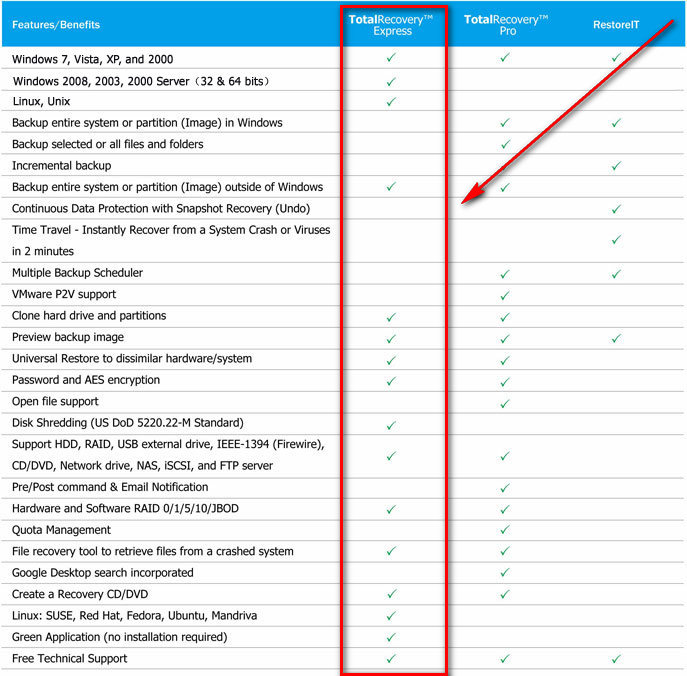
(Click on the chart above to view it in full size.)

Freebie Details

FarStone TotalRecovery 7 Express is being given away in a promotion by Novate Solutions. There is no information on if this promotion is time-limited or not nor if you can install/reinstall after the promotion has ended.

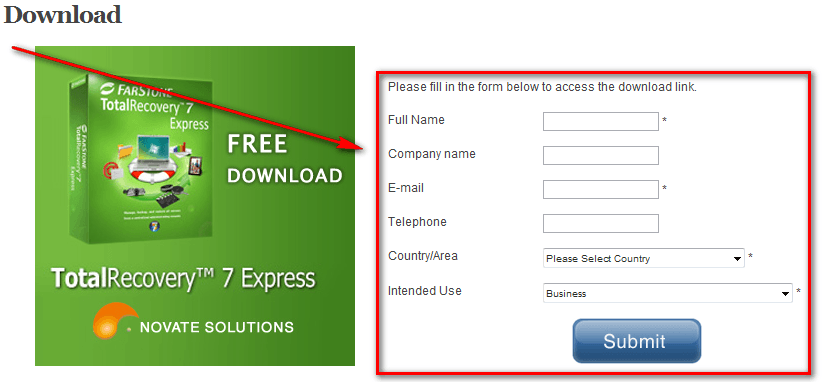
To get FarStone TotalRecovery 7 Express for free, do the following:

Version being given out for free: v7.03.1 Build 20100618

Free updates: Unknown

Free technical support: Unknown

Supported OS: You need to be on Windows 2000 or higher to register the program and create the bootable CD/DVD/USB but afterwards TotalRecovery 7 Express is OS-less — it works outside operating systems and as such can backup and restore any OS partition/hard drive.

Download size: 199.5 MB

  • Once you hit Submit, you will be given a license number:
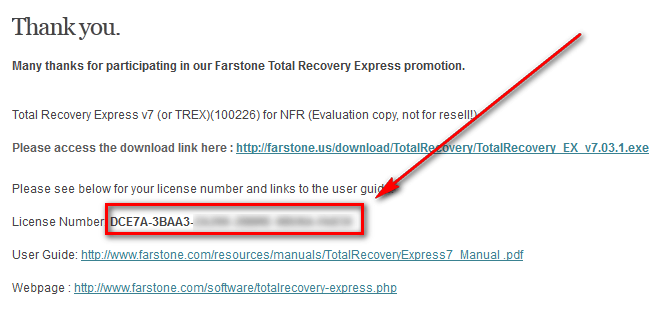
Copy this number and keep it in a safe place — you will need it to register TotalRecovery 7 Express.

  • Download TotalRecovery 7 Express.
  • After the download has finished, run the EXE file (TotalRecovery_EX_v7.03.1.exe).
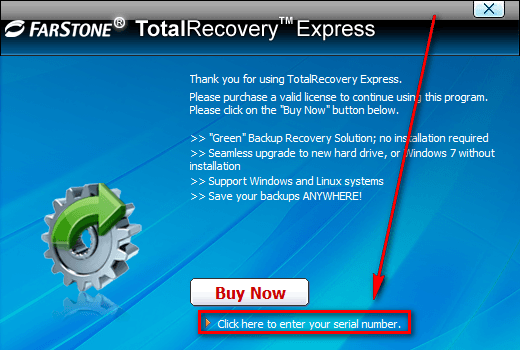
  • When you run the EXE file it will seem like you are installing TotalRecovery 7 Express. You aren’t really “installing” it. Rather, the EXE is extracting files to a temporary folder needed to allow you to register TotalRecovery 7 Express and create the bootable CD/DVD/USB. As such, wait while the files are extracted and until you see a “Thank you” screen. At that screen click on Click here to enter serial number:
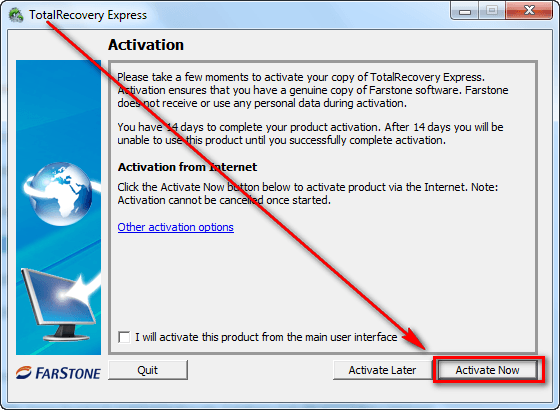
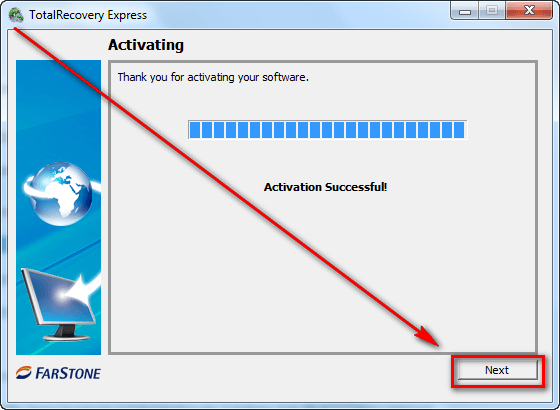
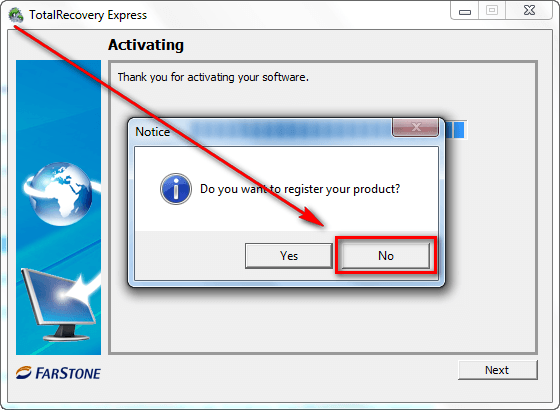
  • Now you will go through the process of registering and activating TotalRecovery 7 Express. (Don’t worry, you don’t need to do this everytime you run TotalRecovery 7 Express — just the first time.) It is a fairly straightforward process but if you are confused, these screenshots guide you through step-by-step — follow the red boxes, arrows, and text:
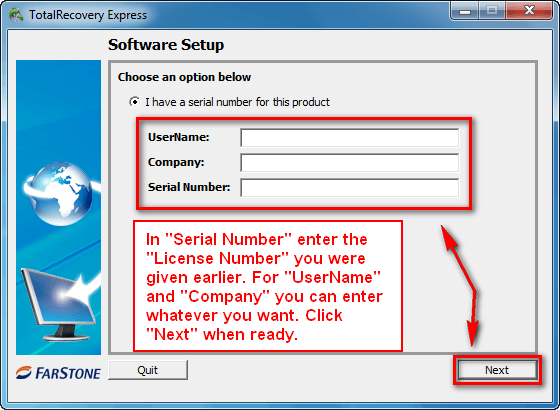
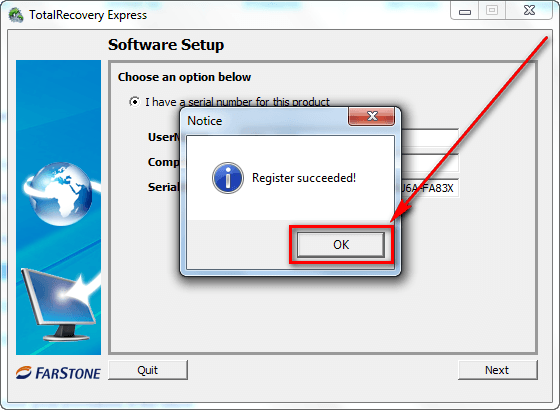
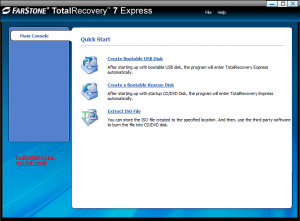
  • After you past that last screen and see a window that allows you to create bootable CD/DVD/USB or ISO…
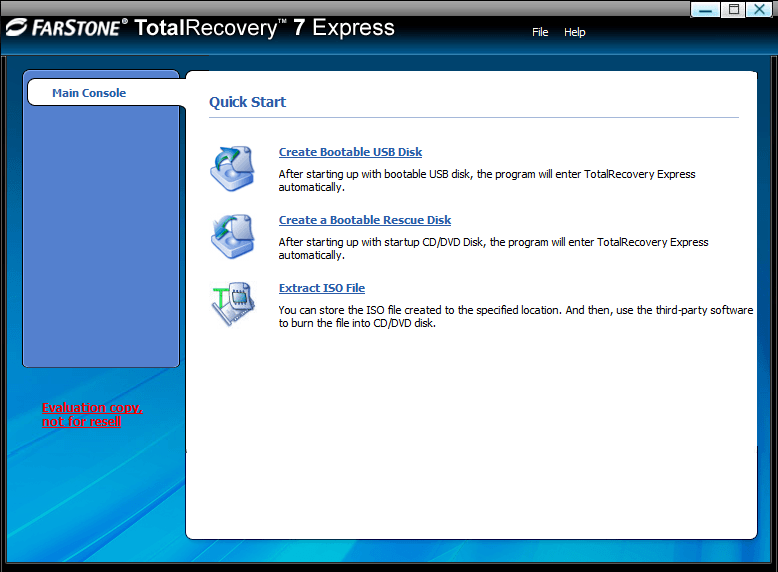
…you are good to go. All you have to do now is create your bootable CD/DVD/USB (or ISO) and start using TotalRecovery 7 Express (from outside Windows — you must boot from the CD/DVD/USB).

  • Enjoy!

If you have trouble getting FarStone TotalRecovery 7 Express for free, post below and other dotTechies or I will try to help.

[Thanks jayesstee!]

54 Comments »

  1. ric February 24, 2012 at 10:09 AM (comment permalink) -

    I open up exe file that I downloaded with administrative privileges and it extracts files opens up and I get the error, I cannot do anything with the program, there is nothing in main console of program just the xml error.

    26
  2. Rob (Down Under) February 24, 2012 at 10:22 AM (comment permalink) -

    @ric:
    Sounds like you are in Vista or Win7 ?
    And possibly in 64 bit ?
    Do you have another PC with say XP 32 bit ?
    Try doing it all in that, or in a friends PC.
    Since it is a once only ‘pretend Install’ and the end result will be a CD that should be bootable in any PC, it won’t matter what PC you used to create the CD.
    That is one of the rules in my PC troubleshooting handbook -
    - Avoid the problem if you can.

    If you only have one PC, you could try changing the compatibility mode to XP 32bit, in the Properties window of the pretend Installer program, or in the shortcut to it.

    PS You keep using the expression console.
    If my memory is any good (it ain’t) I think the pretend Installer briefly (about 1 second) showed a console window, which disappeared by itself, and continued showing proper forms.
    Is that the console you are referring to ?

    27
  3. Bruce Fraser February 24, 2012 at 11:46 AM (comment permalink) -

    I have tried TotalRecovery Express 7 several times over the past year, each time it has been promoted as a freebie. Each time I get the same error message when I try to install it:
    ================
    The XML page cannot be displayed

    Cannot view XML input using XSL style sheet. Please correct the error
    and then click the Refresh button, or try again later.

    Invalid class string Error occurred during compilation of
    included or imported stylesheet
    ‘file:///E:/Temp/pftBOBB.tmp/ma…
    ====================

    It sounds in theory like a wonderful program, especially the part about restoring to dissimilar hardware. But I just can’t get it to work.

    OS is Windows Server 2008 R2, which is on the list of supported OS (“Windows 2008 series”).

    28
  4. Patara February 24, 2012 at 2:06 PM (comment permalink) -

    It worked fine on install and activation on my Win7 64bit Desktop. On my Win7 64bit Laptop I couldn’t get it to activate at all.

    29
  5. Rob (Down Under) February 24, 2012 at 3:38 PM (comment permalink) -

    @Patara:
    Were you ‘Installing’ on both, just as an experiment ?
    You realize that you only have to ‘Install’ it in in one PC, so as to get the Bootable CD.
    (Those having problems, could use the neighbors PC)
    From that day on, you can use the Bootable CD in any PC
    (You do not have to ‘Install’ in those other PCs)

    ROB
    For others with XML problems.
    Possibly the PCs have different versions of the background software that handles XML
    Those that have the matching background software versions, don’t get the error.
    Mind you I don’t have a solution,
    “I am just saying”

    30
  6. ric February 24, 2012 at 3:42 PM (comment permalink) -

    Thks rob I’ll try it on windows 8 developer,on another partition I have can’t hurt.

    31
  7. Patara February 24, 2012 at 4:16 PM (comment permalink) -

    @Rob (Down Under):
    Yes I knew. Had tried the Laptop first and when it wouldn’t connect to Internet I did the manual option of emailing for the code but got no response [so far]. Last night decided to try Desktop before the offer ends and it worked.

    32
  8. Rob (Down Under) February 24, 2012 at 5:21 PM (comment permalink) -

    I am going to be offline for a wee bit.
    ALL OF YOU’SE THAT AIN’T IMAGING YET, PLEASE START TODAY.
    Either using today’s offering or the free Seagate DiscWizard (I can advise how to get a bootable CD)
    They both offer similar functionality, except -
    - DiscWizard creates one large image file, instead of many 2 GB files.
    - Farstone has dissimilar hardware Restore

    I mentioned that I am having Blue Screen of death problems.
    I suspect that turning off my PC is corrupting some system file(s).
    I probably have flaky Ram or hard drive.

    I have Avast free installed.
    Today between my Blue Screens of Death, Avast prompted me for a minor program update, and I foolishly said yes.
    The next time I closed down and then restarted, I got a Blue Screen, and had to go to an earlier System Restore point.
    Windows System Restore and Avast updates do not like each other.
    Now my Avast has stopped, and won’t start.
    I cannot get to Repair via the Add Remove Programs panel.
    I cannot uninstall Avast.
    I cannot download and install the latest Avast.
    If I did not have a DiscWizard image from two days ago, I would be in deep trouble.
    I am about to close down and Restore from that two day old image.
    (Note to myself, start doing nightly images)

    Rob
    PS If you Google, others are having Similar problems, even with just the virus Database being updated

    33
  9. HelpIsOntheWay February 24, 2012 at 5:28 PM (comment permalink) -

    Rob: do yourself a big favor and remove Avast. I have tried almost all the AV products, and have removed them all from my own and my clients’ computers. I now only use and recommend Microsoft Security Essentials. Remember the dirty little secret is that there is no “best” AV product. So I choose MSE which has the best compromise of effectiveness and very low overhead. Plus, it is supported by M$, for whatever that is worth.

    P.S. I STILL cannot load the promotion page at http://www.novate.com.my/Farstonepromo.php

    34
  10. ric February 24, 2012 at 7:08 PM (comment permalink) -

    Rob I got it working under windows 8 with privileges under win7 and admin. There must be something wrong with my win7 64 bit? Thks , DVD of Farstone works great so far i did a small test.

    35
  11. ric February 24, 2012 at 7:30 PM (comment permalink) -

    rob if u need help with your system just ask me in here i’ll try to help . That is the least I can do.

    36
  12. Rob (Down Under) February 25, 2012 at 1:14 AM (comment permalink) -

    @ric:
    Glad you got it working.
    Thanks for the offer.
    I appear to be ‘running’ again.
    I restored my DiscWizard image from the 21st.
    It then booted up ok (no Blue screen).
    I updated Avast to ver 7
    And immediately created a Windows Restore Point.
    Then closed down and booted into the DiscWizard, and created an image. And then verified it.
    As I say, Windows then booted OK, and Avast is functioning.
    Thank goodness I had a recent (ish) image.

    HelpIsOntheWay,
    Are you saying that this page -
    http://www.novate.com.my/Farstonepromo.php
    won’t load in your browser ?
    I just clicked your link, and it opened.
    If you wish, I could type in your details, with your email address, and presumably the email with the download link will go to your email program ?
    Full Name
    Email
    Country
    Home or Business use (Probably Home)
    Probably some good Samaritan from the same country as you should do this, in case they check the IP country
    PS I half hear you.
    I wonder whether the Avast conflict was causing my Blue screens ?

    37
  13. Patara February 25, 2012 at 1:39 AM (comment permalink) -

    @Rob (Down Under):
    Rob I use the BlueScreenView on the rare occasions when I have a BSOD. Had a few last year when trying to connect my webcam to win7. It was a driver issue and this neat exe helped me solve it.
    http://www.nirsoft.net/utils/blue_screen_view.html

    38
  14. Reginald February 25, 2012 at 3:18 AM (comment permalink) -

    @Rob (Down Under): Your spot-on mate! Carry on lad….

    39
  15. Dave February 25, 2012 at 3:33 AM (comment permalink) -

    I’ve used Avast for years now and have not experienced the BSOD. Anyone else having problems of BSOD because of Avast? I would be curious to know…..

    40
  16. Rob (Down Under) February 25, 2012 at 6:07 AM (comment permalink) -

    @Dave:
    I am not saying that the normal running Avast is causing blue Screens.
    If it did cause mine, it was because it did a program update (to version 7) , and then I subsequently went back to a Windows system Restore Point, which was created prior to the Avast program update.
    From my Googling, it appears that Windows Restore and Avast updates, are extremely likely to cause serious problems for Avast (and possibly my PC’s Blue Screen), if one goes back to a Restore Point that was created prior to Avast’s last update.
    The solution appears to be, to create a Windows System Restore point immediately after Avast does any program updates.
    From my Googling, people have had trouble, even when it was only Virus Database updates.
    Once again it is the combination of an Avast update, and then the user Restoring back to an earlier Restore Point.
    Probably that only causes problems with Avast (not with the PC), and that may be fixable by going to Add/Remove programs, and then choosing the option to do a Repair.
    But if it was a program update, Add/Remove programs won’t even let you click the button.

    @Reginald:
    Thanks

    41
  17. HelpIsOntheWay February 25, 2012 at 7:12 AM (comment permalink) -

    @Rob (Down Under):

    Yes, I would like to take you up on your offer. Please send me your email and I will send a private message. Thanks. My address is waltlamia AT gmail.com

    42
  18. Rob (Down Under) February 25, 2012 at 7:59 AM (comment permalink) -

    @HelpIsOntheWay:
    OK sent
    Mine is (just in case) -
    robhp AT iprimus DOT com DOT au

    A little footnote for others who are teetering regarding creating images.
    Because I had to go back to 21 Feb 2012 I looked like losing some downloads for the last 3 days.
    Even though I will never Restore the image that I did late on 24 Feb (because it has the Avast mess in it), I was able to browse that image and retrieve some files from it, that otherwise would have gone to ‘the twilight zone’ (been lost forever)
    I did that with Seagate’s DiscWizard. But I recall that Farstone had a similar capability

    43
  19. Patara February 25, 2012 at 4:04 PM (comment permalink) -

    I’ve been creating Images of my C Drives for years. I do it regularly as new programs get installed. I’ve only had to replace an Image once and I was back up and running in a very short time. I also do nightly Incremental backups of my User Files on E Drive. I use Macrium Reflect for all backups and it has never let me down. At 2 am every morning it kicks in and starts the backup. As Rob mentions I can also mount my C Drive Image and browse the files the same as one can with the normal Backup procedures. If I didn’t have a good backup regime a few years ago I would have lost everything as my C Drive and my External Backup Drive both died within days of each other. Luckily I had the forethought to backup my backup of User files onto DVD’s as soon as I got the warning.

    44
  20. Riyong February 25, 2012 at 11:03 PM (comment permalink) -

    How long time for license? 1 year or for lifetime license

    45
  21. Rob (Down Under) February 26, 2012 at 2:30 AM (comment permalink) -

    @Riyong:
    The Licence Code entry (during the “Installing” Cough!), are a once only event (and only ever has to be done in one PC).
    During that “Install” (cough!), you create the bootable CD.
    From that day on you can use that CD in any PC.
    No Licence Code will ever be needed again.
    You could build a new PC 2 years after the CD was created, and all you have to do in that new PC, is pop in the CD, and it will work.

    @Patara:
    Way to go.
    I am wary of external drives, if they are enclosed.
    I buy two docks like this -
    http://www.ebay.com/itm/USB-2-5inch-3-5-SATA-Hard-Drive-Disk-ESATA-HDD-Dock-Docking-Backup-Station-US-/200684768528?pt=PCC_Drives_Storage_Internal&hash=item2eb9be8d10
    I buy two Seagate 3.5″ 500GB drives to shove vertically into them.
    I use the eSata connection (instead of USB cable), and alternate my Imaging into those Docks.
    If one of the external drives dies, I can always go to the other dock to get it’s most recent image.
    I use the free Seagate DiscWizard program from a bootable CD.
    I may keep using that program, as I like my image to be a single file.
    (The Farstone Image is broken up into 2GB files)

    PS You can get Docks that have two slots (for two drives).
    You can get Docks with Card readers.
    You can get Docks with USB Hubs
    My advice is – DO NOT DO ANY OF THE ABOVE
    Keep the Dock as simple as possible.

    PPS Avoid Western Digital drives, as they are not a standard interface.

    46
  22. naveed February 26, 2012 at 1:23 PM (comment permalink) -

    @HelpIsOntheWay:

    The problem seems to be with OpenDNS. I tried with Google DNS and it worked.

    47
  23. HelpIsOntheWay February 26, 2012 at 2:53 PM (comment permalink) -

    @naveed:
    Thanks, you are quite right. I have now changed my DNS to Google DNS.

    48
  24. John A February 26, 2012 at 2:59 PM (comment permalink) -
  25. John A February 26, 2012 at 3:09 PM (comment permalink) -

    @Rob (Down Under): My Thanks to Rob for explaining the ISO in relation to
    the Bootable Rescue Disk. Also thanks to Giovanni for his contributions of Free Software. Keep it going.

    50

Leave A Response »