avast’s new v7 brings more features, performance improvements

February 27, 2012 49 Email article | Print article

avast!, a popular security solution best known for its excellent free anti-virus, has recently released a new v7 — and it brings juicy changes:

New Technologies in Version 7

Hybrid Cloud Technologies

New Streaming, real-time virus database updates

Now you get each virus signature sent to you in real-time via connection to the AVAST Virus Lab cloud, rather than needing to wait for a traditional database update. Your database will be continuously updated with latest definitions.

New File reputation system

FileRep lets you know whether a file is safe before you open it – determined in part by how many people have the file and how new the file is. The technology is also used internally, to help the scanning engine make more intelligent decisions.

New Protective Features

Improved AutoSandbox

Suspicious programs are now automatically placed inside the avast! Sandbox. When the program finishes, a comprehensive report is generated and, based on the program’s behavior, you are given a recommendation on how to treat it in the future.

Improved Browser Sandboxing

Enabled by a single click of the mouse, it allows you to completely isolate the browser from the rest of the system – even if the browser gets hijacked, your system stays clean.

Improved WebRep

The version 7 WebRep browser plugins provide greater protection against phishing sites, including heuristics detection of new phishing sites. Also, we can now detect fake/planted SSL certificates, preventing man-in-the-middle attacks against https sites.

Additionally, we have extended browser support to Apple™ Safari™.

Improved SafeZone™

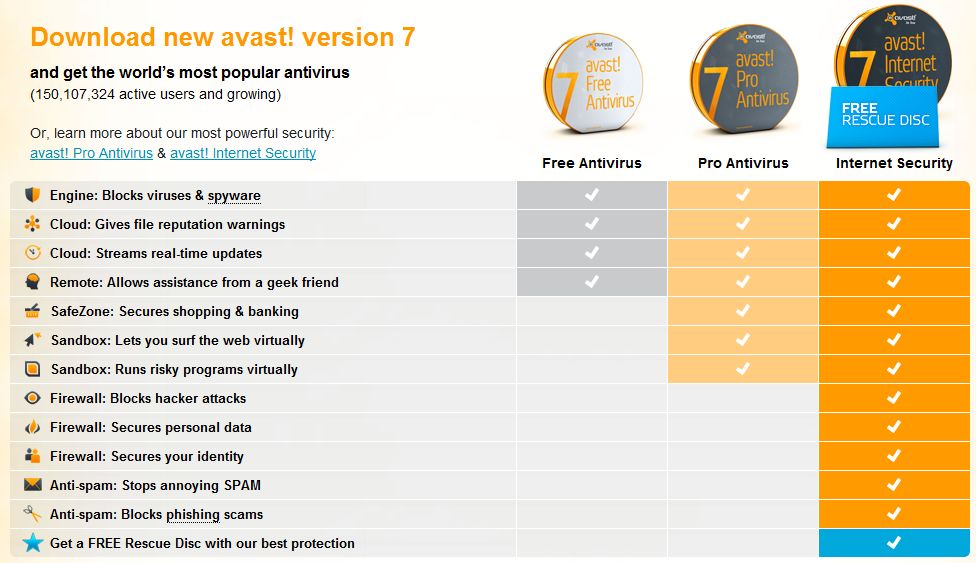
Available only in Pro Antivirus and Internet Security, our SafeZone™, your ultimate clean and secure window for financial transactions, now auto-prompts you and moves to the SafeZone from your regular browser.

Greater Usability

New AVAST Management Portal

Your web-based AVAST Account portal is your personal directory for all your avast! related data. It allows you to track all your avast! installations, complete with their health data, status information, and useful statistics. And it’s multiplatform, allowing you to manage avast! installations on both Windows and Mac computers, as well as Android devices.

New Remote Assistance

Our new Remote Assistance tool lets you initiate remote support from any ‘geek’ among your friends or family who agrees to help. Initiated by you, it routes through AVAST’s servers, bypasses firewalls, and can be terminated by you at any time. You will never have to ask for help over the phone again.

Improved Easy-to-use user interface

The avast! user interface has been optimized to be more intuitive. Novices will find it easy to use, while experts are still able to customize every aspect of the software to their individual needs.

New Customizable installation

Your avast! software can now be installed in Compatibility Mode, meaning that it will run perfectly along with your other antivirus software to act as a second line of defense. And even if you install avast! in normal mode, you are given the possibility to install the components you really need.

Now even faster AND less resource-hungry

Independent tests showed that avast! 6 was one of the fastest and least resource-intensive antivirus products available. We made version 7 even better: this is our best-performing product ever.

Windows 8 Beta compatible

avast! 7 runs great on Windows 8 and even has some cool new Windows 8 specific features, such as the Early-Load Antimalware Driver (ELAM), which snaps into the Windows 8 Secure Boot process to provide additional protection against system-level rootkits and bootkits.

[Above description as per the developer.]

Of course all the features mentioned above are not for avast! Free Antivirus. avast! Free Antivirus, whiile providing excellent protection, doesn’t have as many bells and whistles as avast! Pro Antivirus and avast! Internet Security. Aside from the performance improvements (it will be interesting to see how much avast! has improved in the fourth edition of dotTech’s Best free anti-virus/anti-malware program for Windows article), in my opinion the most interesting new features for avast! Free Antivirus are the FileRep and Remote Assistance capabilities

In regards to FileRep, I’m not totally sure how useful it will be considering that avast! should already be flagging malicious files – prior to people opening them – via its active guard. So telling someone the “reputation” of a file before they open it seems like a useless redundancy — it would be a lot more useful if reputations were given prior to download. That said, however, I haven’t used FileRep yet so it may be implemented in a way that makes it more useful than I make it sound.

The new Remote Assistance feature is very interesting because it doesn’t seem like a feature an antivirus would have. Remote access has typically been the realm of standalone programs like TeamViewer. I haven’t used Remote Assistance yet so I cannot say for sure how it compares to TeamViewer; but it surely will give TeamViewer a run for its money considering it could save business users a lot of money coupling remote access with anti-virus.

Update: It seems like avast! 7 may be more buggy than hoped. Many dotTechies – see comments below – are reporting issues with avast! 7. If you are on avast! 6 you may want to stay there until these bugs with avast! 7 have been fixed. Personally speaking, I was planning on upgrading to avast! 7 but now will wait until avast irons out the issues.

If you already have avast! 6 (or lower) you can upgrade to avast! 7 from within the program itself. If you don’t already have avast!, you can grab avast! 7 Free Antivirus from the links below; when installing, just note avast! comes bundled with Google Chrome — don’t install that if you don’t want it:

Version: v7

Download size: 71.4 MB

Supported OS: Windows 2000 Pro and higher

avast! homepage [Download page]

49 Comments »

  1. PCbasics February 27, 2012 at 12:23 PM (comment permalink) -

    Would you recommend this as best free antivirus?

    1
  2. Ashraf February 27, 2012 at 12:39 PM (comment permalink) -
    Mr. Boss

    @PCbasics: Such decisions require careful analysis. Read Microsoft Security Essentials vs Avira vs avast! vs AVG: Best free anti-virus/anti-malware program for Windows [3rd Edition] to learn more about what I think. It doesn’t include avast! 7 but it will in the next update.

    2
  3. Michael Rainey February 27, 2012 at 1:01 PM (comment permalink) -

    I’ve used avast! happily for six or seven years, but version 7 is extremely buggy. It was released too soon. Many members of the avast! forum are reporting going back to version 6. I can’t update, my browser Back button was disabled, and I’m getting sandbox alerts for programs like Microsoft Word when opened with no file loaded!

    Wait a few weeks.

    3
  4. David Goldstein February 27, 2012 at 1:06 PM (comment permalink) -

    Remote assistance does not work properly – cannot use assister’s keyboard to type into the remote computer’s dialogues. Still the best for remote assistance is Teamviewer.

    4
  5. Rob (Down Under) February 27, 2012 at 1:13 PM (comment permalink) -

    Be warned, that Avast and Windows System Restore Points must be carefully managed BY YOU
    After Avast updates it’s PROGRAM version, and has rebooted, you should manually create a System Repair Point, and include Avast Program Version in the Name you give to that Restore Point.
    If Avast program has been updated, YOU MUST NEVER RECOVER TO ANY RESTORE POINTS PRIOR TO THAT DATE.

    My warning is less severe for Avast’s Anti Virus database definitions.
    I am not sure if my following comment relates to the very frequent updates to the virus Database, or whether they occasionally update the version of the Database ? ? ?
    If you Google, you will see that users have had problems with Avast updates and System Restore points.
    Some of those problems appear fixable (I am guessing virus Database version updates), when you go to Add Remove Programs, and use the Repair option.

    However if you do not heed my warning (regarding Avast program version updates), you will find that is NOT fixable, as Add Remove Programs won’t even let you click the Avast button. The only way to fix it would be to reformat your drive, and do a fresh install. (But see my PS)

    Beware the Ides of March,
    Rob

    PS For those of you, that do not image your whole Hard Drive (or whole Partition), this would be a good time for you to start doing it.
    I got into the mess caused by Avast’s program update, and my going back to an earlier Restore Point.
    I COULD NOT FIX IT.
    Luckily I had a Seagate DiskWizard image, from 3 days earlier, that I was able to go back to.
    If you check Ashraf’s recent web page on Farstone -
    http://dottech.org/freebies/26773/free-farstone-totalrecovery-7-express/comment-page-2/#comments
    And also search his site for the (FREE)
    “Seagate DiskWizard”
    you will find that I have been preaching for millennium, on imaging, and using 3.5″ Seagate (500GB) drives in open air Docks. (Avoid 2.5″ drives, and avoid enclosed external drives)

    PPS Teamviewer has 12 Million users in Europe, and one user in Australia (me).
    It is free for non commercial use.

    5
  6. Jyo February 27, 2012 at 1:28 PM (comment permalink) -

    @Michael Rainey: The remote assistance always timed out and after updating to version 7, I can’t ever update anymore – it just hangs. My boot-time increased as well. When I tried to uninstall avast, the uninstaller was broken -_-.. Maybe it’s just a phase, but for now I am giving Panda Cloud a test run.

    @Ashraf: Any future plans on including Panda Cloud in your Antivirus Benchmark?

    6
  7. Paul February 27, 2012 at 1:28 PM (comment permalink) -

    But if you are a (a) Google Chrome user and (b) updating through the Avast program, be very careful. The installer appears to be buggy.

    http://www.dslreports.com/forum/r26929481-Avast-7-installs-Chrome

    http://forum.avast.com/index.php?topic=93980.0

    It seems the installer SOMETIMES installs a new copy of Chrome without warning to a non-standard location, and this installation hoses your exisiting Chrome settings.

    I should add that it installed a new Chrome for me which I was able to uninstall – I didn’t have Chrome on my system. And Avast itself seems to be behaving OK.

    7
  8. chuck (detailer) February 27, 2012 at 1:38 PM (comment permalink) -

    @Rob (Down Under): I agree-took all my restore points out to lunch.I discovered this when I forgot to opt out of the Chrome installation option.I was paying attention on my other PC-both already had Chrome installed.The problem is that Chrome now installs to Program Files (where it SHOULD HAVE all along),so I ended up with 2 Chrome installations.When I attempted to uninstall the Avast created version of Chrome from the All Programs menu,I lost Chrome completely.Even the exe. from the original file (C:/Users/ etc.) wouldn’t launch it.This is when I found the restore point problem.The first attempt from Avast’s RP left version 6 crippled,unusable,and irreparable.Any previous RP’s created were unusable as well.This sucks,and i should have waited for user feedback,just like I always do with Windows updates.I ditched Avira for Avast 2 years ago and just didn’t expect these types of problems.

    8
  9. jivadas February 27, 2012 at 2:03 PM (comment permalink) -

    DISASTER REPORT:

    I have used Avasti Free on my laptop with no problems, so I thought I would install the _compatability_ version on my PC, Win7 64bit, with MS Security installed already.
    I downloaded and installed it, then tried to restart. Nothing happened.
    I decided to uninstall, and clicked my WinOptimizer, where I uninstall things.
    I got a non-response message.
    My pointer turned into an hourglass.
    The hourglass froze.
    I changed the battery in my wireless mouse, in case that was the problem.
    After some time, I pulled the plug.

    Reconnecting, my PC gave a bad-shutdown message and opened normally.
    But when I tried to open WinOptimizer, to uninstall this Avasti monster, I got the no-response.
    When I tried the Control Panel, it was non-responsive, and I ended-process.
    Now I got a Black Screen, except the floating google deskbar was there. I made it show the dropdown menu, but it would not accept a click.
    Then the floating bar disappeared.
    BLACKSCREEN.
    I pulled the plug, and am going shopping.

    Does anyone have advice about the next step? HELP!!!!!!!!!

    xØx
    jd

    9
  10. chuck (detailer) February 27, 2012 at 2:14 PM (comment permalink) -

    @jivadas: Boot to safe mode-”last known good” or “repair my computer” Best of luck

    10
  11. Donald Bock February 27, 2012 at 3:12 PM (comment permalink) -

    AVAST is/was good as it had decent features and solutions, but I had many problems:
    1. Not loading fully
    2. Not updating fully
    3. Not resuming from a DOS System Scan
    4. Notification Area icons not showing
    5. Database of File Signatures not updating as fast as I thought (it took over 2-3 hours to do)
    6. No Rescue Disk

    I feel sorry for any who use AVAST and expect miracles.
    Look for an AVAST Uninstaller to rid you of it.

    I make a point of downloading a NEW Installer File for my AV (AVG) every 2-4 weeks just because I don’t want to bother with X-glitches or eternal updates…AV Rescue Disk too.

    11
  12. jivadas February 27, 2012 at 3:56 PM (comment permalink) -

    Back home from shopping.
    I was able to start the PC with a few glitches, and uninstalled this piece of shit. Thanks for the suggestion, Chuck.
    Should dottech be offering untested software without a warning? (Judging by other comments, this lump of excremental design has never been tested).
    TWO THUMBS DOWN!!!!

    xØx
    jd

    12
  13. chuck (detailer) February 27, 2012 at 4:04 PM (comment permalink) -

    @jivadas: Glad to hear you are up and running.make sure you got all the left-overs,as they could raise hell with your next AV.
    In fairness to Ashraf, I see this article as more of a “heads up” than a recommendation.Hell,I jumped right on the new version before reading this article,based on my past positive experience with the program.

    13
  14. Ashraf February 27, 2012 at 4:11 PM (comment permalink) -
    Mr. Boss

    @jivadas: I’m sorry. As Chuck mentions, this isn’t a review or recommendation — its just a “heads up” about a new version of avast.

    14
  15. Ashraf February 27, 2012 at 4:12 PM (comment permalink) -
    Mr. Boss

    @Jyo: Yes, I do have future plans to include Panda.

    15
  16. Ashraf February 27, 2012 at 4:13 PM (comment permalink) -
    Mr. Boss

    @Paul: Thanks for the tip.

    @Donald Bock: I’ve never had problems with avast in the past. o_O

    @Michael Rainey: Meh, I expected better from avast…

    @Rob (Down Under): Thanks for the heads up.

    16
  17. njwood60 February 27, 2012 at 4:14 PM (comment permalink) -

    wow -was I lucky! Upgraded no problems and no problems running. I have windows XP

    I just checked and all virus definitions up to date, so it seems to be updating OK.

    @Paul: From memory there was a screen asking if you wanted to install chrome (I unticked that option). I think it was after Avast had installed on the ‘finish’ screen, so you’re quite likely not to read it.

    17
  18. jivadas February 27, 2012 at 4:42 PM (comment permalink) -

    @chuck (detailer):
    If the developer reads this stuff (I hope so!), I think Chrome might have something to do with it.
    It was not in the download (I use Internet Download Manager, Two Thumbs Up); but my computer is highly googleized, with Chrome and google Desktop.
    Or it may be a fault in the Compatability feature (I kept MSEssentials, One Thumb Up)–but surely they would take this service into account.
    I wasn’t scolding Ashraf, but was glad to see him insert an update note (like Chuck, I downloaded before there were two messages on this page–stupid me!); this may have been a heads-up, but the great amount of space, and Ashraf’s past enthusiasm for avast made it look like a recommendation.
    But dottech remains four thumbs up (if you count my big toes).
    xØx
    jd

    18
  19. Paul February 27, 2012 at 4:58 PM (comment permalink) -

    @njwood60: The problem is that the screen you mention doesn’t always appear (it certainly didn’t in my case). The installer is definitely buggy.

    I ended up with Chrome installed with no warning. As I didn’t have a previous install of Chrome no harm was done and I was able to uninstall it, so in my case no big deal. But reading through the two threads I posted links to, it is very clear that this particular installer doesn’t always deliver that warning.

    Believe me, I do NOT miss screens such as that.

    19
  20. Jon Steedley February 27, 2012 at 7:27 PM (comment permalink) -

    Hello, all.
    I also had dwnldd+nstlld the new avast 7, on the 24th.
    The installer is buggy, but I haven’t had the kind of problems others are having.
    I think its because I most definitely do NOT want google’s browser anywhere near my computer.
    Google seems to be trying to out “Microsoft” Microsoft, if you know what I mean.
    For now, I’m still using google Earth, google search, & google maps, but that may change,
    when I find out more about their changing the way they use the info they harvest about us.
    Please keep in mind that NO company is ‘above suspicion’ when your ‘privacy’ is at stake.

    Have a GREAT day, neighbors!
    s10wj0n

    20
  21. ebony February 27, 2012 at 7:51 PM (comment permalink) -

    I was wondering if it was just me. I have not had any problems quite severe as those mentioned above, however during installation, my machine hung at the sign on screen after reboot.

    The other thing I noticed is now I am getting tons of SPAM/CRAP mail. Like 10 to 15 a day and a lot of my good mail is going into junk mail.

    Not sure if I can go back to my other version 6.

    21
  22. Sal February 27, 2012 at 9:47 PM (comment permalink) -

    Hello, I updated to v7 days ago when it asked me to do so and I had no problems (under w7 64 bit home). Sort of lucky it seems.

    22
  23. Jeanjean February 28, 2012 at 12:25 AM (comment permalink) -

    Hi Ashraf,
    Never had a problem with Avast so far; this is a great product for sure.
    Just recently, I uninstalled version 6 to find the cause of sudden shutdown of the PC.
    Avast was not responsible, but I came to realize at that time how it slows down the use of Windows and all my programs.
    I hesitate therefore to install the new version, especially since I have free Prevx.

    23
  24. Safe and Sane February 28, 2012 at 4:11 AM (comment permalink) -

    FWIW, I’ve had absolutely no problems with updating to Avast 7, other than the annoying auto sandbox that kept intercepting programs that I knew to be safe. It got so annoying, in fact, that I disabled the feature but beyond this I’ve had zero problems.

    After *years* of struggling with the effects of multiple security programs — ranging from virtually *every* AV at one time or another to add-on behavior blockers and firewalls — nearly 2 years ago I dumped everything but Avast Free and my hardware router. No software firewall, no resident Malwarebytes, no Mamutu, no ThreatFire, no UAC and none of the other garbage that was robbing me of system performance and my sanity.

    I have remained happily virus-free and sane ever since (diligently checking regularly with various on-demand alternatives to Avast), and my systems have never run better. Turns out, my paranoia was my own worst enemy. I’m a BIG fan of Avast Free and, IMHO, the nicest part of Avast is the lack of false positives. With other AV’s, the number of FP’s was such a problem that I found myself ignoring warnings on many occasions, relying on VirusTotal.com as an ultimate decision-maker. Now, my rule is that if Avast warns, I listen. Period. No second-guessing the program, *ever*. As I say, I’ve never had a problem since I’ve been doing this and I have been (shall we say) “adventuresome” in higher-risk computing activities.

    24
  25. Sal February 28, 2012 at 4:38 AM (comment permalink) -

    I just got the automatic update on my Android phone, too, but it looks there is no way to link to the Avast management portal (simply I don’t find any place where to put the Avast username to link with my profile).
    Is it a problem of mine, or is the portal not yet implemented in Android version? (although the developer features say it is)

    25

Leave A Response »