Microsoft releases Windows 8 Consumer Preview: Try out Windows 8 for free, without that pesky “release” label

February 29, 2012 20 Email article | Print article

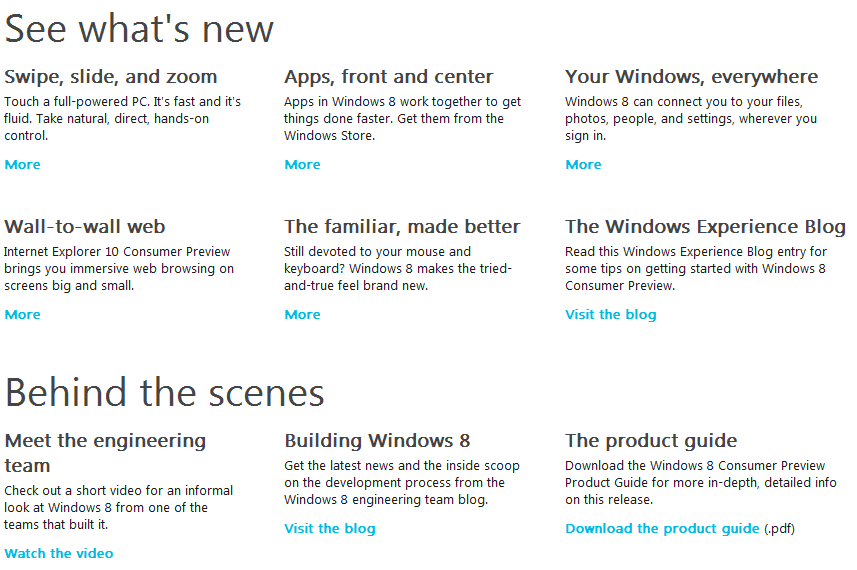
This morning at the Mobile World Conference in Barcelona, Microsoft released Windows 8 Consumer Preview. Essentially a “Beta”, this release is intended to let Windows users see if Windows 8 is right for them. But what’s new in Windows 8 that Microsoft wants you to try? Their site gives several reasons:
And how does Windows 8 look on a device specifically designed for it — a tablet? This morning, tech news site The Verge showed it off running on some tablets Microsoft had available for conference attendees; see the following video:

Interested? Go to Microsoft’s download site, or optionally their ISO download site, to get started today with Windows 8 Consumer Preview today! If you want to give Windows 8 a try without messing up your computer, try installing it virtually using VirtualBox.

Have you downloaded the Consumer Preview? What do you think of Windows 8 so far? Share in the comments below!


20 Comments »

  1. Ashraf February 29, 2012 at 9:09 AM (comment permalink) -
    Mr. Boss

    I’ve been holding off on tablets so far because, essentially, I can do on my phone what I would use a tablet for. But I will probably jump on Win8 tablets if they turn out to be as good as they look.

    1
  2. PCbasics February 29, 2012 at 10:34 AM (comment permalink) -

    Is VMware the same thing as virtual box?

    2
  3. Ashraf February 29, 2012 at 11:06 AM (comment permalink) -
    Mr. Boss

    @PCbasics: No they are two different products. But they do similar things.

    3
  4. PCbasics February 29, 2012 at 1:36 PM (comment permalink) -

    @Ashraf: Can it open .iso files…..was my real question lol

    4
  5. Locutus February 29, 2012 at 3:37 PM (comment permalink) -

    @Ashraf: Thanks for embedding that video for me :)

    @PCbasics: Certainly!

    5
  6. Ashraf February 29, 2012 at 3:59 PM (comment permalink) -
    Mr. Boss

    @PCbasics: Yep, it should be able to.

    @Locutus: No problem! (Does it not allow you to embed them?)

    6
  7. Safe and Sane February 29, 2012 at 4:34 PM (comment permalink) -

    I had the unhappy experience of trying the developer’s preview of Windows 8. It lasted on my system for about an hour and was the worst Windows version experience that I’ve had, Vista included. It might be wonderful for tablets but for PC’s? It was gruesome.

    7
  8. Denis Hands February 29, 2012 at 4:37 PM (comment permalink) -

    Windows Server 8 Beta is out now also http://www.microsoft.com/en-us/server-cloud/windows-server/v8-trial.aspx

    NOTE: FOR SOME REASON IT DOESN’T LIKE TO DOWNLOAD IN FIREFOX

    8
  9. hal February 29, 2012 at 8:56 PM (comment permalink) -

    I can not see any reason I would ever want windows 8, someday will have to go to windows 7 .
    They have taken away some features and hidden then even more, gives the user less control.
    Like the other person maybe good for tablets, but sure not anything for DeskPc. Had to reformat to
    get it off my system, thank god do / did not have a tablet to try it on. Maybe after it has been out 3 or 4 years may take another look at it.

    9
  10. Mike March 1, 2012 at 5:29 AM (comment permalink) -

    I cannot get it to complete the install process in VirtualBox (Windows 7 Home x64); however, installed fine on the HHD. Haven’t had much time to play with it. Not impressed so far.

    10
  11. David March 1, 2012 at 6:11 AM (comment permalink) -

    I downloaded the x64 version and attempted to install it from the subsequently produced boot DVD. The choice was to upgrade the OS already on the drive or ‘Custom.’ ‘Custom’ would not allow me to install it on an available unallocated partition. What is going on? I certainly don’t want to ‘upgrade’ the Windows 7 already on the drive – merely want to dual boot into the OS I want.

    11
  12. Jimmy March 1, 2012 at 6:42 AM (comment permalink) -

    I was going to wait until all the bugs were fixed on the Alfa release, but after reading an article (Windows 8?s Killer Feature: The Killswitch), on Norman Security blog (http://blogs.norman.com/2012/for-consumption/windows-8s-killer-feature-the-killswitch) I do not think I will install Windows 8 until someone comes up with a way to block the so called Killswitch.

    12
  13. Mike March 1, 2012 at 7:02 AM (comment permalink) -

    @David: I experienced the same thing. I had to select the partition I wanted to use and have the DVD erase that partition before installing to it.

    13
  14. David March 1, 2012 at 7:17 AM (comment permalink) -

    @Mike:
    - I don’t recall seeing an option to erase or format that unallocated space. Perhaps I should format the space first and then possibly the program might ask me if I want to erase it. What do you think?

    14
  15. Mike March 1, 2012 at 7:38 AM (comment permalink) -

    @David: I stumbled into that option. I don’t recall exactly how. I think the partition was greyed out but when I clicked on it I had the option to format, erase, detete.

    15
  16. vika6 March 1, 2012 at 7:45 AM (comment permalink) -

    @David:
    You should create a new partition on your unallocated space prior to the instalallation.

    16
  17. David March 1, 2012 at 7:57 AM (comment permalink) -

    @vika6: Yes – created new simple volume, named and formatted it – am now installing Windows 8. Thank you.

    17
  18. Seamus McSeamus March 1, 2012 at 10:20 AM (comment permalink) -

    @ Jimmy

    I’m with you on this one. Until the whole killswitch thing is better explained and a way to disable/opt-out is offered, I will be sticking to 7. Call me paranoid if you will, but I don’t like the idea of Microsoft or any other entity having the ability to access my hard drives without consent. First of all is the privacy issue, but there is also the issue of security. You can bet someone out there is salivating over the thought of being able to exploit this feature for nefarious purposes.

    18
  19. David March 1, 2012 at 1:47 PM (comment permalink) -

    @David: Now – got it installed – find it confusing – sound driver does not work – win 7 x64 driver apparently not compatible – also I cannot find the button to display Programs. So far I do not see any improvements over Win 7 – only more complications.

    19
  20. Greg March 12, 2012 at 4:34 AM (comment permalink) -

    I have now been playing with it for almost 2 weeks. I installed it on a spare 80GB hard drive in my Compaq 8510p. I was pleasantly surprised how easy it installed and that it installed drivers for all components of the laptop; even the quick launch buttons. The first thing I noticed is that OS boots up FAST. After watching the Verge video I am able to navigate it fairly easily. It’s obvious Metro is designed for a tablet so I find that I click on the Desktop tile rather quickly. The interface is smooth and fast. Once back in the desktop there is a comforting sense of familiarity. However, I don’t understand the elimination of the Start button. It was the most used button on the desktop and centralized a lot of commonly used tasks. Now I find myself constantly struggling to find things that used to be at the click of one button. This is the most glaring flaw I have found and the only thing that is making Windows 8 a frustrating experience for me. (Yes I know there are 3rd party apps, and even a way to pin the Start Menu folder, but those aren’t as complete or as well integrated)

    20

Leave A Response »