Free InPaint (v3.1)! [Limited time offer]

March 4, 2012 30 Email article | Print article

Software Description

The following is a description of InPaint, as per the developer:

Inpaint Overview

Do you have a photo that would look just right if you could only remove one or more objects or persons from your composition? For example, look at the following two pictures. The original on the left features a large building in the foreground that dominates the scene while also blocking an uninterrupted view of the horizon. If we could somehow remove this, it would open up the entire view. You can see what we mean in the picture on the right. With the building gone, we can really appreciate the full beauty of this landscape. Well, now you can remove just about any unwanted object or person using Inpaint.
inpaint screenshot

Top Reasons to use Inpaint

  • Repair old photos
  • Remove watermarks
  • Remove unwanted objects
  • Digital Facial retouching
  • Remove date stamps
  • Easy to get started

dotTech Advice

dotTech reviewed InPaint (v3.0) back in back in January 2011. The final verdict of that review describes how I feel about the program:

InPaint is a good program. The performance will vary depending on the image being processed and how you handle the selection and processing, but InPaint is simple enough for novices and yet still handy for a quick touch up by a professional; it works quickly and does a good job, for the most part. [...]

I highly recommend InPaint.

Freebie Details

InPaint is being offered for free in a promotion by WinLoad.de. There is no information if you can install/reinstall at a later date (I believe you can, though) nor is there information on how long this promotion will last (the promotion page says “only a short time”).

This promotion is a German promotion but the program is in English.

To get InPaint for free, follow these simple directions:

Version being given out for free: v3.1

Free updates: No

Free technical support: Unknown

Supported OS: Windows 2000 and higher

Download size: 2.9 MB

Once you fill out the form, hit Absenden.

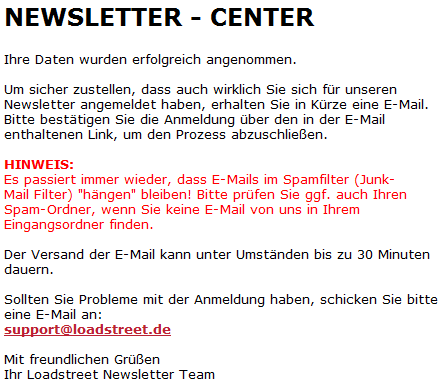
If you do it properly, you should see a confirmation message like the following:
  • Check the inbox of the e-mail address you registered with. Look for an e-mail from LOADSTREET.de info@news.loadstreet.eu with the subject of Newsletter Anmelde-Bestätigung für InPaint 3 Aktion. In the e-mail there will be a confirmation link you need to follow:
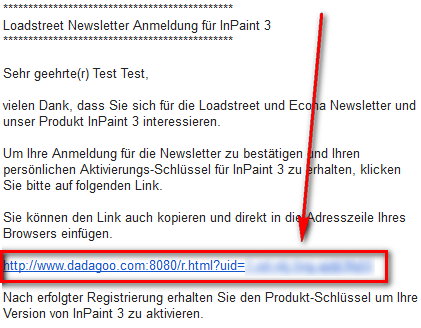
Click on the link, or copy + paste it in your web browser.

  • At the confirmation page you will be given your registration key:
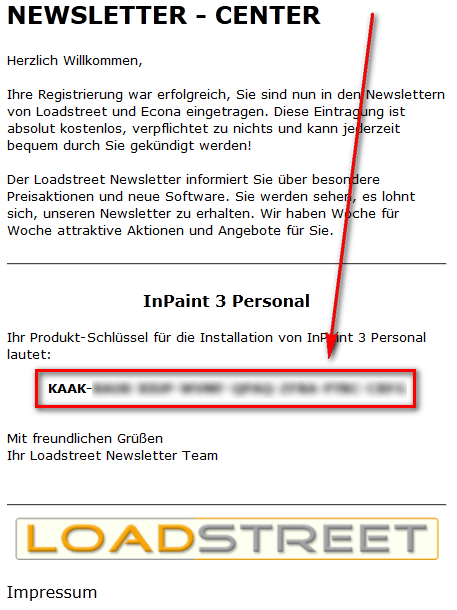
Copy this registration key because you will need it very soon.

  • Download and install InPaint. (This installer and program are in English.)
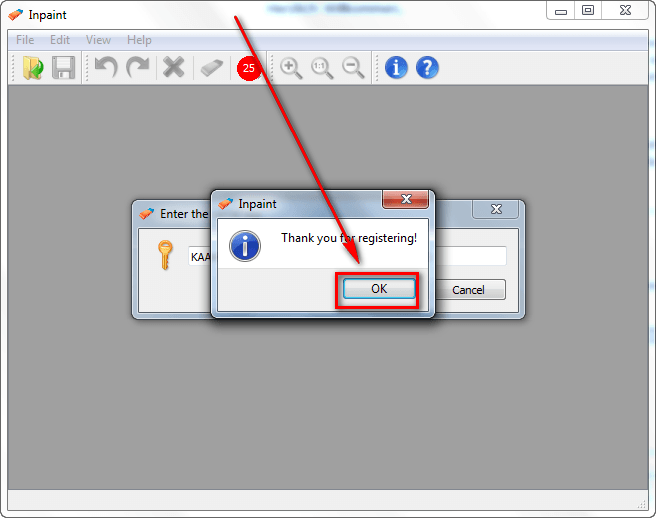
  • After installation, run InPaint and register it with the registration key you received by going to Help -> Enter the serial key:

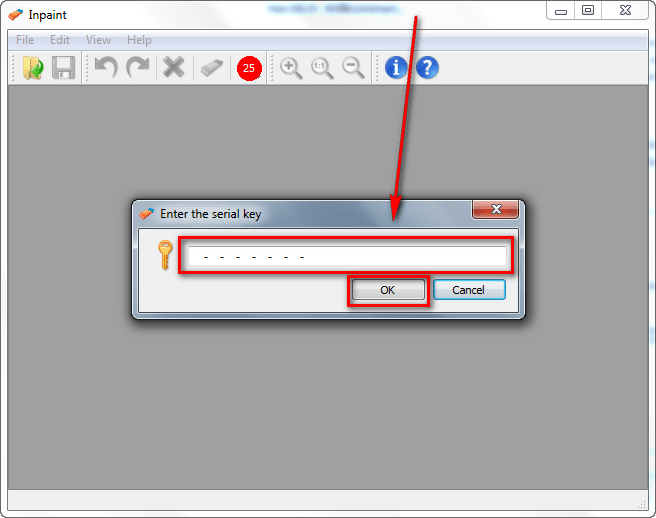
  • Enjoy!

If you have trouble getting InPaint (v3.1) for free, post below and other dotTechies or I will try to help.

[via TipRadar]

30 Comments »

  1. PCbasics March 4, 2012 at 12:14 PM (comment permalink) -

    How do you check whether it is a magazine promo or not? (ex/ like this one…..idk if it was a magazine or not b/c it was in a diff language)

    1
  2. Ashraf March 4, 2012 at 12:22 PM (comment permalink) -
    Mr. Boss

    @PCbasics: Like this:

    1) Google Translate the page and you see:

    Here you can sign up for free newsletter from Load Street and Econa. As a thank you receive your activation key for:
    Inpaint 3

    After you have completed and submitted form data you receive an email with activation link. Please call us to confirm this on your application. The activation key for the software you will receive by separate email.

    Load Street is obviously the software distributor so Econa must be the sponsor of this giveaway.

    2) Google “Econa” and you learn it is a company that runs online websites, one of them being WinLoad.
    3) Visit WinLoad and learn they are running a public promotion of InPaint.

    2
  3. MerryMarjie March 4, 2012 at 2:21 PM (comment permalink) -

    Thank you! Perfect instructions, and I was able to download and install InPaint quickly and easily. I appreciate the freebie.

    3
  4. Ashraf March 4, 2012 at 4:22 PM (comment permalink) -
    Mr. Boss
  5. ebony March 4, 2012 at 6:15 PM (comment permalink) -

    I agree, great instructions. I tried for at least an hour based on instructions from ??? and to no avail. Thought to look here and I have gotten the program, registered it and tested all with approx 15 mins.

    Thanks Ashraf.

    5
  6. Jeffinprov March 4, 2012 at 6:16 PM (comment permalink) -

    This is much appreciated, Ashraf — THANKS! My last version of InPaint went astray in some manner or another, and I’m delighted to have it back.

    6
  7. Ashraf March 4, 2012 at 6:19 PM (comment permalink) -
    Mr. Boss

    @ebony: You are welcome! Can you do me a favor? Next time you see a freebie on another website that isn’t posted on dotTech, post about it on the forums (http://dottech.org/forums/freebies/) so I can learn about it and post about it on the main blog.

    @Jeffinprov: You are welcome!

    7
  8. ebony March 4, 2012 at 6:39 PM (comment permalink) -

    @Ashraf: I certainly will. Anything to help dottech.

    8
  9. Ashraf March 4, 2012 at 6:43 PM (comment permalink) -
    Mr. Boss
  10. ngaryo al indonesy March 4, 2012 at 11:10 PM (comment permalink) -

    “CARE – FULL” INSTRUCTION

    10
  11. ebony March 5, 2012 at 4:42 AM (comment permalink) -

    @Ashraf: Do I post if the freebie/giveaway with license is “exclusive” to a specific site as oppose to directly from the developer? I am wanting to do the ethical thing here.

    11
  12. BuddahBoy March 5, 2012 at 4:44 AM (comment permalink) -

    Not only another great addition to the tool box but very timely! I had v 2.4 and was reading that there were some needed improvements made for v3.* – thank you very very much!! It’s not the most used program BUT when you need it sure does a sweet job. Thank you very much Ashraf.

    12
  13. Col. Panek March 5, 2012 at 5:50 AM (comment permalink) -

    The Resynthesizer plug-in for Gimp does the same thing, and (after you install it) you don’t have to leave an image you’re editing in Gimp to run InPaint. Here’s a couple of demonstrations, which are impressive:

    http://www.aboutlinux.info/2010/05/resynthesizer-gimp-plugin-selectively.html

    The download and install instructions for Windows are left as an exercise for the student.

    13
  14. GAOTD Installer March 5, 2012 at 6:41 AM (comment permalink) -

    LOL I found this 3 days before this was posted. Also, I’m pretty sure the key is the same for everyone.

    14
  15. Tom March 5, 2012 at 6:44 AM (comment permalink) -

    @Ashraf:
    How do i unsubscribe from the newsletter??? It’s all in german and i dont understand it anyway.

    15
  16. Col. Panek March 5, 2012 at 7:46 AM (comment permalink) -

    @Tom: Do what my wife did: sign up for a course, und Deutsch lernen.

    16
  17. Ah Clem March 5, 2012 at 8:21 AM (comment permalink) -

    Trend Micro blocked the verification site.

    17
  18. Wes March 5, 2012 at 9:15 AM (comment permalink) -

    if you follow the instruction, pay attention to the names, I think you reversed the firstname (vorname)and lastname (nachname) fields.

    18
  19. jayesstee March 5, 2012 at 9:36 AM (comment permalink) -

    @Tom:
    I viewed the second email in Firefox (link at the top: “Im Webbrowser ansehen”) and then used ‘Google Translate’ add-on.
    The translation contained the following paragraph:
    “How do I unsubscribe from the newsletter?
    To receive no further the newsletter, simply press the Unsubscribe link that you see the license.”
    The German source of “Unsubscribe link” is “Newsletter abbestellen”.
    Of course, there is no such link in either of the confirmation emails received so far.
    I will wait to till the Newsletters start and hope that they include the unsubscribe link. Otherwise, I will filter them out in GMail!
    Hope this helps?

    19
  20. J. March 5, 2012 at 10:06 AM (comment permalink) -

    I installed this on two different computers using the same serial key, it works great here is the key
    for easy access thanks.
    KAAK-RAUK-XIUP-WVMF-QPAQ-ZFRA-PTRC-CBFG

    20
  21. Ashraf March 5, 2012 at 12:09 PM (comment permalink) -
    Mr. Boss

    @ebony: Yeah, that is fine. As long as the freebie is available to everyone who visits that website, that is fine. I will just give credit to the specific website in question in my post.

    21
  22. Steve March 5, 2012 at 6:30 PM (comment permalink) -

    I believe you have “first name” and “last name” reversed.

    22
  23. Bruce March 6, 2012 at 6:22 AM (comment permalink) -

    @MerryMarjie:

    I don’t have the forward arrow button to press after highlighting the image?

    23
  24. Galan Fords March 7, 2012 at 11:05 AM (comment permalink) -

    Thanks for the tip Ashraf.
    Best regards

    24
  25. Patrick March 10, 2012 at 2:11 AM (comment permalink) -

    Offer STILL open today March 10, 2012…

    Greetz,
    Pat

    25

Leave A Response »