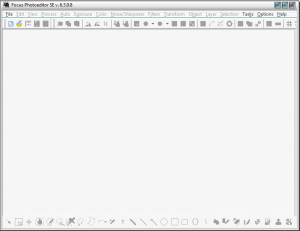
Free Focus Photoeditor (v6.3)! [24-hours only]

March 12, 2012 73 Email article | Print article

Software Description

The following is a description of Focus Photoeditor, as per the developer:

Focus Photoeditor is comparable to software used by the world’s most successful professional photographers, but even without any prior experience using photo editing software, even if you’re a complete novice, you can use the powerful photo wizard functions to enhance your digital photos instantly.

You wouldn’t believe the difference if you hadn’t seen it happen right before your eyes. You’ll see even photos you thought looked “pretty good” being enhanced and improved to jaw-dropping vibrancy.

Here are just a few selection of amazing characteristics of Focus Photoeditor:

  • Full compatibility with Windows 7.The only Photo Editing Program on the market to support all versions of Windows (from Win98 to Win7 in both 32bits and 64 bits modes). Loads blazingly fast, Won’t eat up memory.
  • More than 150 camera models supported and dozens of graphic formats
  • RAW formats are updated to the latest models. Unlimited free updates
  • Save and Export files previewing and optimizing size for all formats
  • Compatible with the PSD Photoshop File Format
  • Quick Fix Wizard – To fix all the most common photo problems in a single step.
  • The Best Set of Automatic Photo Corrections you could ask for
  • Auto Contrast, Auto Colors, Auto White Balance
  • Great Control over Dynamic Range with Smart Flash, Reduce Highlights, Dynamic Range Improver
  • Full Arsenal of Exposure and Color Corrections
  • Professional RGB Curves Correction to achieve tone changes precisely
  • Hue – Saturation Control – Selective Color – Replace and Calibrate Colors
  • Remove Chroma, Luminance Noise and any kind of digital noise
  • Top-Notch Unsharp-Mask Filter to render the sharpest and cleanest picture details
  • Easy to use Batch Processor with ability to undo the changes applied to some or all the pictures
  • Layers: both Image and Text with many option to customize and to organize
  • Selections – A Big Variety of ways of selecting pixels, including free-lasso tool and Magic Wand
  • Drawing, Painting, Retouching. Great control over precise editing.
  • Be creative by painting with the Pressure Sensitive Graphic Tablet Support
  • Create elaborate decorations with Textures, Patterns and Gradients (up to 256 colors and in a multitude of shapes)
  • Unlimited possibilities with hundreds of Built-in Filters and thousands of parameters to experiment with
  • Effective Anti-RedEye retouch tool. Get rid of this annoying problem very quickly.
  • Clone tool to remove unwanted details or duplicate existing ones.
  • Lighten / darken details, improve sharpness, increase saturation by painting over your photo!
  • Easy-to-use picture browser: lets you rotate, make backup copies, copy & paste, print picture files in a sheet.
  • Have access to thousands free and commercial Filters with the Photoshop Plugins Support
  • Save and Reload your Photo Projects
  • Share your photos with the web album builder
  • Enjoy all the rich editing tools found in more expensive software
  • And other ones that you can’t get elsewhere!

dotTech Advice

Digital photography and photo editing isn’t my forte in the least, so there isn’t much advice I can give about Focus Photoeditor. I can say, however, Focus Photoeditor has received 4.5/5 stars from CNET, 4/5 stars from Snapfiles, and 5/5 stars from Softpedia — so it must be doing something right.

(Anyone looking for excellent freeware image editors can check out Paint.NET, GIMP, or RealWorld Paint.)

If you grab Focus Photoeditor, feel free to share your experience in the comments below.

Freebie Details

Focus Photoeditor is being given away in a 24-hours promotion by Giveaway of the Day. The promotion is live until 23:59 Pacific Standard Time Friday March 12, 2012. You must download, install, and register within these 24-hours — you won’t be able to install/register later.

To get Focus Photoeditor for free, do the following:

Version being given out for free: v6.3.9.8 SE

Free updates: No

Free technical support: No

Supported OS: Windows 98 and higher

Download size: 37.3 MB

Giveaway limitation: This is free for non-commercial use only

  • Check the inbox of the e-mail address you registered with. Look for an e-mail from NWS Centurybyte nws@blendpic.com with subject of Verification Required!. In the e-mail is a link you must visit:
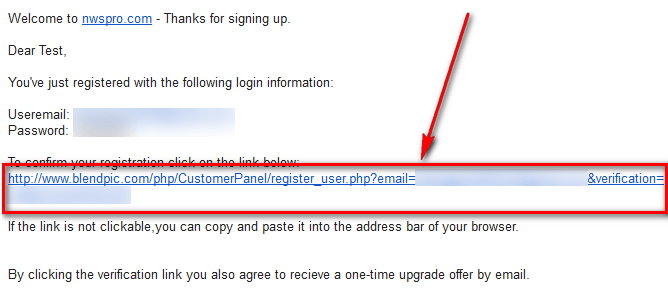
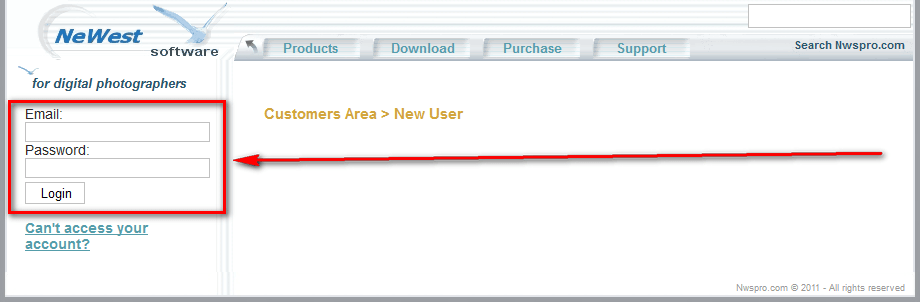
  • When you click (or copy + paste) the link, you need to login at the page that loads with the email address and password you just registered with:
  • Once logged in, click the Get me the Code button and you will be given your registration information:
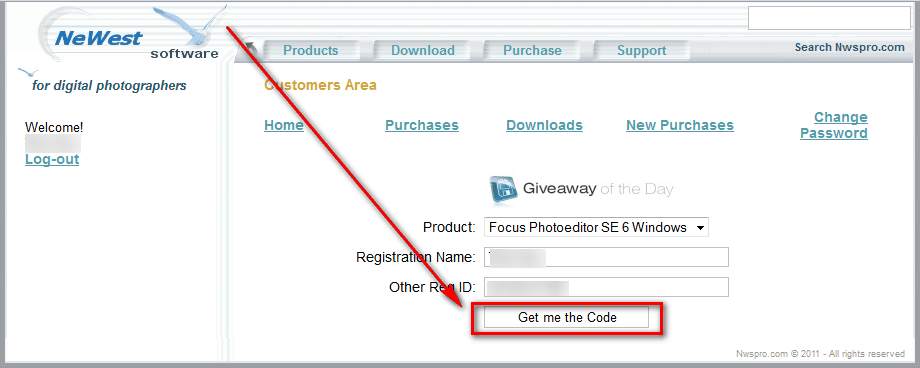
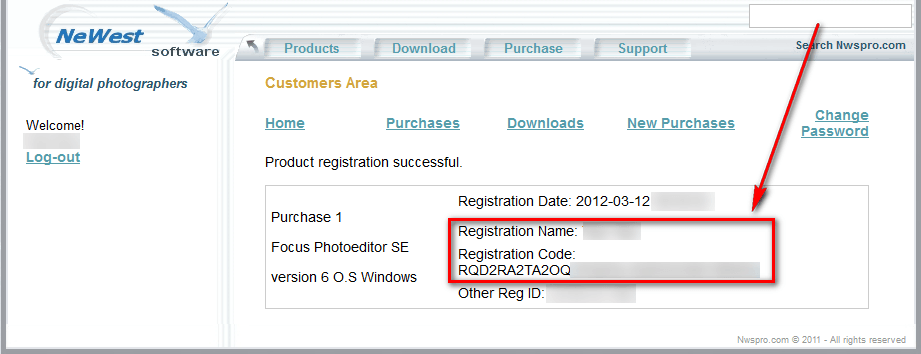
Keep this registration information safe because you will need it soon.

  • Download the giveaway installer ZIP file.
  • Extract the ZIP file and run Setup.exe. Make sure you have a valid Internet connection at the time and wait while the installer checks to make sure the giveaway is still live. Once the installer confirms the giveaway is still live, the installation of Focus Photoeditor will launch:
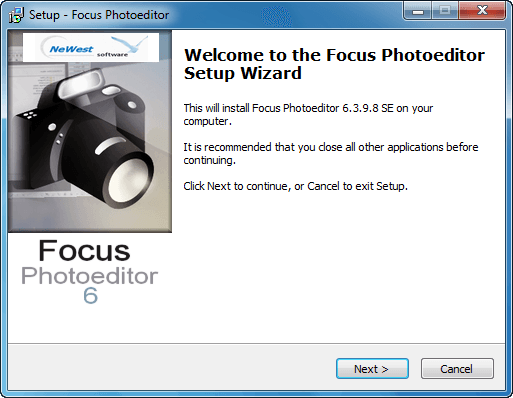
Install Focus Photoeditor like you would install any normal program.

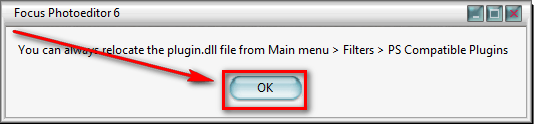
  • After installation of Focus Photoeditor finishes, the Giveaway of the Day installer will popup again — click Close (unless you want to install an optional third-party program Software Informer, in which case click Software Informer):

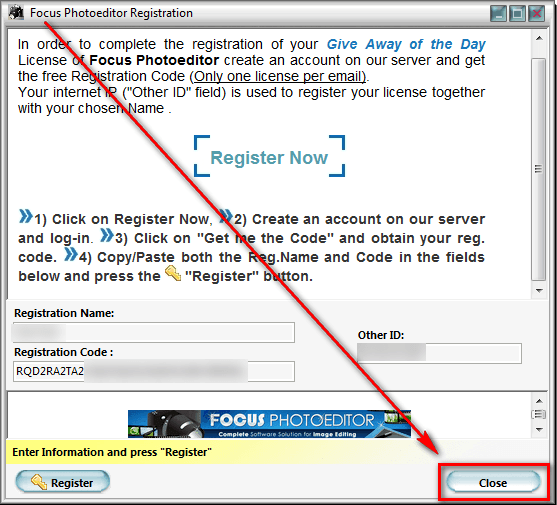
  • Now run Focus Photoeditor if it isn’t already running and register it using the registration information sent to you earlier:

Note: If you get an invalid code error then make sure there isn’t a space after or before the name or code. Also try putting two spaces between first and last name if one space doesn’t work; or if there are already two spaces between first and last name, delete one space and make sure there is only one space left. If the IP address in the program is different than what showed on the website, go to C:\Program Files\NWSoftware\Focus Photoeditor 6 and edit fp6Lic_SE.ini — change the IP address in that file to what is shown on the website when you register. [Thanks everyone for the tips!]

  • Enjoy!

If you have trouble getting Focus Photoeditor for free, post below and other dotTechies or I will try to help.

73 Comments »

  1. Marc March 12, 2012 at 12:22 PM (comment permalink) -

    I had no problems following Ashraf’s directions except that both yahoo.com and gmail.com put the email from them in a spam folder. I tried yahoo.com first and it took its time appearing in the spam folder, so I went back to their website and tried gmail.com, which delivered to my spam folder quickly. I mostly go for the Quick Fix with Undo/Redo, and it does make good improvements, although much slower than Irfanview.

    51
  2. Pamela March 12, 2012 at 12:41 PM (comment permalink) -

    Did what it said to register but it keeps saying “Wrong Code”

    52
  3. Debbie March 12, 2012 at 12:56 PM (comment permalink) -

    I also am getting wrong code,was hoping I would not have to uninstall,usually have no problem
    with giveaway products-hope you can fix this error

    53
  4. Rookgaroo March 12, 2012 at 1:22 PM (comment permalink) -

    Hi, Ashraf,

    If you haven’t heard yet, NeWest Software wants you to contact them so they can give you a free commercial license for this software for all the help you gave. It’s posted in the GOTD comment section (#99).

    Thanks for the help!

    54
  5. Ashraf March 12, 2012 at 1:23 PM (comment permalink) -
    Mr. Boss

    @Everyone: Thank you for helping diagnose why some people can’t register. I’ve added all the tips to the article.

    @Everyone who is having issues: Try any of the following. If you get an invalid code error then make sure there isn’t a space after or before the name or code. Also try putting two spaces between first and last name if one space doesn’t work and vice versa. If the IP address in the program is different than what showed on the website, go to C:\Program Files\NWSoftware\Focus Photoeditor 6 and edit fp6Lic_SE.ini — change the IP address in that file to what is shown on the website when you register.

    55
  6. Ashraf March 12, 2012 at 1:27 PM (comment permalink) -
    Mr. Boss

    @Rookgaroo: Thank you for the heads up, I didn’t see that. And you are welcome!

    56
  7. Pamela March 12, 2012 at 1:35 PM (comment permalink) -

    Tried all of that and it still doesn’t work. :-(

    57
  8. Lisa Prestegard March 12, 2012 at 1:56 PM (comment permalink) -

    Thanks Ashraf! It installed perfectly running windows 7 64 using your detailed instructions :)

    One hitch… it said it could not find the .dll file on my system and I can’t find a link to it on their site. Ideas??

    58
  9. Ashraf March 12, 2012 at 2:00 PM (comment permalink) -
    Mr. Boss

    @Pamela: :-( That’s all I have in my bag of tricks :-( Are you open to trying freeware editors?

    @Lisa Prestegard: You are welcome! I believe you have to grab it from Adobe, which I’m sure if its possible without having Adobe Photoshop. Maybe if you download the trial but that’s hundreds of MB. Have you tried Googling for it? (Be sure to download from a safe site only.)

    59
  10. Lisa Prestegard March 12, 2012 at 2:17 PM (comment permalink) -

    @Ashraf:

    What”s the name of the .dll should I be looking for? And where should I save it?
    *novice user*

    60
  11. Ashraf March 12, 2012 at 2:20 PM (comment permalink) -
    Mr. Boss

    @Lisa Prestegard: Honestly I don’t know. I didn’t really look into Focus Photoeditor that much to find out. From what I understand the plugin is for Photoshop plugins so unless you have Photoshop installed you may not even need it. If you really really want it I suppose I could install Focus Photoeditor later if I have time and find out for you. No promises, though.

    61
  12. Lisa Prestegard March 12, 2012 at 2:36 PM (comment permalink) -

    No worries. I don’t have Photoshop and the program seems to be working just fine :)
    Thanks again!

    62
  13. Ashraf March 12, 2012 at 2:38 PM (comment permalink) -
    Mr. Boss
  14. jevvv March 12, 2012 at 4:22 PM (comment permalink) -

    Hi Lisa – when my install ran it said it needed the dll, then gave me an option to search for it – I clicked on the dll it found as being ok to use, then the close button for that dialog, and it continued from there.

    64
  15. Sue March 12, 2012 at 4:26 PM (comment permalink) -

    I tried every suggestion and I am still getting an error after I paste in the code. I don’t think I am the problem. This appears to be a universal situation. Please fix it and send me an email with the fix.

    65
  16. jevvv March 12, 2012 at 4:29 PM (comment permalink) -

    And thank you again to Ashraf and the community here for the original post here and also the extra details for registering.

    I had no problems.

    66
  17. ns March 12, 2012 at 5:30 PM (comment permalink) -

    If you get “An Error occurred. Could not complete your request.” after pressing the “Get me the code” button, click on the “Purchases” link (in the line where links are listed: Home, Purchases, Downloads, New Purchases, Change Password). This displays the Registration Code that does not display after clicking the “Get me the code” button. At least, this was my experience (I used Firefox).

    67
  18. doofus March 12, 2012 at 6:49 PM (comment permalink) -

    after following all the guides and “updated” advices, and maybe some stuff past what was written here,
    we still get wrong code errors… thanks for not deleting my previous post… maybe its my win7, 32bits…
    i remember a key at another software i had working in xp no longer worked under win7 (using same kit and key)

    68
  19. sos22 March 12, 2012 at 7:24 PM (comment permalink) -

    I was helped by the comment by NS, which I will repeat here:

    If you get “An Error occurred. Could not complete your request.” after pressing the “Get me the code” button, click on the “Purchases” link (in the line where links are listed: Home, Purchases, Downloads, New Purchases, Change Password). This displays the Registration Code that does not display after clicking the “Get me the code” button. At least, this was my experience (I used Firefox).

    This worked for me – after a frustrating hour of trying everything I could think of. Thank you NS!

    69
  20. A. Wilcox March 12, 2012 at 7:45 PM (comment permalink) -

    Well that us a waste of time. Won’t install as it won’t accept the license number. Why even have this rubbish on the freebie site when it doesn’t work.

    70
  21. Michael Vanier March 13, 2012 at 1:13 AM (comment permalink) -

    Dear Ashraf-Thanks,AGAIN,as you are the one beacon of knowledge that still makes any sense-tried to DL this Beast from-well,you know where,and,well,read my rant-#206?I was about to lose my sanity and blow my top—-but, I thought,perhaps Ashraf can Explain…..so,I looked to you for you for guidance,and your posts NEVER fail to enlighten-You may think I am waxing Poetic,and philosophical,But Once again, ,I have managed to keep my sanity whilst downloading problematic Installs. Thank you,again-your effort and Knowledge is not wasted upon me-I will sing your praises any,and every,Day. (Insert Deity HERE),bless you,Thanks !!!!!!!!!!!!!!!!! MGV.

    71
  22. john barrentine March 30, 2012 at 4:38 AM (comment permalink) -

    I commented on the day the program was offered. I recieved a registration successful date 2012-03-12-12 13:06.19. My comment was #40 on the articule page. but didn’t find any answer or help. I tried newest software.com no site page If you happened to check the “old” download comments I hope to hear something if possible

    72
  23. diet during pregnancy pdf December 6, 2012 at 1:14 PM (comment permalink) -

    Good post. I learn something new and challenging on sites I stumbleupon every day.
    It will always be useful to read articles from other authors and use something from their web sites.

    73

Leave A Response »