Software Description
The following is a description of AnVir Task Manager, as per the developer:
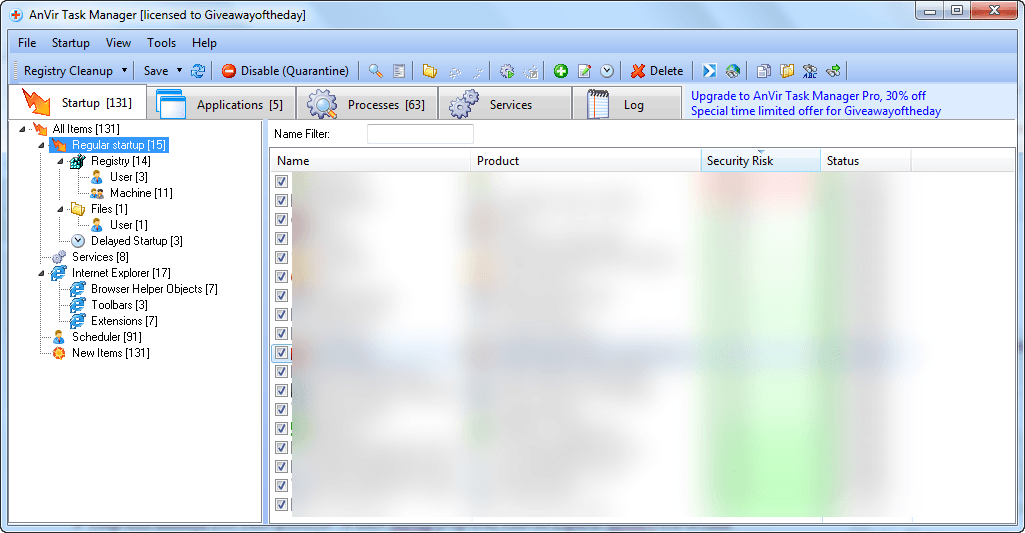
AnVir Task Manager gives full information about process, services, TCP/UPD connections, drivers, DLLs. It has descriptions for 70 000+ startup programs and services. It detects new and unknown Trojans using security analysis and alerts on new startups. It can speed up boot time (Delayed Startup), balance CPU usage, optimize memory. Tray icons shows status of disk, network, memory, CPU. Tray menu keeps last launched programs and folders. Also users can hide windows to system tray, set windows ‘always on top’, and change windows transparency.
Monitor your system and replace Windows Task Manager
- Information about processes, startup programs, services, internet connections, drivers
- Integrated database with Descriptions for 70 000+ startup programs, Internet Explorer toolbars and services
- Icons in the tray that indicate CPU, disk, network, memory and battery
Get rid of viruses, Trojans and spyware that your antivirus missed
- Security risk rating for each active process and startup program
- Get notification when any program tries to add itself to startup
Enhance and tune up XP or Vista
- Tweaker that gives access to hundreds of XP / Vista settings
- Click on the title of any application to minimize window to system tray
- List of recently used folders in Open / Save dialogs
- Drive’s free space as a colored horizontal bar in Windows ‘My Computer’
Speed up your PC and Windows startup
- “Delayed Startup” lets you set up any startup program to run few minutes later after Windows startup
- Run startup programs minimized to system tray, or as a floating icon
- Balance CPU usage
dotTech Advice
dotTech has reviewed AnVir Task Manager multiple times in the past and it was a dotTech freebie for over two-years (the dotTech freebie has now expired). While I can’t support the developer’s claim AnVir Task Manager is a very good solution at removing malware (spyware, trojans, viruses, etc.) in the traditional sense, it is a very good tool for managing your computer with a variety of features such as controlling startup programs, balancing CPU, etc. AnVir Task Manager is highly recommended. Read dotTech’s review to learn more about AnVir Task Manager.
Freebie Details
AnVir Task Manager is being given away in a promotion by Giveaway of the Day. The promotion is live until 23:59 Pacific Standard Time Thursday March 15, 2012. You must download, install, and register within these 24-hours — you won’t be able to install/register later. Also take note this promotion is of AnVir Task Manager that regularly costs $29.95 — not AnVir Task Manager Free, which is always free.
To get AnVir Task Manager for free, do the following:
Version being given out for free: v6.7.0
Free updates: No
Free technical support: Unknown
Supported OS: Windows XP/Vista/Win7
Download size: 8.16 MB
Giveaway limitation: This is free for non-commercial use only
- Download the giveaway installer ZIP file.
- Extract the ZIP file and run Setup.exe. Make sure you have a valid Internet connection at the time and wait while the installer checks to make sure the giveaway is still live. Once the installer confirms the giveaway is still live, the installer of AnVir Task Manager will launch. Install AnVir Task Manager like any normal program. However, take note AnVir Task Manager comes bundled with third-party crapware, Reg Organizer. To avoid installing Reg Organizer, be sure to uncheck it during installation:
- After installation of AnVir Task Manager finishes, the Giveaway of the Day installer will popup again — click Close (unless you want to install an optional third-party program Software Informer, in which case click Software Informer):
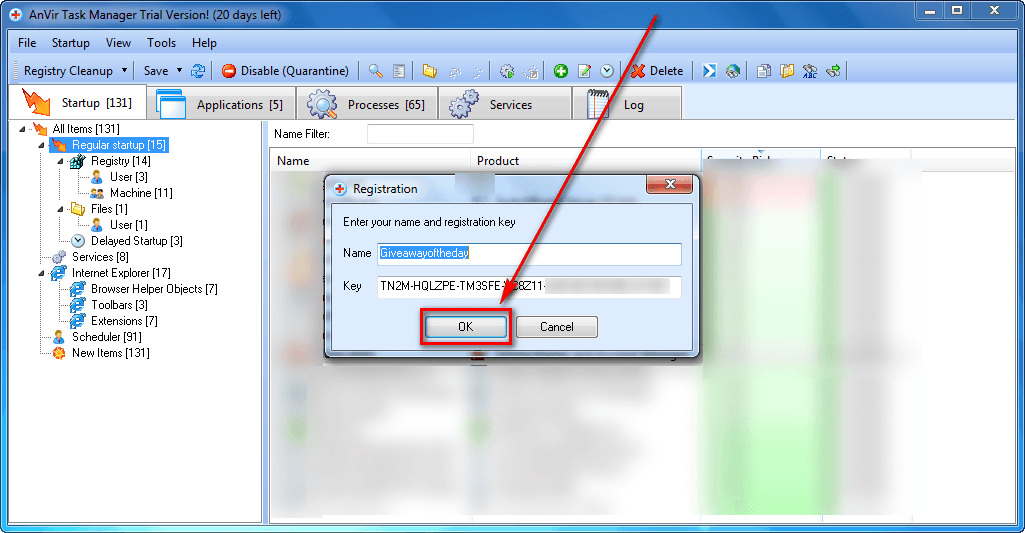
- Now run AnVir Task Manager, if it isn’t running already. You will be prompted by a three-step Configuration Wizard. You can either hit Cancel or go through all the three steps, it is your choice. Whatever you pick, after you get past the three-step Configuration Wizard, go to Help -> Enter Registration Key… and a window will pop open. In that window the registration information will already be inputted for you — all you have to do is hit OK:
- Enjoy!
If you have trouble getting AnVir Task Manager for free, post below and other dotTechies or I will try to help.


Email article


Is this the same version as the freebie license at Raymonds?
There’s a giveaway there that may still be available if someone reads this after the 24 hours is up (and I think there’s another post here that refers to that too ;) ).
Please edit and let me know if it’s not appropriate to post a link but I think it’s a dot-tech friendly site.
http://www.raymond.cc/blog/anvir-task-manager-review-with-exclusive-license-key-for-raymond-cc-readers/
@WobblyWombat: No, this is a slightly newer version. Raymond’s promo (posted about at http://dottech.org/freebies/27047/free-anvir-task-manager-v6-5-limited-time-offer/) is of v6.5. This is of v6.7.
You also get free updates until the end of the month. In the past updates have not been so fast but it seems the last month or so they have been quite fast so we could see an update before those updates go away. All in all it seems like a great giveaway. Thanks Ashraf for the heads up.
In the process of installing this version of AnVir Task Manager, the application listed 118 startup items and asked me to confirm each one. I was surprised by the large number of items. Usually I am asked for one or two items when I install new software. In this case, it seemed like AnVir was asking me to confirm all existing startup items.
Most of them were from Microsoft. Some were recommended for non-inclusion by AnVir. I did my best to select what I needed. However, some had no names and for some I could not understand their purpose.
My concern now is how stable will my system be. Does anyone have a similar experience? What advice would you give me?
same for me and I already had 6.5 the last vers. just exit out of prog and did fine for me. uncheck the add ons when install unless want reg optimizer and others.
Raymond’s promo is v 6.5 but it’s always updatable, unlike this GAOTD: is that right??
No updates? That doesn’t make sense.
@jacemace:
Terms and conditions for every GAOTD
Please note that the software you download and install during the Giveaway period comes with the following important limitations: 1) No free technical support; 2) No free upgrades to future versions; 3) Strictly personal usage.
I’m not seeing any real difference from 6.3 to the current release.
Also,though Anvir might point an experienced user toward a process that is malicious,I haven’t yet found the programs ability to “remove” malware etc. either.
Ashraf- “the dotTech freebie has now expired”
This may not be true.Seems only the download link from the original article has changed to point to the exe. for v6.5.If you saved,or could find the v6.3 exe.,I believe the registration credentials are still valid.Also,this is the $29.95 version being offered-Not the Free or Pro @ $49.95-No one ever clarifies that.
I installed Raymon’ds 6.5 giveaway over my old 5.6 version. Don’t use it for it’s virus trojans and spyware removal abilities, just to monitor the system, so, for this, updates are not so important. Looked at 6.7 x 6.5 features and the differences don’t seem to justify the upgrade.
What’s your opinion Ashraf?
thank you in advance
mario from brasil
@Mario:
Yes I got your point…but maybe next version (6.8?? 6.9?? 7.0??) will sport much more features than it does now….who knows!!
The problem is that with this GAOTD version you won’t be able to upgrade to any future release, unless GAOTD team will give away a new version of this tool, of course.
@Ashraf: FYI You can download version 6.7 directly from anvir’s download site, and use the registration data from raymond.cc to validate it.
Ashraf- My apologies-you did clarify the version.I’ve been so used to this not being explained in dozens of previous offers over the past three years,that I read right over it. I had more coffee-all is clear now! Cheers
@JT:
Great TIP, mate!!
In other words this means that this GAOTD is USELESS….LOL!
@Tony Osime:
I had the same surprising experience….I believe it is because we downloaded the version on the Home page, which turns out to be the Pro version. I found this out when trying to register— a window told me Ramond’s key is for Regular and I installed Pro….When I then dl’ed and installed the reg version, I didn’t get that long list of startups…..
What is new in Version 6.7
1. Hidden processes monitoring.
2. Monitoring of additional Startup sections:
+ Task scheduler tasks
+ Internet Explorer panels
3. Display the temperature and load of a video-card.
4. Display the remaining life for SSD drives.
Improvements:
1. On Windows 7 and Vista the program runs with full rights (via Windows Task scheduler).
2. Display the temperature for new processors.
3. Improvements in the user interface
So it’s not exactly the same as V 6.5, as somebody said here….
FREE PORTABLE VERSION:
http://www.anvir.com/downloads/taskfree.zip
@JT
your tip works great. Don’t even have to re-enter Raymond’s license. It Just installs on top of v 6.5
thank you
mario
GAOTD is updatable until 30/03/2012. My version of raymond’s was updatable only until yesterday. Could people who have downloaded directly from site telle me how long their new version is updatable? Thank you.
I never use this stuff anyway. Just using Winpatrol.
It would be nice to compare one day Anvir Task Manager with these great FREE APPS:
- (Portable) AUSLOGICS TASK MANAGER
- PROCESS HACKER
- PROCESS EXPLORER
- SYSTEM EXPLORER
- PROCESS REVEALER
- PROCESS EYE
- STARTER
- WINPATROL
Another awesome (Italian) FREE APP I highly recommend trying is also the following one:
http://tcpmonitor.altervista.org/tcpeye-network-monitoring/
In short it helps you identify the program a specified process belongs to, giving you the possibility even to scan any suspicious process via VirusTotal. So it could be a great addition to a program like Anvir Task Manager!!
Full review here:
http://www.softpedia.com/reviews/windows/TCPEye-Review-181688.shtml
Finally, once you have finished to optimize your system, you can even test for FREE your PC performance (CPU, RAM, HDD, 2D Graphics, 3D Gaming Graphics etc…) to find out its real speed, so as to make sure that it’s running at its top speed!!!
* AUSLOGICS BENCHTOWN
http://www.softpedia.com/get/System/System-Miscellaneous/Auslogics-Benchtown.shtml
Screenshots:
http://www.softpedia.com/progScreenshots/Auslogics-Benchtown-Screenshot-192889.html
Enjoy!!
is this an antivirus scanner also ? already got process lasso. what is the difference?
need a new antivirus scanner online and offline. AVG is using 50 to 90 % memory.
As commented above, if you have AnVir version 6.5 through raymond.cc, to upgrade to the latest AnVir version, simply download and install the latest (non-Pro) version from the AnVir download page (http://www.anvir.com/download.htm) and install over your current installed version–the license you have from before transfers automatically. (At least, this worked for me today.) The advantage of this over the Giveaway of the Day offer/download: the ability to re-install the program, if needed. (Note: the About info. for the version updated through this method still says that the program is updatable through yesterday. March 14, but the update today worked for me regardless.)
@Everyone: Here is a little secret on AnVir Task Manager. None of the AnVir Task Manager freebies (dotTech’s, Raymond’s, GOTD’s, etc.) come with official free updates. However, the developer of AnVir Task Manager seems to always allow free updates anyway. Anyone that used dotTech’s freebie knows that even though there weren’t free updates, you could update up to v6.3 after which the registration process was altered hence the key was no longer valid. The same here applies to Raymond’s serial and GOTD’s serial. So it doesn’t really matter where you get it from.
You’ll never guess what I use AnVir for…..R-clicking the icon in the system tray gives you recently opened apps and folders. It is the only app I’ve tried that really does list ALL. The Windows ones never seem to have all of them…..or any of the many other programs that have this function….
@Tony Osime: Only 118? I got 132!
Advice – this is what I did:
1) ERUNT registry back-up.
2) Set a ‘System Restore Point’ .
3) Looked at each item carefully.
a) If it was a pure Microsoft related entry, or if it referred to an installed app., I allowed it.
b) If I knew it had no right being there, I deleted it. For instance, I have a partition solely dedicated to downloaded installers that I have or may install. Any entry referring to this partition has no legitimacy.
c) If it didn’t fit in a) or b) above, I quarantined it.
4) I crossed my fingers and hoped for the best.