
Windows has hundreds of thousands of programs. Because of this great volume and lack of a central store, software discovery (aka finding new and useful programs) is extremely difficult. With our Windows Software of the Day initiative, dotTech aims to change that. Everyday we post three programs, allowing our readers to discover new software, daily. Enjoy! [Subscribe to our Windows section to never miss an article: RSS Feed | E-mail]
Developers: Click here to get your apps featured here!
dotTechies: Want to see an app on here? Send us a tip!
Software for March 24, 2012:
USB Write Protect
USB Write Protect is a tiny little program that disables thumb drive write access on your computer. If you’ve ever needed to give a prankster your computer to use with a thumb drive in it, this program would help: no more pesky deleting! (And you can even set a password so they can’t change it themselves.) It’s also great if you’re prone to make mistakes when managing your files.
However, it’s not all fun and games. USB Write Protect works by telling Windows, not your thumb drive, to disable write access, meaning you can still plug your drive into another computer and change files. On Windows 7, you’ll also need to reinsert your drive after you disable write access, or it won’t take effect.
Even with these downsides, however, it’s still a useful piece of software to keep on hand for an emergency, and weighing in at just a couple dozen kilobytes, it’s not a space hog either. You can even keep it on your thumb drive!
Price: Free!
Version discovered: v2.0.0
Supported OS: Windows XP/Vista/7
Download size: 65.9KB
Malware scan: VirusTotal scan results 0/43
4t Tray Minimizer
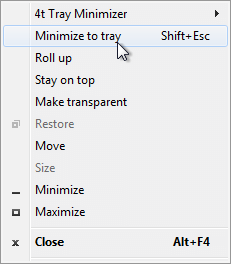
Some applications love to leave themselves in your taskbar and Alt-Tab screen. If you’re a big multitasker, you can have dozens of programs open at once, and having to skip through windows you want hidden windows. In addition to minimizing windows to the tray, 4t Tray Minimizer can also roll up windows, make them transparent, or make them stay on top.
Windows can be controlled using the buttons added to the standard Windows control scheme in the upper right (minimize, restore/maximize, and close), as shown below. For windows that don’t use standard Windows controls, 4t offers the ability to control via the right click menu, as shown at left.

Of course, just because you can minimize windows to the tray doesn’t mean you should. You might end up having a few too many windows and end up with a laggy computer.
Upgrading to the Pro version of 4t allows you to automatically minimize certain apps, and to add certain buttons to certain apps. It also allows custom keyboard shortcuts and a few more small things like permanent tray icons.
Price: Free, with $19.95 Pro version
Version discovered: v5.52
Supported OS: Windows XP/Vista/7
Download size: 1.4MB
Malware scan: VirusTotal scan results 0/43
Everything
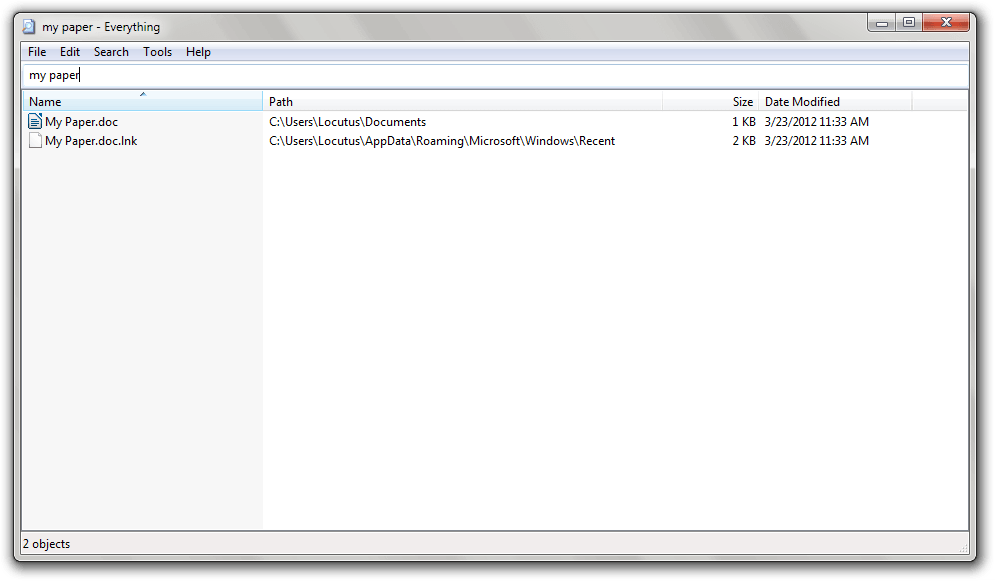
Windows search is one of the slowest search tools I’ve seen. Even in Windows 7, it still takes me less time to find something on a server 8000 miles away using Google than a small file five inches away on my hard drive.
While Windows search is slow, that does not mean all searches for Windows are slow. Meet Everything. It’s a tiny, tiny program that has all the real-time indexing capabilities you want, while still remaining quite fast. It has a simple interface but still throws in cool features like regex support and ETP server support. It can build its search database in seconds by searching literally everything and by only indexing file names.
One of the only downsides to Everything is that, unless you use a special trick to start it, it’ll throw a UAC prompt on start. However, that’s easily fixed and is very outweighed by the positives.
Price: Free!
Version discovered: v1.2.1.371
Supported OS: Windows 2000/XP/Server 2003/Vista/Server 2008/7
Download size: 344KB
Malware scan: VirusTotal scan results 0/43
dotTechies: We have tested all the software listed above. However, Windows Software of the Day articles are not intended as “reviews” but rather as “heads-up” to help you discover new programs. Always use your best judgement when downloading programs, such as trying trial/free versions before purchasing shareware programs, if applicable.
19 Comments »
Leave A Response »


Email article
![[Windows] Minimize and lock open windows to prevent unauthorized access with WinLock](http://cdn.dottech.org/media/2013/05/WinLock-UI-134x90.png)
![How to bring back the classic drop-down menu in Office 2007, 2010, and 2013 on Windows [Tip]](http://cdn.dottech.org/media/2013/05/ubit-134x90.jpg)
![Another Windows 8 fail [Image]](http://cdn.dottech.org/media/2013/05/windows_8_fail_another-134x90.jpg)
![This computer is “never obsolete” [Image]](http://cdn.dottech.org/media/2013/05/emachine_never_obsolete-134x90.png)
find everything brilliant
“Search Everything” is my most used app to find stuff on multiple internal and external drives and partitions and I would be absolutely lost without it. It only works on NTFS file systems but as that is all newer Windows OS, no prob. The first time you run it, it checks and shows all NTFS files on your system. Everything is on that first window and as you add items to the search box, it narrows the field which is why it appears to be lightning fast.
Right clicking on any item gives you the normal context menu which is very handy, and it is the easiest way to find hidden and temp folders and files which can be almost impossible to find. AAAAA+
Trayit is free, and permanently does what you tell it
Set it to minimize an app to the tray (Just by dragging it into Trayit’s Form), and it will do it forever.
http://www.teamcti.com/trayit/trayit.htm
I have not used Win 7 enough to bother using it there, so feedback from a Win 7 user, will be of interest to other Win 7 users.
I have used it in XP for over a year, and it is great.
I use it for FireFox and Thunderbird.
Everything has become one of the most useful programs on my computer. The speed and regex capabilities make it unbeatable.
Been using it for some time now and love it!!
Everything is on every one of my five computers. Cannot manage without it.
I still prefer Locate32 as my searcher for Windows.
http://www.locate32.net/
EVERYTHING
… MUST be a very good application… reading all the above positive comments And more than a very good application, I should think, from browsing the developer’s site.
I’ve been following the threads from the Everything homepage in search of a manual in pdf format for this application only.
Under the download-tab I find…:
- Download Everything for Windows…[versions]
- Download Everything Language Pack
- Download Everything Command-line Interface
- Download Everything SDK
Quite a nice little app? Again, a lot more than that. But no link to any manual.
Lots of info under the FAQs-tab, but no “monolitic” no nonsense manual either…
Under the Support-tab then, perhaps?
Sorry: “Everything Wiki Mainpage” only.
Well, “only” doesn’t quite “cover the cargo”: the contents is spread over 12 online “chapters” (http://support.voidtools.com/everything/Main_Page ). But not the cute little manual I would so much like to have for reference.
So I started copy-pasting these chapters into a Word document (which I would like to convert to a pdf-file), and after some 2,5 hours of editing I’ve come up with 60+ pages. I’m halfway “Chapter Ini Settings” but I have to give up for the time being – a 12 year stretch of neck-, schoulders- and lower back pains are getting the better off me. But I’ll get the job done because I think it needs being done… and updated. But that, again, is more than I ask for.
Still, there’s a nagging question I would like Ashraf to answer.
Does it suffice to download Everything-1.2.1.371.exe (334 KB) from Everything Homepage (http://www.voidtools.com/ ) and “use a special trick to start it” to get things up and running? .I guess the answer will be “yes; you have no need for Language Pack, etc… to get started”.
BTW: you mention “Download size: 65.9KB” in stead of 334KB…
I do have to rest now
Greetz to all,
Patrick
@Flowers ForA:
Did you have a look at the Help file (Help Topics in the Help Menu) ?
Regarding making your Doc into a PDF.
I have the free doPDF installed.
Anything I print (EG selecting print option from Word) will be ‘printed’ as a PDF file.
@Rob (Down Under):
Hi Rob,
No, I havent looked at the Help pages because I have not yet downloaded/installed the program.
The reason: “Does it suffice to download Everything-1.2.1.371.exe (…)” etc.
Thanks for your tip on doPDF. There are quite some free converters for downloading. Most of them are good as long as the original doc-file does not contain pictures or tables – however, that is my personal experience, some people may differ on that.
I have to re-install some software as my system “hard”-crashed a while ago, i.e. all essential hardware for some strange reason kind of killed itself , literally with a dim flash and a soft explosion sound. The reason was probably a power surge, but the electricity company denies such a surge having taken place… I’m using this disaster to be a bit more selective on which software I install ;-)
Greetz,
Patrick.
For more complex searching (including file content etc.) I recommend NirSoft SearchMyFiles. Cca 90 KB.
SearchMyFiles
Everything is by far the best search tool, tiny, lightning-fast, portable, multi-platform.
Why index just to find files?
Try the following fast searchers:
Ultrasearch (free*)
FileSeek (free*)
Search GT (not free)
*at least these were free when I got them
@Flowers ForA:
There is a portable version if you prefer -
http://www.voidtools.com/
Also you can email me at -
robhp AT iprimus DOT com DOT au
and I will send you the help file.
It is a .chm so should just open with no install required.
Rob
For others,
I use Everything if searching for file names.
If searching the contents of files I use the free XYPlorer File manager -
http://www.portablefreeware.com/?q=xyplorer&m=Search
Download link -
http://www.portablefreeware.com/download.php?dd=579
It is the last freeware version
Program XYplorerFree — The XYplorer Freeware Edition
Portable File Manager
for Windows 98, NT, ME, 2000, XP, XP x64, 2003, Vista, Vista x64
Version 5.55.0002
Release 18-Feb-2008
License Freeware
XYplorer
——–
XYplorer is a multi-tabbed file manager featuring a very powerful file
search, versatile preview facilities, a highly customizable interface,
and a large array of unique ways to efficiently automate frequently
recurring tasks. XYplorer is a tool rather than a toy, and targets
power users and computer professionals who are looking for an Explorer
replacement that deserves its name.
This Is A No-Install Package
—————————-
Extract xyplorer_free.zip anywhere.
Read, understand, and accept LicenseXY.txt.
Start working.
License Information
——————-
XYplorerFree is freeware.
I rarely use Win 7, but I have had it running in there.
It has Tabs, which means you will treat Windows Explorer with contempt from now on.
If you get the focus on the desired Folder (or C:\), then press F12, a beautiful Search panel appears, allowing you to enter bits of text that you are looking for. Also you can filter by Dates, and all sorts of things.
It does not Index, so you can turn off Windows Indexing, and treat Windows Search dialog with contempt as well.
I have tried over a dozen File Managers, and XYPlorer is the best.
I posted my email address in the previous post.
If anyone wants the help file, email me.
Rob
@alzie:
I love it too, using it already for quite a long time. One downside for me: it doesn’t search on network drives (or I didn’t find yet how to do it).
For the rest, as mentioned by someone else: multiple A+’es!!!
AgentRansack might be worth trying too.
Everything is everything for me when it comes to searching files. I have not learned the tricks of filtering but it has help kept me from dling duplicate sw during giveways. I am sure it has a lot more features than I use, but I have not taking the time to explore all its features. I just use it for searches.
I have XYplorer but I forget about it most times but the times I have used it, it does what it says.
AgentRansack, hmmm not so much, it is me not the program. It is not my personal preference.
Locutus
I am not sure where this post should fit in, but I just wanted you to know that I really enjoy Windows software of the day.
Finding out what is out there and the “good bad and ugly” of it is “priceless”, especially when it comes from a trusted knowledgeable “geek” :).
Thank you and know that your hard work is appreciated.
Now go get some sleep. ROFL



