
 Email article
Today’s Software
- Qwertick, an app to make typewriter sounds
- Minibin, a system tray recycling bin manager
- WinPlusX, a quick settings panel
Subscribe to our Windows section to never miss an article: RSS Feed | E-mail
About Windows Software of the Day
Windows has hundreds of thousands of programs. Because of this great volume and lack of a central store, software discovery (aka finding new and useful programs) is extremely difficult. With our Windows Software of the Day initiative, dotTech aims to change that. Everyday we post three programs, allowing our readers to discover new software, daily. Enjoy! [Subscribe to our Windows section to never miss an article: RSS Feed | E-mail]
Developers: Click here to get your apps featured here!
dotTechies: Want to see an app on here? Send us a tip!
Software for April 12th, 2012
Qwertick
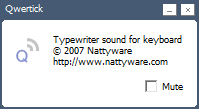
Is anything more satisfying than typing on an IBM Model M? Actually, I don’t know because I’ve never used one. However, I’ve heard they’re the best keyboard ever produced. They had just the right amount of click and the right amount of springiness.
After installing Qwertick, you’ll get to hear the sound of a typewriter. It’s not the nicest sounding typewriter, but it’s still a nice thing to have. It’s also not loud and in your face like many of its competitors.
Price: Free!
Version discovered: v1.0.1
Supported OS: Windows 2000/XP/Vista/7
Download size: 33KB installer | 26KB portable
VirusTotal malware scan results: 0/36 installer | 0/43 portable
MiniBin
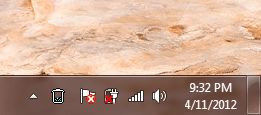 Keeping an eye on your Recycle Bin can be a pain. Especially if you keep your desktop hidden, you can often lose track of its used space and wind up having only a tiny bit of hard drive space left by the time you remember to empty it.
MiniBin offers an elegant solution to this problem: by adding a recycle bin to the system tray, you can always keep an eye on it to make sure it’s relatively low. And if it’s too full, MiniBin offers a nice fix for that too: double click and it’ll empty the bin.
MiniBin is a really nice (and really themeable) program that lets you keep good track of your recycle bin and make sure it doesn’t use up too much space.
Price: Free!
Version discovered: v3.8.3.0
Supported OS: Windows ??
Download size: 100KB
VirusTotal malware scan results: 0/43
WinPlusX
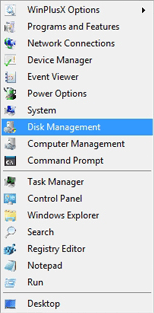 Windows 8 brings many new features to the traditional desktop, and pretty much all of them are 100% controversial. One of these new features is a quick menu that can be accessed by hitting Win + X. Developer Abhishek Pratap Singh decided that he wanted this feature now, not when Windows 8 comes out, and thus WinPlusX was born.
By hitting Win + X (or right-clicking on the Start menu) you can call up a special menu that’ll contain tons of links to Windows options: Event Viewer, Command Prompt, and Windows Explorer all make appearances, and you can also add your own shortcuts.
WinPlusX is a free tool that lets you carry back one of the (slightly) less controversial features from Windows 8 to Windows XP/Vista/7.
Price: Free!
Version discovered: v4.0
Supported OS: Windows XP/Vista/7
Download size: 1.3MB – requires .NET 4.0
VirusTotal malware scan results: 0/42
dotTechies: We have tested all the software listed above. However, Windows Software of the Day articles are not intended as “reviews” but rather as “heads-up” to help you discover new programs. Always use your best judgement when downloading programs, such as trying trial/free versions before purchasing shareware programs, if applicable.




