
 Email article
Today’s Software
- Measurement Converter: convert between various units without the use of the internet
- Privacy Guard: clear history/cache/cookies from multiple web browsers with style
- Fake Format: confuse your friends and shock your enemies by pretending to format your hard drive
Subscribe to our Windows section to never miss an article: RSS Feed | E-mail
About Windows Software of the Day
Windows has hundreds of thousands of programs. Because of this great volume and lack of a central store, software discovery (aka finding new and useful programs) is extremely difficult. With our Windows Software of the Day initiative, dotTech aims to change that. Everyday we post three programs, allowing our readers to discover new software, daily. Enjoy! [Subscribe to our Windows section to never miss an article: RSS Feed | E-mail]
Developers: Click here to get your apps featured here!
dotTechies: Want to see an app on here? Send us a tip!
Software for May 13, 2012
Measurement Converter
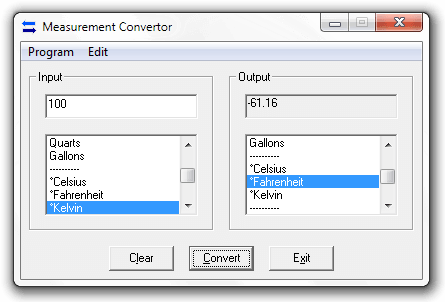 Need to convert measurements? Some might say use Google; others might say use Wolfram Alpha. However, if you don’t have an internet connection or don’t want to use a search engine, there’s Measurement Converter: a free program that lets you convert between various units of length, weight, volume, temperature, and time.
While Measurement Converter is a nice and useful program, it’s not the most amazing one in the world. There are several things it lacks, such as automatic output unit selection. It’d be nice if it only displayed compatible output units once you select an input unit.
However, Measurement Converter is still a nice program that supports lots of units, and if you don’t have an internet connection or don’t want to use Google or Wolfram Alpha, it’s a good tool to have around. After all, does anyone actually have the number of pounds in 12.4kg memorized?
Price: Free!
Version discovered: v2.07
Supported OS: Windows XP+
Download size: 10KB
VirusTotal malware scan results: 1/42
Portability: Entirely portable!
Measurement Converter homepage
Privacy Agent
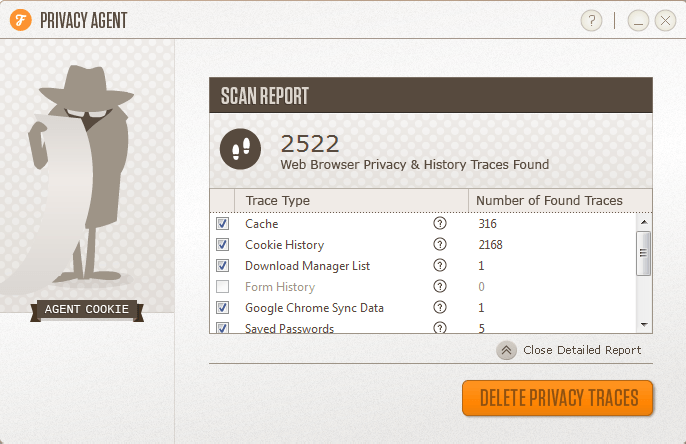 Want a beautifully-designed program that lets you manage your history, cache, cookies, download lists, saved passwords, and oh so much more from virtually any browser? Welcome to Privacy Agent.
Privacy Agent automatically scans your various browsers, be they Internet Explorer, Chrome, Firefox, Safari, or even Opera. When it’s done scanning, it’ll present you with a report detailing what it found; it lets you clear things like history, saved passwords, cache, cookies, and much more.
If you’re looking for a well-designed browser clearing suite, Privacy Agent is your best buddy. The rest of us, however, can continue using other software designed for the same job and more, like CCleaner.
Price: Free!
Version discovered: v1.1
Supported OS: Windows XP+; Mac OS X 10.5+ soon
Download size: 382KB
VirusTotal malware scan results: 0/42
Portability: not portable
Fake Format
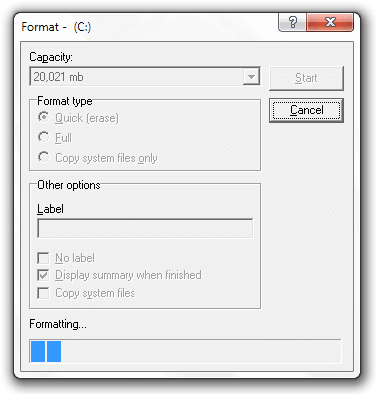 Want to prank a technology-savvy friend? Format their hard drive! Actually, that seems a bit harsh. However, pretending to format their hard drive could work out much better.
Fake Format does just that. Once you start it, it’ll automatically start progressing, and in the mean time, make it look like your hard drive is being formatted. Once it’s done, you can simply hit Close.
If you’re in the business to prank your friends, please don’t format their hard drive. However, do pretend!
Price: Free!
Version discovered: v
Supported OS: Windows 95+
Download size: 113KB
VirusTotal malware scan results: 32/41 — usual for prank programs
Portability: Entirely portable!
dotTechies: We have tested all the software listed above. However, Windows Software of the Day articles are not intended as “reviews” but rather as “heads-up” to help you discover new programs. Always use your best judgement when downloading programs, such as trying trial/free versions before purchasing shareware programs, if applicable.




