Windows software of the day [May 16, 2012]

May 16, 2012 26 Email article | Print article

Today’s Software

Subscribe to our Windows section to never miss an article: RSS Feed | E-mail

About Windows Software of the Day

Windows has hundreds of thousands of programs. Because of this great volume and lack of a central store, software discovery (aka finding new and useful programs) is extremely difficult. With our Windows Software of the Day initiative, dotTech aims to change that. Everyday we post three programs, allowing our readers to discover new software, daily. Enjoy! [Subscribe to our Windows section to never miss an article: RSS Feed | E-mail]

Developers: Click here to get your apps featured here!

dotTechies: Want to see an app on here? Send us a tip!

Software for May 16, 2012

Windows File Analyzer
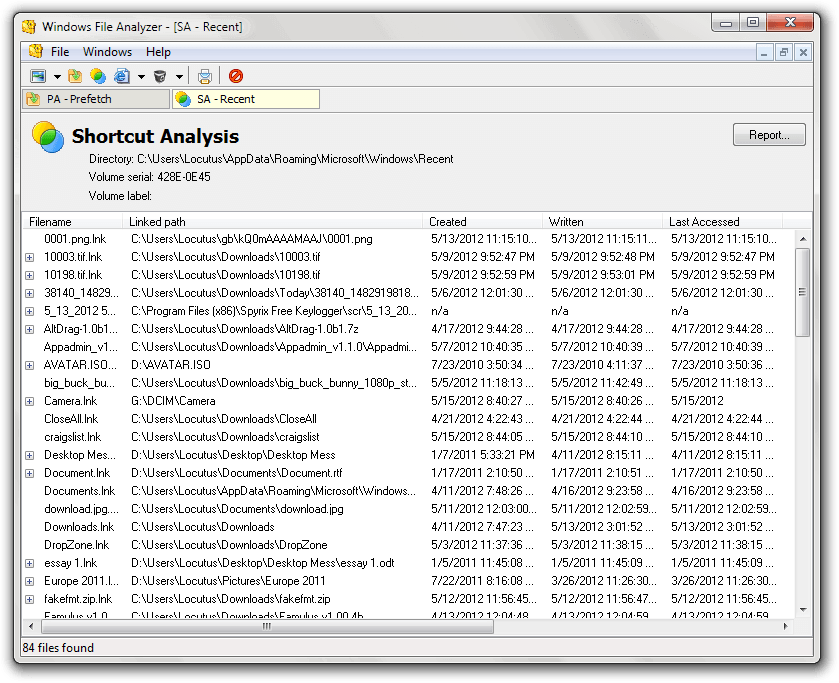
Windows stores lots of its data in hidden files such as Index.dat for Internet Explorer data and thumbs.db for pre-generated thumbnails. If you need to analyze these files and more, Windows File Analyzer can do the job. Besides Index.dat and thumbs.db files, it also supports:

  • ACDSee fpt files
  • Google Picasa .db files
  • FastStone Viewer dsviewer.db files
  • HP digital Imaging db and dat files
  • Prefetch files
  • Shortcuts
  • Recycle Bin information

If you select thumbnail cache files like thumbs.db, it’ll also even show you the small thumbnails. WFA is a nice tool if you’re looking to dig into these various system-generated files or need to get access to thumbnail cache.

Price: Free!

Version discovered: v2.6.0.0

Supported OS: Windows 2000+

Download size: 949KB

VirusTotal malware scan results: 0/40

Portability: Entirely portable!

Windows File Analyzer homepage

Clipboard Magic
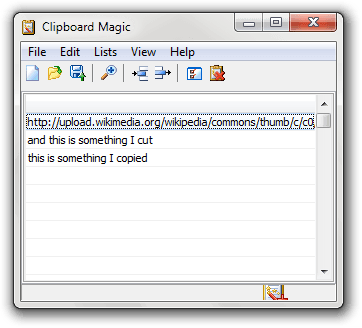
Looking for a simple program that’ll monitor all of the plain-text copies and cuts that you make while using Windows? Clipboard Magic fits that bill exactly, and brings along a few extra features to boot.

Using Clipboard Magic, you can also color code pastes by importance by right-clicking them and using Change Background Color. And, if you tend to copy the same thing over and over, you can also just clear the duplicates using the handily located Edit>Remove Duplicates option.

If you want to paste a clip, you have multiple options. You can use Ctrl+V to paste the most recent clip, or paste the clips using Ctrl+Shift+<0-9>. Clipboard Magic is nice if you’re constantly copying over a clipboard you needed to keep.

Price: Free!

Version discovered: v5.00

Supported OS: Windows ME+

Download size: 1.2MB

VirusTotal malware scan results: 0/42

Portability: Requires installation

Clipboard Magic homepage

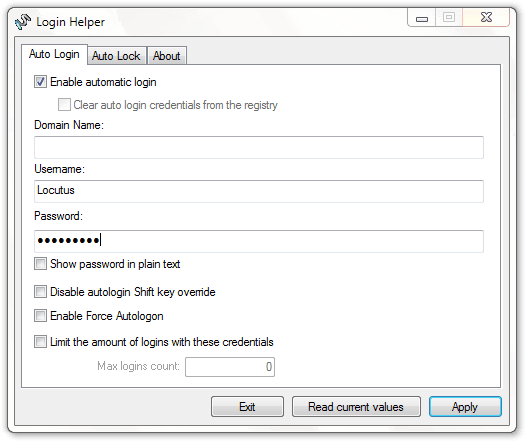
Login Helper

We’ve covered a lot of auto-login programs on Windows Software of the Day. This is in part because they’re quite useful, and each one brings its own features. Login Helper is one of these: it lets you automatically log your computer in when you start it up, and then automatically lock it when it finishes.

The Auto Lock feature is really where Login Helper shines. You can set up Login Helper to automatically lock your computer — and optionally even play a screensaver or turn off your monitor — as soon as it’s done logging you in. While this does require running an extra program at boot, it’s quite convenient and probably the best of all the auto-login programs we’ve seen so far.

Price: Free!

Version discovered: v1.0

Supported OS: Windows 2000+

Download size: 32-bit: 365KB | 64-bit: 424KB

VirusTotal malware scan results: 32-bit: 0/41 | 64-bit: 0/42

Portability: Not portable

Login Helper homepage

dotTechies: We have tested all the software listed above. However, Windows Software of the Day articles are not intended as “reviews” but rather as “heads-up” to help you discover new programs. Always use your best judgement when downloading programs, such as trying trial/free versions before purchasing shareware programs, if applicable.

http://upload.wikimedia.org/wikipedia/commons/thumb/c/c0/Wood-clipboard.jpg/220px-Wood-clipboard.jpg


26 Comments »

  1. RobCr May 16, 2012 at 3:56 AM (comment permalink) -

    I have a collection of clipboard programs, many of which I have not checked out yet.Clipboard Magic was one of those. I have downloaded the latest version.
    Before exploring it, I fired up a couple of the others.
    Phrase Express (free) might appeal to some of you. I believe it can do the usual clipboard stuff, plus a whole lot of other features. Some of those features Ashraf and I hate, but you can turn those off.
    Someone (Janet ?) mentioned Ditto on another DotTech page.
    I thought I would see if Gizmo had ranked clipboard programs.
    He had ‘Best Free Clipboard Replacement Utility’, and he gave Ditto the top ranking.
    (But read on.)
    The reviews are about 6 months old, and members have written in with other suggestions, which the author has looked at (‘All the usual suspects’)
    However he has not reported back on them. I have just posted asking if he could just give us a list of names, in the order that he likes them.
    One of the suggestions was Ethervane Echo
    The author of that program had been a long time users of Ditto, but felt it had some shortcomings, so he wrote his own.
    You can get it from his web site, or from Donationcoders web site.
    http://www.tranglos.com/echo/
    There are tabs along the bottom, which allow you to show different sets of clips.
    One feature that ‘knocked my socks off’ was the ability, to type into the air (whilst in any of the Tabs) a word or text, and the displayed list discards all entries that lack what you just typed. Esc key shows the whole list again.
    So say I had Clipboard’d “Mary had a little Lamb” a week ago. If I type “Lamb” only that clip will be shown.

    Another feature is the ability to paste into your Active application (Ditto can do that as well), which is not easy, because clicking the SysTray, makes Windows forget your previous Active application.
    Currently you need a double click to paste a clip, but I have written asking for an option for a single left click to paste. (My post is in the DonationCoder web page).

    1
  2. kell May 16, 2012 at 5:53 AM (comment permalink) -

    Went to the MiTeC website to check out Windows File Analyzer and found some very nice tools there. How did I miss that place all these years?

    2
  3. Terry Nachtmerrie May 16, 2012 at 8:14 AM (comment permalink) -

    My favourite clipboard manager thingy since ages: Arsclip.
    Highly customizable, lots of options but easy in use. I’ve been using it for years and never wanted anything else.

    3
  4. RobCr May 16, 2012 at 9:15 AM (comment permalink) -

    @Terry Nachtmerrie:
    Can it paste directly into your active application (not via the clipboard)

    In fact I don’t think Clipboard Magic can do that either.

    4
  5. tuiruru May 16, 2012 at 1:47 PM (comment permalink) -

    I used to use XNeat but have gone over to ClipX. The thing I liked about xNeat was the “stickies” are always there for you. ClipX is supposed to do the same thing but I’ve never been able to get the “stickies” working in Vista Home Premium SP 2

    What I’d really like is a FREE utility that would keep the formatting of the clip as well, instead of having to CTRL V it via the Windows clipboard.

    Is there anything like that around?

    5
  6. Jim-1 May 16, 2012 at 2:18 PM (comment permalink) -

    Thanks for telling us about Login Helper. I had a problem with two older computers running XP. They boot slowly, so I would power them up, wait until I could log in, and then do something else while they crunch the boot sequence. With Login Helper, I can skip the wait to log in and go directly to my cup of coffee sooner. Thanks!!

    6
  7. Mr.Dave May 16, 2012 at 8:14 PM (comment permalink) -

    Gotta agree with Terry Nachtmerrie — ArsClip is my favorite after trying about 10 clipboard managers. Easy with lots of underlying functionality. I like the way it lets me grab several clips in a row and easily paste them in succession in another place. Also lets me paste with or without formatting, and create “permanent clips” that I can paste anytime. Well worth checking out to see if it fits your needs. I’ll give Ethervane Echo a shot as well, it sounds interestiong. Thanks RobCr for the suggestion!

    7
  8. RobCr May 17, 2012 at 12:19 AM (comment permalink) -

    @tuiruru:
    Ethervane Echo does both of your desires.
    I created a line of text that had different colored words, different sized words, Italic, bold.
    I copied it to the clipboard.
    I then double clicked the entry in Ethervane Echo, and it pasted it, with all of the formatting intact.
    I also made it a sticky, and went to the Sticky Tab, and it too pasted from there, with full formatting.

    For those that have not tried the program, please do.
    Gizmo rated Ditto the best, and the author of Ethervane Echo (who had used Ditto for years) wrote Ethervane Echo as an improvement over Ditto.
    Also it is No Install

    8
  9. Terry Nachtmerrie May 17, 2012 at 6:56 AM (comment permalink) -

    @RobCr:
    yes, yes it does! By hotkey or by a popup menu, you choose!

    9
  10. RobCr May 17, 2012 at 7:30 AM (comment permalink) -

    @Terry Nachtmerrie: @Terry Nachtmerrie:
    Are you sure ?
    I am having some problems, so it may be me.
    But I do not see how to paste direct from Clipboard Magic into Notepad (NOT via the clipboard).
    If I click a clip it goes into the Clipboard
    If I double click, lord knows what happens (I think it goes into edit mode)
    If I right click there is no paste option.
    I perused the Help file, but could see no mention of direct pasting ?

    10
  11. tuiruru May 17, 2012 at 11:36 AM (comment permalink) -

    @Mr.Dave and RobCr – thanks for the feedback. I’l give them both a go at the weekend :)

    11
  12. Terry Nachtmerrie May 17, 2012 at 1:47 PM (comment permalink) -

    @RobCr: I don’t know about Clipboard Magic, I’m using ArsClip.

    12
  13. pohanginapete May 18, 2012 at 2:33 PM (comment permalink) -

    @RobCr:
    Echo looks great — I’ve just been trying it out — but unfortunately it doesn’t recognise single-letter clips. The author’s rationale is that it’s easier just to type the letter; however, this ignores the convenience of being able to paste symbols and accented characters, e.g. an en-dash (—) in most programs requires typing alt 0150.

    I use M8 Freeclip. Moving the cursor to the edge of the screen pops up a “clipboard” button, click on that and the clipboard pops up; alternatively, use ctrl F8. The free version saves 25 temporary clips and 25 permanent (sticky) clips — more than enough for me (YMMV). Saves single characters (symbols, accented characters) and graphics clips; can paste formatted or plain text, etc. While I like the look of Echo, I won’t switch to it until it recognises single characters.

    Tried ArsClip (the developers obviously had no knowledge of New Zealand English when they called it that!) but couldn’t get it to save permanent clips (probably some idiosyncracy of my system?), so ditched it.

    13
  14. tuiruru May 18, 2012 at 6:15 PM (comment permalink) -

    I’ve tried M8 and Spartan which I think is M8′s big brother or previous incarnation. It works for a while and then suffs up – I’m using Vista HP SP2

    14
  15. RobCr May 18, 2012 at 10:26 PM (comment permalink) -

    @pohanginapete:
    Can you copy your special char doubled, so that Echo adds it to it’s list.
    Use Echo to paste it, and immediately press the backspace key.
    I could live with that, and I am a cranky 70 year old.

    15
  16. RobCr May 18, 2012 at 11:23 PM (comment permalink) -

    I probably will favor Echo, but having an open mind, I thought I would look at M8
    (I notice it is written in VB6)
    I also noticed that the site offers Spartan Lite for free as well.

    Does anyone know the differences ?
    Or is it all Greek to you too ?

    Rob
    PS I notice that M8 will paste with a single left click (the way god intended)
    I am trying to convince the author of Echo, to provide an option for those that prefer a single left click. He is resisting.
    I hate double clicks when they are not necessary.
    Could all of you that are using Echo, write to the author, requesting a choice to be able to use a single left click for pasting.

    16
  17. pohanginapete May 19, 2012 at 2:48 PM (comment permalink) -

    @RobCr:
    I am a cranky 70 year old” — Wow! Someone even older than me!

    Rob, that’s a good idea about copying the special character twice and deleting the second after pasting. I might look again at Echo (but see my final paragraph, below).

    Spartan lite seems identical to M8, but when M8 first loads it takes up most of the screen so it can show me the unavailable fields that would be available if I bought the full version of Spartan; it has a small nag window too. I have to resize the M8 window to hide the useless stuff. Yesterday I tried Spartan lite (portable) and it doesn’t have that inconvenience, so I switched.

    Spartan/M8 doesn’t need the mouse, either — just bring it up with the hotkey, use the arrow keys to choose the clip, then press enter. Brilliant.

    Spartan lite/M8 seems remarkably powerful for such an easy-to-use program. As great as Echo is, for my purposes it doesn’t offer me anything extra; it also lacks the ability to store and paste graphics clips.

    17
  18. RobCr May 19, 2012 at 11:42 PM (comment permalink) -

    @pohanginapete:
    Thanks for the feedback.
    Can you have both installed without them mucking each other up ?
    ( PS When tuiruru says “I’ve tried M8 and Spartan . . . It works for a while and then stuffs up” I wonder if that happened because he had both installed ? )
    I wonder if using the portable spartan (like you did), would avoid problems.
    Is it truly portable ?
    It does not appear that I can just place an EXE into a folder (EG C:\PGMS_NoInstall\_Clipboards\M8_Spartan_Portable\ ) and run it.
    I hate the concept of having to install something, to run portable programs

    When my M8 shows, it is not full screen, it just shows the two columns.
    I am still getting familiar with it.
    The different views don’t appear to be any different from each other. I will have to bite the bullet, and read the manual.
    With the different Sheets, it appears that it gives us 20 sheets, each containing 25 of our saved (permanent) clips ?
    Does the free version of M8, allow all of that ?

    18
  19. pohanginapete May 20, 2012 at 12:42 AM (comment permalink) -

    @RobCr:
    Rob, I don’t know if you can run M8 and Spartan simultaneously — and I guess the developers wouldn’t have thought anyone would want to do that. Nor can I shed any light on tuiruru’s observation, I’m afraid. I’ve never had M8 stuff up.

    Spartan lite portable is certainly portable — I put it in my Dropbox folder and it works perfectly; I get the same saved clips on every computer this way. To get it to start with Windows I had to add it to the startup programs using WinPatrol because this option’s disabled for some weird (and unstated) reason in the portable version. (I’m no expert, but I think you can do the same thing by putting a shortcut in the startup folder?)

    19
  20. RobCr May 20, 2012 at 4:44 AM (comment permalink) -

    I bit the bullet (actually just one side of my mouth), and installed it in another PC.
    That PC has Win 7, which I don’t mind stuffing.
    The CNet installer, appears required for two reasons -
    1) To get you to install the web browser search bar
    2) To download the VB5 runtimes, which it places in the same folder as Spartan’s EXE
    I agree, the two programs are identical.
    M8 uses VB6 runtimes, which would suggest that it was written more recently than Spartan.
    However the upgrading of VB5 programs to VB6 is a piece of cake, so they probably were both written with VB5, and they upgraded M8 to VB6 when they were fixing some bugs.

    Regarding the ‘start with Windows’, I would not expect portable programs to make that setting.
    Instead, they depend on the user placing a shortcut into the Start Menu’s Startup folder, or the programmer could build an option into Preferences, to do it for you (probably not using that Startup folder, as there are other means).

    20
  21. RobCr May 20, 2012 at 5:23 AM (comment permalink) -

    Actually they are both VB5

    If any DotTechies are going to use either program, I would recommend Spartan Portable.
    My reasoning being, I hate programs saving my data in the rabid mineshaft called ‘Documents and Settings’
    That is where M8 stores the folder called Spartan_Data
    C:\Documents and Settings\Rob\Application Data\M8 Software\Spartan_Data\
    If you use M8, you would have to go there to ensure it is not getting too big.
    And you would also have to go there to backup your data (or you could use the backup option in the menu).
    I prefer the Spartan Portable program, as everything is in the one folder, for you to keep an eye on the size, and to backup.

    21
  22. tuiruru May 20, 2012 at 2:02 PM (comment permalink) -

    @RobCr & Pohan

    I first came across Sparton ages and ages ago and think I got a “full” version code from something like giveawayoftheday> It worked quite well and from my point of view was good in that it retained the formatting of the originl text. I do a lot of mucking around downloading free software and at some stage something I installed “broke” spartan so I ended up ditching it. Ages later I came across M8 and tried it and again it worked for a while and then started giving error messages. To be fair I did contact M8 via e-mail and got a reasonably prompt reply (within 24 hours – I’m in NZ) . He went thru’ the same procedures that I did and things worked ok for him. I’m on Vista HP SP2 and this installation has always been a bit “flakey” in certain circumstances, so once again I just ditched it. Some of the little apps that I was experimenting with at the time (and involved “looking” at the clipboard) i no longer use so I may re-visit Spartan afte I’ve tried a couple of the other things mentioned above. Hope this helps

    22
  23. pohanginapete May 20, 2012 at 3:32 PM (comment permalink) -

    @tuiruru:
    I guessed you were from NZ, with a name like “tuiruru” (two of my favourite birds).

    I’m running XP SP3 on a desktop and laptop and Windows 7 on a netbook. No problems with M8 or Spartan on any of those.

    Cheers.

    23
  24. tuiruru May 20, 2012 at 5:31 PM (comment permalink) -

    @ pohan – Damn!! There goes the witness protection program I’m in!! Guess I’ll have to change my name to Condor so that people think I’m a hermit in the Andes! ;-)

    24
  25. RobCr May 21, 2012 at 12:52 AM (comment permalink) -

    @tuiruru:
    “change my name to Condor”
    I don’t think that will fly.

    Windows is prone to ‘DLL Hell’
    And VB is prone to causing it, if the developer uses the extra controls and DLLs that come with VB.
    I bend over backwards to avoid using those extra controls, and that is why most of my programs do not require Installation.

    ‘DLL Hell’ arises when installing a program that uses some dependencies, when your PC already has those dependencies installed, but different versions (releases).
    So presumably some of the programs you installed afterwards, changed the version of the dependencies that M8 or Spartan were depending on.
    Solutions -
    1) Uninstall and re-install M8 or Spartnn
    or
    2) Try the portable Spartan

    That is why I love portable programs, as they either have no dependencies, or the program has it’s private little set of them in the same folder as the EXE, and nobody else can touch them.

    25

Leave A Response »