
 Email article
Today’s Software
- AnalogX Extension Changer: automatically change file extensions
- Saver Starter: start/stop screensavers using “hot” corners
- Hot Key Plus: use the Windows key for what it’s good for!
Subscribe to our Windows section to never miss an article: RSS Feed | E-mail
About Windows Software of the Day
Windows has hundreds of thousands of programs. Because of this great volume and lack of a central store, software discovery (aka finding new and useful programs) is extremely difficult. With our Windows Software of the Day initiative, dotTech aims to change that. Everyday we post three programs, allowing our readers to discover new software, daily. Enjoy! [Subscribe to our Windows section to never miss an article: RSS Feed | E-mail]
Developers: Click here to get your apps featured here!
dotTechies: Want to see an app on here? Send us a tip!
Software for June 15, 2012
AnalogX Extension Changer
 Did you accidentally rename every file in your photos folder so that they don’t have extensions?
 How!? AnalogX Extension Changer is for you! It makes it as easy as can be to give every file a new extension: you drop them in, type in a new extension, and you’re golden.
If you ever make a mistake with AXEC, it’s easy to undo. Just go to config and select the undo tab. Since AXEC makes logs of every change, you can just select the relevant log and quickly undo it.
Although most people don’t have a need for a program like AnalogX Extension Changer, it’s still quite nice and feature complete for any who do need it.
Price: Free!
Version discovered: v1.00
Supported OS: Windows 95+
Download size: 433KB
VirusTotal malware scan results: 0/41
Portability: Requires installation
AnalogX Extension Changer homepage
Saver Starter
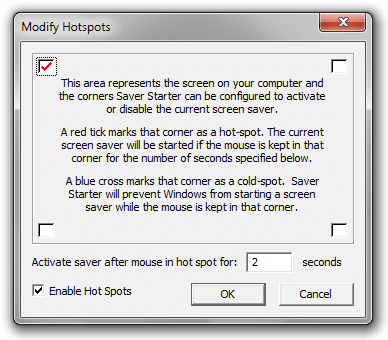 Timed screensavers are nice, but don’t allow for much customization. Disabling them, even temporarily, is an annoying process, and starting them immediately is a no-go no matter what. That’s where Saver Starter comes in: it allows you to set hotspots in the corners of your screen to automatically start or stop your screensaver.
If you want your screensaver to come on instantly, you can just move your mouse to a selected corner of the screen for two seconds. If disabling it is more your style, just set up a “cold-spot” in a corner and move your mouse to it. It’s that simple!
Most people ignore screensavers, and rightly so. They’re not very customizable, and haven’t been interesting since Bubbles came out with Vista. But if you want to automatically start or keep your screensaver from starting, Saver Starter is the program for you.
Price: Free!
Version discovered: v1.50
Supported OS: Windows unknown
Download size: 8KB
VirusTotal malware scan results: 0/43
Portability: Entirely portable!
Hot Key Plus
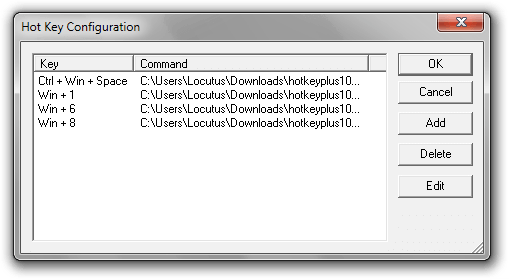 Want to start programs instantly using nothing but your keyboard? You have two options: set up some complicated scheme involving a shortcut and some special properties, or use a program that unobtrusively sits in the background sucking up less than 2MB of RAM. Hot Key Plus is just that kind of program: it lets you create shortcuts using the Shift, Alt, Ctrl, and Win modifier keys.
Hot Key Plus is quite configurable, too. You can set a hotkey that needs to be pressed along with modifier keys, the specific program and parameters to run, and a working directory. It also comes bundled with programs that can automatically start your screensaver and resize windows.
If you’re looking for an entirely configurable hot key program, Hot Key Plus is definitely a great one to check out.
Price: Free!
Version discovered: v1.01
Supported OS: Windows unknown
Download size: 36KB
VirusTotal malware scan results: 0/42
Portability: Entirely portable!
dotTechies: We have tested all the software listed above. However, Windows Software of the Day articles are not intended as “reviews” but rather as “heads-up” to help you discover new programs. Always use your best judgement when downloading programs, such as trying trial/free versions before purchasing shareware programs, if applicable.




