
 Email article
Today’s Software
- ResizeEnable: resize size-restricted windows
- Update Freezer: stop automatic updaters
- iCopy: turn your scanner into a photocopier
Subscribe to our Windows section to never miss an article: RSS Feed | E-mail
About Windows Software of the Day
Windows has hundreds of thousands of programs. Because of this great volume and lack of a central store, software discovery (aka finding new and useful programs) is extremely difficult. With our Windows Software of the Day initiative, dotTech aims to change that. Everyday we post three programs, allowing our readers to discover new software, daily. Enjoy! [Subscribe to our Windows section to never miss an article: RSS Feed | E-mail]
Developers: Click here to get your apps featured here!
dotTechies: Want to see an app on here? Send us a tip!
Software for June 19, 2012
ResizeEnable
 One of the most basic things about Windows is being able to resize, well, windows. However, some apps decide that they’re too good for this basic maneuver, and disable resizing. If you’re looking to put an end to this annoying behavior, ResizeEnable is the program for you.
ResizeEnable is extremely easy to use. Once it’s running, just go to any window that’s not resizable–Windows’ various settings dialogs, for example–and resize them using the standard window border controls. It works with most software, but some software has resizes disabled for a reason: they might not work correctly, or they might just add empty space. However, the software ResizeEnable does work for vastly outnumbers the software it doesn’t work for, and it’s a nice addition to any compulsive Windows tweaker’s toolkit.
Price: Free!
Version discovered: v1.4
Supported OS: Windows 2000+
Download size: 42KB
VirusTotal malware scan results: ??
Portability: No installation required!
Update Freezer
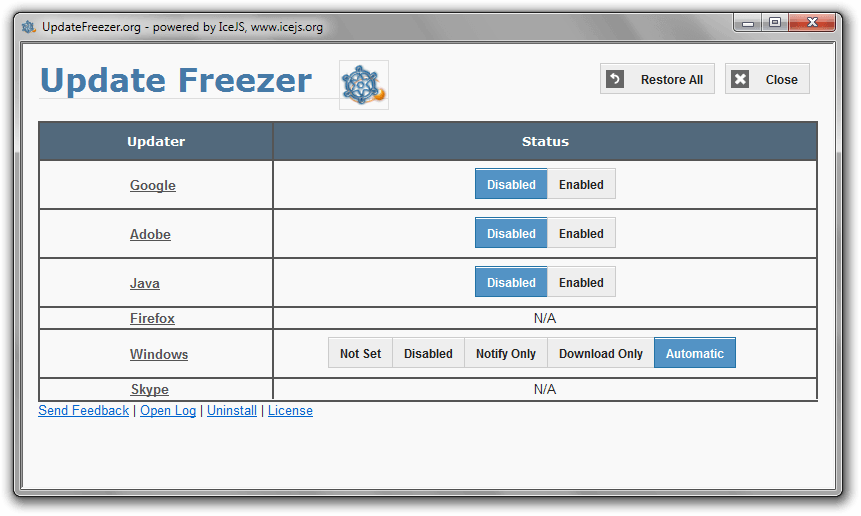 Hey, want to update Flash player? No? How about Java? Chrome? Skype?
Put an end to annoying update messages with Update Freezer. It’s entirely portable, too, so you can put it on your thumb drive and use it on friend’s computers to disable automatic updaters. It’s easy to use, as once you’ve started it, it presents you with just a few simple options and nice, big buttons.
Update Freezer has a nice featureset. It lets you disable and enable updates for Google, Adobe, Skype, Java, Firefox, and even Windows. If you’re looking to stop automatic updaters, Update Freezer is a nice tool and is quite easy to use.
Price: Free!
Version discovered: v1.3
Supported OS: Windows unknown
Download size: 1.8-2.2MB
VirusTotal malware scan results: unavailable
Portability: Portable version available!
[via Raymond.cc]
iCopy
 Want to copy documents but don’t want to buy a photocopier? If you have just a standard scanner and inkjet printer, you can make all the copies you want (ink providing). iCopy is a nice tool that automates this task, allowing you to copy documents with the click of a button.
Scanners often come with copying software. This software is giant and bloated, making it annoying to use and hard to get rid of. iCopy is none of these, and is quite responsive. It also supports most any printer and scanner, making it one of the most easy to use photocopying apps around.
Price: Free!
Version discovered: v1.5.1
Supported OS: Windows
Download size: 490-785KB
VirusTotal malware scan results:
Portability: Portable version available!
[via Gizmo’s Freeware]
dotTechies: We have tested all the software listed above. However, Windows Software of the Day articles are not intended as “reviews” but rather as “heads-up” to help you discover new programs. Always use your best judgement when downloading programs, such as trying trial/free versions before purchasing shareware programs, if applicable.




