
The only free file (audio, video, image) converting program you will ever need.
May 2, 2011 89
Email article | Print article
Ask yourself these five questions:
- Do I want to be able to easily convert a video file to literally any video format?
- Do I want to be able to easily convert an audio file to literally any audio format?
- Do I want to be able to easily rip the audio from a video file?
- Do I want to be able to easily convert an image file to many different image formats?
- Do I want to be able to easily rip (video and audio) DVD/CDs?
- Do I want to have the ability to do all this with one file at a time and in batch mode?
If the answer to any of the above 6 questions is “Yes”, then you should keep reading. If you answered “No” to all the questions, get lost (just kidding – please don’t get lost).
Ladies and gentleman, meet FormatFactory:
FormatFactory meet ladies and gentlemen. FormatFactory is a freeware program that will replace all your other converting programs. With FormatFactory you can convert videos -> videos, audios -> audios, images -> images. As an added bonus, you can also rip the audio from video files, and rip music/movie DVD/CDs.
In more detail FormatFactory supports:
- The conversion of the following video formats (input files)…
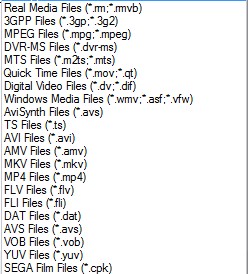
…into MP4, 3GP, AVI, WMV, MPG, VOB, FLV, SWF and MOV video formats (output files). Also, there are also predefined profiles included for mobile devices, such as an iPod or iPhone, that you can convert to (output files):
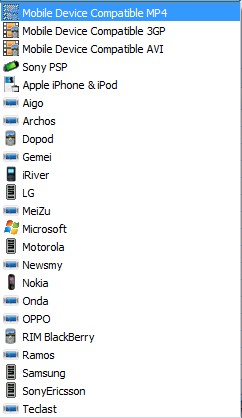
Okay so that is not literally *every* video format like I claimed. But I figured it is close enough that you will forgive me for stretching the truth a little bit. :)
- The conversion of the following audio formats (input files)…
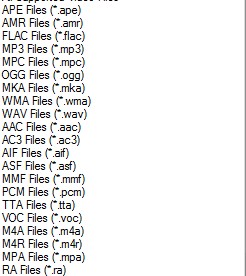
…into MP3, WMA, FLAC, ACC, MMF, AMR, M4A, M4R, OGG, MP2 and WAV audio formats (output files). Again I sort of stretched the truth about being able to convert to *every* audio format, but hey, if I did not say that would you be reading this impressive list? :)
- The ripping of audio from the above mentioned video formats (input files) into MP3, WMA, FLAC, ACC, MMF, AMR, M4A, M4R, OGG, MP2 and WAV audio formats (output files).
- The conversion of the following image formats (input files)…
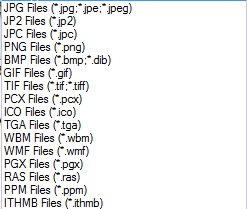
…into JPG, PNG, ICO, BMP, GIF, TIF, PCX, and TGA image formats (output files).
- The ripping of video DVDs (input files) into MP4, AVI, WMV, 3GP, MPG, VOB, or FLV video formats (output files). Also you can convert to the mobile device profiles I mentioned above. (DRM bypass not supported.)
- The ripping of Music CDs (input files) into MP3, WMA, FLAC, ACC, MMF, AMR, M4A, M4R, OGG, MP2 and WAV audio formats (output files).
- The ripping of a DVD/CD (input) into an ISO or CSO (output).
- Conversion of an ISO to a CSO and vice versa.
- The ability to combine any two of the video formats (input files) I mentioned above into one single AVI or WMV video (output files).
- To top it all off, you can do all the converting in batch mode (except maybe ripping a DVD for obvious reasons).
Update: All the above features are for FormatFactory v1.70. Since I the time I wrote this post originally, FormatFactory has been updated frequently and it has a lot more features now. For example, the video joiner supports FLV, MP4, MKV, 3GP, SWF, and mobile devices in addition to WMV and AVI now.
All along the way, you can the ability to control the quality and settings of your output file. For example, you can change the resolution of your output video files; you can change the bitrate of your audio files; you can make the output file high quality but big file size, low quality and small file size, or anything in between.
And for non-English speakers, FormatFactory supports 42 languages:
The *only* con I found with FormatFactory is that it cannot take SWF flash videos as an input (it will take FLV), but you can output as them. Hopefully the developer will add this feature in later versions.
If you are still interested, you can download FormatFactory from the following link:
Officially FormatFactory works on all 32-bit Windows; however 64-bit Windows dotTechies have reported it works on 64-bit just fine.
Update: Take note FormatFactory comes bundled with some crapware. Be sure to uncheck boxes/click ‘Decline’ during installation for this crapware to avoid installation.
Click here to download FormatFactory
Update: This review was conducted on FormatFactory when it was v1.70. FormatFactory has been updated multiple times since then; new features have been added and improvements have been made. Just an FYI.
89 Comments »
Leave A Response »


![[Windows] Convert and optimize videos for various mobile devices with Click2Mobile](http://cdn.dottech.org/media/2013/05/Click2Mobile-Main-UI-134x90.png)
![[Windows] Best free video and audio converter](http://cdn.dottech.org/media/2013/02/v2v2-250x202-134x90.jpg)
![[Windows] Convert video files between popular formats with Eusing Free Video Converter](http://cdn.dottech.org/media/2012/12/Eusing-Free-Video-Converter-134x90.png)
![[Windows] Foto2Avi is a video editor and converter in one program; it can not only convert videos but also turn photos into videos](http://cdn.dottech.org/media/2012/12/Foto2Avi-134x90.png)
Everything I have ever tried to post on GOTD – nothing has come up since the first post which was about some program. But you already know that.
Meanwhile I am tired of running system restore. Only good progs to come off that site were the bee icons and folder icons stuff.
Spot
Spot of Borg,
I have no idea what you are talking about. I can assure you I don’t remove anything but spam. Maybe your posts were marked as spam by my filter and I overlooked them. Feel free to submit them again.
So you ignore the contact form too then?
If I received any email from you I would have replied. Now if you continue to post these useless comments I will be forced to delete them because we both know you never posted any comments nor sent me any emails.
hi guys , keep the way discovering HIGHT QUALITY FREE SOFTWARES like FF and don’t give credit to peolples like SoB , the world keeps turning without them and the others will continue to visit dotTech.org dayly …
Um, Ashraf, I do believe that these people think that you actually have something to do with GOTD… you know, other than you just posting reviews for the products they giveaway (which you do fantastically, btw).
Perhaps a scrolling banner or some other signage will help dissuade future misconception.
;0)
Agreed w/ above, Ashraf.
Might want to clear that up
Update: I tried to download from freewintools.com, but it switched me over to lunarpages web hosting. Skip that! So I tried formatoz.com and it was up. It listed the latest version as 1.80. I clicked the download link and it jumped me to Brothersoft.com, which had the latest version. FYI, as of 3-31-09 …
what a pity this program no convert to VOB- Thanks
anyway
Um FF does convert to VOB…
First thing first, I go to GAOTD everyday; first thing first there, I seek your review. With your review there, I can skip a lot of others. :) Thank Ashraf, for your wonderful reviews.
Hi Ashraf,
Love all your reviews on GOTD, I always read yours first. Can you please tell me if there’s a converter that will convert .swf files to a movie you can play on a DVD player?? Thanks so much in advance!
That is a hard one. Never really tried it myself but you can if you want:try http://swftoavi.com/ or http://www.avi-swf-convert.com/ or http://www.softpedia.com/get/Internet/WEB-Design/Flash/swf-avi.shtml
After you convert SWF to AVI or some other format, consider using DVDFlick to create a DVD.
I actually think I will make a post on how to convert SWFs… stay tuned :)
Come to think of it, DVDFlick itself can also convert SWF videos to DVDs; however the developer says for SWFs “Only embedded audio is decoded” so I am not exactly sure if it would work properly. This is why I recommend converting to another format first, such as AVI, then using DVDFlick.
@Ashraf: Ashraf, I very much enjoy and value your reviews, however this is your blog and as moderator you have the right to delete worthless and stupid comment to keep the thread consistent IMHO. (by the way if you do clean up the stupid comments, I would not feel slighted if you cleaned up my comment) As always you are spot on in your review of FF as it is an excellent program.
Hi Ashraf,
I install format factory, it looks great.
only hitch is it stopped me from using my media-player, my classic-player even my Creative Media Player, with a prompt (something or another then “sorry your player is shutting down”)(DivX Player did work though).
of course I had to uninstall, please help cause I love to install it back on.
regards,
Bugsi.
forgot to tick “Notify me of followup comments via e-mail” on previous comment, sorry
regards Bugsi.
@lou (bugsi): What OS are you on?
@Ashraf:
windows xp professional
Hi Ashraf:
Thanks for introducing a great software. I have a question. Does this allow you to join HD videos in MP4 and MOV format. I have two digital cameras that are capable of making HD videos in 720p format. One of them makes it in .mp4 format and the other one in .mov format. So far only the professional softwares such as Roxio Easy Media Creator and Vegas Platinum can handle HD format. It would be nice to have a software that would join the clips to make one single video file quick.
Thanks.
@Shah: As far as I can tell, yes you can but you will have to manually go and change the output settings. However take note you cannot join to MOV (for some reason) but you can join to MP4, AVI, 3GP, FLV, etc. If you want both your movies joined to MOV, I suggest you convert to MP4 or AVI then use FF’s video converting capabilities to convert to MOV.
@lou (bugsi): Apologies for not replying earlier. I totally forgot about your comment.
Can you try to download GOMPlayer and see if you can play videos with it?
If you still have a problem I think it may be because of corrupt codecs. If so I suggest you download CCC Codecs and see if that solves your problem.
Thank you! This is useful! Maybe this will be interesting for you (audio, video online downloaders and converters) http://soundtaxi.org/
Hello Ashraf, can Format Factory add watermarks to videos?
I have downloaded a YouTube .flv (with TubeHoarder) and have used Format Factory to convert it to VOB.
If I was wishing Nero to burn that (or another format out of Format Factory) onto a DVD, so that it would be playable by a friend, what steps do I need to take ?
Nero (nor I) does not know what to do with it.
I assume that I cannot just burn the VOB onto a blank DVD ?
Thanks for any help



