
The only free file (audio, video, image) converting program you will ever need.

May 2, 2011 89 Email article | Print article

Ask yourself these five questions:

  1. Do I want to be able to easily convert a video file to literally any video format?
  2. Do I want to be able to easily convert an audio file to literally any audio format?
  3. Do I want to be able to easily rip the audio from a video file?
  4. Do I want to be able to easily convert an image file to many different image formats?
  5. Do I want to be able to easily rip (video and audio) DVD/CDs?
  6. Do I want to have the ability to do all this with one file at a time and in batch mode?

If the answer to any of the above 6 questions is “Yes”, then you should keep reading. If you answered “No” to all the questions, get lost (just kidding – please don’t get lost).

Ladies and gentleman, meet FormatFactory:

2009-02-13_150631

FormatFactory meet ladies and gentlemen. FormatFactory is a freeware program that will replace all your other converting programs. With FormatFactory you can convert videos -> videos, audios -> audios, images -> images. As an added bonus, you can also rip the audio from video files, and rip music/movie DVD/CDs.

In more detail FormatFactory supports:

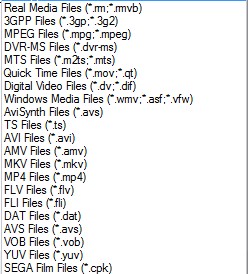
  • The conversion of the following video formats (input files)…
2009-02-13_151036

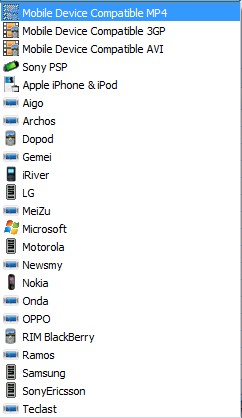
…into MP4, 3GP, AVI, WMV, MPG, VOB, FLV, SWF and MOV video formats (output files). Also, there are also predefined profiles included for mobile devices, such as an iPod or iPhone, that you can convert to (output files):
2009-02-13_152345

Okay so that is not literally *every* video format like I claimed. But I figured it is close enough that you will forgive me for stretching the truth a little bit. :)

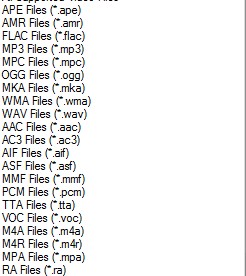
  • The conversion of the following audio formats (input files)…
2009-02-13_151442

…into MP3, WMA, FLAC, ACC, MMF, AMR, M4A, M4R, OGG, MP2 and WAV audio formats (output files). Again I sort of stretched the truth about being able to convert to *every* audio format, but hey, if I did not say that would you be reading this impressive list? :)

  • The ripping of audio from the above mentioned video formats (input files) into MP3, WMA, FLAC, ACC, MMF, AMR, M4A, M4R, OGG, MP2 and WAV audio formats (output files).
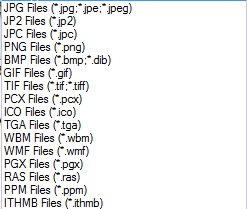
  • The conversion of the following image formats (input files)…
2009-02-13_151908

…into JPG, PNG, ICO, BMP, GIF, TIF, PCX, and TGA image formats (output files).

  • The ripping of video DVDs (input files) into MP4, AVI, WMV, 3GP, MPG, VOB, or FLV video formats (output files). Also you can convert to the mobile device profiles I mentioned above. (DRM bypass not supported.)
  • The ripping of Music CDs (input files) into MP3, WMA, FLAC, ACC, MMF, AMR, M4A, M4R, OGG, MP2 and WAV audio formats (output files).
  • The ripping of a DVD/CD (input) into an ISO or CSO (output).
  • Conversion of an ISO to a CSO and vice versa.
  • The ability to combine any two of the video formats (input files) I mentioned above into one single AVI or WMV video (output files).
  • To top it all off, you can do all the converting in batch mode (except maybe ripping a DVD for obvious reasons).

Update: All the above features are for FormatFactory v1.70. Since I the time I wrote this post originally, FormatFactory has been updated frequently and it has a lot more features now. For example, the video joiner supports FLV, MP4, MKV, 3GP, SWF, and mobile devices in addition to WMV and AVI now.

All along the way, you can the ability to control the quality and settings of your output file. For example, you can change the resolution of your output video files; you can change the bitrate of your audio files; you can make the output file high quality but big file size, low quality and small file size, or anything in between.

And for non-English speakers, FormatFactory supports 42 languages:

2009-02-13_153326

The *only* con I found with FormatFactory is that it cannot take SWF flash videos as an input (it will take FLV), but you can output as them. Hopefully the developer will add this feature in later versions.

If you are still interested, you can download FormatFactory from the following link:

Officially FormatFactory works on all 32-bit Windows; however 64-bit Windows dotTechies have reported it works on 64-bit just fine.

Update: Take note FormatFactory comes bundled with some crapware. Be sure to uncheck boxes/click ‘Decline’ during installation for this crapware to avoid installation.

Click here to download FormatFactory

Update: This review was conducted on FormatFactory when it was v1.70. FormatFactory has been updated multiple times since then; new features have been added and improvements have been made. Just an FYI.


89 Comments »

  1. amnesia October 6, 2009 at 6:54 AM (comment permalink) -
  2. PTLdom October 15, 2009 at 3:49 AM (comment permalink) -

    Since using the freesource Super@ (search for Super C) I scrapped all the other incompetent freebies for video converting.

    52
  3. Mario October 16, 2009 at 1:37 PM (comment permalink) -

    On an .avi to .vob conversion, that’s exactly what FF did! That is, no Video_ts folder and files, not .ifo, not .bup files, etc. As I don’t know how to make them, kind of useless this conversion, don’t you think? How do I convert an .avi to a “DVD format” that can be viewed on any DVD equipment. Ashampoo Burning Studio does that, I’ve tried it, but takes forever!
    tks

    53
  4. Ashraf October 16, 2009 at 3:04 PM (comment permalink) -
    Mr. Boss
  5. Mario October 19, 2009 at 3:54 AM (comment permalink) -

    Hi Ashraf,
    tks for reminding me of DVDFlick, but check on my comment #7 on this mentioned link. I still can’t produce menus using DVDFlick on my PC and it is also slow. Wonder which one is slower – DVDFlick or Ashampoo?!? Will have to time it with a small avi!

    55
  6. Opie October 30, 2009 at 8:51 AM (comment permalink) -

    this programs rocks! so easy to understand.
    & use. Very quick format time. Works like
    a charm. Thanks for this one :)

    56
  7. Opie November 9, 2009 at 3:58 PM (comment permalink) -

    Ok format factory seems to have the option
    to convert midi’s to other formats; however
    no matter what format I try it says failed.
    Do you know any other coverter that might
    work for this. There are so many and short
    of installing them one by one I thought I
    would ask you..and thanks in advance :)

    57
  8. Rob December 9, 2009 at 9:36 AM (comment permalink) -

    Hi Guys,
    I have downloaded some TV episodes, which were avi
    I used Formatfactory and converted them to VOB files
    I would now like to burm them to a DVD for playing on normal DVD player.
    How can i (easily) convince Nero Express to burn the DVD ?
    It expects me to have ifo files etc present (which I don’t)

    58
  9. Rob December 10, 2009 at 5:53 AM (comment permalink) -

    OOPs did a search of this site and found that Mario had asked the same question above.
    And I looked back further on this page and noticed that Amnesia had suggested DVDFlick for an earlier post by me.
    I wonder whether Amnesia is what I am suffering from ?

    I am using DVDFlick now (as we speak), and I have asked a related question on Ashraf’s DVDFlick page -
    http://dottech.org/freewaresr/9708

    59
  10. lol768 February 27, 2010 at 5:01 AM (comment permalink) -

    I see that format factory is listed on this site http://www.ffmpeg.org/shame.html
    Does this mean it is not safe to use?

    60
  11. jmail March 21, 2010 at 4:09 PM (comment permalink) -

    i downloaded ff from brothers and scaned it with the new microsoft antivirus and spware program and warned me that there was a trojen and asked me to delete it could you clarify on that one please bye for now

    61
  12. Alexandery March 24, 2010 at 2:48 AM (comment permalink) -

    So interesting,but i prefer use Video to Flash Converter Pro.It’s prog can convert many different formats.

    62
  13. ET April 10, 2010 at 7:14 PM (comment permalink) -

    Well it seems nice, but the video joiner doesn’t join in order and the audio becomes out of sync after a while.

    63
  14. 3K3 May 6, 2010 at 12:09 PM (comment permalink) -

    I made Format Factory 2.30 Portable. I’m posting a link to the zip package:

    http://www.mediafire.com/?dz2ynntmwty
    The package will be available till 11th of May

    64
  15. VW Gann May 17, 2010 at 9:25 PM (comment permalink) -

    I think you need to pay attention to the warnings listed above. I just upgraded FF to 2.30. After installing, AnVir warned me that my homepage was hijacked and that Ask wanted to put its toolbar in my start up. Of course, I denied these with AnVir. Then WinPatrol warned me that Ask had scheduled updates for its toolbar. On top of that, QuickStores.url put an icon on my desktop. There was no place during installation of FF which asked me of any of these things. I consider FF to be malware of the most obnoxious kind. I strongly suggest you recommend another formatting program.

    65
  16. Joseph Cannon June 30, 2010 at 10:55 AM (comment permalink) -

    It is absolutely impossible to use the program unless you allow the app to talk to the internet — as though a video converter NEEDS to do that. This is obvious spyware.

    66
  17. Paul August 5, 2010 at 4:56 AM (comment permalink) -

    Does anyone know how to get formatfactory off my computer. I am trying to uninstall it, it asks me if i want to remove it and i click yes. It starts to remove and my computer resets back to the POST. No warnings, and my hard discs have to spin back up while the POST waits. This can’t be good for them. Every time i try it does the same thing and i can’t get it off. Any help will be appreciated. Thank you.

    67
  18. Paul August 5, 2010 at 5:59 AM (comment permalink) -

    Never mind people, i had to do a system restore to get rid of it. I won’t be installing that again in a hurry!! For the sake of my hard drives as well as me. Love the site by the way.

    68
  19. Dennis August 29, 2010 at 6:49 AM (comment permalink) -

    I just downloaded this software.  Checked it with Ad-Aware and Zone Alarm. It came up clean. 

    69
  20. RobCr September 12, 2010 at 11:52 PM (comment permalink) -

    I have the latest version.
    I cannot see the option to Convert an AVI to DivX
    I have converted to MP4 (which I thought was the same), but Googling I see other programs offering converters MP4 to DivX
    I have scrolled down through Format Factory’s offered conversions, but cannot see DivX
    I have searched their Help file, and got no hits
    Can any one enlighten me ?
     

    70
  21. RobCr September 13, 2010 at 8:02 PM (comment permalink) -

    No response ?
    I’ll try an easier question -
    Is AVI the same as DivX ?
    If I have a lounge room DVD player that says on the box, it can play DivX
    Will that lounge room DVD player, play files with an AVI extension ?

    71
  22. Paul September 15, 2010 at 3:31 PM (comment permalink) -

    DivX is a codec, one of many. AVI is a way of combining those codecs into one file (video and audio), AVI stands for Audio Video Interleave, interleaving the audio with the video. One of the best places you can find out about all the different codecs and anything else to do with video is videohelp dot com. I can’t help you with formatfactory as you can see above i had some trouble with that, but i hope that site i mentioned can clear up a few things you need to know.
    Paul

    72
  23. RobCr September 21, 2010 at 6:34 AM (comment permalink) -

    I have GOOD news, and BAD news.
    The BAD news, I still have not been able to play my AVI’s on a lounge room DVD player.
    FF does not list DivX as an option.
    FF created a large single VOB file (that is me desperately trying other Format choices). then VirtualDub and Nero8, and ImgBirn don’t know what to do with it.
    All my Googling on AVI, MP4, DivX, tells me it is an uncontrollable mess out there.
    I wrote to Ashraf, asking if he has a page where we post ‘Heads Ups’ for free software.
    No reply yet ?
    I was going to run one them ( from Ashampoo ) past Ashraf, as I am not sure whether Ashampoo intends me to pass them on to you lot. (I am allowed to pass to family and friends)
    Now to the GOOD news -
    Wondershare Video Converter ( $69 worth ) is free for a few days -
    http://www.techsupportalert.com/content/69-software-giveaway-video-converter-ultimate.htm?utm_source=feedburner&utm_medium=email&utm_campaign=Feed%3A+gizmosbest+%28Gizmo%27s+Best-ever+Freeware%29
    After you try it, you can all tell me how to get it to convert AVI to DivX or to VOB files.
    It is converting the AVI, but I am waiting to see what it will convert to.
     

    73
  24. RobCr September 22, 2010 at 8:28 PM (comment permalink) -

    Haven’t heard from Ashraf yet.
    If any of you others know which web page on DotTech we use to post freebies, let me know.
    In the meantime, I believe Ashampoo intend this offer to be distributed.

    5 Ashampoo full versions –
    Absolutely free, instant and guaranteed without obligation!
    I’d be glad, if you could pass on the address
    www DOT ashampoo DOT com/gift
    together with the coupon code ASH-444LW1  – to your friends, acquaintances, relatives and/or co-workers.

    74
  25. john staple December 12, 2010 at 5:49 PM (comment permalink) -

    I want to know if this program will let me burn only edited songs from a EX. movie, concert dvd, etc…
    I just want to have a “best of” collection of all my dvd’s on one disc. Just audio not…..video with it.

    Please email me.

    thanks

    75

Leave A Response »


