
 Email article
{rw_text}Software reviewed in this article:
Version reviewed:
v3.5
Software description as per the developer:
Driver Magician offers a professional solution for device drivers backup, restoration, update and removal in Windows operating system. It identifies all the hardware in the system, extracts their associated drivers from the hard disk and backs them up to a location of your choice. Then when you format and reinstall/upgrade your operating system, you can restore all the “saved” drivers just as if you had the original driver diskettes in your hands. After one system reboot, your PC will be loaded and running with the required hardware drivers.
What’s more, Driver Magician has a built in database of the latest drivers with the ability to go to the Internet to receive the driver updates. It saves lots of time to find the correct drivers and mature drivers will obviously increase the performance of hardware. If there are unknown devices in your PC, Driver Magician helps you detect them easily and quickly with its built in hardware identifier database.
Supported OS:
Windows 98 and higher
Price:
$29.95 (USD)
{/rw_text}
{rw_good}
- Straightforward and easy to use.
- Users can backup drivers in multiple different ways, including to a standalone executable (“auto-setup package”) which allows for restoration of drivers without having to have Driver Magician installed.
- Users have the ability to include or exclude Microsoft Windows drivers.
- Has built-in tools to help users update drivers, detect unknown devices, and uninstall drivers.
- Has a few extra backing up capabilities, like backing up the registry and My Documents.
- Allows users to restore drivers “silently”.
{/rw_good}
{rw_bad}
- Restoring backed up drivers from standalone executable (“auto-setup package”) can be a bit annoying since users are required to input Driver Magician’s registration details (name and code) to restore drivers.
- Users can’t choose the name of backups.
- If an old backup is of the same name in the same location as the new backup, older backup will be overwritten without prompt.
{/rw_bad}
{rw_score}
{for=”Ease of Use” value=”8″}Very easy to use. There is one major annoyance, though: Users are required to enter Driver Magician’s registration details (name and code) before they can restore drivers from the “auto-setup package”. This can be very annoying because not everyone may have Driver Magician registration details on hand when drivers need to be restored, or users may not be connected to the Internet in which case the registration information could not be authenticated.
{/for}
{for=”Performance” value=”10″}Performs extremely well in regards to backing up and restoring drivers.
{/for}
{for=”Usefulness” value=”7″}I can see quite a few people finding this program useful, although there will be some who never format their computers, so having a driver backup program is a moot issue.
{/for}
{for=”Price” value=”5″}Although Driver Magician has some nice features, aside from just backing up drivers, I feel $29.95 is a bit much for this program considering how easy it is to download drivers (nowadays Windows Updates finds most drivers for you, especially if you are running Windows 7 or higher). I believe $19.95 is more fair.
{/for}
{for=”Final Score” value=”8″}
{/for}
{/rw_score}
{rw_verdict}[tup]
{/rw_verdict}
Driver Magician is a splendid little program that allows you to backup the drivers on your computer. (For those that don’t know what drivers are: drivers are the medium between hardware and software ; drivers allow hardware and software to communicate with each other. Drivers are an absolute must on every computer or else nothing would work.)
This is what the main program window for Driver Magician looks like:
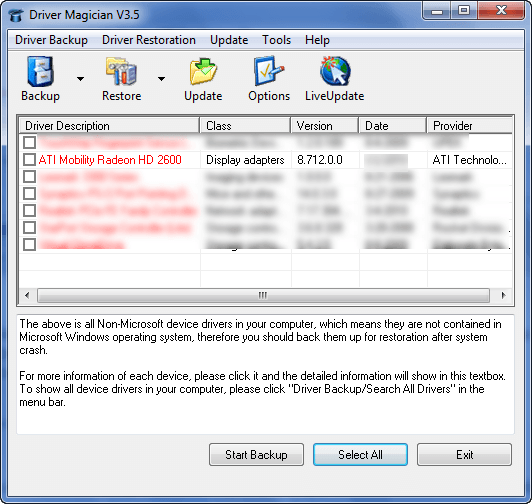
As mentioned above, the main function of this program is to allow you to back up computer drivers. Driver Magician is setup for out-of-the-box usage, so backing up drivers is very easy. By default Driver Magician is set to backup non-Microsoft drivers and is set to store the backups in a folder in an uncompressed format. Thus, once you run the program click on  then click on
  . You will be prompted to choose where to place your backup (you will not, however, have a choice to name your backup). Choose the desired location, click “OK”, and wait. (Take note if you already have en existing backup in the location you just selected it will be automatically overwritten since Driver Magician does not rename backups everything they are conducted.) It should not take too long to backup your drivers; it took only around ~2 mins to backup all my drivers. When the back up is done, the program will tell you so:

After the backup is done, go to the location where you saved the backup to. There will be a “Drivers Backup” folder at that location. Inside that folder will be the backed up drivers in an uncompressed format (i.e. in their normal file state). Keep this “Drivers Backup” folder handy; whenever you need to restore drivers you can tell Driver Magician to restore the drivers from this folder.
Aside from the uncompressed format, Driver Magician allows users to create driver backups to a compressed file, self extracting .EXE, or “auto-setup package” .EXE. (Both .EXE are also compressed formats.):

(This window is accessible via “Tools” -> “Options” -> “Driver Backup Options”.)
The main differences between the four backup formats is as follows:
- “Back up drivers to folders” allows users to backup drivers as-is to a backup folder. Nothing is compressed. Driver Magician must be used to restore these backups (unless you are tech savvy and know how to restore the backups manually).
- “Back up drivers to a compressed file” does the same thing as backing up to folders except instead of storing backed up drivers in an uncompressed format, drivers are stored in a single compressed .BCK file. Compression level can be customized (“None”, “Low”, “Medium”, or “High”). If you have an archive extractor, like 7-zip, you can extract the drivers – and store them in a folder like the first backup option – from this .BCK file whenever you want. Driver Magician must be used to restore a backup from a .BCK format (unless you are tech savvy and know how to restore the backups manually after you have extracted them).
- “Back up drivers to a self-extractor (.EXE)” does the exact same thing as “Backup drivers to a compressed file” with one difference: Instead of creating a compressed .BCK file, a compressed .EXE file is created. This .EXE does not require an archive extractor to extract drivers; extracting files – and placing them in a folder – from this .EXE is as simple as double clicking it. Driver Magician must be used to restore a backup from this format format (unless you are tech savvy and know how to restore the backups manually after you have extracted them). Both “Back up drivers to a self-extractor (.EXE)” and “Back up drivers to a compressed file” seem very similar – so why have both features? The reason is two-pronged, for the most part:
- .EXE does not require a third party application to extract drivers from, whereas .BCK does. So people that don’t have an archive extractor (most people have it, though) or don’t understand how to use one will prefer .EXE.
- It is often hard to transfer .EXE files because you can’t send them as attachments, and sometimes user permissions restrict the usage of an .EXE. So people in this situation would prefer .BCK.
- “Back up drivers to an auto-setup package (.EXE)” is probably the main attraction to Driver Magician. The “auto-setup package” allows users to restore drivers without having Driver Magician installed. In other words, you can backup drivers to an auto-setup package, and when you reformat your computer you don’t have to reinstall Driver Magician to restore drivers – you can just run the auto-setup package and it will restore the drivers for you. Auto-setup package literally restores the drives – it does not extract them like the previous .EXE. There is one annoying caveat to auto-setup package, however: You are required to enter Driver Magician registration information (name and code) when you want to restore drivers from an auto-setup package backup:

If you have Driver Magician registration information and you are connected to the Internet, this is not a problem. However, if you don’t have Driver Magician registration information on hand (maybe you lost it, or you never received it because you got Driver Magician through Giveaway of the Day), or you are not connected to the Internet, you will have difficulty in using the auto-setup package to restore the backed up drivers.
I realize the developer has implemented this method to prevent users from abusing the trial version of Driver Magician (i.e. installed it, using the auto-setup package to backup, and then restoring with it) but I believe this can be done a better way: Simply disable the auto-setup package in the trial version. This way the auto-setup package can’t be abused by non-customers, and the developer can remove the requirement to enter registration information when users are trying to restore from the auto-setup packaging (making it easier for Driver Magician customers).
Restoring drivers is a little bit more involved than creating backups, but is nonetheless very easy to do:
- Step 1 – Set what type of backup you want to restore from:
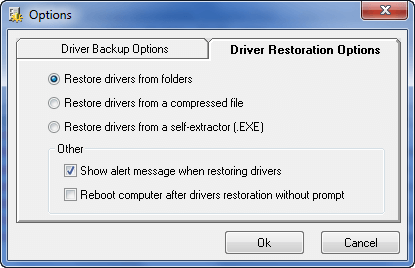
(This window is accessible via “Tools” -> “Options” -> “Driver Restoration Options”.)
Take note that restoring drivers from folder, compressed file (.BCK), or self-extractor (.EXE) is done the same way. Only restoring drivers from auto-setup package (.EXE) is done differently that is because you don’t need Driver Magician installed to restore from an auto-setup package while you do need it installed for the rest of the backups.
Also note that Driver Magician allows users to perform “silent” restore. A “silent” restore is basically a restore that performs the restoration from start to finish with prompting you for any action (you must start the restoration yourself, though). Uncheck “Show alert message when restoring drivers” if you want to perform a silent restore; the silent restore will work with all three different backup formats. You may also have Driver Magician automatically reboot your computer after restoration has finished.
Silent restores can be done with auto-setup packages also:

- Step 2 – Click the “Restore” button (from the main program window), select the backed up files (folder, .BCK, or .EXE depending on what you are are restoring from).
- Step 3 – Select the drivers you want to restore:

Take note if you click on the black downwards arrow next to the “Restore” button you have the ability to view all backed up drivers (assuming you decided to backup Microsoft and non-Microsoft drivers), or just the non-Microsoft ones.
- Step 4 – Hit “Start Restore”.
- Step 5 – Wait.
- Step 6 – Profit.
Here are a few other aspects of Driver Magician:
- As already discussed, by default Driver Magician is set to backup all non-Microsoft drivers. Driver Magician does this because reinstalling Windows brings all necessary Microsoft drivers with it. However, users are still allowed to backup Microsoft drivers if they wish; simply click on the downwards facing black arrow next to the “Backup” button and select “Search All Drivers”. Microsoft drivers will be shown in black and non-Microsoft drivers will be shown in red. To go back to just non-Microsoft drivers, select “Search Non-Microsoft Drivers” from the same black arrow.
- Driver Magician has a feature built-in which allows users to update outdated drivers (“Update” -> “Driver Update”). Driver Magician scans the computer and sees if there are any drivers that are old and outdated. If there are some drivers with new versions, users will have the ability to download and update those drivers.
There is one word of caution on this driver update feature. When it comes to drivers, as the old saying goes, “if it ain’t broke, don’t fix it”. You see, in my humble opinion, if a driver is working fine for you, you should leave it alone. I don’t care if Driver Magician tells you there is an update to the driver which you can download. Unless you have a specific reason to update the driver (such as sometimes you need an update for your video card driver to support the newest and greatest games), leave the driver as-is. When the times comes for you to update a driver, it is typically more safe to grab the driver from the manufacture’s website and/or Windows Update rather than a third party software like Driver Magician.
So, in my book, this driver update feature of Driver Magician is not very useful; but hey it is there if you want to use it.
- If you go to “Tools” you can do a few things:
- “Uninstall Drivers” obviously allows you to uninstall your drivers.
- “Detect Unknown Devices” will help you find and recognize devices on your computer that you don’t have drivers installed for yet. Very handy when reformatting your computer and a device is not recognized by Windows.
- “More Backup and Restoration” is a feature that allows users to backup (and restore) things other than drivers, such as the registry:
Everything from “More Backup and Restoration” is backed up to a .BCK file. So users can either use an archive extractor – such as 7-zip – to extract the files when users want to restore them, or users can restore the files using Driver Magician.

{rw_freea}
Double Driver is an excellent standalone and portable driver backup and restore tool. With Double Driver you can:
- View all installed drivers;
- Backup all installed drivers (as uncompressed folders, compressed .ZIP, or compressed self-extractor);
- Restore drivers from backups;
- Save details on all installed drivers in a TXT file;
- Print details on all installed drivers.
This is a very stripped down version of Driver Magician. Basically the only thing you can do with Lite is backup your drivers and only to folder.
DriverMax is a really nice program for being free. It does not have as many features as Driver Magician (mainly it lacks the ability to backup drivers to standalone executables and compression is not as good) and it is pretty slow but is a worthwhile free alternative if you don’t have Driver Magician.
Windows Update
Windows Update isn’t a driver backup tool. Rather this is a “tip” I would like to give.
You see Microsoft has done as excellent job in using Windows Update to detect and download any necessary drivers for a computer (more so for Windows Vista/Win7 than Windows XP/2000). So you should definitely backup your drivers and keep them in a safe place in case you need them in the future. However if you ever do end up having to reformat/reinstall Windows, you may want to hold off on restoring your drivers from your backup because Windows Update may be able to find them first.
{/rw_freea}
{rw_verdict2}Although not without its fair share of annoyances, being easy to use and multifunctional, Driver Magician is a good program. I give it a thumbs up. However, I feel Driver Magician is a bit overpriced. It is hard to justify shelling out $29.95 when there are other methods to grab drivers when the need arises (i.e. the Windows Update example I gave above). Get Driver Magician if you want it, but at a price tag of $29.95 I am not going to recommend Driver Magician. However, this program is a steal if found lower than or at $20.
{/rw_verdict2}
