Email article
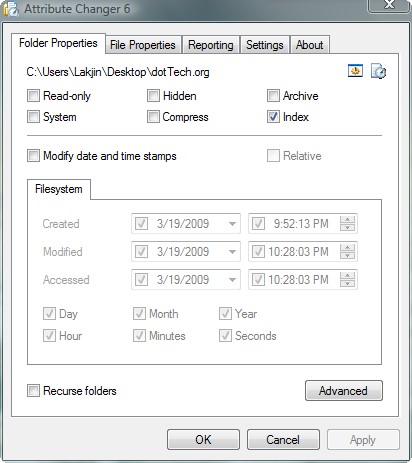 Before I begin this post let me state that the developer of Attribute Changer specifically states “64-bit editions of MS Windows are NOT supported“. Therefore this post is not for 64-bit users; however if you are a 64-bit user and you want to try out this software, please be kind enough to post your results (if you were successful or not) below.
A couple of weeks ago I had an assignment to turn in. It was a homework assignment that I was supposed to do at home then print out and bring to class. Being the slacker that I am, I forgot about the assignment. Before class began (~15 minutes) one of my classmates informed me that we had this certain assignment due that day. First I was shocked. Then I panicked. Hurriedly I started typing up the assignment on my laptop. Thankfully I finished before class started. However, as I mentioned earlier, I was supposed to bring a hard copy of the assignment to class. Obviously since I had just did it, I did not have a chance to print it. Thus when class started this was my conversation with my professor:
Me: “I did not have a chance to print out the assignment. May I email it to you?”
[Technically speaking the above statement was true.]
Her: “Do you have it done?”
Me: “Yes.”
[Again, technically speaking, the above statement was true; ignore the fact I had just done the assignment.]
Her: “Okay do email it to me now.”
Me: “The network is down.”
Her: “Again? Okay email it to me when it is back up.”
Me: “Thanks.”
I got around to emailing the assignment to her about 2 hours later because I had another class right after the class mentioned above. Right as I was emailing it to her I was thinking to myself:
“It has been a while since the network is up. I was supposed to email it to her when it came back up. What if she thinks I spent all this time doing the assignment? Maybe I can tell her to check the ‘Date Modified’ timestamp on the file.”
At that point I looked at the “Date Modified” and noticed it said “1 minute ago”. This was not surprising because I had just saved the file one minute ago (I always open my files and save them right before I send them to someone regardless of if I changed anything or not). At that point I was thinking:
“Oh crap. I may be screwed if she does not accept the assignment. I wish I could change that ‘Date Modified’ to two hours back.”
Well Ashraf, you moron, there is a way to change the “Date Modified”. In fact there is a way to change the “Date Created” and “Date Accessed” too. How do it you ask? Using Attribute Changer of course.
Attribute Changer is a handy program that allows you change the attributes of a file or folder. While it can change more attributues then just the timestamps, the focus of this Tips ‘n Tricks article is on the timestamp changing ability of Attribute Changer.
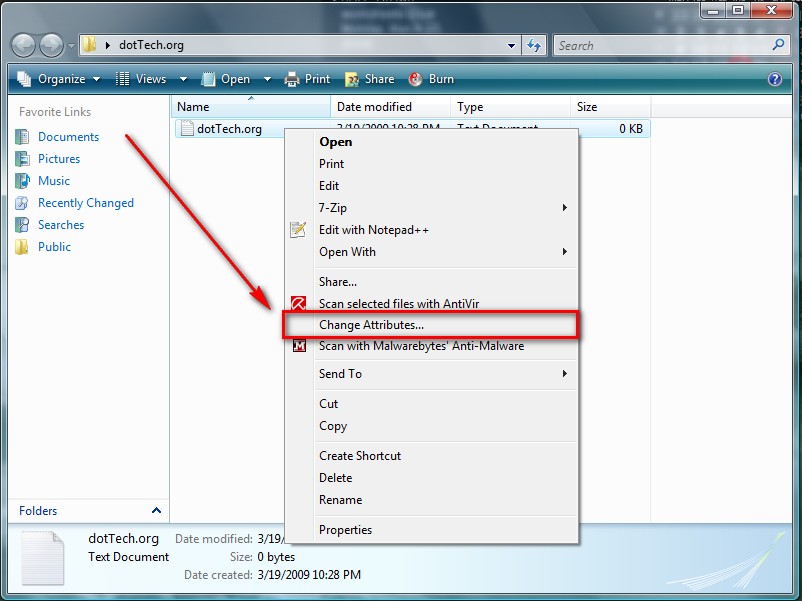
When you install Attribute Changer it adds an entry in your explorer context menu (there will be no desktop icon). You can only run Attribute Changer via this context menu entry. When you want to change the “Date Created”, “Date Modified” or “Date Accessed” of a file or folder, you right click on that specific file or folder, click on “Change Attributes”, change the timestamps you desire to change, click “Apply” and then “OK”. Viola! Now you can trick anyone into thinking you did that assignment on time change the timestamps of any file or folder as you please =).
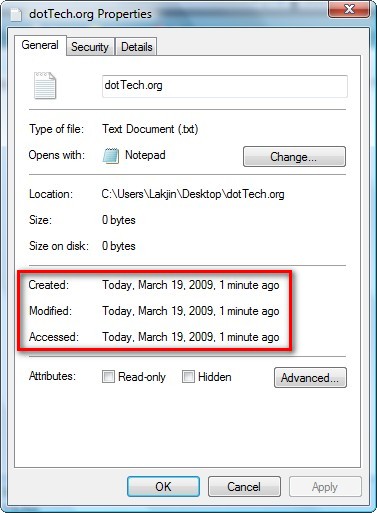
Here is an example of changing the timestamps of a file on my computer:
- Before I use Attribute Changer:
- Now I use Attribute Changer to change all the timestamps:

- The result:
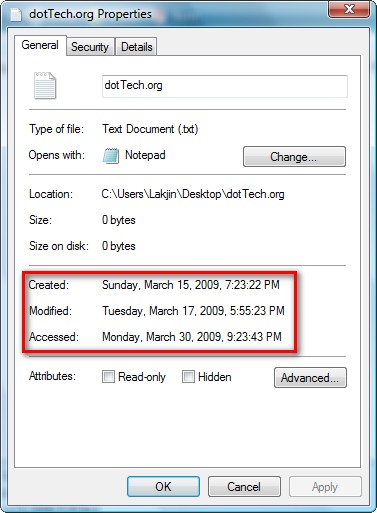
Isn’t it beautiful =D? You can download Attribute Changer from the following link: