Know everything there is to know about your computer with WinAudit.

March 25, 2009 24 Email article | Print article

windowsEver been asked “what are the specs of your computer” or “what [insert hardware component here] do you have” or “does your computer have a [insert hardware product here]” or “what programs do you have installed” or [insert hardware related question here]? These types of questions are usually asked of you when you need some sort of help with a computer related issue; however sometimes you may be asked by a friend or even on an online forum. Isn’t it embarrassing to say “I don’t know”? Okay it may not be embarrassing for some but for sure no one wants to answer “I don’t know”. Am I rite or am I rite? Come onnnnn Ashraf is always right ^_- (that is a joke for the people who don’t know me and my sense of humor (or lack thereof depending on which way you look at it)). Well get rid of that sad face and get glad (yes pun intended – however I am not telling you to go out and buy Glad plastic bags) because today I am here to introduce you to WinAudit:
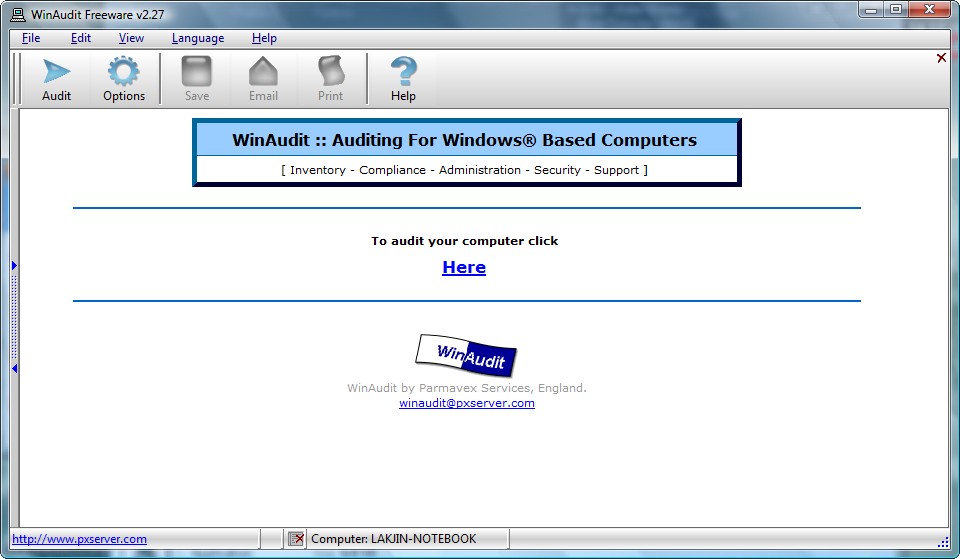
2009-03-25_201304

WinAudit literally “audits” your computer (it only took ~30 seconds to audit my laptop) and displays the results in an organized fashion:
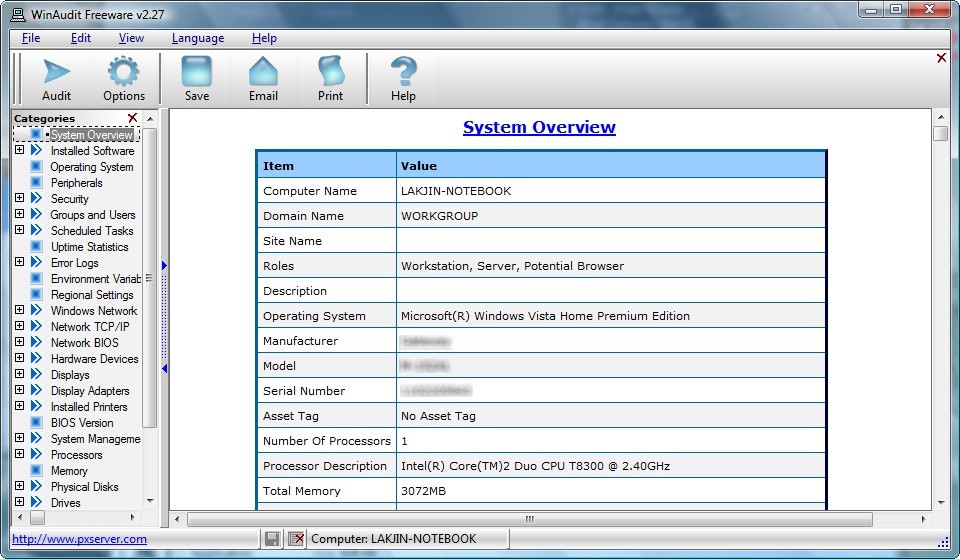
2009-03-25_201413

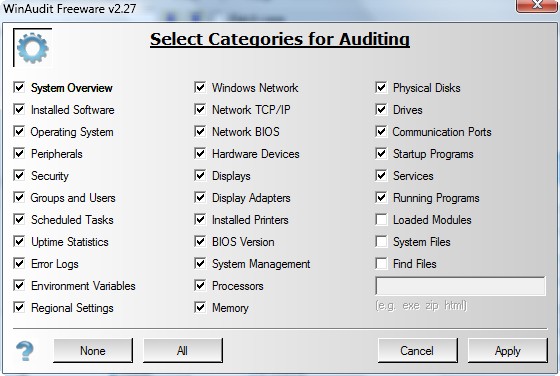
WinAudit works on all Windows Windows PE/95/98/Me/NT3.51/NT4/2000/XP/2003/Vista and both architectures (32 or 64 bit). WinAudit has the ability to detect and show you all of the following:
2009-03-25_203131

You can access the window you see in the above screenshot by clicking on “Options”. You can check/uncheck specific categories at will to display/not display then in your audit.

Now you may have audited your computer, but the information is so vast and confusing, you may not want to mess with it (rather opting to just send the information directly to whoever asked for it). Well no worries again. With WinAudit you have the ability to do save, email or print your whole audit:

2009-03-25_204054

  • “Save” will save your whole audit into three HTML files (one HTML file is for actual audit information, one is for the left scrolling menu, and one is to put both of the previous two mentioned HTML files into an organized userfriendly format).
  • “Email” will convert all your audit information into text and insert it into an email. You will then just have to input the recipient’s email address and click “Send” to send your whole audit report to them. Note that with “email” there is no nice navigation like with HTML – it is just straight text (but it is formatted/organized).
  • “Print” will print your whole audit.

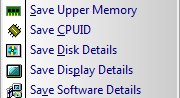
In addition to being able to save/email/print your whole audit, you can save individual parts of your audit into TXT files:
2009-03-25_204823

You can find the above features under “Help”.

Lastly, WinAudit can be used in multiple different languages:

2009-03-25_205116

Note: If you plan on using WinAudit in a language that does not use the Latin alphabet (English letters), such as Japanese, you must get the Unicode version of WinAudit. Unicode version is 966 KB in file size and only works on Windows PE/NT4/2000/XP/2003/Vista.

Because I know someone is going to bring it up, yes there are lots of other programs out there that do similar things as WinAudit (one of my personal favorites is PC Wizard – maybe a post about PC Wizard in the near future). However, what gives WinAudit an upper hand (in my opinion) over many of these “other programs” is that WinAudit is standalone, portable, and a very small program (830 KB file size for the ASCII/non-Unicode version). Plus it supports many languages and gives you nice exporting capabilities.

Are you ready to download WinAudit yet? Dang I am good. You can download WinAudit from the following links:


WinAudit

WinAudit (Unicode)

24 Comments »

  1. Ashraf March 25, 2009 at 9:26 PM (comment permalink) -
    Mr. Boss

    Just so people know, I have e-mailed the developer of WinAudit requesting that they add in the ability for WinAudit to also display information on Window’s architecture. Lets see how it goes.

    1
  2. Jean-Luc Picard March 25, 2009 at 9:37 PM (comment permalink) -

    (that is a joke for the people who don’t know me and my sense of humor (or lack thereof depending on which way you look at it)).

    I view it as lack thereof.

    Does it work in Windows 3.1?

    Does it support 8-bit and 116-bittages?

    Does it support this windows?

    2
  3. Ashraf March 25, 2009 at 9:39 PM (comment permalink) -
    Mr. Boss

    Okay fine. I will be more clear.

    WinAudit works on:
    Windows® PE/95/98/Me/NT3.51/NT4/2000/XP/2003/Vista

    The Unicode version only works on:
    Windows® PE/NT4/2000/XP/2003/Vista

    3
  4. Frank March 25, 2009 at 10:01 PM (comment permalink) -

    JPL,

    if you want to ba a brighthead then be one!
    It was not this windows, it was THIS window or THESE windows. Your pic did not show the latter.

    Bleeding hell!

    Frank

    4
  5. Mohammed Sarhan March 25, 2009 at 11:43 PM (comment permalink) -

    Jean-Luc Picard,

    The picture was a joke, isn’t it?

    Did you read the blog title?

    Is that window related to technology?

    5
  6. Ashraf March 25, 2009 at 11:53 PM (comment permalink) -
    Mr. Boss

    Guys,

    Jean was joking :)

    You know how kids are nowadays :P

    6
  7. Rob March 26, 2009 at 12:02 AM (comment permalink) -

    Thanks for the ‘heads up’
    I love pgms that do not require installation.
    Had a quick wee run, and it looks good.
    Regards,
    Rob

    7
  8. Jean-Luc Picard March 26, 2009 at 12:12 AM (comment permalink) -

    Wait-
    it doesn’t need an installation?

    I might actually try it instead of making stupid jokes about it.

    8
  9. Jean-Luc Picard March 26, 2009 at 12:25 AM (comment permalink) -

    Windows House edtion:
    http://www.arsgeek.com/wp-content/uploads/2008/01/windows-mbr.jpg

    logo:
    http://myfiles4free.googlepages.com/winhome.png

    Also, on the program:
    1. >.<’ish interface
    2. TMI for the basic user, but I like it!

    9
  10. Ashraf March 26, 2009 at 2:00 AM (comment permalink) -
    Mr. Boss

    Jean,

    “Standalone” means not requiring an install when it is used to describe a program.

    10
  11. Jean-Luc Picard March 26, 2009 at 2:10 AM (comment permalink) -

    I know, it’s just I usually skim things.
    I promise to actually read your next review… which is up.

    11
  12. Rbb March 26, 2009 at 5:37 AM (comment permalink) -

    WinAudit and SIW free standalones are both as excellent, and complement each other on my pc.

    12
  13. giovanni March 26, 2009 at 7:28 PM (comment permalink) -

    [Removed by Ashraf. Reason: Possibly dangerous program]

    Had you ever heard about it before, Ashraf?

    13
  14. Ashraf March 26, 2009 at 7:30 PM (comment permalink) -
    Mr. Boss

    Nope never heard of it. However it seems nice…if it works like it says.

    Update: Checked out the program. It doesn’t really “audit” like WinAudit; in fact it shows very little information compared to WinAudit.

    Also, the drivers it detects are very limited.

    Lastly, updating your drivers with this program may prove dangerous because you are downloading drivers from 3DP Chip’s developer’s website instead of the original source of the driver (i.e. Microsoft, AMD, Intel, etc.). For example, it is telling me to upgrade my video driver to v9.3. That is the desktop driver – the latest driver for my laptop is not v9.3. If I were to download that (assuming I did not know that you can’t use AMD desktop drivers on laptops), I could very possibly have to say bye bye to my laptop. I am removing your link, sorry.

    14
  15. giovanni March 26, 2009 at 8:00 PM (comment permalink) -

    Removed by Ashraf. Reason: Possibly dangerous program]

    NO man…

    Do you trust SOFTPEDIA??

    Excellent (5.0/5)

    Note: Some antivirus and antispyware programs flag 3DP Chip as being infected/malware, although the application is perfectly safe and does not pose a threat to your system. This is called a ‘false positive’. The term false positive is used when antivirus software wrongly classifies an innocuous ( inoffensive ) file as a virus. The incorrect detection may be due to heuristics or to an incorrect virus signature in a database. [Similar problems can occur with antitrojan or antispyware software.]

    15
  16. Liam K March 26, 2009 at 9:33 PM (comment permalink) -

    Does this do more than Revo Uninstaller + Start > Run > dxdiag?

    16
  17. Liam K March 26, 2009 at 9:34 PM (comment permalink) -

    There’s also Start > Programs > Accessories > System Tools > System Information.

    17
  18. Robert March 27, 2009 at 2:14 AM (comment permalink) -

    Download links aren’t working today :-(

    18
  19. Robert March 27, 2009 at 2:23 AM (comment permalink) -

    Oops – my fault – I was blocking ftp.

    19
  20. Liam K March 27, 2009 at 3:23 PM (comment permalink) -

    Robert: Works for me. Does your browser support FTP?

    21
  21. Janet March 30, 2009 at 4:32 AM (comment permalink) -

    Hi Ashraf!

    I couldn’t download from your links, so I used the WinAudit home page as recommended by one of your posters (PxServer.com). When I click on the WinAudit.exe downloaded from the site, I get a Security Warning window saying the the file cannot be verified due to Unknown Publisher. Is this safe? Thanks for all your help!

    Janet

    22
  22. Jean-Luc Picard March 30, 2009 at 4:51 AM (comment permalink) -

    I’d consider it OK, but then again I’m OK with having to reinstall Windows. Yeah, I’d say it’s fine, and it did no harm to my computer.

    23
  23. Janet March 30, 2009 at 7:06 AM (comment permalink) -

    This is the prompt reply I received from WinAudit:

    “Hello Janet,

    Thanks for the message, you are being told this ["Security Warning window saying the the file cannot be verified"]because the programme
    does not have a software certificate. The purpose of which is to give
    some assurance of where the software came from. However, certificates
    are issued by a Certificate Authority at an annual subscription fee. As the WinAudit programme is given out freely to everyone we can’t really justify paying a re-curring cost. Anyway, if you are interested an interim update to the WinAudit programme is available here:
    http://www.pxserver.com/WinAudit/WinAuditu_2_27_17.exe
    Rename it to WinAuditu.exe if you want to, note this one does not run on Windows 95, 98 or Me. Thanks!

    Regards
    Steven Niffikeer
    Parmavex Services
    Birmingham, England”

    Posted by Janet

    24

Leave A Response »