8 free software to image/backup/ghost your computer (free alternatives to Acronis True Image, Norton Ghost, etc.).

April 10, 2009 96 Email article | Print article

Lately I have been running into a lot of backup programs. Each time I see a backup program, I think “Acronis True Image” or “Norton Ghost”. However both Acronis and Norton are commercial products that can be had for five simple payments of $19.95! Okay okay I exaggerate a bit – they are not that expensive. The point is every time I think of Acronis or Norton I think there must be viable free alternatives; there are always viable free alternatives. So I did the research, the testing, and have put together a list of 7 free programs that you can use to image/backup/ghost your partitions or hard drives like you can with Acronis True Image or Norton Ghost or any other similar commercial software.

Before I show the list of program, let me clarify something. Quite a few people have asked me “should I replaced X backup software with Y backup software”. Often times X and Y are two different types of backup software. What I mean is in the category of “backup software”, there are two subcategories:

  • Software that is intended to backup whole partitions/operating systems or hard drives. Usually software that can do this refer to the task as “creating an image” or “disk imaging” or something similar.
  • Software that is intended to backup individual files and documents.

Now every backup software does not have to be either or; one software may be able to do both tasks. The software I am about to show you are intended for full backup of partitions/operating systems or hard drives. They are not intended for individual files and documents. For a free backup software that is intended for files/documents check out Titan Backup.

Okay so here goes:

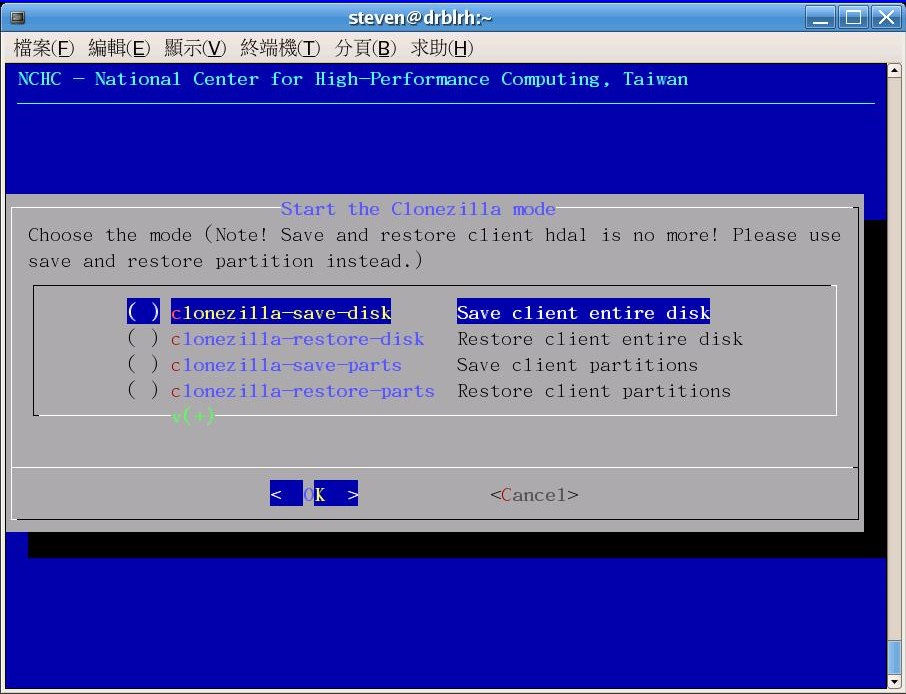
Clonezilla
2009-04-10_172933

NOTE: Screenshot for Clonezilla was taken from the developer’s website.

PING

pingimage

NOTE: Screenshot for PING was taken from the developer’s website.

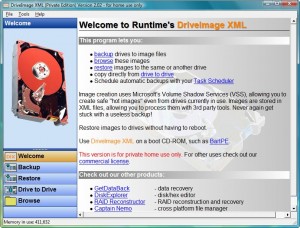
DriveImage XML
2009-04-10_173721

Paragon Drive Backup Express

2009-04-10_184742

Paragon Hard Disk Manager 8.5 SE

paragonharddiskmanager85se

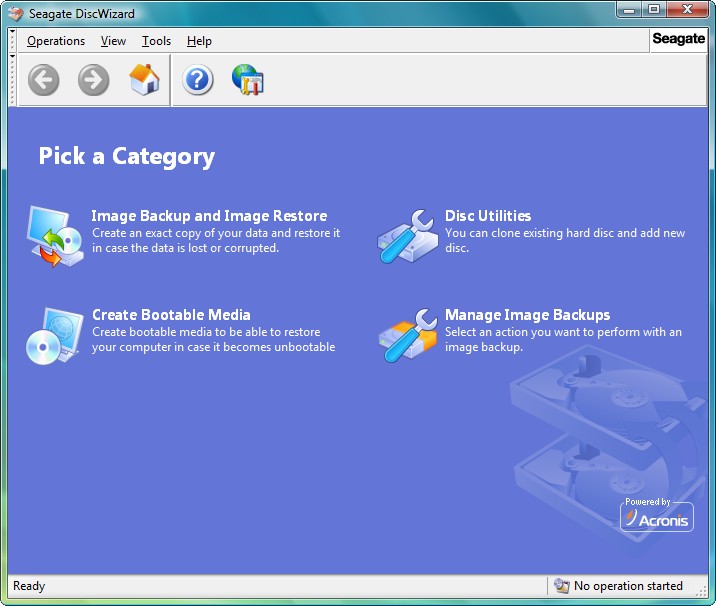
Seagate DiscWizard (by Acronis)

2009-04-10_175429

NOTE: Seagate DiscWizard is for Seagate hard drives only. For those people that don’t know, “Seagate” is a company that manufactures hard drives. You can try to use DiscWizard on a different hard drive brand at your own risk (some people say it works but I cannot verify that).

Acronis True Image WD Edition

Acronis for WD HDDs

NOTE: Acronis True Image WD Edition is for Western Digital hard drives only.For those people that don’t know, “Western Digital” is a company that manufactures hard drives. You can try to use this on a different hard drive brand at your own risk (some people say it works but I cannot verify that).

NOTE2: Seagate DiscWizard and Acronis True Image WD Edition are both the same software but for different hard drive brands. They are both “watered down” versions of Arconis True Image.

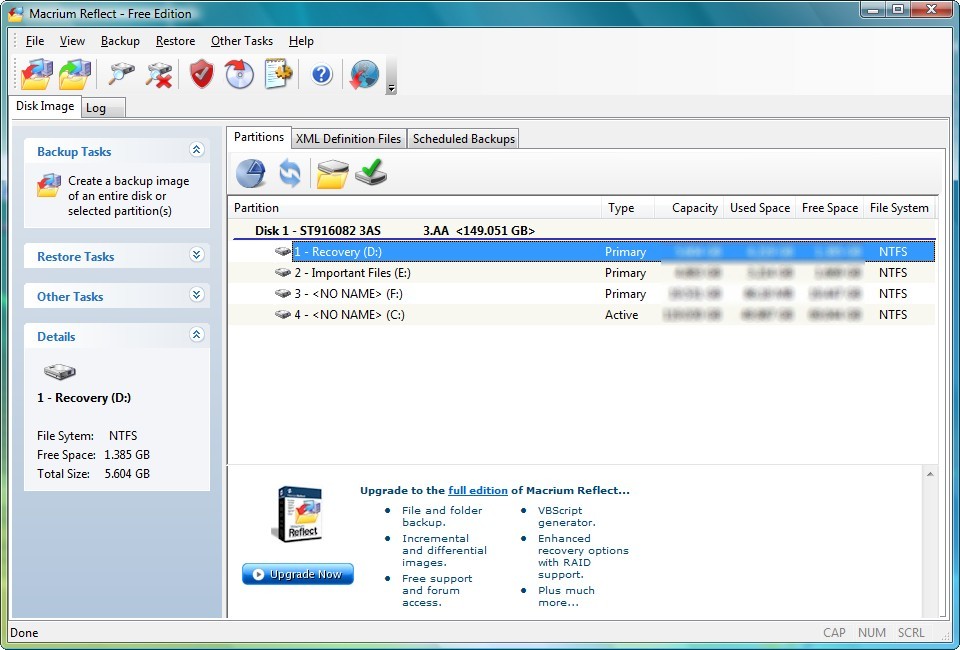
Macrium Reflect (Free Edition)

2009-04-10_175552

Before I start my “analysis” let me say that Paragon Hard Disk Manager 8.5 SE is one of my favorite freebies of all times. However, unfortunately, it does not really impress me in the category of partition/hard drive imaging/backup (it has bunch of other useful features though).

That being said, out of all seven programs, the programs that has the most features are definitely Seagate Disc Wizard and Acronis True Image WD Edition. Both are Acronis powered free tool Seagate and WD offers their customers. The only problem with them is is you must have a Seagate or WD hard drive to use it so it is hardly a freebie for everyone (since not everyone has a Seagate or WD hard drive). Additionally, I noticed that DiscWizard/Acronis True Image WD Edition was slower than I expected for backing up: when trying to create an image of ~44 GB partition, Seagate was giving me an estimate time of 3 hours at the highest compression =O. Safe to say I did not actually test to see if it in fact did take three hours, but if it does, that is very slow.

Okay so to figure out which program (bar DiscWizard and Acronis True Image WD Edition since they are brand specific) is the “best free partition/hard disk backup tool” I was used three criteria:

  • User friendliness.
  • Performance (speed/compression).
  • Ability to create a bootable CD.

Clonezilla and PING both are not very user friendly so those were out the window pretty quickly. DriveImage XML does not have the most user friendly process of creating a bootable CD so that was eliminated also.

That left me with Macrium and the two Paragons. All three of these programs did fairly well in all three of my criteria mentioned above, but Macrium impressed me the most.

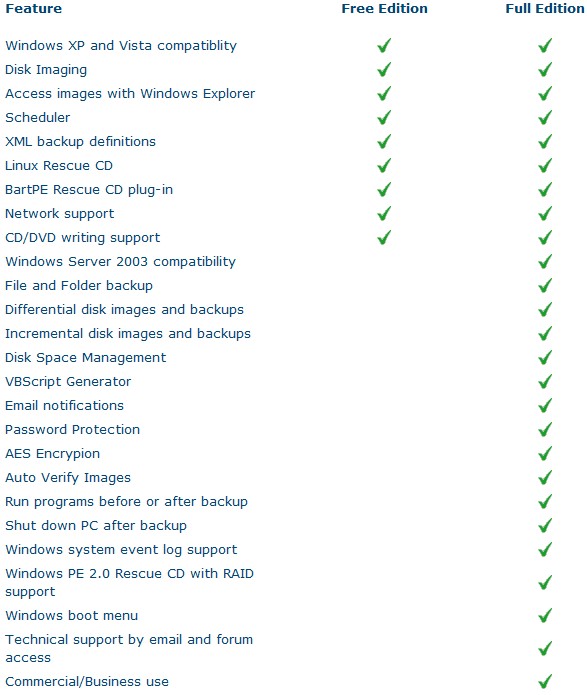
Macrium Reflect is an awesome professional disk imaging software that allows you to create and compress full image backups, to explore each image backup just like you were viewing a folder (useful if you want to only restore a certain file instead of the whole backup), has a scheduler and supports the creation of Linux and BartPE bootable disks.  There are two versions of Macrium, free edition (the one mentioned here) and full version (costs $39.99). Here is a full list of features:

2009-04-10_181641

Creating an image of my C:/ partition (32 GB in size – the one with Windows on it) was a breeze: it took me less than 30 minutes with Macrium set on low priority to create an image backup. I set compression at its highest and the image file size was only 10 GB (the image created by the Paragon software was 14.5 GB). The whole time the backup was running I was using my computer and never once did my computer even hiccup (Macrium supports Microsoft volume shadow copy so you can make a full backup of your Windows partition while using Windows).

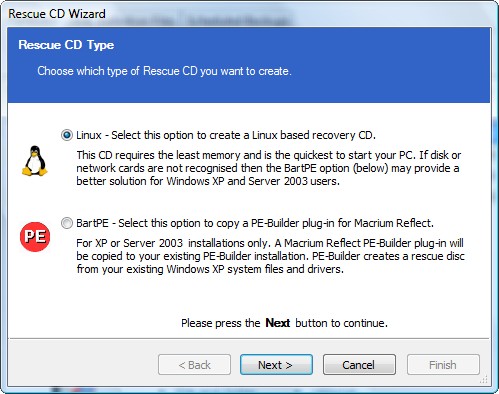
Additionally, as I already mentioned, you can create Linux or BartPE bootable/rescue CDs with Macrium:

2009-04-10_182455

These rescue CDs are helpful if your Windows screws up and you are not able to login. All you do is pop in the bootable disk and run Macrium and restore your Windows installation from previously backed up image files without ever logging into Windows. While Macrium does not have native support to create a bootable USB/flash drive, you can create an ISO of the Linux bootable disk and google how to turn the ISO into a bootable USB/flash drive.

To make everything even better, Macrium Reflect supports both 32 and 64 bit versions of XP and Vista and the size of the installation file you must download is only 27 MB.

Macrium Reflect Free Edition is dotTech.org’s free full partition/hard disk backup software of choice. If this was a formal review I would say “two thumbs up”.

Here are the download links for all the software I mentioned above:

Clonezilla

PING

DriveImage XML

Paragon Drive Backup Express

Paragon Hard Disk Manager 8.5 SE

Seagate DiscWizard

Acronis True Image WD Edition

Macrium Reflect Free Edition

96 Comments »

  1. Jean-Luc Picard April 10, 2009 at 8:07 PM (comment permalink) -

    Ahh, thanks! I have a Seagate HDD (the samsung in my brother’s is crap, and it burned out. Now he has a Seagate!)
    But I don’t know if my new HDD will be a Seagate, so can you tell me if it would restore to non-Seagates?

    1
  2. Ashraf April 10, 2009 at 9:40 PM (comment permalink) -
    Mr. Boss
  3. Saji April 10, 2009 at 10:22 PM (comment permalink) -

    I have been using Seagate DiscWizard with non-Seagate drives with no issues. Just imaged my Maxtor disk to a WD hard disk with no issues.

    3
  4. Frank April 10, 2009 at 10:43 PM (comment permalink) -

    JLP,

    as long as you do a full image of the disk and the disk is the mainboard of the computer stays the same any disk imaging software will restore your image to a new HDD. The HDDs brand does not matter.

    What would /not/ work was if you changed an ATA for a SATA drive, changed the main board or HDD controller etc.
    I even saw restores fail to another revision of the same mainboard.

    If I was you I used the paragon software, because it is upwards compatible. Should you, at any time, need to change mainboard (or the whole computer) you simply buy Drive Backup Personal (39.95$) and you can restore the image you made with DB Express to completely new hardware.

    Frank

    4
  5. Ashraf April 10, 2009 at 11:43 PM (comment permalink) -
    Mr. Boss

    Just noticed: this is my first Tips ‘n Tricks article after over a week :o

    5
  6. NIghtcrawler April 11, 2009 at 12:11 AM (comment permalink) -

    Hi Ashraf,
    Thanks for this review, was looking for a comparison like this for quite some time. For some unfathomable reason, the system restore and shadow copy service does not work, was disabled, it is not even found in services. Admin says something about viruses remaining in shadow copy memory, something… I am not much of a tech person so I don’t understand all that. Do you know if Macrium reflect will work then? I am wary of installing software just to see if it works or not. And thank you for the paragon hard disk manager information. I never knew it was free :). Looking forward to more great things from you, Cheers.

    6
  7. Rob April 11, 2009 at 3:42 AM (comment permalink) -

    Jean-Luc Picard,
    If you can control which brand that you buy, then ONLY buy Seagate.

    Ashraf,
    Thanks for the review.
    I only use Seagate drives (have about 6).
    If you only used Seagate drives, would you use the Seagate DiscWizard, or would you use Macrium Reflect (Free Edition) ?

    When using the Macrium , and you are needing a recovery, do you boot into Macrium’s Recovery CD, and select the image that is within the XP drive (the drive that has the OS) ?
    Also, can the image be copied to (or originally saved to) an external USB drive ? (I have an external 500 GB usb drive). And can the recovery cd see an external usb drive and restore from the image on it ?
    I notice that the Pro version can Auto verify images. Does that mean you are ‘dicing with death’, hoping that the Free image is ok ?

    Thanks again,
    Rob

    7
  8. Rob April 11, 2009 at 3:45 AM (comment permalink) -

    PS
    I guess restoring an image to another PC is not available ?
    I assume restoring to another drive (within the same pc), is available ?

    Rob

    8
  9. Frank April 11, 2009 at 4:01 AM (comment permalink) -

    Rob,

    you can restore /anything/ /everywhere/. No restriction on any hardware component (drive, MoBo, memory, processor, whatsoever).
    Just if you restore the system partition (the one where \Windows or \WinNT resides on) to different hardware and try to boot from that restored system partition you will most likely get a BSOD “inaccessible boot device” when booting up. See my above post about Paragon Software.

    Frank

    9
  10. David Roper April 11, 2009 at 7:12 AM (comment permalink) -

    Super review and super suggestions. Thanks again.

    10
  11. Jeanjean April 11, 2009 at 11:22 AM (comment permalink) -

    I use DriveImage XML and I created a bootable CD “UBCD4WIN” accordance with instructions from their site (I think !).
    I got a backup-image of 19 GB for a partition c: 44.4 GB.
    I will thus test Macrium Reflect as soon as possible Thank yyyyou !

    11
  12. FR April 11, 2009 at 12:44 PM (comment permalink) -

    @ASHRAF
    Let me express my appreciation for your review.
    One of the problems I find with “Imaging” applications (read Acronis here), is corrupt images. When the user conducted the backup originally, the software verified the image and said it was fine, however, when the user is ready to “restore”, the software gives the error message that the original image is corrupt.
    If this happens when the user is in the agony of a disaster and depended on that image, then he/she is in serious trouble.
    I will try your “thumbs up” (you have never led me astray in the past) and do a restore to satisfy curiosity.
    Again, thanks for your review.
    Cheers

    12
  13. sunkumarspace April 12, 2009 at 2:18 AM (comment permalink) -

    amriuculum reflect good in gui and also has speed but one think i perosonally experienced it has fuile system integration problem and also the image back up willnot compress while paragon express has compress image backup so it is far better and also should be used

    13
  14. S.Jaafar Al-Mosawi April 12, 2009 at 2:58 AM (comment permalink) -

    Hi Ashraf.
    I’m looking for a free backup software that lets me make an image and store it on the harddisk while putting the image restore option at the boot screen just as what Acronis True Image does.\

    14
  15. Rafael Vidurrizaga April 12, 2009 at 10:44 AM (comment permalink) -

    Your site is a very amazing one and I really appreciate your comments and reviews.- I’ve just found your site a few days ago and I am learning a lot of it.
    I have a PC, Windows XP Home Edition SP3, Pentium 4, 2.40 Ghz, 768 Mb RAM, 80Gb HDD IDE Seagate.
    Can you please tell me:
    1.- if Seagate DiszWizard and Macrium are for IDE HDD ?
    2.- Can I make Disk Image (with Seagate, or Macrium or the two Paragon programs) using DVD’s as target?
    Thank you very much for your comment.
    Rafael Vidurrizaga
    from Lima, Peru, South America.

    P.S.- Please sorry for my english. My mother language is spanish.

    15
  16. Rafael Vidurrizaga April 12, 2009 at 10:54 AM (comment permalink) -

    Hi Ashraf: I forgot to ask you if is there any difference between Paragon Drive Backup 9.0 Express and Paragon Drive Backup 9 Personal.
    Thanks again.
    Rafael Vidurrizaga.

    16
  17. Ashraf April 12, 2009 at 12:56 PM (comment permalink) -
    Mr. Boss

    Paragon Drive Backup 9 Personal has more features. I am not sure exactly which features off the top of my head but I am sure if you looked on their website it would tell you.

    17
  18. Ashraf April 12, 2009 at 12:58 PM (comment permalink) -
    Mr. Boss

    1) I am not sure – hardware really isn’t my thing. However I don’t see why it shouldn’t.
    2) Yes you can burn your backup onto DVDs.

    18
  19. Ashraf April 12, 2009 at 1:00 PM (comment permalink) -
    Mr. Boss

    I have never used Acronis so I am not 100% sure what you are talking about. However from what I understand, it seems the feature you want is something you will only find in paid commercial software; usually free backup software don’t have that many “bells and whistles” (I am talking about the restore option at boot screen part).

    19
  20. Rafael Vidurrizaga April 12, 2009 at 3:50 PM (comment permalink) -

    To Ashraf:
    Thank you very much for your answers. You are very kind.
    Rafael

    20
  21. Steve April 14, 2009 at 7:23 PM (comment permalink) -

    Hi Ashraf,

    Thank you again, for your tip.

    System:
    Biostar Mother board
    AMD 1.8Mhz
    2GB ram
    XPPro SP3
    CD/DVD burner

    Installed Macrium Reflect free without a hitch.
    Created 9.953GB Image straight to DVD
    High compression
    High priority
    Used 1 DVD plus 1.1MB of second DVD
    Time 18′:02″, includes verification

    In retrospect, I should have used medium compression (as recommended)
    I didn’t see it, but I suspect the program may figure compression out, after it knows what type medium the user will use.
    I Dislike using a DVD for 1.1MB :(

    The only “con” if it is one, was when It asked me for the second disk. After I clicked okay it took awhile to start back up, then burned at 12KBs, but fortunately went back to 93KBs.
    Methinks the program, and burner took that time to re-sync.

    Total time could be reduced by 5′…I was a little tardy in renewing the DVD.

    Regards…..Steve

    21
  22. Ashraf April 14, 2009 at 7:25 PM (comment permalink) -
    Mr. Boss

    Glad it all worked out for you Steve… except the DVD part :P

    22
  23. bkca April 17, 2009 at 8:02 AM (comment permalink) -

    Hi All,

    you can register for a free copy of Paragon Drive Backup 9.0 Personal SE at

    [Remove by Ashraf. Reason: Bkca thanks for posting about this but this offer is not for the general public; it is only for ComputerActive Magazine subscribers. I can't allow you to post it (ethically and the fact that VNUNET gets pissed when people leech off their magazine freebies).]

    23
  24. Jeanjean April 17, 2009 at 8:42 AM (comment permalink) -

    Hello Ashraf,

    I tested Macrium Reflect and compared it with Drive Image XML.
    Reflect found 22 Gb used, while DriveImage found 41 Gb!?
    No wonder that the backup completed with Reflect (14.7 Gb) is smaller than that achieved with DIXml (19 Gb).
    Can You explain this fact ?

    24
  25. Ashraf April 17, 2009 at 9:54 AM (comment permalink) -
    Mr. Boss

    Hmm? What does My Computer tell you? 22 GB or 41 GB used? It may just be a difference in settings. For example you may have one doing a backup of just your used space and the other of your used and unused space.

    25

Leave A Response »