
 Email article
Update: This promo seems to be over.
For the longest time I have been telling people about how you can grab TuneUp Utilities 2007 for free. Well now today you can upgrade to 2008 for free also! Andi, my German friend who informed me about this offer, has told me this is a today only offer so be sure to upgrade today. It seems the offer is still available =).
Here are the changes between TuneUp Utilities 2007 and TuneUp Utilities 2008:
New Features in TuneUp Utilities 2008
div.hcp1 { position:relative; } table.hcp2 { x-cell-content-align:top; border-spacing:0px; } tr.hcp3 { x-cell-content-align:top; } td.hcp4 { padding-right:10px; padding-left:10px; x-cell-content-align:center; } –>
Compared to TuneUp Utilities 2007, TuneUp Utilities 2008 features a number of substantial upgrades and new features. Once again, our goal for the update was to implement the requests of our users in a simple and easy way. The most important changes are listed below.
New module: “TuneUp Drive Defrag”
TuneUp Utilities 2008 now includes the brand new TuneUp Drive Defrag module, one of the most powerful modules in the Increase performance category. TuneUp Drive Defrag performs a thorough analysis of your disks to determine whether they are highly fragmented. Highly fragmented disks can slow down your system performance, as the files needed by Windows must first be reconstructed from individual pieces (fragments) before they can be opened.
TuneUp Drive Defrag puts the scattered fragments on your hard disk back together to speed up your system substantially. The files are also reorganized in an intelligent way so that Windows and frequently used programs or games will launch substantially faster. Finally, the free space on your disks is consolidated to prevent new fragments from being created for as long as possible. This comprehensive optimization may take a while but is worth it – just give it a try!
Improved TuneUp 1-Click Maintenance
TuneUp 1-Click Maintenance in TuneUp Utilities 2008 allows you to perform even more maintenance functions on your system with a single click of the mouse. You can also run this important function directly from the Start Center. Additional information about TuneUp 1-Click Maintenance is also shown there. In the new software version, defragmentation of your hard disks is now included in TuneUp 1-Click Maintenance. While this is being done in the background, you can minimize TuneUp 1-Click Maintenance and continue working with your computer without any problems.
New Start Center – even easier to use
The TuneUp Utilities Start Center has been completely redesigned to make it more visually appealing and modern. But that’s not all. The new software version now lets users navigate to program modules much more quickly. The completely revised navigation system in the TuneUp Utilities 2008 Start Center has been made even more intuitive. The left side of the window now shows potential changes that can be made. There are now six categories to choose from: Increase performance, Free up disk space, Maintain Windows, Solve problems, Customize Windows and Additional tools. After a category has been selected, the names of the corresponding modules will be displayed on the right side of the window.
The latest version of the software now includes links to specific functions within the modules. The program also displays links to related modules along the bottom edge of every category page (“See also“).
New area: “Free up disk space”
Even the largest hard disk fills up at some point. With today’s Internet connections and the constantly growing range of downloads, this happens more quickly than most users would like it to. That’s why TuneUp Utilities 2008 now offers even more features to find and delete unnecessary files.
In the Free up disk space area of the Start Center, TuneUp Utilities 2008 now gives you an overview of the amount of space that can be saved on each system drive. This function replaces and expands upon the “TuneUp DiskCleaner” module, which was used in earlier versions of TuneUp Utilities. In addition to the file types that were identified by the older program versions, the program now finds error reporting files, thumbnail files (Windows, ACDSee and Google Picasa formats), restore points, Windows Update backups and the Google Earth cache. The “Windows functions” category, also new, can help you to quickly free up gigabytes of additional disk space.
New module: “TuneUp Repair Wizard”
The TuneUp Repair Wizard can be opened directly from the Start Center in the new category Solve problems. This recognizes common computer or display problems and can quickly resolve them.
TuneUp System Control with even more tweaks for Vista
TuneUp System Control gives you more than 400 options for customizing Windows and program settings. The new version also includes additional functions for the brand new Windows Vista operating system.
How to get TuneUp Utilities 2008? Well it is a Chip.de offer but it is open to the general public (click here to view the original offer). The download from Chip.de contains the installer for TuneUp 2008 and the registration key (in a text file) to register it. The only problem is if you download TuneUp Utilities 2008 from Chip.de it will be in German. Therefore I have decided to post an alternative way of how to get it in English. People who are regulars to my blog know that I usually don’t go around and posting alternative methods/serial keys for freebies, it is against my “run-a-clean-blog” policy, but I know many dotTech readers are on 56k and having to download two 13 MB files when you can only download one is not an option. That being said, to get TuneUp Utilities 2008 in English:
- Visit Chip.de at least once as a symbolic gesture thanking the magazine for the freebie.
- Download TuneUp Utilities 2008 from Tune-up.com: click here.
- If the above link is not working or it is slow, you can try the alternative download link: click here.
NOTE: You are downloading the English version from the links I provided; it will not be in German.
- Install TuneUp Utilites and run it.
- You should be prompted to either use the trial or enter a registration code.
- Register TuneUp Utilities 2008 with the following serial code (this serial code comes in the download from Chip.de):
- Product Key: [REMOVED]
- Your registration name can be anything.
- Enjoy.
Thanks Andi for informing dotTech about this awesome freebie!
***Update***
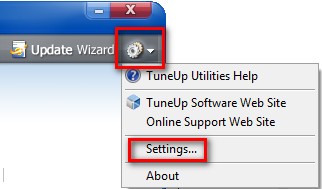
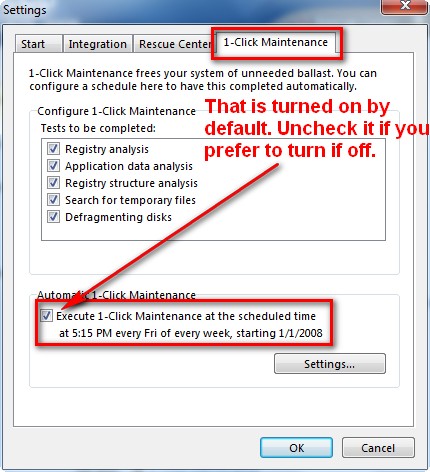
It seems by default 1-click Maintenance is set to automatically occur at 5:15 PM every Friday. If you do not want this to happen (like I don’t) be sure to turn it off:
Thanks Janet for pointing this out!
