
 Email article
 So. How are you guys doing today? Great I hope. Guess what? What was that? Sorry I did not hear you, can you repeat it one last time? …No the moon is not made of cheese – but nice try. Don’t worry I have something better to tell you about then a cheesy moon: another dotTech.org exclusive freebie =). Yes you heard (read) me correctly; with the ever gaining popularity of dotTech.org (thank you all for being constant visitors – long live tasty pizza dotTech.org) developers are more and more willing to promote their software on dT. Last time it was software from YL-Computing; this time it is software from EAST Technologies.
I am sure many of you have heard of the name “East-Tec” before; I am sure many of you have even used their software before. For the people who fall into either of the previous categories there is no need for explanation: you know first hand the top notch quality of East-Tec software. If you have never heard of East-Tec before nor experienced their software no worries; you can check them out for yourself now: today I am here to tell you about dotTech exclusive freebie of full free unlimited license to East-Tec Eraser 2008!
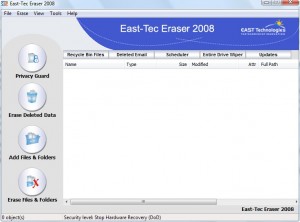
East-Tec Eraser is a program that allows you to securely delete files, data and user activity from your computer. You see usually when you delete something on your computer, it is not truly “deleted” in the sense that there are ways for the data to be retrieved. East-Tec Eraser allows you to delete files/data/user activity using secure erasing methods that make it near impossible for others to retrieve what you deleted.
The best way I would describe East-Tec Eraser is CCleaner + Heidi’s Eraser into one program. With East-Tec Eraser not only can you securely delete individual files and folders but you can also protect your privacy by securely deleting your Windows (applications/programs, email, P2P, etc.) data and Internet (almost all browsers are supported – including Chrome and Opera) activity. To help you with the former task, East-Tec Eraser has an easy to use interface where you can add multiple files and folders at once to delete; you also have the ability to add entries in your right click context menu. To help you with the later task, East-Tec Eraser has a built in application detector that will detect all the possible applications that it can erase the activity history from automatically; if East-Tec Eraser does not find a particular application that you use, you have the ability to add custom programs (by designating files, folders or registry entries) to delete the history from.
East-Tec Eraser boasts the ability to erase anything using methods from a normal erase to a Gutmann wipe (35 pass) and everything in between, including methods that match and surpass US Department of Defense 5220.22-M standards. Heck if you don’t like any pre-configured secure erasing methods you have the ability to create/define your own also (if you custom created method to securely erase files/data becomes popular and you become rich and famous, I expect royalties).
Additionally, you can use East-Tec to securely erase files/data/user activity that you previously deleted or use the built in disk wiper to securely wipe any hard drives (internal or external – including USB/flash drives) or select partitions.
There are still a few features that I have not even mentioned but I think you get the point: East-Tec Eraser kicks ***. I am sure you just want me to shutup and tell you how to get East-Tec Eraser 2008. To get East-Tec Eraser 2008 (full free unlimited license):
Supported OS: Windows Vista, XP, Server 2003, 2000, NT, ME, and 98.
Windows 7 is not officially supported in East-Tec Eraser 2008 but it seems to work on Win7.
- Download East-Tec Eraser 2008 by clicking here.
Note: This is a dotTech.org exclusive offer. You may not copy, paste, or reprint this download link or upload the installation file anywhere else including private or public forums, blogs, file hosting services, etc. If you want to spread information about this offer, you may link to it by providing a permalink to your audience.
- Install East-Tec Eraser 2008 and run it. ***It is recommended for Windows Vista users to install as Administrator (and run as Administrator if you have any permission errors).
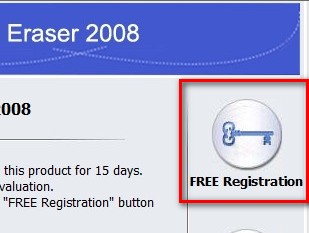
- You should see a “Reminder” window. On the window there is a “Free Registration” button. Click it:
- The registration page will open in your browser window. Fill out the proper information (registration name + email) and hit “Submit”.
Note: This is a dotTech.org exclusive offer. You may not copy, paste, or reprint the registration page link/URL anywhere else including private or public forums, blogs, etc. If you want to spread information about this offer, you may link to it by providing a permalink to your audience.
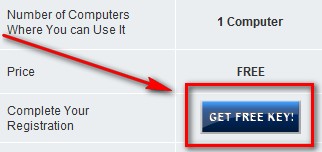
- Go check the inbox of the email you entered. You should have an email from “EAST Technologies Support <support@east-tec.com>” with the subject “Confirmation required for your dotTech.org registration of East-Tec Eraser 2008”. If you can’t find the email be sure to check your junk/spam box. In the email there is a link. Click on/visit the link. You will be brought to a page that gives you the option to either upgrade to East-Tec Eraser 2009 for $15 or grab the registration key for East-Tec Eraser 2008 for free. To grab the free key, scroll down and click on “Get Free Key!”:
- The next page will display your registration name and registration key:

Copy the key.
***Note: If you ever lose the key, just go back to the email you were sent and click on the link again to get the key back.
- If you left East-Tec Eraser open, go back to it. If you did not, run it. There should be “Enter Key…” at the bottom left:
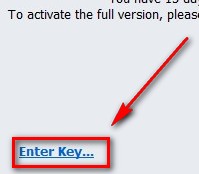
Click on it, enter your registration name and registration key, hit “OK” and you are good to go.
- Enjoy.
Grats. If you have any problems please post below – I will try to help.
P.S. Similar to WinUtilities 6.2, East-Tec Eraser 2008 is not the latest version; 2009 is the latest version. If you enjoy East-Tec Eraser 2008 and find it to be a useful program, you can purchase East-Tec Eraser 2009 for $15 (normal price is $50 so you are getting a $35 discount). For literally pocket change ($15) you will get the latest version of an excellent software and 2 years of free updates/upgrades (in other words you will be able to download East-Tec Eraser 2010 and 2011 over the course of two years – keep in mind that the full free version of East-Tec Eraser 2008 offered to you here does not include free upgrades). And for people wondering: no dotTech is not receiving any commission what-so-ever from East-Tec.
