
 Email article
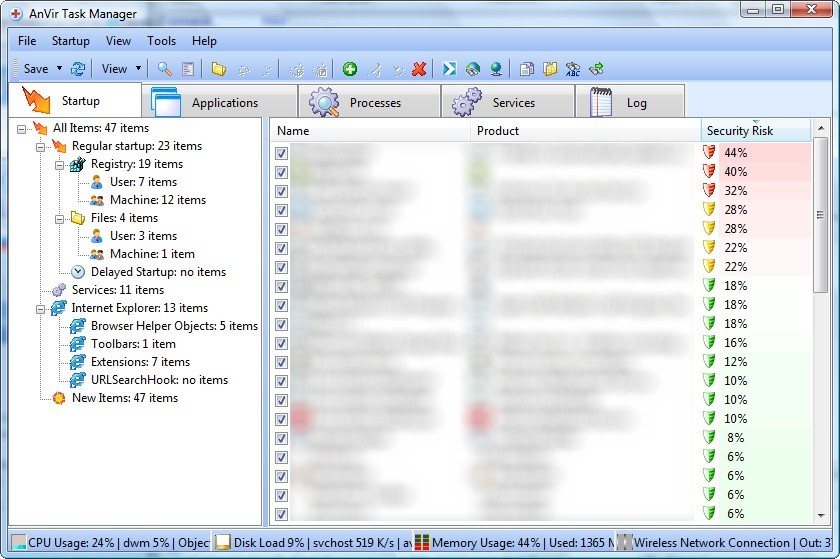 UPDATE1: This is post is not about the freeware version of AnVir Task Manager but rather the shareware version which you would normally have to $39.95 pay for.
UPDATE2: If you have Kaspersky you may get a warning when trying to install AnVir. As far as I know, it is a false positive – AnVir is 100% clean. If anyone has any information that says otherwise, please let me know.
UPDATE3: It seems that the AnVir Task Manager’s installer now comes with offer(s) to install third party software. Be sure to uncheck those software(s) during installation unless you want them be to installed. You don’t need the third party software for AnVir Task Manager to work properly.
dotTech is batting a 3/3 and with an average of .AWESOME. Okay fine, fine: I admit – that was my lame attempt at a baseball related joke. Give me a break… I have not followed baseball since Micheal Jordan played for the Chicago Yankees. The point of my lame joke is to let you know there is another dotTech Exclusive freebie on the horizon and this is another winner: AnVir Task Manager. In fact AnVir Task Manager is such a good program that it made my pick of top ten giveaways.
The best way I can describe AnVir Task Manager is a “buffed up” Windows task manager that supplements your anti-malware software. AnVir Task Manager is a program that monitors and analyzes your processes, services and startup programs. In addition to doing all the typical tasks accomplished by Windows task manager (i.e. close a service/process, monitor computer resource usage, etc.), AnVir balances CPU usage and tells you how much of a “security risk” each process, service or startup program is. AnVir also includes a Windows XP/Vista tweaker which lets you tweak many Windows settings. AnVir Task Manager includes tons of features – too many to describe in this little post. Here is a short description by the developer on what AnVir Task Manager can do:
AnVir Task Manager gives full information about process, services, TCP/UPD connections, drivers, DLLs. It has descriptions for 70 000+ startup programs and services. It detects new and unknown Trojans using security analysis and alerts on new startups. It can speed up boot time (Delayed Startup), balance CPU usage, optimize memory. Tray icons shows status of disk, network, memory, CPU. Tray menu keeps last launched programs and folders. Also users can hide windows to system tray, set windows ‘always on top’, and change windows transparency.
Monitor your system and replace Windows Task Manager
- Information about processes, startup programs, services, internet connections, drivers
- Integrated database with Descriptions for 70 000+ startup programs, Internet Explorer toolbars and services
- Icons in the tray that indicate CPU, disk, network, memory and battery
Get rid of viruses, Trojans and spyware that your antivirus missed
- Security risk rating for each active process and startup program
- Get notification when any program tries to add itself to startup
Enhance and tune up XP or Vista
- Tweaker that gives access to hundreds of XP / Vista settings
- Click on the title of any application to minimize window to system tray
- List of recently used folders in Open / Save dialogs
- Drive’s free space as a colored horizontal bar in Windows ‘My Computer’
Speed up your PC and Windows startup
- “Delayed Startup” lets you set up any startup program to run few minutes later after Windows startup
- Run startup programs minimized to system tray, or as a floating icon
- Balance CPU usage
If you would like to know more about AnVir Task Manager you can read my review of AnVir Task Manager v5.4.1 or visit the developer’s homepage for more information but I can tell you two of my favorite features of AnVir Task Manager is the ability to lower the processing priority of programs hogging your CPU and the ability to deal with memory leaking programs.
Now get this: today’s offering of free AnVir Task Manager is not of an older version. You are getting v5.6 of AnVir Task Manager – the latest version which just came out on May 2nd 2009. Also, this is not a time limited offer so you can install, uninstall, reinstall, etc. as you please and you will receive free updates until 10/1/2009. Cool, huh?
Update: When this promotion was originally available, back in May ’09, you were getting v5.6 (the latest version at the time). However since then AnVir Task Manager has been updated a few times and the latest version is v6.3.1 (as of November 26, 2010). This offer for free AnVir Task Manager is still available even with the latest version; the registration information you find below still works on the latest v6.3.1!
To get AnVir Task Manager:
- Download AnVir Task Manager (click here).
- Install and run AnVir Task Manager. When prompted to enter registration information enter the following:
- Name: dotTech.org
- Key: TN2M-HQLZPN-NCWBSH-YU9W41-14GB2M-KNYZ5P-LRCZ1
Note: This is a dotTech.org exclusive offer. You may not copy, paste, or reprint this registration name or key anywhere else including private or public forums, blogs, etc. nor can you mirror the download. If you want to spread information about this offer, you may link to it by providing a permalink to your audience.
If you have any problems getting AnVir Task Manager post below – I will try to help.
Lastly, I would like to point out if you enjoy AnVir Task Manager and agree it is a great software, consider upgrading to AnVir Task Manager Pro or AnVir Security Suite. You can learn of the feature differences between Task Manager, Task Manager Pro, and Security Suite from here. If you do plan on upgrading, you can get 20% off by using the coupon code dotTech. Don’t worry – the coupon is exclusively for your benefit because dotTech is not earning any commission what so ever.
Enjoy!
