dotTech Exclusive: Free AnVir Task Manager!

May 16, 2009 167 Email article | Print article

2009-05-16_135803UPDATE1: This is post is not about the freeware version of AnVir Task Manager but rather the shareware version which you would normally have to $39.95 pay for.

UPDATE2: If you have Kaspersky you may get a warning when trying to install AnVir. As far as I know, it is a false positive – AnVir is 100% clean. If anyone has any information that says otherwise, please let me know.

UPDATE3: It seems that the AnVir Task Manager’s installer now comes with offer(s) to install third party software. Be sure to uncheck those software(s) during installation unless you want them be to installed. You don’t need the third party software for AnVir Task Manager to work properly.

dotTech is batting a 3/3 and with an average of .AWESOME. Okay fine, fine: I admit – that was my lame attempt at a baseball related joke. Give me a break… I have not followed baseball since Micheal Jordan played for the Chicago Yankees. The point of my lame joke is to let you know there is another dotTech Exclusive freebie on the horizon and this is another winner: AnVir Task Manager. In fact AnVir Task Manager is such a good program that it made my pick of top ten giveaways.

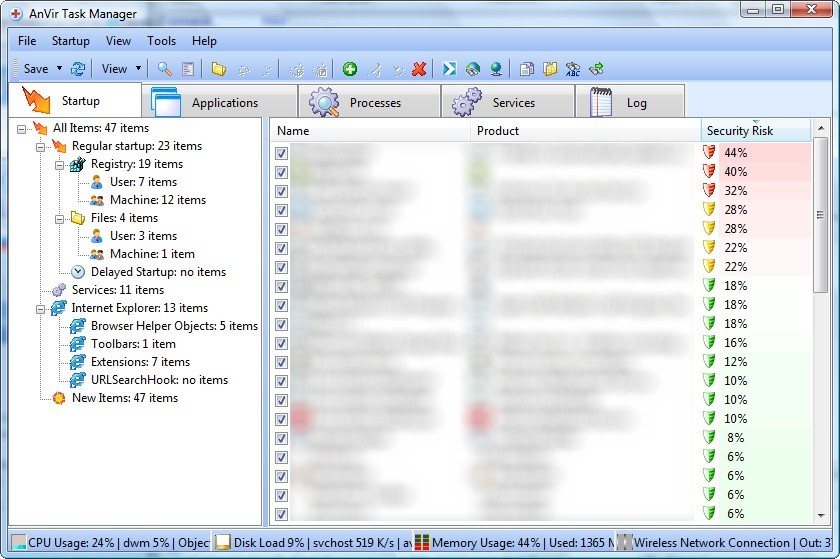
The best way I can describe AnVir Task Manager is a “buffed up” Windows task manager that supplements your anti-malware software. AnVir Task Manager is a program that monitors and analyzes your processes, services and startup programs. In addition to doing all the typical tasks accomplished by Windows task manager (i.e. close a service/process, monitor computer resource usage, etc.), AnVir balances CPU usage and tells you how much of a “security risk” each process, service or startup program is. AnVir also includes a Windows XP/Vista tweaker which lets you tweak many Windows settings. AnVir Task Manager includes tons of features – too many to describe in this little post. Here is a short description by the developer on what AnVir Task Manager can do:

AnVir Task Manager gives full information about process, services, TCP/UPD connections, drivers, DLLs. It has descriptions for 70 000+ startup programs and services. It detects new and unknown Trojans using security analysis and alerts on new startups. It can speed up boot time (Delayed Startup), balance CPU usage, optimize memory. Tray icons shows status of disk, network, memory, CPU. Tray menu keeps last launched programs and folders. Also users can hide windows to system tray, set windows ‘always on top’, and change windows transparency.

Monitor your system and replace Windows Task Manager

  • Information about processes, startup programs, services, internet connections, drivers
  • Integrated database with Descriptions for 70 000+ startup programs, Internet Explorer toolbars and services
  • Icons in the tray that indicate CPU, disk, network, memory and battery

Get rid of viruses, Trojans and spyware that your antivirus missed

  • Security risk rating for each active process and startup program
  • Get notification when any program tries to add itself to startup

Enhance and tune up XP or Vista

  • Tweaker that gives access to hundreds of XP / Vista settings
  • Click on the title of any application to minimize window to system tray
  • List of recently used folders in Open / Save dialogs
  • Drive’s free space as a colored horizontal bar in Windows ‘My Computer’

Speed up your PC and Windows startup

  • “Delayed Startup” lets you set up any startup program to run few minutes later after Windows startup
  • Run startup programs minimized to system tray, or as a floating icon
  • Balance CPU usage

If you would like to know more about AnVir Task Manager you can read my review of AnVir Task Manager v5.4.1 or visit the developer’s homepage for more information but I can tell you two of my favorite features of AnVir Task Manager is the ability to lower the processing priority of programs hogging your CPU and the ability to deal with memory leaking programs.

Now get this: today’s offering of free AnVir Task Manager is not of an older version. You are getting v5.6 of AnVir Task Manager – the latest version which just came out on May 2nd 2009. Also, this is not a time limited offer so you can install, uninstall, reinstall, etc. as you please and you will receive free updates until 10/1/2009. Cool, huh?

Update: When this promotion was originally available, back in May ’09, you were getting v5.6 (the latest version at the time). However since then AnVir Task Manager has been updated a few times and the latest version is v6.3.1 (as of November 26, 2010). This offer for free AnVir Task Manager is still available even with the latest version; the registration information you find below still works on the latest v6.3.1!

To get AnVir Task Manager:

  • Download AnVir Task Manager (click here).
  • Install and run AnVir Task Manager. When prompted to enter registration information enter the following:
    • Name: dotTech.org
    • Key: TN2M-HQLZPN-NCWBSH-YU9W41-14GB2M-KNYZ5P-LRCZ1

Note: This is a dotTech.org exclusive offer. You may not copy, paste, or reprint this registration name or key anywhere else including private or public forums, blogs, etc. nor can you mirror the download. If you want to spread information about this offer, you may link to it by providing a permalink to your audience.

If you have any problems getting AnVir Task Manager post below – I will try to help.

Lastly, I would like to point out if you enjoy AnVir Task Manager and agree it is a great software, consider upgrading to AnVir Task Manager Pro or AnVir Security Suite. You can learn of the feature differences between Task Manager, Task Manager Pro, and Security Suite from here. If you do plan on upgrading, you can get 20% off by using the coupon code dotTech. Don’t worry – the coupon is exclusively for your benefit because dotTech is not earning any commission what so ever.

Enjoy!

167 Comments »

  1. Athlonite May 17, 2009 at 11:27 PM (comment permalink) -

    Hey Ashraf !!

    I have been a fan of your reviews for a while and reading quietly in the background.Now , I must ask a question. Could it be possible that the Already Checked boxes for the Yahoo Toolbar and the Dealio Toolbar be the culprit in the false positives coming from Kasperski and other AV programs?

    I have installed and registered the version you posted the license for with No problems at all. Avira AntiVir did not detect any infected files from the downloaded installer and neither did MalwareBytes Anti-Malware.

    I am running Vista SP1 with a dual core @ 2Gigs with 3Gigs of ram and AnVir doesn’t take more than 9Mb of ram with a CPU rate of 3%. I also have WinPatrol Plus and haven’t experienced any conflicts so, all in all, this is a keeper.

    Those toolbars should Not be pre-checked. This doesn’t look good and you should have the choice of checking them on if you want them. If you look at the scorecard for the Dealio Toolbar on the W.O.T site, you will see why this add-on is probably tagged as spyware and spam.
    Web of Trust scorecard : http://www.mywot.com/en/scorecard/dealio.com .

    I just hope you can continue your Excellent work and reviews. I am always looking forward to reading you and your e-mails.

    Athlonite.

    51
  2. Ashraf May 17, 2009 at 11:32 PM (comment permalink) -
    Mr. Boss

    @Athlonite: No I don’t think it is the toolbars that cause false positives because I remember I got Kaspersky false positives back in Decemember of last year and I can tell you for sure I never install any toolbars. However I do agree that the toolbars should not be pre-checked since this is a commercial app but nonetheless everyone does it so we can’t really blame one specific developer for all the evil in the world. ;)

    52
  3. Aiman May 18, 2009 at 2:06 AM (comment permalink) -

    Asraf,

    Few weeks ago, you have recommended Process Tamer. Can AnVir Task Manager replaces Process Tames to control CPU usage.

    53
  4. Janet Berg May 18, 2009 at 3:13 AM (comment permalink) -

    @Aiman:

    Ashraf,

    I was going to ask the same question…If we have the new AnVir, is there any reason to keep Process Tamer? I don’t keep them on all the time–just open when needed for something specific or if my computer is unusually slow to see who the hog is. Just a few days ago, my system was VEEEEEEERY slow, and AnVir discovered an OLD Acrobat Reader shared-Adobe-Update file ( I totally uninstalled Acrobat Reader ages ago!) was using 80-100% CPU!!!! At present I have both AnVir Task Manager and Process Tamer on my QuickLaunch bar and would like to get rid of the latter if it doesn’t add anything to the former….

    Many thanks,
    Janet

    54
  5. Bob May 18, 2009 at 4:20 AM (comment permalink) -

    Great freebie thank you Ashraf

    It seems like the server for downloading is sssslllllloooooowwwwww

    Is there any chance some good person could upload a copy to rapidshare or ifile for the rest of us to get a copy or would that breach something?

    55
  6. Ashraf May 18, 2009 at 9:07 AM (comment permalink) -
    Mr. Boss

    @Aiman and @Janet Berg: With AnVir you can monitor and control CPU usage of processes/programs but the advantage of Process Tamer is that PT automatically lowers CPU usage while you have to do it manually with AnVir. Someone correct me if I am wrong.

    56
  7. Janet Berg May 18, 2009 at 9:53 AM (comment permalink) -

    @Ashraf:

    R-click on a process in AnVir. Then:
    Set Priority > Autochange Priority

    Janet

    57
  8. Bob May 18, 2009 at 1:20 PM (comment permalink) -

    I managed to get a download from the original server. If anyone is having problems I have uploaded it to

    [Remove by Ashraf. Reason: Sorry Bob but the developer does not want it hosted on other websites - I asked to host a mirror on dotTech. Anyone that has problems can email me.]

    I hope this may help a fellow user

    58
  9. Ashraf May 18, 2009 at 1:40 PM (comment permalink) -
    Mr. Boss

    @Janet Berg: That feature does not do what PT does. PT monitors all your processes and lowers the priority of any process to low if it gets above a designated threshold. The feature you are talking about with AnVir allows you to set the priority of certain processes that you designate to a certain priority – it does not lower the priority of any process if it gets above XXX threshold.

    It doesn’t even matter though because that feature is not available in this version. That is only for Task Manager Pro and Security Suite.

    59
  10. Aiman May 18, 2009 at 5:16 PM (comment permalink) -

    @Ashraf: I went to developer website to find detail information on ‘balance CPU usage’. Below is what they said ; (you can activate this function when you click ‘option’ and then ‘performance’)

    Balance CPU Utilization

    Reduce the priority (limit the CPU usage) of background processes that eat a lot of CPU, temporary, until CPU usage returns to a reasonable level -Turn this feature On or Off

    Total system wide CPU usage when start to limit CPU usage of processes – When CPU usage becomes greater than specified value, AnVir Task Manager reduces the priority of all processes that run in foreground and use a lot of CPU.

    Maximum allowed CPU usage per a process before reduce its priority – If a process uses less CPU than specified value, its priority will not be reduced.

    CPU usage of a process before increase its priority back – When process with reduced priority finished its activity and it uses less CPU than specified value, its priority will be increased back.

    Show notification in system tray when priority changed: never, first time only, or each time – When show notification about changing of processes priorit.

    60
  11. Ashraf May 18, 2009 at 5:19 PM (comment permalink) -
    Mr. Boss

    @Aiman: Ohhhh now I see. Yes indeed it does have this feature. Can’t believe I missed it. AnVir just became an even better software in my eyes. No need for PT!

    61
  12. Howard Bartle May 19, 2009 at 2:42 AM (comment permalink) -

    Hi Ashraf,
    Thanks for this ,but I have tried anumber of times but cannot get it to register. It shows as registered to giveawayoftheday when i enter your register details it shows an error wrong details
    regards Howard

    62
  13. Ashraf May 19, 2009 at 2:45 AM (comment permalink) -
    Mr. Boss

    @Howard Bartle: Well people are reporting that you can upgrade the GOTD version to the latest version anyway so it shouldn’t matter; in the end you should have v5.6 regardless of if you are registered to GOTD or w/ my name/key.

    63
  14. Em May 19, 2009 at 8:36 AM (comment permalink) -

    Thank you for this! I’ve used the GAOTD one before, loved it, lost it and then had to settle with the free one. This is a great software! =)

    64
  15. Robert May 19, 2009 at 7:33 PM (comment permalink) -

    I didn’t update my copy of AnVir last time it was offered on GAOTD, figured it was working fine as it was, didn’t want to mess with it, but this has served as a good impetus for me to go ahead and get current with the program.

    I absolutely love this program, always keep it running, as it often seems to come in handy for one thing or another. My favorite trick, lately: when I want to run a memory-intensive program but I happen to have Firefox running with a jillion tabs open and don’t want to kill it and suffer thru having to wait for all the tabs to regenerate (and Avast antivirus to scan)next time I run Firefox, but I want to reclaim some of the tons of memory that Firefox seems to want to accumulate after it’s been running for a while, I just click on AnVir, select Firefox in the Processes tab, click on Free Memory, then immediately suspend Firefox until I want to go back to it (that also keeps the RSS feeds that I have natively running in Firefox from refreshing and triggering Avast to do a virus scan on all of them every half hour or so, which can be very annoying).

    Before GAOTD introduced me to AnVir, I used to keep the old Sysinternals program “Process Explorer” running, and (talk about redundancy!) I still often keep that running, even WITH AnVir running. If a program is hogging the CPU, Process Explorer lets you check out exactly which thread of the program’s execution is causing the problem, which can be useful in determining if I want to modify my usage of the program in question to perhaps be able to avoid the CPU hogging issue. I think the “Pro” version of AnVir offers this info on individual program threads, but until I break down and purchase that, Process Explorer is going to hang around as a “backup” to AnVir. I also find that Process Explorer has a nice, quick context menu option “Bring Window to Front” that can help in some odd situations when a program seems to disappear or is unresponsive from the taskbar. AnVir’s window-related functions are more extensive than Process Explorer’s, allowing you to resize windows, see normally invisible process windows, etc, but for “quick & dirty” restoration of oddly behaving program windows, Process Explorer is more functional, at least for me.

    When I’ve got a bit more cash hanging around, the Pro version of AnVir is something that I intend to purchase. The developer has done SUCH a great job on it, and deserves to be rewarded for that fine work.

    Robert

    PS, I decided to try to just update my old GAOTD version of AnVir, as others were saying it updated fine, and yep, so did my copy!

    65
  16. Ian May 20, 2009 at 9:15 AM (comment permalink) -

    Key accepted but keeps displaying error will not save….. Keeps rebooting to trial version.
    Help

    66
  17. normofthenorth May 21, 2009 at 6:14 PM (comment permalink) -

    OK, new info that may change the advice re registered users of the GOTD version.

    As noted above, I DID successfully upgrade my older GOTD version to this new version.

    ON THE OTHER HAND, the installation didn’t seem as “privileged” as it used to be, and I just re-registered it using the dottech.org method Ashraf posted way above here — which worked fine.

    Basically, when looking at detailed info for (e.g.) startup items, I got info saying that my Giveawayoftheday version registration had expired, so I couldn’t get all the info. When I went to Help | About, it showed it was registered, but with no “free updates till” date. Now it’s got one, 2009/10/01. And I’m getting full info on Startup items, processes, servers, etc.

    So, I think I’d now advise you all to re-register with DotTech.org’s registration after all!

    67
  18. Janet Berg May 22, 2009 at 12:31 AM (comment permalink) -

    @normofthenorth:

    Hi!

    The upgraded GOATD version had no upgrade restriction date! It is only when the dotTech version gets registered that a restriction date appears! [See my earlier WARNING! post (#33).]

    I found the updated Goatd version full. Why do you say: “the installation didn’t seem as ‘privileged’ as it used to be…”?

    In short, I (perhaps mistakenly?) understand that both the upgraded GOATD version and the dotTech version are full versions. And that the GOATD version in fact has no update restriction after all, while the dotTech version does. That’s why I tried to warn people to update the GOATD version and not change the registration to dotTech….

    Janet

    68
  19. normofthenorth May 22, 2009 at 8:32 AM (comment permalink) -

    Janet, I originally thought the same thing — in fact, I made that recommendation here before you did, in comment #13! But then I actually started using the updated version, e.g., to check out startup items and processes and services. Try double-clicking on a few of those items and read the details on the bottom of your Anvir screen.

    On my computer, those details included a notice saying that my Giveawayoftheday version had expired, and I think the details were truncated, too. I can’t do an “A/B” test now, because I’ve changed the registration and can’t go back, but there may have also been differences in what I could do with those items.

    That’s why I’ve now switched to the DotTech.Org version.

    If somebody upgraded their GODT version and it’s REALLY fully functional — as I originally thought mine was — then keep it. But if it’s semi-crippled, as mine was, then switch to Ashraf’s!

    69
  20. Burt May 31, 2009 at 12:39 PM (comment permalink) -

    I guess I’m one of the few who gets the message that the key is not for this software. I installed on Vista Ultimate 32 bit with no problem. What to do?

    70
  21. Burt May 31, 2009 at 1:02 PM (comment permalink) -

    @Burt: Replying to my own post. No idea why, but the tenth time it worked! Thanks.

    71
  22. spredo June 8, 2009 at 7:02 AM (comment permalink) -

    Great software.
    Have been hoping for this one ever since I got my new computer up and running.
    Spredo

    72
  23. Pissappointed August 5, 2009 at 5:12 PM (comment permalink) -

    Dead download link, came up “page cannot be found.”

    73
  24. Ashraf August 5, 2009 at 5:16 PM (comment permalink) -
    Mr. Boss

    @Pissappointed: It works just fine for me. What URL does it take you to? It should point you to http://www.anvir.com/downloads/taskman.exe.

    74
  25. JJSlider August 11, 2009 at 7:39 AM (comment permalink) -

    This is installed on every one of my computers now. Thanks, Ashraf!

    75

Leave A Response »