UPDATE1: This is post is not about the freeware version of AnVir Task Manager but rather the shareware version which you would normally have to $39.95 pay for.
UPDATE2: If you have Kaspersky you may get a warning when trying to install AnVir. As far as I know, it is a false positive – AnVir is 100% clean. If anyone has any information that says otherwise, please let me know.
UPDATE3: It seems that the AnVir Task Manager’s installer now comes with offer(s) to install third party software. Be sure to uncheck those software(s) during installation unless you want them be to installed. You don’t need the third party software for AnVir Task Manager to work properly.
dotTech is batting a 3/3 and with an average of .AWESOME. Okay fine, fine: I admit – that was my lame attempt at a baseball related joke. Give me a break… I have not followed baseball since Micheal Jordan played for the Chicago Yankees. The point of my lame joke is to let you know there is another dotTech Exclusive freebie on the horizon and this is another winner: AnVir Task Manager. In fact AnVir Task Manager is such a good program that it made my pick of top ten giveaways.
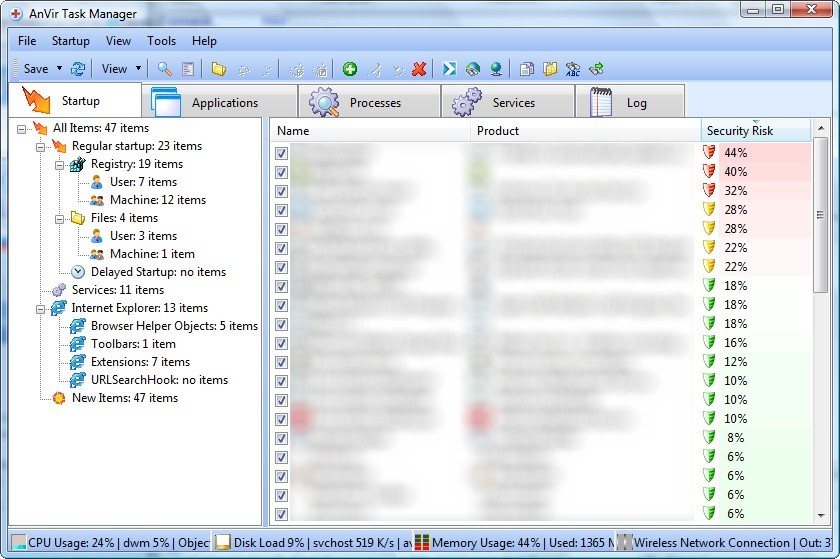
The best way I can describe AnVir Task Manager is a “buffed up” Windows task manager that supplements your anti-malware software. AnVir Task Manager is a program that monitors and analyzes your processes, services and startup programs. In addition to doing all the typical tasks accomplished by Windows task manager (i.e. close a service/process, monitor computer resource usage, etc.), AnVir balances CPU usage and tells you how much of a “security risk” each process, service or startup program is. AnVir also includes a Windows XP/Vista tweaker which lets you tweak many Windows settings. AnVir Task Manager includes tons of features – too many to describe in this little post. Here is a short description by the developer on what AnVir Task Manager can do:
AnVir Task Manager gives full information about process, services, TCP/UPD connections, drivers, DLLs. It has descriptions for 70 000+ startup programs and services. It detects new and unknown Trojans using security analysis and alerts on new startups. It can speed up boot time (Delayed Startup), balance CPU usage, optimize memory. Tray icons shows status of disk, network, memory, CPU. Tray menu keeps last launched programs and folders. Also users can hide windows to system tray, set windows ‘always on top’, and change windows transparency.
Monitor your system and replace Windows Task Manager
- Information about processes, startup programs, services, internet connections, drivers
- Integrated database with Descriptions for 70 000+ startup programs, Internet Explorer toolbars and services
- Icons in the tray that indicate CPU, disk, network, memory and battery
Get rid of viruses, Trojans and spyware that your antivirus missed
- Security risk rating for each active process and startup program
- Get notification when any program tries to add itself to startup
Enhance and tune up XP or Vista
- Tweaker that gives access to hundreds of XP / Vista settings
- Click on the title of any application to minimize window to system tray
- List of recently used folders in Open / Save dialogs
- Drive’s free space as a colored horizontal bar in Windows ‘My Computer’
Speed up your PC and Windows startup
- “Delayed Startup” lets you set up any startup program to run few minutes later after Windows startup
- Run startup programs minimized to system tray, or as a floating icon
- Balance CPU usage
If you would like to know more about AnVir Task Manager you can read my review of AnVir Task Manager v5.4.1 or visit the developer’s homepage for more information but I can tell you two of my favorite features of AnVir Task Manager is the ability to lower the processing priority of programs hogging your CPU and the ability to deal with memory leaking programs.
Now get this: today’s offering of free AnVir Task Manager is not of an older version. You are getting v5.6 of AnVir Task Manager – the latest version which just came out on May 2nd 2009. Also, this is not a time limited offer so you can install, uninstall, reinstall, etc. as you please and you will receive free updates until 10/1/2009. Cool, huh?
Update: When this promotion was originally available, back in May ’09, you were getting v5.6 (the latest version at the time). However since then AnVir Task Manager has been updated a few times and the latest version is v6.3.1 (as of November 26, 2010). This offer for free AnVir Task Manager is still available even with the latest version; the registration information you find below still works on the latest v6.3.1!
To get AnVir Task Manager:
- Download AnVir Task Manager (click here).
- Install and run AnVir Task Manager. When prompted to enter registration information enter the following:
- Name: dotTech.org
- Key: TN2M-HQLZPN-NCWBSH-YU9W41-14GB2M-KNYZ5P-LRCZ1
Note: This is a dotTech.org exclusive offer. You may not copy, paste, or reprint this registration name or key anywhere else including private or public forums, blogs, etc. nor can you mirror the download. If you want to spread information about this offer, you may link to it by providing a permalink to your audience.
If you have any problems getting AnVir Task Manager post below – I will try to help.
Lastly, I would like to point out if you enjoy AnVir Task Manager and agree it is a great software, consider upgrading to AnVir Task Manager Pro or AnVir Security Suite. You can learn of the feature differences between Task Manager, Task Manager Pro, and Security Suite from here. If you do plan on upgrading, you can get 20% off by using the coupon code dotTech. Don’t worry – the coupon is exclusively for your benefit because dotTech is not earning any commission what so ever.
Enjoy!
167 Comments »
Leave A Response »


Email article
To those who say they updated the GOTD version without losing registration:
I tried this and here is what happened:
The program still says registered to Giveawayoftheday, BUT you lose your program info database access.
Where you once got info on various programs it will now say the GOTD key is expired.
The same for new start up warning pop ups.
If you still have the coupon code showing on the top bar of the program, perhaps it is fine, but if that is gone, check the info window as you click on various entries, only the basic stuff will show in the information window at the bottom left.
I had to use the dotTech key to regain full access.
I still have the portable on the GOTD license, so if I need it it is there.
As others have had this same result, then it likely is the case for those who thought that they still had the full use with an updated GOTD version and have just not yet noticed the lowered functionality yet.
Yup, I had the same experience. See comment #67 from May 21, above. Teejerman’s experience (comment #17) was similar, too.
@Normofthenorth: So I am sort of confused now. Did the dotTech license hurt or help the people who installed it over the GOTD license? :D
The initial “upgrade” didn’t help, and I’d say it hurt. The total re-installation after uninstalling the GOtD version maybe helped, I’m not even sure. It’s a newer version, but it expires in a year, so it may depend on what’s available when it expires.
I don’t recall if the two fully-enabled versions are different in version or power or privileges or not, maybe somebody else does. But the apparently “upgraded” version was clearly less powerful than either of the others, GotD’s or DotTech’s clean install.
As soon as there is an update available AFTER this coming Oct 1, we’ll see who will be able to update: folks with the DotTech version and/or folks with the GOATD version….In any case, I’m sure that during the course of the year, SOME SITE, SOMEWHERE will be offering a free download of the newer version…eventually….Besides, the present version is just fine…:-)…—although I WOULD like to be able to set Automatic Priority by program (which presently needs Pro version..)…….:-)……
when i try to register i keep getting “this key is not for this product” message.i had the gaotd version prior to this download.software is telling me my 20 day trial period is over.i copy and pasted the above key.any help?
@babychiefm: Uninstall what you have. Download it again from my link above and then try.
I have 2 question to ask. The first is a very stupid question. Does Anvir Task manager have the ability to end task like in windows task manager?
2nd question, if I were to install this on vista 32-bit, when i press CTRL+ALT+DELETE, will it open up windows task manager or anvir task manager?
@LunarWolf:
1) Yes. It can do everything Windows Task Manager does, and much more.
2) The way I have it set up, CTRL+ALT+DELETE, still opens up windows task manager. Anvir TM is easy for me to open, because I have it displaying my CPU and RAM and HDD and Network usage stats (including who’s hogging the resources) on my TaskBar, lower right. Clicking on one of those icons gives more details, and double-clicking on it opens Anvir TM.
2a) There’s an option to have ATM replace WTM completely. There’s also an option to setup or personalize a hotkey to open ATM (default is Ctrl + Shift + 1). But I just double-click one of the TaskBar icons.
Good Morning Ashraf,
Hope all is swell with you and yours. It seems I have missed out of this one….Dangit! This is what it is telling me:
Big Red X > Key is not correct!
Program will be restarted.
if you could give me any insight on this I sure would be oblidged to you again.
I had to reset my cp to its factory setup and I lost all my programs.
So I am starting over, with {you know it} your help. So Thanks my Friend and Blessing to you and Yours, Bella :);)
Hello All
Turns out I somehow had forgotten to do the upgrade on my other PC … *sigh*
Well, I finally did it yesterday!!
This time I didn’t uninstall GOTD’s version.
Like Susan (#76) said, at first it seems to still be registered to “giveaway”, but there is indeed a text/warning saying GOTD key has expired, instead of where we usually see programs info on the Startup tab.
But clicking through Registration, under Help, we can enter Ash’s registration there. And it was accepted.
So all is good!! :D
Ciao
@Bella:
Hello Bella
Install w the .exe provided by Ashraf’s link, then enter the Name/Registration from here. After that, the prog shuts down to verify the key and opens up after that.
I just did it yesterday and everything went perfectly smoothly.
No problem at all!!
Were you installing the new v5.6 for the first time, or on top of GOTD’s? Did you uninstall it first? Did you do a Restore Point prior? Are you on XP?
Without more info, its hard to help.
Peace
@Bella: The freebie should still be active. Please make sure you entering the key properly and you are entering it for the right version (it won’t work for “Pro” or “Security Suite”).
Hehe, makaseh ar bro… Very2 gud product ar this anvir…
I’m wondering why the freeware version 6.1.0 is about 1.8 meg file, the Pro home version download from your site is a 3.23 meg program?
Are we getting the Pro version?
Enjoy your reviews on GAotD as I allways read these and visit here also.
Thanks,
Ken
Thanks Ashraf!
I have only been reading you for a month now since using your reviews of GOTD offerings to decide if I should download them. Also, your reviews of the freeware alternatives is priceless (literally and figuratively); it helps if I like the GOTD software but know I won’t be able to install it on my laptop before the time expires. Thank you so much for the services you provide.
BTW Even if you were getting a commmission if I upgrade TaskManager, for all the benefits you provide regarding GOTD and dotTech.org, you deserve it. I will donate to your efforts.
Again, thank you for your help, and for providing this program.
Cynthia
I have not been able to register the program. (wrong key code). I tried the uninstall & reinstall also w/o results. Anything else?
Thx
Doug
Ashraf, I came to your site today from your review of today’s Giveaway. My XP SP3 PC already had GAOTD’s forever version of AnVir. I downlaoded the program from your link and installed it over the old version, but used the new registration code. When the program restarted, it still had the GAOTD name, but now showed “free updates til 2009-10-1″. I uninstalled, re-downloaded from your site and re-registered, and now it shows dotTech.org in the name field, but still shows “free updates til 2009-10-1″
Is this correct, and if so then should I make sure auto update is turned off, like we do with GAOTD programs???
Thanks a bunch, Rich
janet Berg and normofthenorth,
After reading your posts, looks like the way to go is this.
Go over to GOATD today before it expires and download, install the GAOTD version, which is similar to Ashraf’s version.
Keep Ashraf’s version install key. Come next time when there is an upgrade or update available, do the update or upgrade. It the updated GAOTD version becomes less functional, then do the next best thing.
When the GAOTD version proves to be less functional after an update or upgrade, then and only then, install Ashraf’s version
LuHulu, that should work, but I’m not sure it will work any better than taking Ashraf’s version today.
I noticed today’s GAOTD offering and I noticed that it was a significantly newer version than I had (6.1 vs. 5.6). I downloaded the new one (NOT from GAOTD) and installed it. (It uninstalled my old one first, as part of the installation.)
Even before I entered any codes, it said it was registered to dottech.org, same as the old one. Both before AND after I re-entered the codes, it said I got free updates until 2009-10-1, which is two weeks ago. But I got the new version installed and running fine. So I admit I am a bit confused.
Normofthenorth,
Why are you so easily confused?
Just uninstall everything you have got from Anvir Task Mgr and do a fresh install.
1. Install today’s GAOTD (which is supposed to be the latest version, as of today, 15 or 16 Oct 2009, depending on time zone)
2. Try it until an upgrade or update is available
3. Install the upgrade or upgrade
4. After that, if the software performs with less function, then..
5. Uninstall it
6. Install Ashraf’s version, which is supposed to be today’s GAOTD version with a limitation date.
Sorry, I did not explain myself clearer.
Do not rely on the software to un-install any old version for you. It will keep the old registration details, I think.
Just do a complete un-install of any old version, using Revo.
I think that should prevent the upgrade or update from using any old registration details.
The DotTech version still works fine, you can still update it and keep it registered. Its about windows shows that the version is still registered to DotTech.org (free updates or not) and that’s good enough for me.
In my opinion, the GAOTD version is completely unnecessary and a waste of time (not to mention your computer could get messed up).
@teejerman:
I also used the GAOTD AnVir TaskManager until it ran out. I abolutely recommend it (the paid version) to any tech-minded person who wants to maintain strict control over what starts up… f’rinstance I disabled or delayed crud like google notification and adobe-related junk and had it start the spybot malware signature analyzer and my av (with low priority).
And AV TM even pointed out that I mistakenly allowed a crapbar to be installed with a ‘free’ firefox addon, which was then disabled and destroyed. I have used it to tweak PCs to delay horribly large printer driver startups (this is you, HP AIOs!).
Users: keep it clean, keep it fast!
thanks also to dotTech.
I’ve heard friends say that the license key no longer works. Is that true?
Adrian