dotTech Exclusive: Free AnVir Task Manager!

May 16, 2009 167 Email article | Print article

2009-05-16_135803UPDATE1: This is post is not about the freeware version of AnVir Task Manager but rather the shareware version which you would normally have to $39.95 pay for.

UPDATE2: If you have Kaspersky you may get a warning when trying to install AnVir. As far as I know, it is a false positive – AnVir is 100% clean. If anyone has any information that says otherwise, please let me know.

UPDATE3: It seems that the AnVir Task Manager’s installer now comes with offer(s) to install third party software. Be sure to uncheck those software(s) during installation unless you want them be to installed. You don’t need the third party software for AnVir Task Manager to work properly.

dotTech is batting a 3/3 and with an average of .AWESOME. Okay fine, fine: I admit – that was my lame attempt at a baseball related joke. Give me a break… I have not followed baseball since Micheal Jordan played for the Chicago Yankees. The point of my lame joke is to let you know there is another dotTech Exclusive freebie on the horizon and this is another winner: AnVir Task Manager. In fact AnVir Task Manager is such a good program that it made my pick of top ten giveaways.

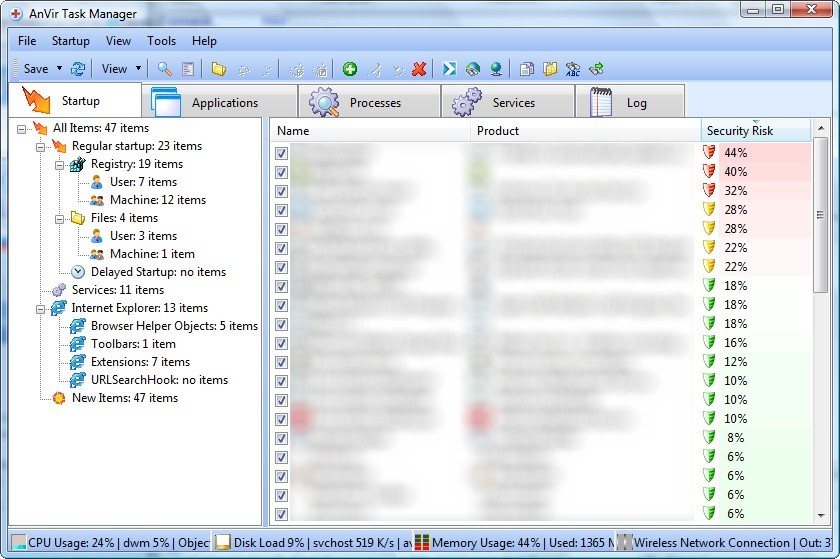
The best way I can describe AnVir Task Manager is a “buffed up” Windows task manager that supplements your anti-malware software. AnVir Task Manager is a program that monitors and analyzes your processes, services and startup programs. In addition to doing all the typical tasks accomplished by Windows task manager (i.e. close a service/process, monitor computer resource usage, etc.), AnVir balances CPU usage and tells you how much of a “security risk” each process, service or startup program is. AnVir also includes a Windows XP/Vista tweaker which lets you tweak many Windows settings. AnVir Task Manager includes tons of features – too many to describe in this little post. Here is a short description by the developer on what AnVir Task Manager can do:

AnVir Task Manager gives full information about process, services, TCP/UPD connections, drivers, DLLs. It has descriptions for 70 000+ startup programs and services. It detects new and unknown Trojans using security analysis and alerts on new startups. It can speed up boot time (Delayed Startup), balance CPU usage, optimize memory. Tray icons shows status of disk, network, memory, CPU. Tray menu keeps last launched programs and folders. Also users can hide windows to system tray, set windows ‘always on top’, and change windows transparency.

Monitor your system and replace Windows Task Manager

  • Information about processes, startup programs, services, internet connections, drivers
  • Integrated database with Descriptions for 70 000+ startup programs, Internet Explorer toolbars and services
  • Icons in the tray that indicate CPU, disk, network, memory and battery

Get rid of viruses, Trojans and spyware that your antivirus missed

  • Security risk rating for each active process and startup program
  • Get notification when any program tries to add itself to startup

Enhance and tune up XP or Vista

  • Tweaker that gives access to hundreds of XP / Vista settings
  • Click on the title of any application to minimize window to system tray
  • List of recently used folders in Open / Save dialogs
  • Drive’s free space as a colored horizontal bar in Windows ‘My Computer’

Speed up your PC and Windows startup

  • “Delayed Startup” lets you set up any startup program to run few minutes later after Windows startup
  • Run startup programs minimized to system tray, or as a floating icon
  • Balance CPU usage

If you would like to know more about AnVir Task Manager you can read my review of AnVir Task Manager v5.4.1 or visit the developer’s homepage for more information but I can tell you two of my favorite features of AnVir Task Manager is the ability to lower the processing priority of programs hogging your CPU and the ability to deal with memory leaking programs.

Now get this: today’s offering of free AnVir Task Manager is not of an older version. You are getting v5.6 of AnVir Task Manager – the latest version which just came out on May 2nd 2009. Also, this is not a time limited offer so you can install, uninstall, reinstall, etc. as you please and you will receive free updates until 10/1/2009. Cool, huh?

Update: When this promotion was originally available, back in May ’09, you were getting v5.6 (the latest version at the time). However since then AnVir Task Manager has been updated a few times and the latest version is v6.3.1 (as of November 26, 2010). This offer for free AnVir Task Manager is still available even with the latest version; the registration information you find below still works on the latest v6.3.1!

To get AnVir Task Manager:

  • Download AnVir Task Manager (click here).
  • Install and run AnVir Task Manager. When prompted to enter registration information enter the following:
    • Name: dotTech.org
    • Key: TN2M-HQLZPN-NCWBSH-YU9W41-14GB2M-KNYZ5P-LRCZ1

Note: This is a dotTech.org exclusive offer. You may not copy, paste, or reprint this registration name or key anywhere else including private or public forums, blogs, etc. nor can you mirror the download. If you want to spread information about this offer, you may link to it by providing a permalink to your audience.

If you have any problems getting AnVir Task Manager post below – I will try to help.

Lastly, I would like to point out if you enjoy AnVir Task Manager and agree it is a great software, consider upgrading to AnVir Task Manager Pro or AnVir Security Suite. You can learn of the feature differences between Task Manager, Task Manager Pro, and Security Suite from here. If you do plan on upgrading, you can get 20% off by using the coupon code dotTech. Don’t worry – the coupon is exclusively for your benefit because dotTech is not earning any commission what so ever.

Enjoy!

167 Comments »

  1. Babe February 24, 2010 at 12:35 PM (comment permalink) -

    pops read carefully the article! key works

    126
  2. Joji March 3, 2010 at 7:48 PM (comment permalink) -

    How long will this key stay active? Like when will this key not work anymore for registering a copy of that program?

    ~Joji~

    127
  3. Ashraf March 3, 2010 at 9:00 PM (comment permalink) -
    Mr. Boss

    @Joji: Beats me… lol.

    128
  4. evolution March 27, 2010 at 9:02 AM (comment permalink) -

    Hi Ashraf
    Thanks for all your hard work!
    I have just downloaded and installed AnVir Task Manager on my XP Pro SP3. Actually it runs fine, but…
    There seems to be always a but…
    Kaspersky Internet security 2010 is now complaining that AnVir is infected with the virus HEUR:Backdoor.Win32.Generic

    Would appreciate if you could share your experience or explanation if any.

    Thanks again!

    129
  5. Jules March 27, 2010 at 11:06 AM (comment permalink) -

    @evolution:

    I get the same with Kaspersky AntiVirus 2009. Is this a false positive or real? I deleted it until I know for sure.

    130
  6. Tech-Less March 30, 2010 at 6:59 PM (comment permalink) -

    ME too…Kaspersky detected the virus HEUR:Backdoor.Win32.Generic

    Currently in quarantine.

    Need your expertise here Ashraf.

    131
  7. Ashraf March 30, 2010 at 7:22 PM (comment permalink) -
    Mr. Boss

    @evolution and @Tech-Less: Yeah that is a known problem; I had an update stating this specifically which I seemed to have accidentally removed. It is a false positive as far as I know.

    132
  8. wskt April 6, 2010 at 8:17 AM (comment permalink) -

    just downloaded and succesfully updated to version 6.3.1
    thanks Ashraf for the key :-)

    133
  9. Janet April 15, 2010 at 6:47 AM (comment permalink) -

    A couple of posts have mentioned registering PRO version with the above codes….Has anyone done that recently? For me, this code says it’s not for that program if I try using it on a Pro download….Has there been some free download of Pro version somewhere else?

    134
  10. blue April 27, 2010 at 6:12 AM (comment permalink) -

    Now THIS is what Task Manager *should* have been; thanks for the gift! FWIW, this site and raymond.cc are more useful than (just about) the entire rest of the web on these topics. Thanks!

    135
  11. Gil May 11, 2010 at 9:17 AM (comment permalink) -

    Installed and tried registering this product. I’m getting a “Bad Format of Registration Key. Error Code 14″. This won’t allow me to download drivers to be fixed.

    When I ran the scan on the system in the cleaner – it came up with a number of items to be fixed and categorized them. Any way to see just what is going to the “fixed”?

    Thanks Ashraf – your site is much better than GAOTD. Keep up the good work!

    136
  12. Gil May 11, 2010 at 12:52 PM (comment permalink) -

    @Gil: This is true for Task Manager Pro, Driver Updater Pro, and Registry Cleaner Pro. I didn’t pursue the XP Tweaker so I don’t know about that one. I can’t get the code supplied on this site to work anywhere.

    In effect, in just a few weeks, none of this will be any good unless I pay out the money.

    137
  13. Patrick July 2, 2010 at 12:34 PM (comment permalink) -

    Just downloaded version 6.3.1 and the registration keys work just fine. This is a great program, thank you Ashraf.
    Patrick

    138
  14. djhightek2000 July 30, 2010 at 7:01 AM (comment permalink) -

    Is this “Anvir Task Manager Professional Product Key” you gave out on here in the pass Legit? I used it for awhile without a problem and then I notice when I tried to run it one day it had “Expired”. I believe it was the 2008 version. The Key was working just fine until a few Connections to the Internet and after that the Program would not take the Key anymore after Flushing it.

    139
  15. jboy August 16, 2010 at 2:51 PM (comment permalink) -

    Thank you!! I recently had to reload my OS and lost the AnVir TM I had gotten from GGOTD. When I found this on your site, I was thrilled. Back in business and working fine now. Thanks again!  .

    140
  16. Jason September 2, 2010 at 9:20 AM (comment permalink) -

    unable to download Anvir TM as documented above. IE gives not found message.  Any suggestions?

    Thanks

    141
  17. Splashof September 27, 2010 at 10:07 PM (comment permalink) -

    I just downloaded the latest version from the website and it works just great. Used the name and key listed above. Got version 6.3.1

    142
  18. Moontje December 8, 2010 at 12:44 PM (comment permalink) -

    Just downloaded it without uninstalling my Free version. Worked fine, code still working and all my settings were the same. Thanks!

    143
  19. janetb December 9, 2010 at 3:30 AM (comment permalink) -

    ASHRAF
    AVIRA TELLS ME THE DOWNLOAD CONTAINS MALWARE/VIRUS CALLED APPL/Agent.1002. IF I HAVE AVIRA REMOVE IT, THE DOWNLOAD WON’T RUN.

    144
  20. janetb December 14, 2010 at 5:20 AM (comment permalink) -

    At this point, I am not at all clear regarding what exactly to download which will work with this key….I have 6.3.1 Free. Which non-free version (if any) is this good for…? Thanks.

    145
  21. Louis December 19, 2010 at 2:00 PM (comment permalink) -

    Hi Ashraf and other experts ?!

    I’ve come across you great site a short while ago, and since follow it on a daily basis. Great stuff Ahsraf and Associates !

    Cutting to the chase :

    Background info : I run Win XP Pro SP3 , use the Windows Task Manager to see what’s going on, stopping programs etc, and I use WinPatrol Free Edition, to manage my startup prgrams and services, as well as the option to move certain startup programs to Delayed startup section.

    Compaq Presario c795EI Laptop System : Intel dual core 2 x 1.86 / Ram = 3 GB/Pagefile set to ‘Managed by Windows’

    Yet although my laptop just formatted and minimum software reloaded, just rebooted, with Skype 5 and FireFox 3.6, (with a lot of open tabs, most moved to TooManyTabs) , KeyWallet Password Manager & 1 x Excel spreadsheet the only software apart from Zone Alarm and ESET nod 32, running on my system as we speak, something isn’t quite right (already scanned for malware and spyware – clean) :

    I battle doing simple things, like typing this, my hard drive sounds just like what you would typically hear from a cd your pc is battling to read, it spins, stops, spins again etc until in perpetuity, unless you remove the cd — essentially it is lagging behing everything I type, which typically will only appear many seconds after typed on keyboard, forcing me to stop and wait for words to catch up 9just one example).

    I was looking for possible improvements to my software management, and came across 2 programs you gave the thums up for, Ashraf :

    Anvir Task Manager as replacement for the Windows Task Manager
    Although the download for the paid version of Process Lasso from the German website has expired, I believed Ashraf, you mentioned that the Free version of Process Lasso contains essentially everything that the give away version can do as well.
    I am not sure if Process lasso Free replaces Windows task manager, or runs alongside it.

    My question :

    it seems, from reading your reviews and the developers’ desription, that these two programs shares common functions. Here is my my ‘technical knowledge’ ends !

    Can you plesase advise, Should/ could I run both Avir and Process Lasso simultaneously, or only one — if only one, which one would you recommend, given the description of my other software, where relevant, above ?

    i would appreciate advice for what would probably be a relatively simple question to you guys, but to me not so — would like to run the most efficient setup possible

    Thanks

    Louis

    146
  22. Sebastian Plaskba January 27, 2011 at 1:05 PM (comment permalink) -

    Many many thanks for the license code!
    It works perfectly with the current version 6.3.1
    I use the program for years already but only with a license from GAOTD where it is replaced only infrequently, and the code expires.
    Now I’m back up to date and thank you again sincerely!
    Without this brilliant software I can not imagine my computer!
    An absolute must have tool for everyone.
    Greetings from Germany (sorry for my bad english)

    147
  23. Jorge Gonzalez March 1, 2011 at 9:38 PM (comment permalink) -

    Great giveaway, and great tool, the best in its field in my opinion. Thanks!

    148
  24. RA Guillemette November 27, 2011 at 5:48 PM (comment permalink) -

    PC Tools Threatfire, among other things, says that it tried to uninstall itself, a highly suspicious activity. Any ocmment?

    149
  25. Rob (Down Under) December 15, 2011 at 11:56 PM (comment permalink) -

    There are a few posts where you guys say -
    “Just downloaded version 6.3.1″
    “I just downloaded the latest version from the website”
    “It works perfectly with the current version 6.3.1″
    ETC

    Not one of you mentions which of the three programs -
    Task Manager Free
    Task Manager
    Task Manager Pro

    Ashraf has a ‘heads up’ at the top -
    “rather the shareware version which you would normally have to $39.95″
    So that narrows the possibilities down to 2 (don’t download the Free one)
    However the prices for the two paid ones are -
    $29.95 and $49.95

    So I would like to repeat janetb’s unanswered question -
    “At this point, I am not at all clear regarding what exactly to download which will work with this key….I have 6.3.1 Free. Which non-free version (if any) is this good for…? Thanks.”

    150

Leave A Response »