Free Avanquest Expert PDF Pro 7!

July 2, 2012 88 Email article | Print article

UPDATE: This freebie may only be of Expert PDF Pro’s converter — not the editor. Please don’t uninstall Expert PDF Pro 6 until we get this figured out.

Software Description

The following is a description of  Avanquest Expert PDF Pro, as per the developer:

Create PDF Documents

  • Create PDF files from any printable PC application; Word, Excel, Pictures, Photos etc.
  • Create several PDF files in one single operation
  • Merge Multiple Documents –Combine files from various applications (Word, Excel, PowerPoint etc.) into a single PDF
  • One-Click PDF creation from Microsoft®Office
  • Send PDFs automatically by e-mail

Edit PDF Documents

  • Text-Editing –Cut, copy, paste and edit text
  • Graphic-Editing –Add images, shapes & notes to your PDFs
  • Add watermarks, headers and footers
  • Insert, delete, rotate and crop PDF pages
  • Add interactive features such as links and bookmarks
  • Document Management –Use Bates Numbering to index documents with time, date, copyrights or unique coding for easy identification and file retrieval

Convert PDF Documents

  • PDF to Word Conversion –one-click conversion of any PDF file into a Microsoft Word document for easy editing
  • Save documents as popular file formats; JPG, TIF, GIF etc.

Protect your PDF Documents

  • Secure – Digitally Sign, and certify PDF documents
  • Passwords – Keep your PDF documents confidential (up to 256 bits encryption for files requiring higher security access control)
  • Encryption – Secure your PDF files using 256-bit RC4 or AES encryption algorithms.
  • Set Permissions – Control which users can read, print, edit, copy or comment your PDF files.

dotTech Advice

For quite a few years here at dotTech, we’ve been giving you the latest freebies, including several on Expert PDF Pro. As such, it’s really gotten ingrained in our site, and we’ve even offered tips on getting rid of some of its annoyances over the years. It’s definitely a nice program, and in version seven Avanquest gave it a nice overhaul, with a Windows 7 ribbon interface and all. (That may or may not be a pro.) It’s definitely worth snagging, if not for now, for future use, especially if you use a lot of PDFs.

Freebie Details

Avanquest Expert PDF 7 is being give away by Avanquest directly.

Here’s some information about the giveaway:

  • Version being given away: v7.0.1800
    • Free updates: unknown, probably none
    • Free technical support: unknown, probably none
  • Supported OS: Windows 2000+
  • Download size: 29.8MB – 0/40

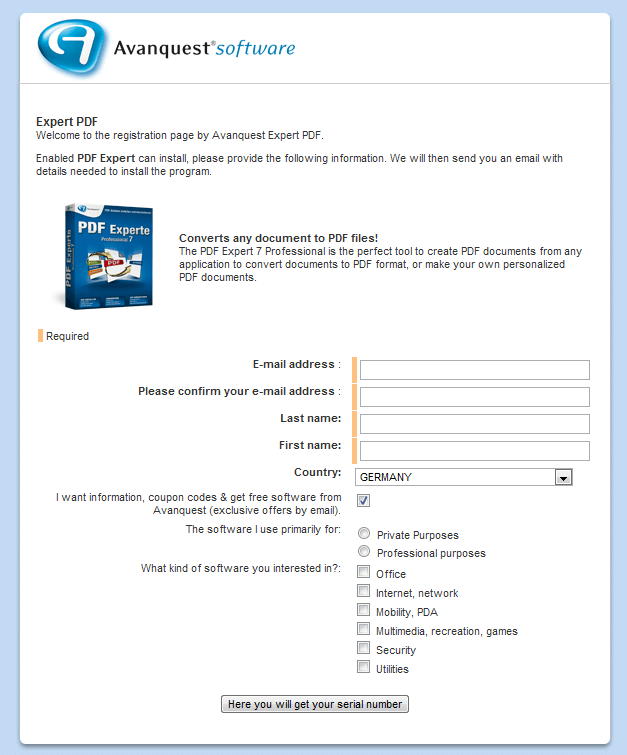
First, download and install Avanquest ExpertPDF Pro v7. Then, visit the registration page. You’ll need to enter an email address and get automatically subscribed to a mailing list, so you might want to use a service like Mailinator. The page is in German, so if you don’t use a browser with auto-translate, you can use the page below as a guide:
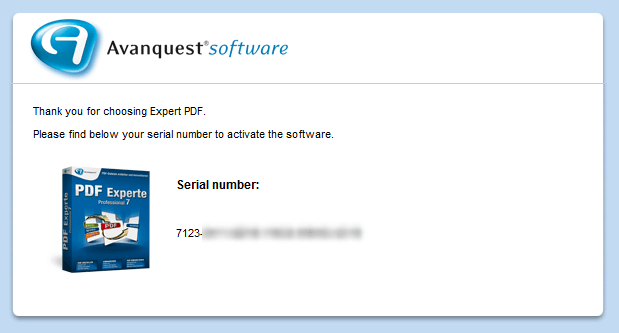
In your email, click the “klicken Sie bitte hier” button to get your code:
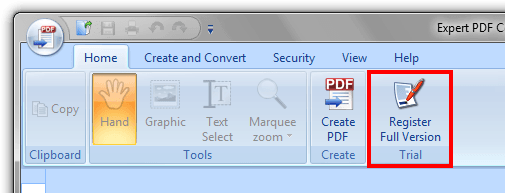
Once you’ve got the code, just open Expert PDF Pro and click the Register Full Version button:
paste it into the registration field…
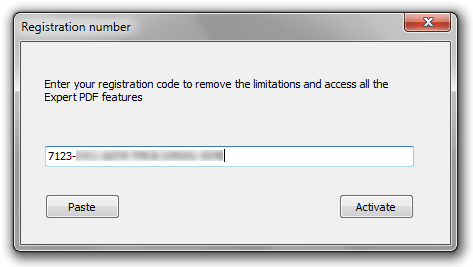
… hit register, and you’re done!

If you have trouble getting Avanquest Expert PDF Pro for free, post below and I other dotTechies or I will try to help.

 [via Techno360.in]

88 Comments »

  1. Shatimi July 2, 2012 at 1:45 AM (comment permalink) -

    Is it better than Nitro PDF Converter?

    1
  2. clayry July 2, 2012 at 1:47 AM (comment permalink) -

    Many thanks Locutus !

    2
  3. Josh July 2, 2012 at 1:59 AM (comment permalink) -

    Before I download/install, a simple question…. Can it REALLY edit PDF files without converting to Word, etc., or is it just another notation function masquerading as so-called editing?

    3
  4. Mardel July 2, 2012 at 3:18 AM (comment permalink) -

    Need to know if this give away is better than Algologic Extractor Pro l.07 which I am currently using.
    I am only asking because I can’t see any where that this software will split pdf’s which Algologic splits files.
    I do notice that the encrypting part is better than Algologic. I visited the website for Avanquest but couldn’t even see this product. Would appreciate a reply and thanks for the info.

    4
  5. Chelle July 2, 2012 at 3:29 AM (comment permalink) -

    No code given. Just tells me my subscription is already validated but it is still a trial version.

    5
  6. Janetb July 2, 2012 at 3:47 AM (comment permalink) -

    WARNING!!!

    I did a SUPER-THOROUGH uninstall of my Expert PDF 6.xx to get a clean install for the new v.7—only to discover that your download link is NOT for Expert PDF 7 Professional but rather ONLY the for the converters (ExpertPDF_V7_Converter_Trial_ENG.exe)–WITHOUT THE EDITOR!!!!! Hoping the serial code would work on an Expert PDF 7 Professional download, I discovered the the v.7 link at http://expertpdfpro.com/ is for v.8! So there is no v.7 link…..!

    Hope that there is a free v.7 somewhere, or that the old v.6 still works, because that was my PDF editor…:-(…!

    6
  7. Jeanjean July 2, 2012 at 4:22 AM (comment permalink) -

    @ Janetb
    I’ve tried with the english & french versions of Expert PDF 7 Pro (link : ftp://ftp2.avanquest.com/evaluation/ExpertPDF/7/) and the key don’t work !
    In addition, when installing the program, I had the same error : “DoAddPrinterDrive : FAILED 126, couldn’t find the module”

    7
  8. mukhi July 2, 2012 at 4:46 AM (comment permalink) -

    is it the same thing as visagesoft expert pdf pro?

    8
  9. Ashraf July 2, 2012 at 4:48 AM (comment permalink) -
    Mr. Boss

    @Janetb: Updated post to reflect this. Let’s wait until Locutus reports back, maybe something went wrong.

    9
  10. Janetb July 2, 2012 at 5:13 AM (comment permalink) -

    @mukhi:

    Visagesoft is the developer. Avanquest is just a distributer.

    It was always “eXPert PDF” in the past….:-)….Now that XP is ‘out’, I see they changed it to Expert PDF”…….

    10
  11. Mags July 2, 2012 at 5:31 AM (comment permalink) -

    I’m currently using Expert PDF 6 and have been since I first found out about it here on DotTech. It does an excellent job on almost everything I need to have done for PDF. My only two complaints is 1) it is really awkward when trying to create forms, and 2) when converting from Word or Excel etc., the file size is way to large.

    Yesterday I just got my new desktop (Lenovo ThinkCentre, Win 7 64 bit) so setting it up today, and will install Version 7 on it (will check here first to see if it is or isn’t the editor version) and get back with the results later.

    11
  12. Az July 2, 2012 at 5:34 AM (comment permalink) -

    EDIT: Just tried the visagesoft install. It installs ok but the registration requires a unique order number along with the auto generated serial. I’ll leave the link here in case someone else wants to give it a go. The link below will install only a trial version of 7, the code above will not work with it. Again, maybe someone else can figure out how to get these working together.

    Those looking for the full download can use the visagesoft archived downloads page.
    http://www.visagesoft.com/help/index.php?/Knowledgebase/Article/View/18/7/expert-pdf-archived-downloads

    12
  13. Mags July 2, 2012 at 5:50 AM (comment permalink) -

    Missed being able to update my previous comment.

    @ Ashraf, just sent you an email.

    13
  14. Commonkore July 2, 2012 at 7:09 AM (comment permalink) -

    Help. I’ve tried several times clicking the “download and install” but the file simply won’t download. Could I be doing something wrong? Is there a web site I should visit to download and install the software first. I seem to be able to get to the registration page ok but I can’t get the file downloaded.

    14
  15. Frank D July 2, 2012 at 8:35 AM (comment permalink) -

    Win7 64-bit. Downloaded and registered fine. Trying to use it was a disaster. When I finally learned how to create a PDF from a Word document, I found that the resulting PDF did NOT have *active links*, which were in the original document, in spite of my specifying that I wanted the links to be active. It turns out that this program is no better than some freebies (like PDF creator). I uninstalled it. All that work for nothing. A better approach is to use Libre Office, which is free, lets you edit the document, and works perfectly with active links in the PDF. Why is this program called “Expert” when there’s nothing expert about it?

    P.S. I thoroughly hate the ribbon UI!!!!

    15
  16. jayesstee July 2, 2012 at 9:51 AM (comment permalink) -

    @Janetb:
    Yes you can get PDF Expert 7 Professional! Please read the following before using the link:

    This source gives you “PDF Experte 7 Creator”, “PDF Experte 7 Pro” and “PDF Experte to Word Converter” Note the word “Experte”, the registration, download and installation will be in German. However the link gives instructions on how to convert the installed PDF Experte(s) to English. And it works!!

    The link is http://www.tipradar.com/forum/Thread-Get-Free-PDF-Experte-7-Professional

    Got to the link below and select the German registration (which may or may not be the same as Locutus link above) and of course select the German download. Full instructions are given.

    Good luck.

    16
  17. Larry Newman July 2, 2012 at 10:03 AM (comment permalink) -

    I followed the process diligently, and when I enter the activation code I get the following: Invalid serial specified (00000018). What can I do????

    17
  18. Janetb July 2, 2012 at 10:41 AM (comment permalink) -

    @jayesstee:

    Everyone: Don’t bother with their English link–it’s the same one we have here….

    18
  19. internetexplorer July 2, 2012 at 10:51 AM (comment permalink) -

    How long is this giveaway going to last, does anybody know? At this point, I would rather wait and see if any of the issues raised above can be resolved.

    19
  20. Jeanjean July 2, 2012 at 11:07 AM (comment permalink) -

    The procedure given by jayesstee (thanks !) works !
    Download (http://ftp2.avanquest.com/pub/ExpertPDF/table_v7/PDF%20Experte%207%20Professional_DEU.exe) & install the german version and change all the *.deu-files in *.eng-files.

    20
  21. Janetb July 2, 2012 at 11:26 AM (comment permalink) -

    @jayesstee:

    The German version is ALSO WITHOUT THE EDITOR! Shoot–I sure hope I can get my V.6 back….LOCUTUS–HEEEEEEELLLLLLLPPPPPPPP!!!!!

    21
  22. Hugo_vH July 2, 2012 at 11:31 AM (comment permalink) -

    The same procedure jayesstee suggests -’the German connection’- works for Avantquest Powerdesk / Powerexplorer as well ( as I happened to fiind out just a few days ago ). So have a go at this one if you want to use this Windows Explorer-Ersatz.. But more to the point: This Powerdesk offer started more than a year ago (december 2010?) and seems to be going on forever. So maybe, Mr/Ms internetexplorer, the PDF offer goess on for a long time as well.

    22
  23. jayesstee July 2, 2012 at 12:04 PM (comment permalink) -

    @Janetb:

    Sorry, I didn’t realise about the ‘editor’!

    @Everybody:

    After renaming all the “*.deu files”, the helpfiles (*.chm) are still in German – useless.

    23
  24. Hugo_vH July 2, 2012 at 1:17 PM (comment permalink) -

    @jayesstee
    Simple solution: Learn German -it’s easy ( man = mann, sister=schwester, house=haus, download = herunterladen… ). Simpler still: Download the English trail, deinstall but keep the help-files and other language-sensitive stuff, install the German version, replace the proper language files ? There’s no free lunch – es gibt kein freie Lunch ;-)

    24
  25. jayesstee July 2, 2012 at 1:42 PM (comment permalink) -

    @Hugo_vH:

    “Ich will wegnehmen Experte PDF under weiter zu nutzen Nitro PDF!” (courtesy of frengly.com!)

    25

Leave A Response »