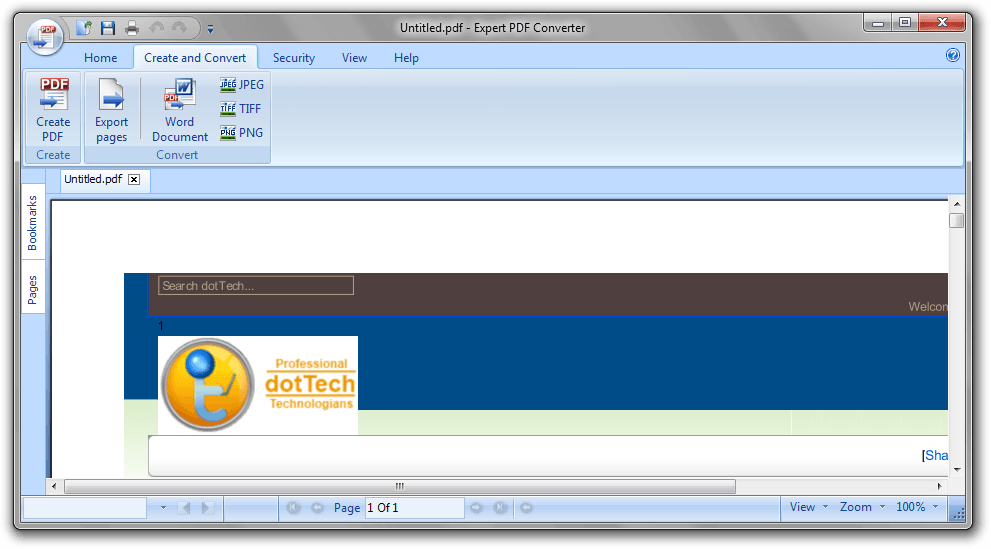
UPDATE: This freebie may only be of Expert PDF Pro’s converter — not the editor. Please don’t uninstall Expert PDF Pro 6 until we get this figured out.
Software Description
The following is a description of Avanquest Expert PDF Pro, as per the developer:
Create PDF Documents
- Create PDF files from any printable PC application; Word, Excel, Pictures, Photos etc.
- Create several PDF files in one single operation
- Merge Multiple Documents –Combine files from various applications (Word, Excel, PowerPoint etc.) into a single PDF
- One-Click PDF creation from Microsoft®Office
- Send PDFs automatically by e-mail
Edit PDF Documents
- Text-Editing –Cut, copy, paste and edit text
- Graphic-Editing –Add images, shapes & notes to your PDFs
- Add watermarks, headers and footers
- Insert, delete, rotate and crop PDF pages
- Add interactive features such as links and bookmarks
- Document Management –Use Bates Numbering to index documents with time, date, copyrights or unique coding for easy identification and file retrieval
Convert PDF Documents
- PDF to Word Conversion –one-click conversion of any PDF file into a Microsoft Word document for easy editing
- Save documents as popular file formats; JPG, TIF, GIF etc.
Protect your PDF Documents
- Secure – Digitally Sign, and certify PDF documents
- Passwords – Keep your PDF documents confidential (up to 256 bits encryption for files requiring higher security access control)
- Encryption – Secure your PDF files using 256-bit RC4 or AES encryption algorithms.
- Set Permissions – Control which users can read, print, edit, copy or comment your PDF files.
dotTech Advice
For quite a few years here at dotTech, we’ve been giving you the latest freebies, including several on Expert PDF Pro. As such, it’s really gotten ingrained in our site, and we’ve even offered tips on getting rid of some of its annoyances over the years. It’s definitely a nice program, and in version seven Avanquest gave it a nice overhaul, with a Windows 7 ribbon interface and all. (That may or may not be a pro.) It’s definitely worth snagging, if not for now, for future use, especially if you use a lot of PDFs.
Freebie Details
Avanquest Expert PDF 7 is being give away by Avanquest directly.
Here’s some information about the giveaway:
- Version being given away: v7.0.1800
- Free updates: unknown, probably none
- Free technical support: unknown, probably none
- Supported OS: Windows 2000+
- Download size: 29.8MB – 0/40
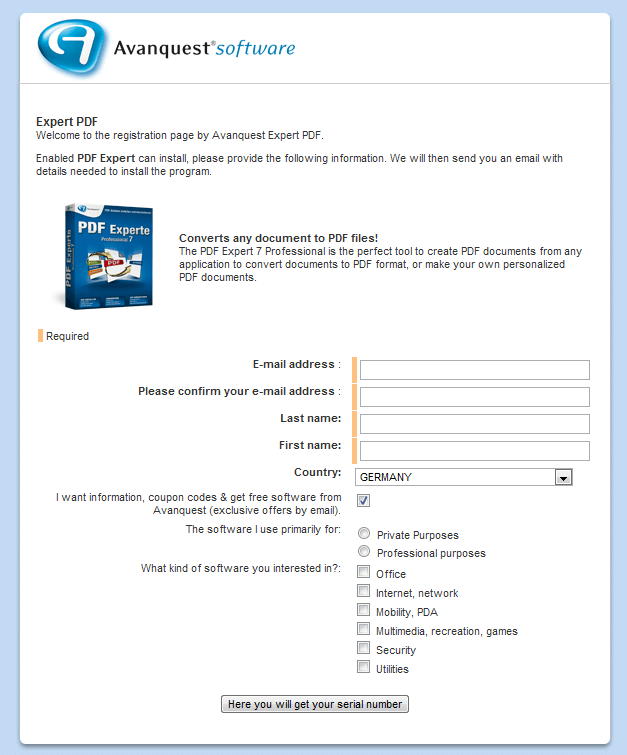
First, download and install Avanquest ExpertPDF Pro v7. Then, visit the registration page. You’ll need to enter an email address and get automatically subscribed to a mailing list, so you might want to use a service like Mailinator. The page is in German, so if you don’t use a browser with auto-translate, you can use the page below as a guide:
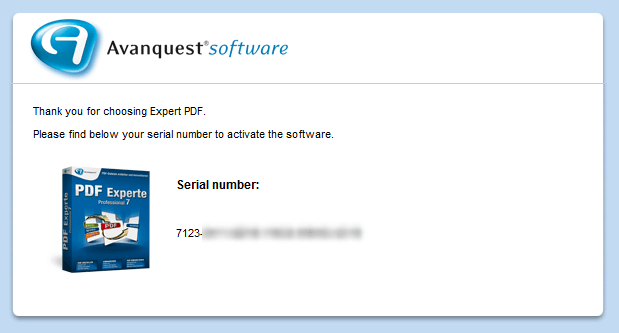
In your email, click the “klicken Sie bitte hier” button to get your code:
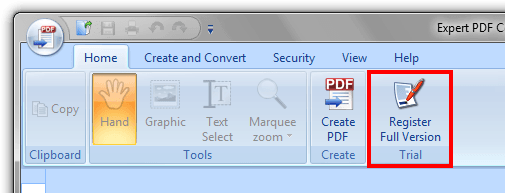
Once you’ve got the code, just open Expert PDF Pro and click the Register Full Version button:
paste it into the registration field…
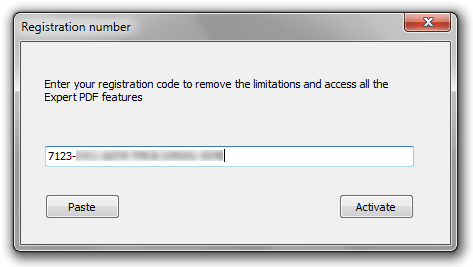
… hit register, and you’re done!
If you have trouble getting Avanquest Expert PDF Pro for free, post below and I other dotTechies or I will try to help.
[via Techno360.in]
88 Comments »
Leave A Response »


Email article


![How to edit PDFs on Windows, Mac, and Linux for free [Guide]](http://cdn.dottech.org/media/2013/04/2013-04-09_203637-134x90.png)
![iOS apps of the day [August 12, 2012]](http://cdn.dottech.org/media/2012/08/signnow-e1344609969302-134x90.jpg)
![Windows software of the day [March 22, 2012]](http://cdn.dottech.org/media/2012/03/audials-1-134x90.png)
@jayesstee:
I will detach Pundit PDF and continue to use Nitro PDF! !?!? – courtesy Frengly.com
@Hugo_vH:
“Experte” is the Avanquest German word, perhaps they don’t know it means
“Pundit” (according to fengly.com).
Over and out!
@jayesstee:
OK, but did my suggestion work? ( Install english version, keep language files, uninstall, install german version, replace german files with english ones … ).
People, please don’t get it wrong.
Avanquest PDF Experte 7 Professional (Deutch) = Avanquest Expert PDF 7 Converter (English).
If you need editor feature, then you need to upgrade it into PDF Experte 7 Ultimate (Deutch), or Expert PDF 8 Converter (English).
Anyway, why bother renaming all the “*.deu” files into “*.eng” files?
If you want to change PDF Experte 7 language into English UI, simply delete all the “*.deu” files.
I have downloaded via the link on your article.
I have requested and received serial number through e-mail.
When I copied and pasted the number in order to register to full version, the following error message pops up.
“Invalid serial specified. (000016)”
I visited Avanquest website and looked for ExpertPDF Converter.
I could not find the product.
Instead, they have Lightning PDF professional 7.
Maybe they have sent me the serial number for the new product called “Lightening PDF” instead?
Uh oh, I was hoping that I had, at last, found a useful program for actually editing PDF files, other than the lumpy and overpriced Adobe one, but this looks like chaos. I have no burning desire to jump through hoops to make it work. If things start off this way, the future for this app looks dim. Better to wait till another one comes along. I must say, it has caused quite a stir… I have not had so many email notifications about a specific app assaulting my inbox for a long time. If the distributor simply wanted fame for 15 minutes, they certainly succeeded spectacularly.
@ David.
Tested again. Still the same code & installer. They works.
Lightning PDF professional 7 is different product.
If you wish to search something at Avanquest, then you must go to specific site (UK, US, DE ..).
Use this link (and plese remember, these is newest version, v8. Your v7 code will be useless)
Avanquest PDF Experte (Deutsch) : http://www.avanquest.com/Deutschland/ergebnisse.html?gsearch=pdf+experte
Avanquest Expert PDF (UK): http://www.avanquest.com/UK/search.html?gsearch=expert+pdf
Hope that will help.
After doing all that is required and then using the supplied registration code you are told that it is no accepted.
@jayesstee:
meh, good that i saw your comment, else i was going to install version 7.
ok, so far i see PDF editor is not included in this but can somebody confirm whether this can create editable PDF form? thanks.
The problem is Locutus mistakenly offering what he called “Expert PDF Pro 7″.
“EXpert PDF Pro 6″, offered by dotTech for the last couple of years, is a FULL PFD EDITOR. NONE of the links you have been given on this page (both in the article and in the posts) are for a PDF EDITOR–neither the English nor the German links.
http://expertpdfpro.com/ will take you to an Avanquest page which appears to be for Expert PDF Pro 7, but when you go to download, the download file is “Expert PDF_8.exe”.
If you go to the Visagesoft site, you will see that v.8 is divided into two separate programs: Expert PDF Creator and Expert PDF Editor. It seems that v.7 has also switched to this division. All the links we have been looking at are for the Creator only! Now the full suite (ie both) is the Lightening series.
So the last full suite called “Expert PDF Pro” is version 6. If you have 6, DO NOT REPLACE IT WITH ONE OF THESE LIMITED 7′s if you don’t want to lose your editing capabilities like I did!
I use Writepdf and have no complaints
What has Locutus done to us? I installed this and now get:
“Dieses Programm wird jetzt beendet. Vielen Dank und einen schönen Tag!”
Can someone translate this for me? What does it say???
@ella:
Costs: $9.99 (NOT free)
to those who are complaining about this giveaway (yes, there is a mistake but it happens!):
after seeing this incident (or accident?), i would strongly recommend that you spend your time to install a new software 1st in a virtual environment to avoid disappointment, if everything looks fine, install in the real environment later.
very easy to do by software like returnil system safe free:
http://www.returnilvirtualsystem.com/returnil-system-safe
# download, install, run, turn virtual mode on, install software of choice.
# don’t like it? reboot your computer, you see as if NOTHING happened!!! once you are in desktop, you now MUST make sure that virtual mode is OFF.
like it? do as above and install again. this time the software is in real environment like any other software in your computer.
WARNING: if you want to save your activities, ALWAYS keep virtual mode off, otherwise, anything but files saved in external drives will be deleted.
you can actually avoid various issues, like messing up by new software, malware, external files…
@Janetb:
You might be able to get back your version 6 pro if you have your registration code. I found the original DotTech posting from November 2010 (http://dottech.org/freebies/18437/) through a quick search, and the German and English download links for V6 still work. I downloaded the files only to learn that I “misplaced” my registration code for V6 pro, so I didn’t proceed with the installation. Hope it works!
What DOES Helen’s message in German say? I would be curious to know!
@Allen:
“Now this program is finished. Many thanks and a nice day”
I downloaded this yesterday afternoon, I got three shortcuts. Pdf 7 converter; pdf creator, word converter. They all say version 7, when I clicked help it did show help for version 8, otherwise they are registered as v7.
@eric506:
I have my old reg code as well as the code I got yesterday from the v6 download page–neither worked! I have written to Avanquest. I think I will write to Visagesoft as well…..
@Mike; Wash.:
Yes–all you are missing is the editor—the main part…:-)….
@Hugo_vH:
Sorry, didn’t try your suggestion ‘cos I had already uninstalled it. Having seen the ‘lack of editor’ comments, I decided that I would stick to Nitro PDF Pro which does have the facility to edit.
Definitely, “Over and Out”.
Are there any free PDF editors around…?
@Janetb:
I haven’t found any free editors, and have looked long and hard. Nitro PDF Pro (at $119 USD) and Nuance PDF Converter Pro 8 (at $99 USD) both can edit and are a whole lot cheaper than Acrobat. I’ve had some luck using one of the free PDF converters or online PDF converter sites to change a PDF file into a DOC/DOCX, RTF, or TXT file, then making the edits, and using a PDF printer driver to recreate the PDF file.
Your other option is to get a response from Avanquest or Visagesoft. Version 7 must have left a trace somewhere, but I scanned the registry for Avanquest, Visagesoft, ExpertPDF, and the new (V7) registration code, and removed everything I found, but that didn’t get me past the “incorrect serial number” when I tried to reinstall V6. I tried looking on the hard drive for left-behind files, and couldn’t find anything. I even reinstalled Version 7 and traced it with a couple uninstallers, hoping that it would remove anything left behind, but no joy there, either.
Good luck!
I spent most of today trying all the free “PDF editors” and found only one that is worthy of the name: Open Office with the PDF Import extension.
Here is the procedure for editing a PDF file, pretty much as you would in MS Word:
To edit a PDF file using Open Office (you can download it from http://www.openoffice.org/download/ and you’ll need the the PDF Import Extension which you can download from the same site),
>>> NOTE: All active links will be rendered inactive, so use this only for
creating documents without links or which will not suffer. <<<
1. Open OpenOffice Draw (from the main program, and yes, the Draw component is where you edit the PDFs) .
2. From within Draw, open the PDF file you want to edit.
3. Edit existing text by selecting or typing as you would do in Word.
4. To add new text (outside of the existing text), click the Text link at the bottom of the Window, and then click where you want to add text.
5. After you have finished editing the file click the PDF link to export the file as a PDF.
Although this is a fantastic free solution for editing a PDF, the PDF Import Extension does have some limitations. It does not currently support PDF forms, table conversions, and decrypting protected files.
HTH!
If I were going to buy a pdf editor, I would go with the company that made my superb pdf viewer, PDF-XChange Viewer (free). It has extensive annotation capabilities—pretty good for a viewer! I use it as my default pdf viewer because it was able to display drop shadows perfectly, whereas eXPert PDF Pro 6 (my full editor) showed dropshadows as solid, matte shapes! You can compare the PDF-XChange products here:
http://www.tracker-software.com/pdf-xchange-products-comparison-chart
Nice selection in a range of prices…..