UPDATE: This freebie may only be of Expert PDF Pro’s converter — not the editor. Please don’t uninstall Expert PDF Pro 6 until we get this figured out.
Software Description
The following is a description of Avanquest Expert PDF Pro, as per the developer:
Create PDF Documents
- Create PDF files from any printable PC application; Word, Excel, Pictures, Photos etc.
- Create several PDF files in one single operation
- Merge Multiple Documents –Combine files from various applications (Word, Excel, PowerPoint etc.) into a single PDF
- One-Click PDF creation from Microsoft®Office
- Send PDFs automatically by e-mail
Edit PDF Documents
- Text-Editing –Cut, copy, paste and edit text
- Graphic-Editing –Add images, shapes & notes to your PDFs
- Add watermarks, headers and footers
- Insert, delete, rotate and crop PDF pages
- Add interactive features such as links and bookmarks
- Document Management –Use Bates Numbering to index documents with time, date, copyrights or unique coding for easy identification and file retrieval
Convert PDF Documents
- PDF to Word Conversion –one-click conversion of any PDF file into a Microsoft Word document for easy editing
- Save documents as popular file formats; JPG, TIF, GIF etc.
Protect your PDF Documents
- Secure – Digitally Sign, and certify PDF documents
- Passwords – Keep your PDF documents confidential (up to 256 bits encryption for files requiring higher security access control)
- Encryption – Secure your PDF files using 256-bit RC4 or AES encryption algorithms.
- Set Permissions – Control which users can read, print, edit, copy or comment your PDF files.
dotTech Advice
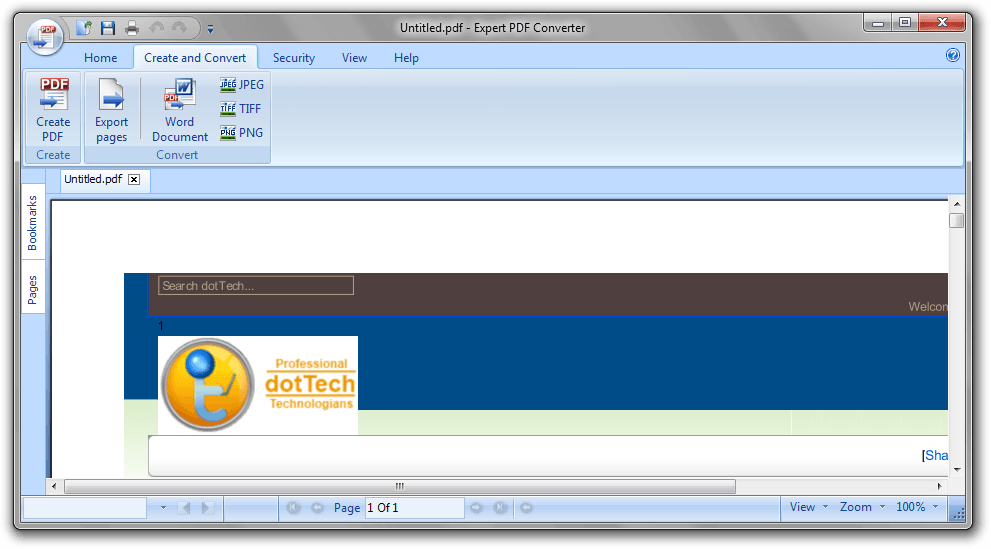
For quite a few years here at dotTech, we’ve been giving you the latest freebies, including several on Expert PDF Pro. As such, it’s really gotten ingrained in our site, and we’ve even offered tips on getting rid of some of its annoyances over the years. It’s definitely a nice program, and in version seven Avanquest gave it a nice overhaul, with a Windows 7 ribbon interface and all. (That may or may not be a pro.) It’s definitely worth snagging, if not for now, for future use, especially if you use a lot of PDFs.
Freebie Details
Avanquest Expert PDF 7 is being give away by Avanquest directly.
Here’s some information about the giveaway:
- Version being given away: v7.0.1800
- Free updates: unknown, probably none
- Free technical support: unknown, probably none
- Supported OS: Windows 2000+
- Download size: 29.8MB – 0/40
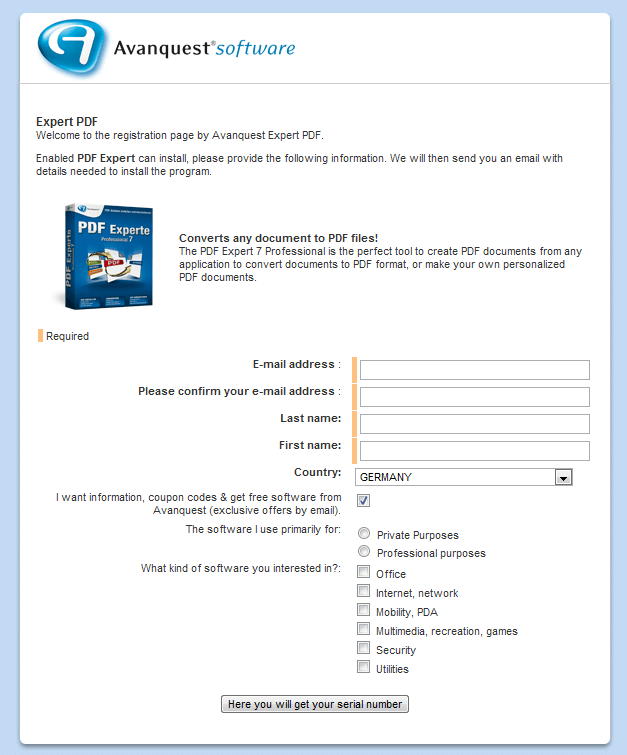
First, download and install Avanquest ExpertPDF Pro v7. Then, visit the registration page. You’ll need to enter an email address and get automatically subscribed to a mailing list, so you might want to use a service like Mailinator. The page is in German, so if you don’t use a browser with auto-translate, you can use the page below as a guide:
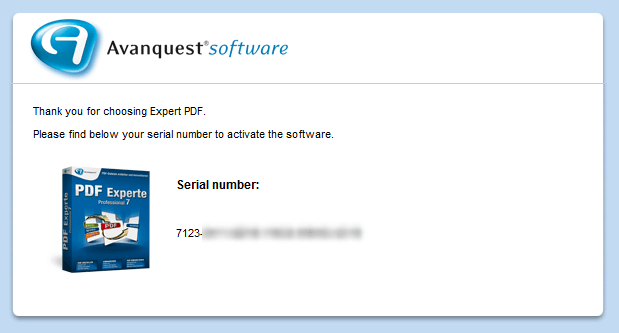
In your email, click the “klicken Sie bitte hier” button to get your code:
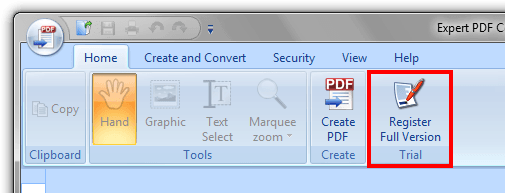
Once you’ve got the code, just open Expert PDF Pro and click the Register Full Version button:
paste it into the registration field…
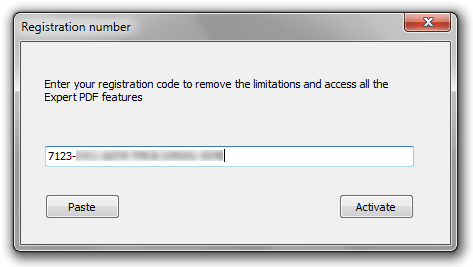
… hit register, and you’re done!
If you have trouble getting Avanquest Expert PDF Pro for free, post below and I other dotTechies or I will try to help.
[via Techno360.in]
88 Comments »
Leave A Response »


Email article


![How to edit PDFs on Windows, Mac, and Linux for free [Guide]](http://cdn.dottech.org/media/2013/04/2013-04-09_203637-134x90.png)
![iOS apps of the day [August 12, 2012]](http://cdn.dottech.org/media/2012/08/signnow-e1344609969302-134x90.jpg)
![Windows software of the day [March 22, 2012]](http://cdn.dottech.org/media/2012/03/audials-1-134x90.png)
I think, this is not “Avanquest Expert PDF 7 Professional”!!! Rather it is “Avanquest Expert PDF 7.0.1800.0 Converter”. So the giveaway topic may need a correction!!!!!!!!!!
@Mahafuz:
Read the earlier posts…:-)…..particularly #6…….
@janetb: not having any drop shadows handy to try them out on, do you happen to know if Foxit Reader or even Adobe Reader display them properly? I would hate to miss content because of faulty PDF viewers.
I just checked and for some reason I only have version 5.1 of Visage’s Expert PDF Editor; anybody know if I can still get the download and license for version 6? I must have missed the offer in November 2010.
being impatient, I went ahead and followed Ashraf’s procedure for getting Visagesoft Expert PDF Pro 6, in English, from November 24, 2010, and it all still works perfectly! Just be sure not to update the German version or the English one won’t install over it (I found out the hard way and had to uninstall and start again.). Now I’m the proud owner of version 6.32 after updating the English edition, thanks to Ashraf.
PDF Split and Merge 2.0: a PDF editor with a visual interface
If you are still having trouble with this one; you can check out the one above, my daughter uses it at work and really likes it.
To all those who want a free PDF editor, see message #49. OpenOffice Draw edits PDFs just like MS Word edits .doc or .rtf files.
The serial number Avanquest has sent me still does not work.
When the e-mail was received, there was some weird line of info before the non-working serial number.
Can anyone tell me what it was?
Bitte finden Sie nachstehend Ihre Seriennummer, um die Software zu aktivieren.
Seriennummer:
Normal 0 21 false false false FR X-NONE X-NONE MicrosoftInternetExplorer4
7123-0411-6ZV9-YMC8-W9WG-42YB
I was able to register, download and install eXPert PDF Pro 6 from the original article. Only problem I found
was when you click the link on that page for “How To: Fix some eXPert PDF Pro annoyances (prevent PDF Printer from starting on boot and turn it off automatically when you are done using it)”, it loops you back to the same page http://dottech.org/freebies/18437/free-expert-pdf-pro-6-new-promotion/. So I did a search on dotTech for “How To: Fix some eXPert PDF Pro annoyances” and it took me to http://dottech.org/tipsntricks/6751/how-to-prevent-expert-pdf-printer-from-starting-on-computerwindows-boot/… Hope this helps anyone who wants to get Version 6 back. I missed the original article, so is my first time installing it. If you already had Version 6 you might need to use a new/different email address??? Version history shows as 6.20.400.o
@WildCat:
From which page did you download eXPert PDF Pro 6, which link, and what file name? I had dl’ed eXPertPDF_V6-DEU.exe, but it would not continue the installation without a serial number. I put in the serial from the same dottech page link, but it said it was a false #…..
i am having the following PDF related software in my computer now:
# adobe PDF reader
# foxit portable PDF reader
# PDF-XChange viewer portable
# dopdf7 (PDF printer)
# bullzip (PDF printer, can secure PDF)
# wondershare PDF converter (converts secure PDFs, GAOTD version)
# PDFZilla (PDF to…, works good with images only)
# visagesoft eXPert PDF 6 (includes PDF editor, dottech freebie)
# emagmaker PDF editor (GAOTD version):: keep an eye on GAOTD, they may offer it again!
# pdfsam (split & merge)
# algologic PDF protector, splitter and merger (GAOTD version)
# freeOCR (scanned PDF to text)
@Mike; Wash.
PDF Split and Merge 2.0 is not a PDF editor, it only splits & merges! (aka pdfsam)
Anyone know of a FREE ‘editor’ or viewer/annotator that allows you to add, delete, and change the order of pages? I don’t need it to edit text, graphics, or images.
@Janetb:
You’re shouting!
Anyway, have look at: http://dottech.org/forums/freebies/debenu-pdf-maximus/#p16626
and please don’t shout if it isn’t as good as yor lost Expert PDF 6.
@jayesstee:
CAPS ARE SHOUTING; bold and underline are for emphasis–to call attention to important points. Your link mentions many functions and features–but not add, delete, and change the order of pages…:-)….Do you have reason to think it does this? I emphasized these three features so people would not refer me to apps that did not have these particular three features…:-)….
It’s not a question of good or bad; it’s a question of which features are available. The basic PDF app categories are printers, converters, viewers (most of which are annotators as well nowadays), creators, text-only editors, and full editors. eXPert PDF (as it was called up to v.7) was a full suite which included all the above! We have had many pdf apps on dottech and GAOTD, but eXPert PDF 5 and 6 (and not 7!) are the only full suites (including full editors) that I have ever seen as a free giveaway.
@Janetb:
Janet,
I am very much interested in this quest of yours, am following your comments as well as those of others, and hoping you achieve a satisfactory result. One of my interests in editing PDFs is also changing page orders, but in addition to that, I need to be able to modify tables, which Libre/OpenOffice currently lacks. I would like correspondence with you at my gmail dot com EAddy: wyvern39w, on this subject. Please put PDF in the subject/title line so it gets through the heavy spam filter.
I am surprised that you have failed to get your valid registration number for version 6 to work with the download files for that which still seem to be available.
@Janetb:
# 1 IMHO, more than 50% of a post in bold, is shouting.
# 2 On the link it states:
“Key features
Advanced PDF Split and Merge
Insert Dynamic Text, Image, PDF Stamps and Watermarks
Convert Images to PDFs and PDF to Images
Flatten Layers, Remove Annotations, Attachments, Bookmarks and JavaScript
Crop, Rotate, Delete, Extract and Insert Pages
Extract Text, Images and Fonts from PDF files
Flatten PDF Forms and Extract Form Data
Edit Initial View Settings and Document Metadata
Watched Folders for Workflow Automation
Easy Batch Processing”
Now my use of bold really is for emphasis!
I assume that if you delete and then re-insert a page in a different position, that would be a (crude) way of changing the order of the pages – OK for one or two, too long-winded for a whole multi-page document.
Anyway good luck! Please share when you find what you are looking for.
@jayesstee:
#1 I don’t think most folks would consider one bold sentence shouting…:-)….
#2 Thanks for your bold–yes that looks like it might do….I would tend to think that an app that lets you add and delete pages might well have a change-order function….Anyone out there have it ( installed to verify…?
#3 Still hoping to hear from Avantquest or Visagesoft, as eXPert PDF 6 was a full editor. If I have to buy something, I would switch to Tracker–the makers of the PDF XChange series.
Those of you following this thread might like to follow
http://dottech.org/freebies/18437/free-expert-pdf-pro-6-new-promotion/comment-page-2/#comment-576345
as well…..
@AFPhys:
The serial # issue is being discussed at
http://dottech.org/freebies/18437/free-expert-pdf-pro-6-new-promotion/comment-page-2/#comment-576345
I sent you my email just now….
@Janetb:
I Stack!
What’s “I Stack!”…?? Sorry, I’m just an old lady…:-)….I Googled it but didn’t find anything that seemed to fit the context……
@Janet:
Don’t ask Google, ask a card player, young or old.
There is a $250 program for free at BitsDujour
Debenu PDF Maximus
http://www.bitsdujour.com/software/debenu-pdf-maximus/src=day/?utm_campaign=690451&utm_content=1474557128&utm_medium=email&utm_source=Emailvision
Must be installed in the next 3 days.
And the web page at BitsDujour expires in 14 hours <=====
@Janetb:
I don’t know whether this is any good, but worth a look?
http://dottech.org/forums/freebies/get-free-expert-pdf-8-professional-edition-ultimate-business-edition-dont-miss-it/#p17191
Yes–that’s IT–the full editor! The whole nine yards! Thanks so much for the tip!
@jayesstee:
It may be me,as I just woke up, but is there a link to it ?
(Obviously Janet woke up earlier than me, and found it somewhere)