The best free file backup software: GFI Backup Home Edition
August 13, 2011 87
Email article | Print article
In my article on FBackup I just ranted about how I am obsessed with Titan Backup. Well let me tell you my affair with Titan Backup is over; we are done – I broke up. I found myself a new love which comes in the name of GFI Backup Home Edition:
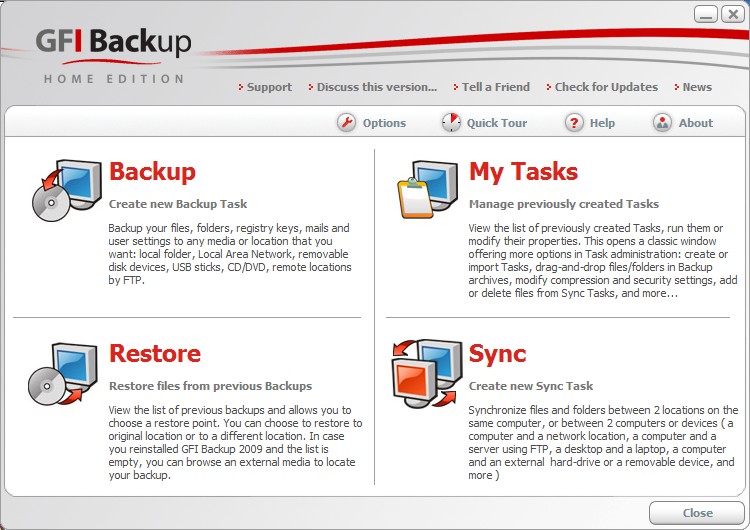
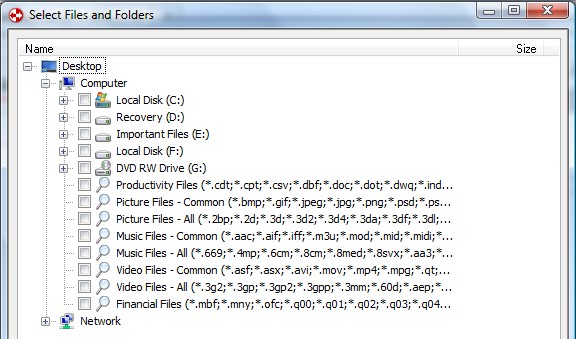
Does the interface for GFI Backup look familiar? Oh yes… now I remember: it looks just like Titan Backup! GFI Backup is literally the same thing as Titan Backup (Titan Backup is the predecessor of GFI Backup) with one difference: GFI Backup Home Edition is now free for home users. So instead of downloading old, outdated versions of Titan Backup, you can use new, free versions of GFI Backup.
To give you a run down of why I say GFI Backup is the best free file backup software, here is what GFI Backup has/can do:
- Nice clean, easy to use interface
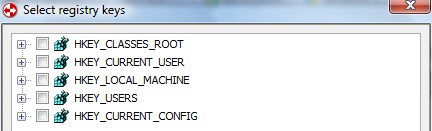
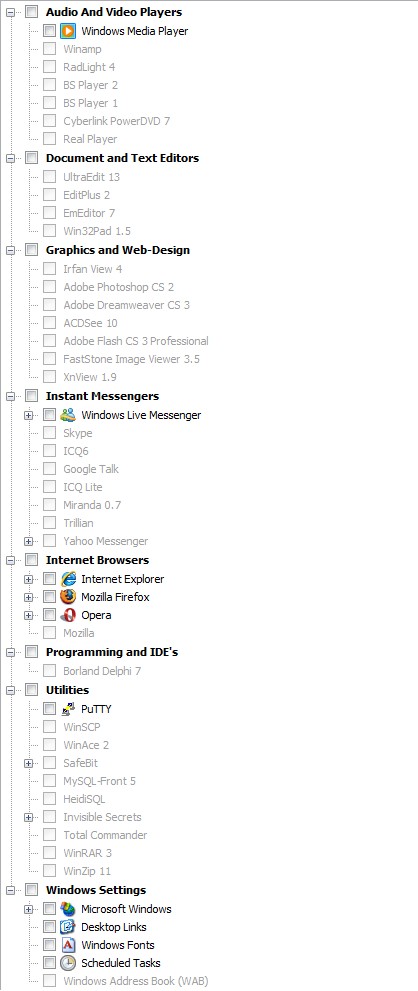
- Backup registry and files/folders (including backup specific program data via pre-installed plugins)
- Apply filters or “masks” to your backup jobs to include/exclude specific files types
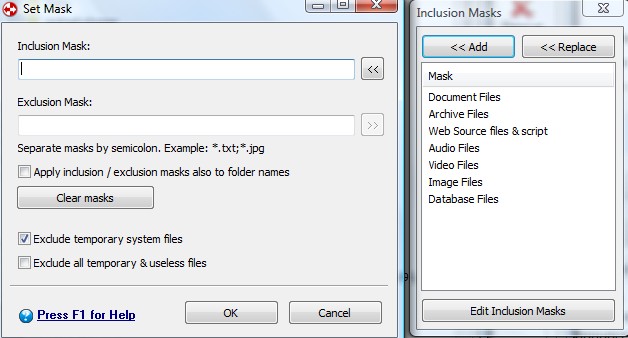
- Ability to backup files that are currently in use (via VSS)
- Backup to a local folder, external hard drive, network folder, portable device, CD/DVD or over FTP
- Create incremental, differential or stacked backups, compress your backups (ZIP64), and protect your backups with .ZIP level password protection or AES 256 encryption
- Automatically do backups with the “scheduler” including at Windows shutdown or boot
- Run a task before the backup, after the backup and shutdown/log off/sleep/hibernate computer after backup has finished
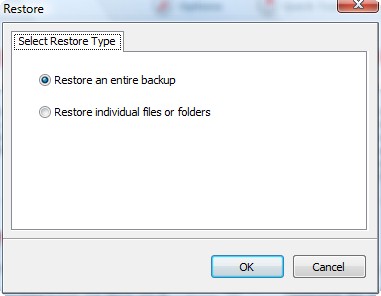
- Restore full backup or individual files/folders
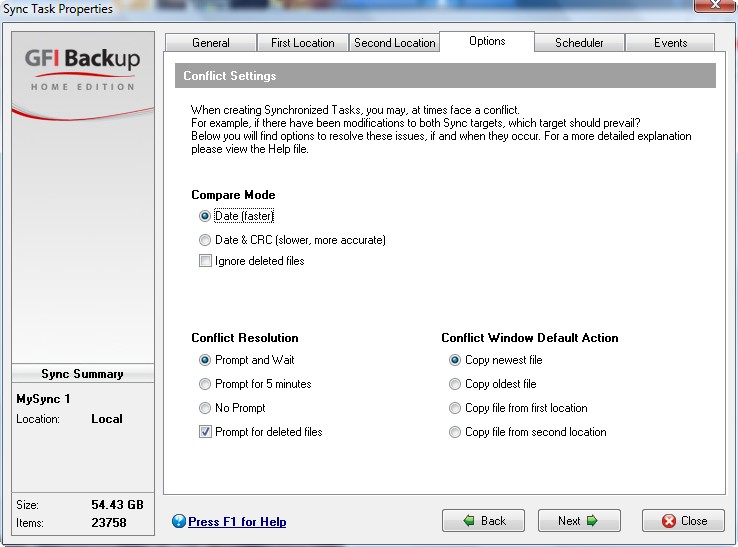
- Sync the files and folders between two locations (two local locations or one local and one external such as network folder, USB, FTP, etc.)
- Ability to run GFI Backup as a service
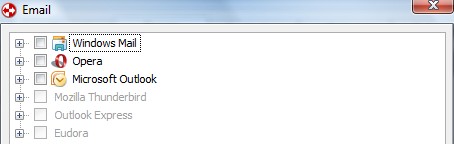
Pretty impressive features for a free program huh? Nothing more I can ask for in a file backup program except maybe the ability to backup email from online email services (such as Gmail or Hotmail) and an open platform for plugin development. Forget Titan Backup and forget FBackup (unless of course FBackup has a plugin that GFI Backup does not) – time to get GFI Backup.
The only downside to GFI Backup is that you must fill out a short form (first name, last name and email address) in order to download it. No biggie though - if you feel too violated of your privacy you can enter fake names and email addresses because you will get a download link directly on your screen after you submit your info. However consider using real information (at least real email) so you can avoid having to register every time you want to download from GFI. You can grab GFI Backup Home Edition from the following link:
***GFI Backup Home Edition System Requirements:
- Intel Pentium III processor or above
- 256 MB RAM (512 MB RAM recommended)
- 8 MB free hard drive space
- Windows XP Home, Windows XP Professional SP2, SP3 (x86 and the x64 versions) and all editions of Windows Vista except for Vista Starter (x86 and the x64 versions)
While officially Windows 7 is not supported, people have reported it is working just fine in Win7.
87 Comments »
Leave A Response »


WARNING!!
This is from the GFI forums:
“If you select the entire C: partition when you make a new backup, GFI Backup 2009 – Home Edition will tell you that you will not be able to restore your operating system from this new backup. Right now, you have to reinstall your operating system and your programs, then you can restore your data files and program settings.
……..we indeed have “drive image support” on the feature requests list which is being considered for future versions.
Two more excerpts from GFI forums:
“I noticed that the minimum timeframe that backups or synchronizations can take place is 1 hour.
While that may be sufficient for your daily backups, it is insufficient for the synchronisation of folders in my opinion.
It would be much better if one is able to configure scheduler so that the synchronization interval takes place in minutes or even seconds instead of just hours.”
“Right now, GFI Backup 2009 will ignore empty folder (as there’s no data inside them). However, I see that some people needs to have a full backup, including empty folders, so I will add this feature on our requested feature list.”
@Janet Berg: Wow, I sure am glad I like to neglect backups!
GFI is not working for me! i am trying to explain here what i did:
i tried to do a back-up from one flash drive to the other. when i inserted the two in my laptop, the 1st one showed up as E whereas the 2nd one as F. when i backed up E drive in F drive , “all files and folders” of E drive was created within a folder “E” (which was within a folder “MyBackup1″ which was existing in root of F drive) in F drive . success! well, i thought, it should work in the same way for my external hard drives. i inserted my HDDs and they showed up as P (my source drive) and Q (my destination drive). now, here “all files and folders” were existing in root of both HDDs. therefore, i thought why waste time? just back-up the new files of P drive! i knew then GFI works this way:
“all files and folders” of source drive is created within a folder “X” (drive letter of source drive which was within a folder “MyBackup…” which exists in root of destination drive) in destination drive.
hence, i created a folder “MyBackup2″ in root of my destination drive. then created a folder “P” within the folder “MyBackup2″. and, now, i put all files and folders of destination drive within “P”. opened GFI, started a new job as “MyBackup2″, source drive was assigned as P and destination drive as Q, selected differential back-up. after a minute, the job failed, the error message was “cannot create back-up in destination”.
i used to back-up by EMC retrospect (old version) which is not working in windows vista.
@mukhi:
Boy o boy–do I empathize!!! Your post sounds exactly like something I would have done…! But I am confused–what sort of format does the GFI Backup give? I assume it is not propietary because Titan wasn’t–it could give you the backup as an exe file. In your case, did it actually give you a COPY (so you could see exactly what was there and open and look at all of the files)? If so, does a differential backup simply make all the changes in the copy that had been made to the original since the first backup was made? If so, isn’t that syncronizing? I have always been a little unclear about backups vs. syncronization (see my earlier post above)…..
@Janet Berg:
unlike some other “crazy” back-up software, both titan and GFI do not give some special format when backed-up, but in the destination drive, you get what you “exactly” had in the source drive, e.g., you get “black or white” MP3 song file in michael jackson folder. differential is pretty easy, it deletes everything in the destination what is not presented in the source. this means if in the source, you delete some files, you do not have to delete in the destination, this back-up software should do this job. incremental does not do it, incremental simply copies the files of the source in the destination. if you delete some files in the source after the previous back-up, those files still stay in the destination if incremental is used as option for the current back-up.
hello there.
Is this backup unicode compliant?
Titan one is not, which makes it useless (for many)
Thanks
Welcome back. Here’s a broad question for you. Considering the great free image backup programs available, I have trouble seeing why I would want to use a file backup application. Am I missing something? What are the advantages of using this type of program instead of an imaging program?
@Jeff Taylor: File backing up programs are usually easier to use when wanted to backup and restore only a certain files instead of your whole computer. So if you want to backup your whole computer/partition go with image backup. If you just need certain files to be backed up go with a file backup program.
Much thanks for this. I’ve been looking for a way to back up my files – have been on alert to GOTD and found GFI via Ashraf.
Much appreciated for your expertise.
Faith
can somebody please tell me what’s going wrong with my back-up with GFI described above?
What do you know about this (from the GFI EULA)?
22. INTELLECTUAL PROPERTY RIGHTS: The Product is protected by copyright, trademark and other intellectual property laws and treaties. You hereby acknowledge that third-party software may be incorporated into the Product. GFI Software or, to the extent such third-party software is incorporated, its licensors, own all title, copyright, and other intellectual property rights in and to the Product.
@face: Hmm sounds to me like GFI is planning on having one of those “Install Ask Toolbar” or “Install Yahoo Toolbar” options in the near future.
i have figured out what was going wrong with my back-up. it turns out to me the way i was doing (which actually made sense) is not accepted by GFI, but by titan 1.5. now that the same back-up is successful with titan 1.5, i would strongly suggest to use titan 1.5 instead of GFI.
@mukhi:
and Ashraf:
Isn’t GFI and (discontinued) Titan the same program?
@Janet:
“GFI Backup is literally the same thing as Titan Backup (Titan Backup is the predecessor of GFI Backup) with one difference: GFI Backup Home Edition is now free for home users.”
@amnesia:
Yes….So what about Muki’s comment:
“it turns out to me the way i was doing….is not accepted by GFI, but ….the same back-up is successful with titan 1.5″?
Sounds like he’s saying you can do something with Titan that you can’t wwith GFI, no? That was the point of my post….
@Janet:
Sorry, I misunderstood. Yeah, I thought they were basically the same.
@Janet and amnesia
although it looks like they are the same (i thought as well), but functionally, they are showing difference! GFI is probably OK if you have one HDD with stuffs (source) and the other with nothing (destination). however, if you have two HDDs with identical stuffs in there (one is already the mirror or back-up of the other), and you want to save some new stuff in source and then use SW to back-up in the other (incremental or differential), GFI does not work while titan 1.5 works!
@mukhi:
Well, that sure is hard to believe….:-)….! Isn’t that what backups are for..???? You only back up to an emty destination ONCE–after that, your backup is always just adding files to and deleting files from your first backup so that it continues to “mirror the source”….I THINK WE NEED ASHRAF HERE…….:-)….!!!!!
This is actually the very point that always confused me with backups (as a result of which I tend to synchronize instead…). The problem is in the Titan/GFI HELP wording which is VERY confused:
It says incremental backup
1. “replaces the previous backup files”
AND
2. “backs up only changed files”!
According to this, you would lose the major portion of your backup and be left with only the few files that had been changed!!!!
My understanding was that incremental backups ADD additional ‘mini-back-ups’ (i.e., the added files), so that after you do a few incremental backups over time, you would have one BIG (i.e., the original) backup file, and a few small (i.e., the incremental, added) backup files. But this is NOT what the HELP says–they clearly place incremental backups in the category of REPLACEMENT backups! That’s what I don’t get and why I still haven’t done a backup beyond the original backup that clearly has everything….
According to the GFI/Titan Help, the second type of ‘Replacement’ backup is ‘differential’ which it says “deletes files from current backup that don’t exist anymore in the source location”. What is meant here by the “current backup”??? The original? The last incremental?
@Janet
here back-up simply means a way to create a mirror (of the files, say A & B of the source drive) in the destination drive. incremental means if you do change A or B or both or/and add C in the source drive, the next time you do the incremental back-up, you will see the new A or new B or both or/and added C in the destination drive. differential means if you do modify A and delete B and add C in the source drive, the next time you do the differential back-up, you will see the new A, no B and added C in the destination drive. if you would do incremental in this case, you would see new A, old B, and added C in the destination drive. titan 1.5 is doing it, but GFI is failing with error message!
UPDATE: @Janet
please read my previous comments (#29). i am talking about a “continued” back-up. in my case, before i have used these SWs both source and destination drives had the same files and folders. i knew either of these SWs creates a folder called “my backup…” and then creates a folder (named as the drive letter, say P, of the source drive) inside this folder in the destination drive and puts all files and folders of the source drive in P of destination. in the root of the destination, another file is created by the SW (.gbt in GFI). so what i did is that i started the SW, once the .gbt was created in destination (takes ~30s), i saw “my backup…” folder and inside it P folder in destination as well. i stopped SW and deleted whatever was created inside P in the destination (as the SW started backing-up which i don’t want as i already have everything in the destination root which is identical to source root! remember, i said i already have identical files and folders in both! i didn’t want to waste time by copying my 600 GB of files again.). now, i “moved” “those files and folders” in the P folder of destination. after this, i run SW again. technically, as the root of source and the P folder of destination had the “same files and folders”, back-up should finish within minutes as there was nothing to “back-up” then (the SW is supposed to compare and finish)! titan 1.5 did this when GFI gave error message. with titan 1.5, i could be able to continue further by adding more files in source and then running differential back-up.
@Janet: Yes they are.
@mukhi: I don’t know what is wrong but I do not face this same problem when creating incremental backups. In fact I just ran one right now and it only backed up the new files and finished in under 2 minutes. Nor do I ever get an error. I agree with Janet in the idea that it is hard to believe Titan 1.5 works on something when GFI does not because Titan is GFI. Neobytes sold Titan Backup to GFI and they turned it into GFI Bckup.
There may be something wrong with your settings. Or maybe your installation is corrupt. Did you try reinstalling it?
@Ashraf,
yah, i tried, i think GFI has some bug which does not allow me to do a back-up in an already existing backed-up drive (as described above), however, GFI works in an empty destination drive, and then if you continue, it still works. titan 1.5 recognizes both!
@mukhi: Wait so let me understand what you are trying to say.
You are trying to do an incremental backup to a folder that already has the contents you want to backup. GFI will not recognize the contents and overwrite them when running the backup but Titan 1.5 does recognize them? Ok let me test this out really fast.