
 Email article
Today’s Software
- Google Drive: sync your computer with the Google cloud
- MD5 & SHA-1 Checksum Utility: verify downloads
- Dimmer: make your computer usable at night
Subscribe to our Windows section to never miss an article: RSS Feed | E-mail
About Windows Software of the Day
Windows has hundreds of thousands of programs. Because of this great volume and lack of a central store, software discovery (aka finding new and useful programs) is extremely difficult. With our Windows Software of the Day initiative, dotTech aims to change that. Everyday we post three programs, allowing our readers to discover new software, daily. Enjoy! [Subscribe to our Windows section to never miss an article: RSS Feed | E-mail]
Developers: Click here to get your apps featured here!
dotTechies: Want to see an app on here? Send us a tip!
Software for July 9, 2012
Google Drive
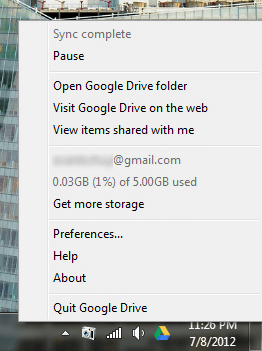 Are you an avid Google user like me? If you are, you’ve definitely heard of Google Drive, Google’s cloud data storage. It’s a lot like Dropbox, but integrates seamlessly into Google Docs, so you can have all of your cloud data available all the time.
Google Drive automatically syncs files to and from a designated folder, much like Dropbox. However, unlike Dropbox, it offers 5GB of storage space for free, up from 2GB. Dropbox of course offers upgrades to almost 20GB of space for free if you get others signed up and do their challenges, but Google Drive is 5GB up front.
All in all, Google Drive is really nice if you don’t already have everything sunk into Dropbox or other services and feel that Google is a good cloud option.
Price: Free!
Version discovered: v1.2.3123.0250
Supported OS: Windows
Download size: unknown
VirusTotal malware scan results: N/A (web installer)
Portability: Requires installation
MD5 & SHA-1 Checksum Utility
 Need to verify a download? Often, developers post short codes called checksums or hashes on their download pages so you can verify that the file you downloaded is correct. MD5 & SHA-1 Checksum Utility is one of a vast number of tools you can use to check them.
Honestly, we’ve covered a number of checksum checkers. This one, like many others, features instant hashes of various types and a place to paste a hash to check it from a download page. It’s pretty much exactly like every other checksum tool out there, but if you don’t already have one this is one that would fit quite nicely 25 times on your floppy disc.
MD5 & SHA-1 Checksum Utility is a nice tool for those who constantly download and are worried about corruption.
Price: Free!
Version discovered: v1.1
Supported OS: Windows unknown
Download size: 52.0KB
VirusTotal malware scan results: 0/42
Portability: No installation required!
MD5 & SHA-1 Checksum Utility homepage
[via Raymond.cc]
Dimmer
 Using your computer screen at night sucks! Unless you lower the brightness past minimum, you’re going to kill your eyes in twenty seconds flat. But how are you supposed to make it dimmer? With the aptly-named Dimmer.
Dimmer doesn’t actually dim your screen, but instead creates a black veil over the entire screen. This effectively makes the screen darker, but beware that it doesn’t help you save electricity. It also unfortunately doesn’t cover the taskbar, but it’s better than nothing.
Overall, Dimmer is really nice if you absolutely must use your computer late at night. If not, though, do us all a favor and go! Get some rest; your body will thank you.
Price: Free!
Version discovered: v1.0
Supported OS: Windows 2000+
Download size: 13KB
VirusTotal malware scan results: 0/42
Portability: No installation required!
dotTechies: We have tested all the software listed above. However, Windows Software of the Day articles are not intended as “reviews” but rather as “heads-up” to help you discover new programs. Always use your best judgement when downloading programs, such as trying trial/free versions before purchasing shareware programs, if applicable.




