How to switch from Outlook.com to Hotmail [How-To Guide]
August 7, 2012 575
Email article | Print article
Outlook.com is a new free web e-mail service by Microsoft intended to replace Hotmail. Using Outlook.com can be done by creating a new Outlook.com account or upgrading your existing Hotmail account to Outlook.com. If you have used Outlook.com and decided you want to go back to Hotmail, that can be done easily. This guide shows you how to do it.
Before We Begin
Before we being, take note going from Hotmail to Outlook.com does not change your e-mail address. This means if you created a new @outlook.com e-mail, that e-mail will stay with you when you go to Hotmail; if you converted your Hotmail account to Outlook.com, you will still retain the same Hotmail e-mail when you go back.
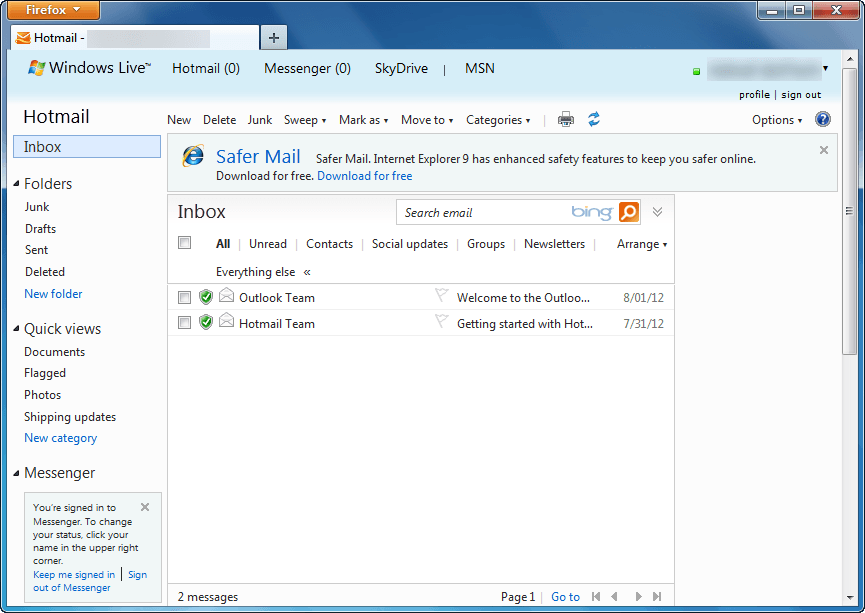
Also, downgrading from Outlook.com to Hotmail does not result in loss of data. All your e-mails, contacts, folders, etc. are converted with you. The only thing that changes when going from Outlook.com to Hotmail is the user interface; you get the old Hotmail inbox and features back.
Lastly, if you were forced to upgrade to Outlook.com from Hotmail, you cannot revert back to Hotmail. Going from Outlook.com to Hotmail is only for those people that voluntarily upgraded.
UPDATE: It looks like Microsoft is no longer allowing people to revert back to Hotmail from Outlook.com. Sorry people — you are stuck with Outlook.com, you cannot change back!
How To Go Back To Hotmail From Outlook.com (How To Turn Off Outlook.com)
The following are the steps you need to take to covert your Outlook.com account to Hotmail:
Note: To enlarge any images below, simply click on them.
- Login to Outlook.com.
- Once logged in, you will be taken to your Outlook.com inbox. From there click on the gear icon located near the top-right corner:
- Clicking on the gear icon will open a menu. From that menu click on Switch back to Hotmail:
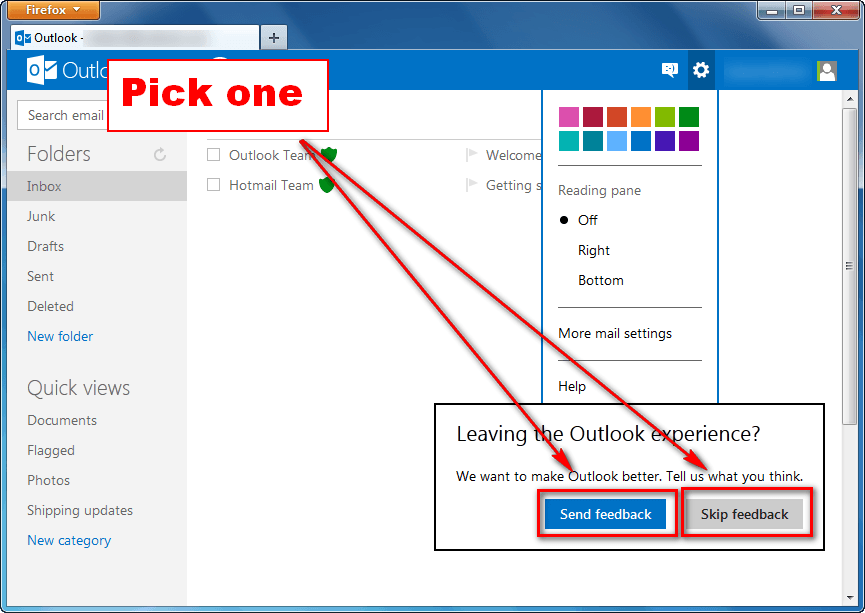
- Next you will be prompted with a message asking for feedback. If you want to provide feedback, click on Send feedback; otherwise, click on Skip feedback:
- Done.
If you opted to send feedback, you will be asked a series of questions after which you will be taken to Hotmail; if you opted to not send feedback, you will be taken directly to Hotmail:
Conclusion
Switching between Hotmail and Outlook.com is very easy and dotTech’s two guides How To Upgrade From Hotmail to Outlook.com and How To Switch from Outlook.com to Hotmail make the process even easier thanks to our step-by-step directions with screenshots. So go, venture into the world of Microsoft e-mail without fear of permanent change. Enjoy!






![Microsoft makes fun of iPad using Siri’s voice in latest Windows 8 ad [Video]](http://cdn.dottech.org/media/2013/05/ipadsurface-134x90.jpg)
![The Leap Motion makes Windows 8 look… awesome [Video]](http://cdn.dottech.org/media/2013/05/leap-134x90.jpg)

![Running Windows is more painful than torture [Comic]](http://cdn.dottech.org/media/2013/05/klingon_pain_stick_comic-134x90.gif)
Agreed,the tree bends with the wind or breaks,cheers,
[@Kendra farns] [@ALAN SHEEHAN.]
This one is for the two of you: Taking advantage of your help offers, I have asked a few times before how to back up all my data in Hotmail (before I either move or get moved) and in Outlook, after I get there.
This is my request on 3/21/2013 at 1:10 AM:
“Kemdra, you said it before and I asked then how do you backup your Hotmail (or your Outlook) data, using Windows Live or any other means. I guess my question became lost in the shuffle, so I’m bringing back and I would appreciate any help you or Alan could provide for that purpose. I’m a computer moron, so I would need detailed info.
Thanks in advance for your patience.”
If you already provided an answer, I apologize, I missed it. If not, can you please provide detailed guidance on that? I confess, I attempted to do it but got nowhere…
Thanks again.
Mark
The easiest way is to install Windows Live Mail email client and sync it to your Hotmail/outlook.com. It will transfer emails, contacts, calenders, rules, etc.
Link to some decent instructions here
http://windows.microsoft.com/en-US/windows-live/mail-import-backup-restore
If you are also getting it on a mobile device make sure “leave a copy on the server is checked”
Sorry I missed the first time.
[@Kendra farns]
Thanks, Kendra! Had I mentioned that I am a computer moron? Yes?… Well, here is the proof, if we needed one — I DO HAVE Windows Live Mail… And yes, I saw there all the same messages I have in my various Hotmail folders… So, what I was talking about?… A moron, indeed… rsrs…
So, I understand I do not need to do anything now in terms of backing up my Hotmail settings and data, am I right? And many thanks go your way for making me wake up and see what I had all along. Now, I notice the environment is quite different from Hotmail’s, which leads me to ask one other question, if you allow me:
In order to start getting a feeling of what waits for me in the (not so distant) future, how would you guys compare the looks of Outlook.com versus Windows Live Mail and versus Hotmail?
This, I believe, will give me a quite good “preview” of what lies ahead, as soon as they push me to the pool…
Thank you once again for all your help and your patience.
but at my outlook dosnt exists that icon switch back to hotmail… uffff sucksss
I must be the most patient guy on the planet…READ
THE PREVIOUS POSTS!!!!!
Alan
Falling on deaf ears I think. Those are the users who whine the most and listen the least
Mark
{sorry for the double post} Been a very busy day as you can imagine.
As long as your WLM is configured to “sync” with your Hotmail account then you are 100x better off than anyone else there.
For the ultimate protection save your WLM store folder
c:\users\your user\app data\local\Microsoft\… and store it to another partition, a flash drive, or where ever. That folder contains almost everything
Hate the Outlook mail! Give back our hotmail!!!
SO???????????????
@witt
Venting may help you come to the realization it just isnt happening. Feel free
@Alan
There are none so blind as those who will not see, none so deaf as those who will not hear. I am working on a tips & tricks for outlook.com, for example clicking to/cc/bcc once gives favorites, twice gives all. Click the “#” to have the alphabet shown.
Yes Kendra,i’m familiar with those & cicking on the V
on the right of the name-”Outlook”[top left]works too,
cheers-Alan.
@Alan
Figured you would be but wanted to get it in public.
we want back to frome qutlook to hotmail but in my account don not have (buck to hotmail) in setting what should i do…..?
[@haroon]
Dont you read the previous posts? THERE IS NO WAY TO GO BACK.
Either use it or find a replacement.
outlook is suck i hate it pls give us back our Hotmail this is bullshit outlook
Talk about an exercise in futility. Logan, it just wont happen.
This time i’m going to be sharp.You are yet another
poster who just comes to this HELP THREAD to
moan.1/.You don’t bother reading what other posters
have said.2/.You should brush up on your English &
then post your complaint to MS!
To take Alans’ one step further (if he doesnt mind) You can complain to your hearts content if thats what it takes. In fact here is where
http://answers.microsoft.com/en-us/windowslive/forum?tab=unanswered
https://feedback.live.com/default.aspx?scrx=1
It wont do any good.!!! Hundreds of thousands of users are being migrated every day. There is always Gmail, Yahoo, AOL, etc.
HELP! I tried to do this but it doesnt give me the option to change it back.
I HATE the new look (outlook) and i just want my hotmaidl back the way it was.
[@hmmm] nor di i grrrrrrrr
Is there any way to change the name of this whatever it is called (thread?) so that people realise there is no way back? Some people obviously read the title, but not the comments. This could go on forever.
Good Lord! Kendra & Alan, you are extremely patient! Most of the updates I get on this thread are from – lets just say it – ignorant jacka**es who don’t pay attention! Folks – if you’d take just a moment to read the posts you would see THERE IS NO GOING BACK TO HOTMAIL! After trying to dive in before being pushed, and failing because MSN had reached their “limit”, the finally did push me. I have to say, I’m not sure what all the fuss is about. It really isn’t that bad. The look isn’t great, but for free email, I have yet to find a problem with it. I’ve been able to locate what I need, etc. I wish there were a line separating emails, rather than simply bold for unread mail, but other than that, it’s not that bad. Get over it or switch to another provider!