How to switch from Outlook.com to Hotmail [How-To Guide]
August 7, 2012 575
Email article | Print article
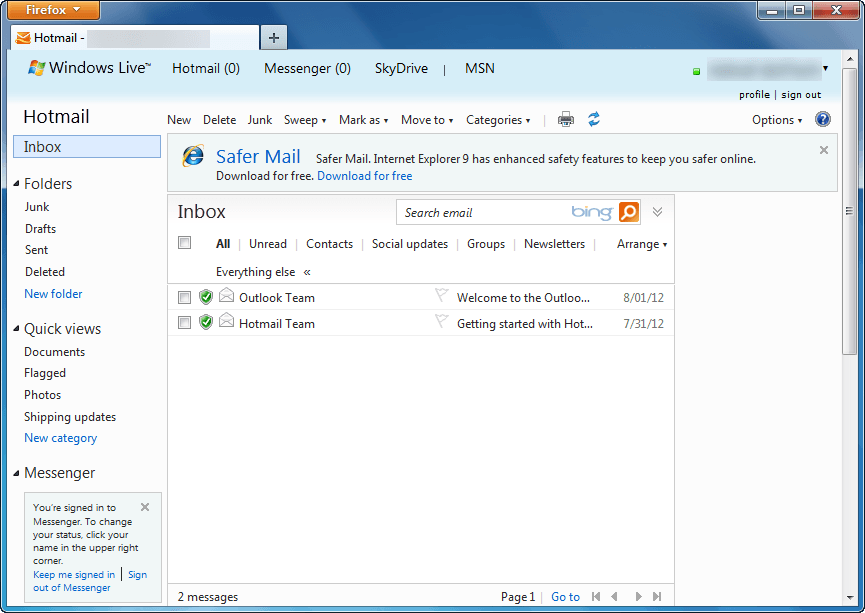
Outlook.com is a new free web e-mail service by Microsoft intended to replace Hotmail. Using Outlook.com can be done by creating a new Outlook.com account or upgrading your existing Hotmail account to Outlook.com. If you have used Outlook.com and decided you want to go back to Hotmail, that can be done easily. This guide shows you how to do it.
Before We Begin
Before we being, take note going from Hotmail to Outlook.com does not change your e-mail address. This means if you created a new @outlook.com e-mail, that e-mail will stay with you when you go to Hotmail; if you converted your Hotmail account to Outlook.com, you will still retain the same Hotmail e-mail when you go back.
Also, downgrading from Outlook.com to Hotmail does not result in loss of data. All your e-mails, contacts, folders, etc. are converted with you. The only thing that changes when going from Outlook.com to Hotmail is the user interface; you get the old Hotmail inbox and features back.
Lastly, if you were forced to upgrade to Outlook.com from Hotmail, you cannot revert back to Hotmail. Going from Outlook.com to Hotmail is only for those people that voluntarily upgraded.
UPDATE: It looks like Microsoft is no longer allowing people to revert back to Hotmail from Outlook.com. Sorry people — you are stuck with Outlook.com, you cannot change back!
How To Go Back To Hotmail From Outlook.com (How To Turn Off Outlook.com)
The following are the steps you need to take to covert your Outlook.com account to Hotmail:
Note: To enlarge any images below, simply click on them.
- Login to Outlook.com.
- Once logged in, you will be taken to your Outlook.com inbox. From there click on the gear icon located near the top-right corner:
- Clicking on the gear icon will open a menu. From that menu click on Switch back to Hotmail:
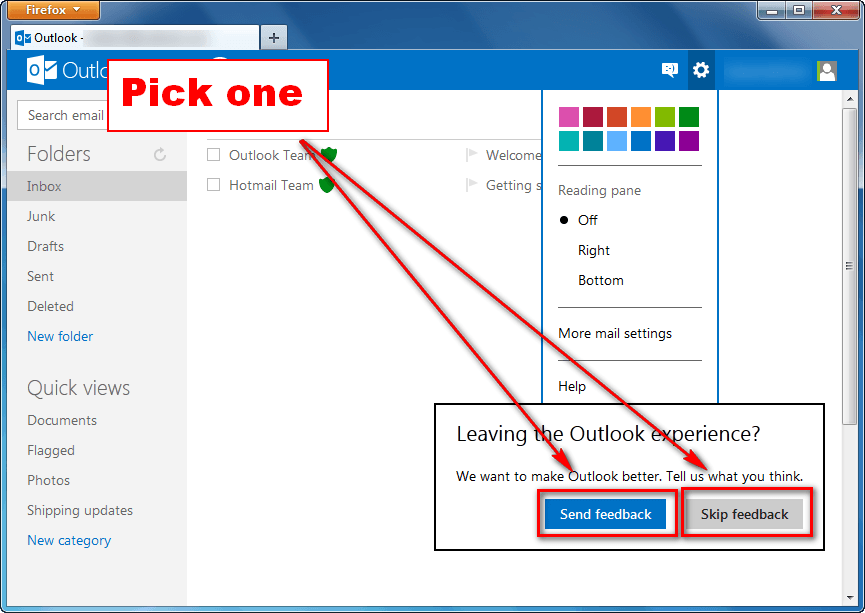
- Next you will be prompted with a message asking for feedback. If you want to provide feedback, click on Send feedback; otherwise, click on Skip feedback:
- Done.
If you opted to send feedback, you will be asked a series of questions after which you will be taken to Hotmail; if you opted to not send feedback, you will be taken directly to Hotmail:
Conclusion
Switching between Hotmail and Outlook.com is very easy and dotTech’s two guides How To Upgrade From Hotmail to Outlook.com and How To Switch from Outlook.com to Hotmail make the process even easier thanks to our step-by-step directions with screenshots. So go, venture into the world of Microsoft e-mail without fear of permanent change. Enjoy!






![Microsoft makes fun of iPad using Siri’s voice in latest Windows 8 ad [Video]](http://cdn.dottech.org/media/2013/05/ipadsurface-134x90.jpg)
![The Leap Motion makes Windows 8 look… awesome [Video]](http://cdn.dottech.org/media/2013/05/leap-134x90.jpg)
Hi. I hade Outlook,but now is my Hotmail back.But I have one other problem,i back Hotmail but still i have problems with contacts.When i go to page to show my contact its diferrent from hotmail way, still seems like contact are in Outlook.When i go to contact from messenger or hotmail i can’t see nothing from he,i can see just name and picture,but with who is my contact friends and other activity no.Can i do something to back my contacts watch,like I hade before Outlook?Pls answer
I followed the directions, but there was no little gear icon available.
@Darlene Castor:
According to Microsoft if you were forced to upgrade to Outlook.com you cannot revert to Hotmail. If you opted to upgrade to Outlook.com and try to revert under the Gear option, it will not allow you to revert. Now you are stuck with Outlook.com or some partial version of Hotmail.com because Outlook.com freezes up and stops working. No one seems to have found a fix so far. Good luck.
Thank you so much for helping me revert to the old version of hotmail, I hated that new Outlook one. a friend and I spent a lot of time trying to do it ourselves before I asked the question (should have asked first, it took a minute to do).
Outlook should take note, we do not like it
My hotmail account keeps on reverting back to some half ass version of Outlook and freezing up so I can’t click on inbox! I am livid beyond belief. Anyone know how to permanently remedy this situation? No little gear icon anymore either so I’m stuck.. can’t figure a thing out. HELP?!
For some of us, there is no option to revert back. Does that mean we’ve lost all of our Hotmail contacts and mail? What an ordeal! Is MSN working on this or is this permanent?
@Rachel:
Unfortunately it is a brief respite. MS is adament about providing the “outlook experience” to all users and they have been “upgrading? a new set of users every 3 days. I suspect it will coincide with the messenger merge to Skype in the fisrt “Q” of 2013.
@Alena: You shouldn’t have lost any data but you won’t be able to switch back to Hotmail. Your contacts and mail should have been migrated to Outlook.
use google chrome..dont use firefox mozilla to open your email
Can’t even open my e-mail!!!!!
Nothing works, just freezes!!!!
thanks for descriptions. really helped. poor & boring outlook. really wasted all my time.
@Lisa: @<a href="http://dottech.org/75517/how-to@Lisa: -downgrade-change-convert-from-outlook-com-back-to-hotmail/comment-page-3/#comment-782033″>Lisa:
yes someone please help me get my hotmail back hate this macbook now i really dislike the out look no in box doesnt let me go to the gear or anything else for that matter! grrrr
Unable to change back to Hotmail & I HATE Outlook!
No Gear icon displayed,or options@ all. I cannot even export or import my contacts,e mails,etc. to another e mail acct.
The Techs.@ Microsoft claim they can make the change (for $100.00!),but can’t guarantee I won’t get switched back again automatically,& wind up in the same fix I am in now.
I also get no response from Outlook @ all!
HELP!!
Help, somebody!
@c-loe: @ACOTB: @ACOTB:
Many thanks for this help. I was curious when asked to try Outlook, I did not expect o lose my Hotmail page, and then I could not find a way back to Hotmail. With your help, I am now back.
Thank you.
@Tschieff:
I am so stuck
I hate outlook
It forced a switch.
Now I can’t read any emails or respond or see any addresses to change to yahoo!!!!!!!
My life has been hijacked by Microsoft and Outlook is awful!!!!
Since I managed to switch back to Hotmail from Outlook, I have been unable to send emails, I can receive emails, but I can’t send any. Can anyone help please?
@Lisa:
get old hotmail back outlook express was forced upon me i’m lost without it HELP PLEASE.
I too have a problem of not seeing a gear icon to try and change back to hotmail.
On the current outlook page I cannot attach files to my emails.. Please help! I had hotmail for years and am lost without it and dont really want to get rid of it if it can be changed back.
I was in the middle of sending an important email with attachments and suddenly I was in Outlook and not Hotmail. I’m not sure if I touched a button or what but now I can’t change back (there is no little gear icon showing) and I can’t send anything with attachments or see all of my contacts and documents. This email system doesn’t work well and people should have some warning before it kicks in.
It happened to me the same exact way 2 wk’s. ago, & I’m having same problems as you. Have spent hr’s. trying to find a way or someone who knows how to switch back,so far no luck.
GRACIAS POR AYUDARME !!!!!!!!!!