How to switch from Outlook.com to Hotmail [How-To Guide]
August 7, 2012 569
Email article | Print article
Outlook.com is a new free web e-mail service by Microsoft intended to replace Hotmail. Using Outlook.com can be done by creating a new Outlook.com account or upgrading your existing Hotmail account to Outlook.com. If you have used Outlook.com and decided you want to go back to Hotmail, that can be done easily. This guide shows you how to do it.
Before We Begin
Before we being, take note going from Hotmail to Outlook.com does not change your e-mail address. This means if you created a new @outlook.com e-mail, that e-mail will stay with you when you go to Hotmail; if you converted your Hotmail account to Outlook.com, you will still retain the same Hotmail e-mail when you go back.
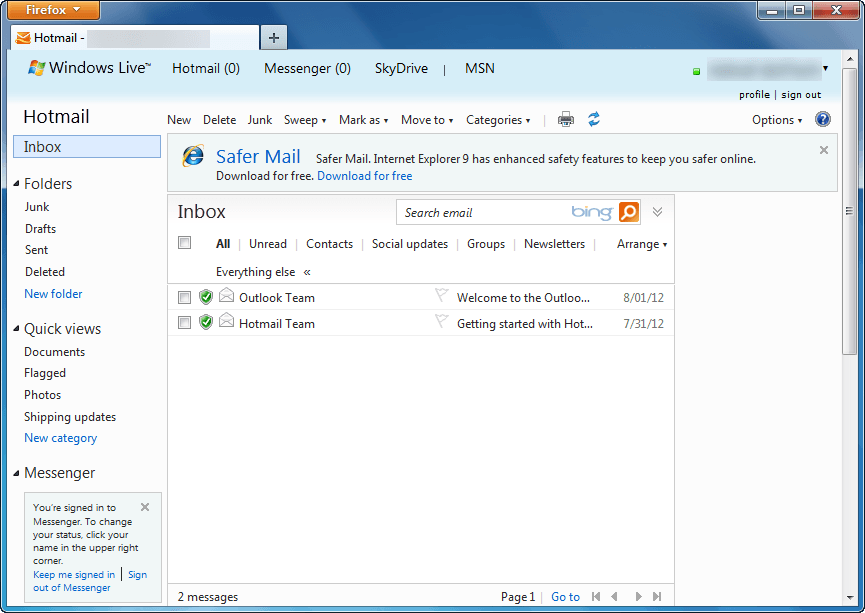
Also, downgrading from Outlook.com to Hotmail does not result in loss of data. All your e-mails, contacts, folders, etc. are converted with you. The only thing that changes when going from Outlook.com to Hotmail is the user interface; you get the old Hotmail inbox and features back.
Lastly, if you were forced to upgrade to Outlook.com from Hotmail, you cannot revert back to Hotmail. Going from Outlook.com to Hotmail is only for those people that voluntarily upgraded.
UPDATE: It looks like Microsoft is no longer allowing people to revert back to Hotmail from Outlook.com. Sorry people — you are stuck with Outlook.com, you cannot change back!
How To Go Back To Hotmail From Outlook.com (How To Turn Off Outlook.com)
The following are the steps you need to take to covert your Outlook.com account to Hotmail:
Note: To enlarge any images below, simply click on them.
- Login to Outlook.com.
- Once logged in, you will be taken to your Outlook.com inbox. From there click on the gear icon located near the top-right corner:
- Clicking on the gear icon will open a menu. From that menu click on Switch back to Hotmail:
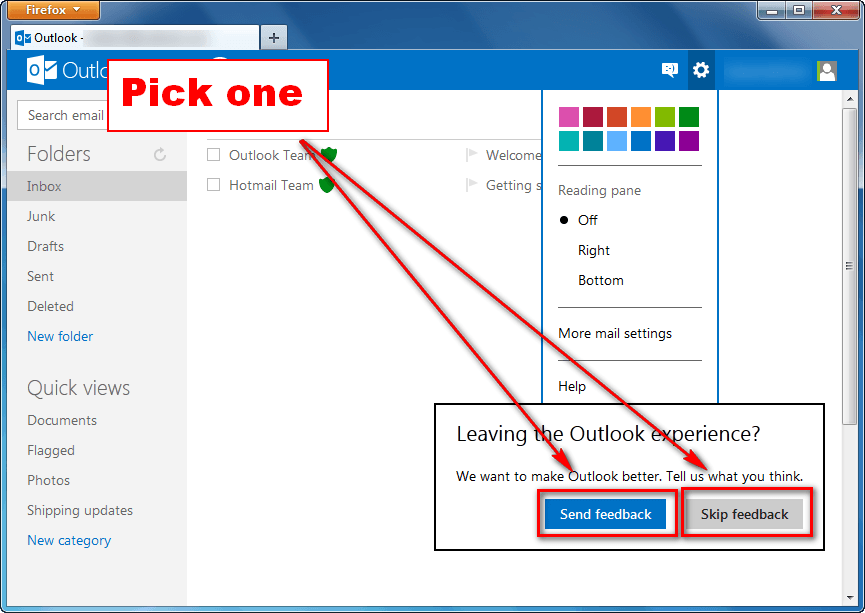
- Next you will be prompted with a message asking for feedback. If you want to provide feedback, click on Send feedback; otherwise, click on Skip feedback:
- Done.
If you opted to send feedback, you will be asked a series of questions after which you will be taken to Hotmail; if you opted to not send feedback, you will be taken directly to Hotmail:
Conclusion
Switching between Hotmail and Outlook.com is very easy and dotTech’s two guides How To Upgrade From Hotmail to Outlook.com and How To Switch from Outlook.com to Hotmail make the process even easier thanks to our step-by-step directions with screenshots. So go, venture into the world of Microsoft e-mail without fear of permanent change. Enjoy!






![Running Windows is more painful than torture [Comic]](http://cdn.dottech.org/media/2013/05/klingon_pain_stick_comic-134x90.gif)


Every Hotmail address got an email saying the change to Outlook was taking place. Perhaps yours went into the junk folder but it was there.
Typical… shove it down our throats… well, looks like I’m going to abandon Live and move on to something that’s at least more customizable. It’s a pain, yes, but worth it to avoid looking at that butt-ugly outlook interface.
I would REALLY REALLY like the old hotmail back.. HOW do I do this… This new outlook is crap, I send 100′s of photos at a time…and with the new out look I cant, ppl dont like getting 6 emails with 6 pics at a time in them, the old hotmail I can upload 200 and send them at a time…If I cant fix this I will be deleating my msn/hotmail accounts and going with something /someone else.
@Ken: fuc u faggot nobody should get it that didnt want it
Your make life easy!
What a load of essatitchonetee. Everytime I try to log on to iGoogle this effin program takes over and I cannot get on to my iGoogle home page.
Also the ‘wheel’ icon doesn’t respond to enable me to revert back to Hotmail.
Waste of time and effort … obviously the Bods at MS have more time on their hands than they need and have to spend, and justify, their time by coming up with ways of making you use their services exclusively.
Not able use my out look (Hotmail) account. Every thing displayed in text format. how to retrieve my account to normal mode
this sucks, I managed to do the switch back to hotmail in my accont however I don;t get the same options on my daughters account, why is that?
ThankYouThankYouThankYouThankYouThankYou!!! I absolutely HATED the new Outlook interface. It was awful, slowed my entire browser down, and made it freeze up. Sometimes it would even close on its own, and I would lose references and tabs and data. It was awful.
Thanks for the help – it was very easy and I feel kinda dumb now for not having seen that before!
@Jerry Mathers
Quite the intelligent reply, no wonder you couldnt figure outlook out.
EVERYONE IS GETTING IT Thats the reality.
Another 20,000 accounts were converted over the week end
Ik wil hot mail inschakellen
thanks lot it done my job,,, very well,,
@Ken: @Ken:
@dee hedman: @dee hedman:
Thank you for showing how to switch off the outlook!
??? outlook ?????? ???????????
You can certainly see your enthusiasm in the article you
write. The world hopes for more passionate writers like you who aren’t afraid to mention how they believe. Always go after your heart.
I try to upgrade but then the outlook is basic and I can not find the gear to come back to hotmail. Pls help!
I tried to follow your directions to switch back to hotmail from outlook however I don’t see the options to switch back to hotmail when I click on the gear icon.
Could you please help. Is there another way to do this.
Maybe I was just forced into Outlook. Wondering why?
Please help.
Thanks,
Wasif.
Wasif
If you dont see the option to revert it is because you were auto upgraded. There is no option to turn back. It is here to stay!!
II have used your instructions to help friends on this so I know that for many it works.
But there is not option to go back for some of us. What do you suggest if that happens?
Thanks,
Sarah
I couldn’t see it at first either but I clicked it again and wait for the option to load and it did, try again. Good luck
Get used to it. Its coming like it or not
@Sarah: Thank you, thank you, thank you for the info re how to dump Outlook and go back to the old Hotmail/Live page. It was so easy. Just followed your instructions.
I have lost all my hotmail contacts. I just changed back from Outlook, but my interface looks much the same as Outlook but it’s just called Hotmail now. My contacts list is nothing like my old Hotmail list and so many of the contacts that I only use now and again have completely disappeared. I am very unhappy, because I have built up quite a large contact list over the years and I know I can’t find people when I wanted them. Now I can’t. Very upsetting and NOT happy at all.