
How to open/run regedit (Registry Editor) in Windows 8 [Guide]
August 19, 2012 9
Email article | Print article
After relying on the search box in Windows 7 to launch programs for so long, I was baffled with how to work Windows 8. More specifically, how the hell do I launch regedit without a proper start menu? I sat there thinking (for approximately five seconds) when it hit me: it may be crude but let’s use the Run command. This guide shows you how to do that, if you are confused.
How to run regedit in Windows 8
To open regedit in Windows 8, do the following:
- Press Win [Windows key] + R on your keyboard. This can be done either while at Windows 8 Start menu/Metro screen or on Windows 8 desktop.
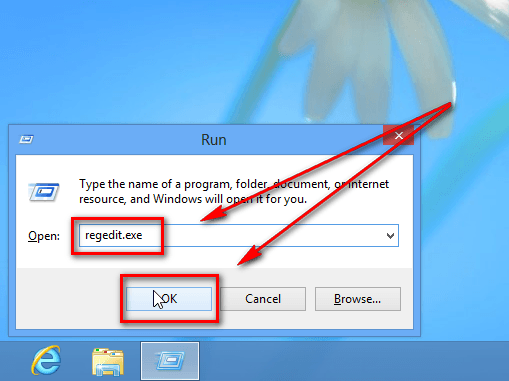
- At the dialog box that pops open, type “regedit.exe” (without the quotes) and hit “OK”:
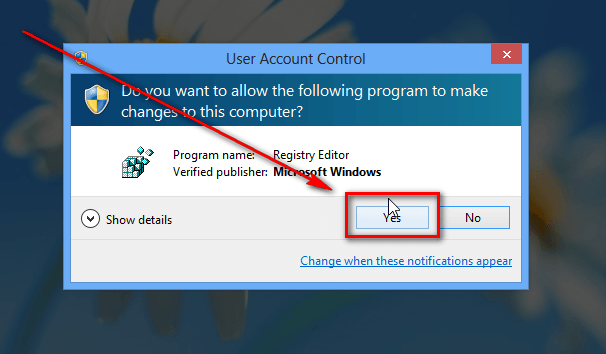
- Once you hit “OK”, Windows UAC will prompt you to confirm you want to open Register Editor — hit “Yes”:
- Done. Registry Editor should now be open:
Conclusion
That was easy. Just remember — don’t make unnecessary changes via Registry Editor least you have to format your computer to fix your bonehead mistakes.
9 Comments »
Leave A Response »


![[Windows] Backup and restore open windows, programs, files, tabs, and more across multiple computers with Cupcloud](http://cdn.dottech.org/media/2013/05/Cupcloud-Beta-empty-UI-134x90.png)
![[Android] RegawMod Rebooter allows you to easily reboot, power off, or go into recovery or bootloader by clicking a button on your Windows computer](http://cdn.dottech.org/media/2013/05/RegawMod-Rebooter-UI-134x90.png)
![The Leap Motion makes Windows 8 look… awesome [Video]](http://cdn.dottech.org/media/2013/05/leap-134x90.jpg)
![[Windows] Backup and restore WiFi and wired network settings with Network Profiles Utility](http://cdn.dottech.org/media/2013/05/Network-Profiles-Utility-main-UI-134x90.png)
You’re a true genius, Ashraf! Working with Win the way it’s meant to be worked with (at least for pro’s). Great find and only a dozen years old :P
@Frank: Hey man, you try using Windows 8. It boggles the mind.
I even had the Alpha. Did not install (yet) the just released RTM though.
BTW: Hate(d) it! Might become the next Vista…
@Frank: Do you have access to the RTM? Punk.
dunno what you mean by saying “Punk”? RTM is freely downloadable from M$s site.
Google for 9200.16384.WIN8_RTM.120725-1247_X64FRE_ENTERPRISE_EVAL_EN-US-HRM_CENA_X64FREE_EN-US_DV5.ISO if you don’t believe me.
@Frank: Oh you mean the evaluation. I thought you were talking about the full RTM from MSDN and TechNet. I’m running the evaluation myself.
well, the same way as always… ;)
reg edit screen just flashes for a split sec. what next. trying to get rid of yontoo and babylon
[@rick] See http://dottech.org/99184/windows-review-avast-browser-cleanup/



