
 Email article
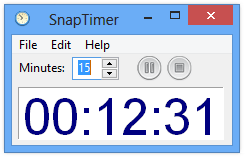 There are few programs more simple than SnapTimer. Its very idea is to be usable in a snap: it can accomplish anything with just three or four taps. Along with its extremely simple idea, it’s also surprisingly customizable. If you’re looking for a no-frills timer app, SnapTimer is definitely worth a look.
SnapTimer is very easy to use. The moment you start it up, it’ll show an unstarted 15 minute timer. You can adjust that time with the minutes box, or simply pause or start it. However, the real settings are under the Edit menu. From there, you can set its visual appearance, including window behavior and font face.
You can also set custom actions to run when SnapTimer finishes counting down. Do you prefer a popup text box, a notification tray notification, an audio file, or a program? SnapTimer can do all of those with just a few taps on your keyboard while in the Alarms section.
SnapTimer is a great little timer program. It’s incredibly simple to use, and lacks pretty much no features. The only main thing missing from SnapTimer is the ability to use it as an alarm clock, as it is missing the clock component. However, cell phones and tablets are much more commonly used as alarm clocks, and the lack of this feature shouldn’t really be an issue.
Price: Free!
Version discovered: v0.1
Supported OS: Windows unknown
Download size: 1.5MB
VirusTotal malware scan results: 0/42
Portability: No installation required!
[via MakeUseOf]




