Leave Windows Calculator behind and use SpeedCrunch instead
December 15, 2011 24
Email article | Print article
Windows Calculator provides you with a fair amount of functionality in terms of mathematical computational needs. However it is an annoying piece of **** to use. One of my biggest grips with Windows Calculator is that you can’t see the computations you did before or the ones you are doing now. Well good thing there is an open source Windows Calculator replacement called SpeedCrunch (thx Liam!):
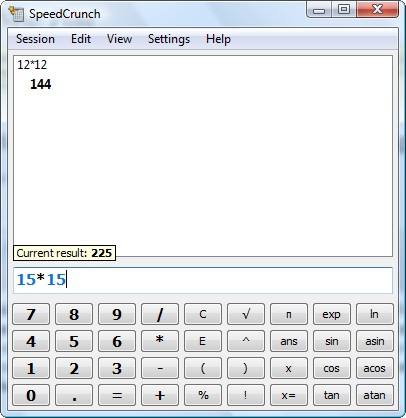
The best way I can describe SpeedCrunch is to say SpeedCrunch is a graphing calculator while Windows Calculator is on the levels of a standard/scientific calculator. For those that have never used a graphing calculator, my previous statement is probably meaningless. So let me explain why SpeedCrunch is superior to Windows Calculator:
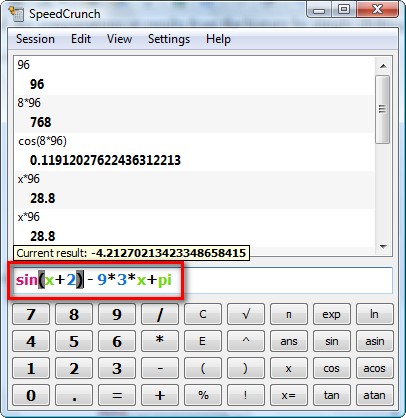
- The ability to see what calculations you are doing
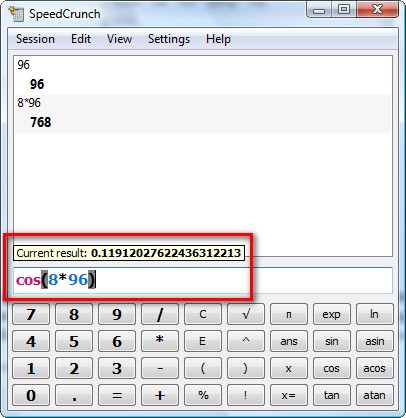
- The ability to store and display the calculations you have already finished (keep a history)
You can recall any computations or results from the history by simply clicking on them.
- The ability to insert 50+ functions
- The ability to create, use, and store unlimited variables
- Color coded syntax and parenthesis highlighting
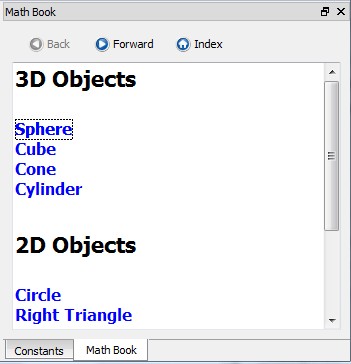
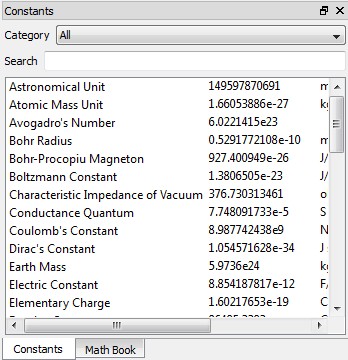
- Built in constants and a simple “math book” for some popular equations
In addition to the already mentioned, SpeedCrunch supports up to 50 decimal places and is extremely keyboard friendly (you can type everything in and use shortcuts if you wish – never have to even touch your mouse). There are also a few more features I did not talk about like the ability to save/load sessions, work in radians or decimals, etc.
To top it all off, SpeedCrunch works on Windows, Linux, Mac OX and comes in a portable version. What more can anyone ask for? You can download SpeedCrunch from the following link:
***SpeedCrunch System Requirements
- Pentium-compatible processor
- RAM minimum 32 MB
- Hard disk space 16 MB
- Microsoft Windows NT/2000/XP/Vista or Linux (32- and 64-bit) or Mac OS X 10.3/10.4/10.5
Click here to visit the download page
24 Comments »
Leave A Response »


Dear Ashraf,
Great suggestion and a fantastic product.
Keep it up.
Dr Nitin
You’re welcome for the suggestion, but I actually found that I don’t really have a need for this.
I use Windows Calculator and Google for most calculations on the computer; for others I use a real-life calculator. I can see how this might come in handy for some classes or a college student, though.
You might wanna try the ” Moffsoft Free Calculator.” It keeps a running tape along side of everything that your doing and you can even make it as big as you need too.
@Kenny:
Sorry guys, it looks like your looking for a calculator that will do everything, including the dishes, and ” Moffsoft,” is just a nice and neat little calculator. My bad, I’ll read the whole article the next time.
Kenny, don’t be so hard on yourself. I love my Moffsoft calculator, too. It’s easy for me to understand, no frills, and has NO learning curve.
Can both Moffsoft and SpeedCrunch be used like an adding machine? I’ve been wanting to get an adding machine for work, so if they can, it would save a lot of $….I need the printed column of figures it adds up for my records. Sounds like these apps will do the trick….:-)…
Thanks David.
Janet, here’s a URL where you can see it, and it should do exactally what you want it too.
Hi guys. Does SpeedCrunch do easy percentages? I am in the process of interpreting a survey we just did and I need to convert the figures into percentages. Or alternatively, does anyone know a simple mathematical equation to do this? Sorry, but maths was never my strong point …
@Ozzie: Um convert figures into percents? As in divide? I assume you are trying to figure out much percent of group A voted this and group B this. Just divide o_o’. Sorry I know this answer is not much help but I am not sure what you need.
Hi Ashraf. So I have numbers of people who answered each question a certain way. Say of 72 people surveyed, 12 answered one way, 26 answered another way, etc. But I want to represent that as X percentage of people said this and X percentage of people said that. Does SpeedCrunch have an option to input such figures and give percentages? I know it’s probably the most simple of calculations, but I don’t know the equation.
So just divide and multiply. Keeping with your example, (12/72)*100, (26/72)*100, etc. That will give you the percentages of how many people said X and how many people said Y.
Brilliant! Thank you!
Fantastic tool.
Good for Mathematicians….
Erm, great review Ashraf…but I doubt I will be using this…in fact, I have no use for this. I dun even use Windows Calculator or any other third-party calculator. Google ‘calculator’? yeah, i have used that before but as far as i remember thrice only…
Liam K said, ‘this might come in handy for some classes or a college student, though’
well, honestly speaking, I have never seen a student used a “computer calculator” before (at least here in Singapore, my country)…I myself am a 2nd year polytechnic student and have always ‘relied’ upon real-life scientific calculators…they are just much better in my opinion…
Dang. . . The calc in Windows 7 can do unit conversions now. . .
Google Calculator is good aswell. . .
but. . .
Bing can do algebra and use variables -
5x – 3 = 3x + 1
And it finds x=2
I also just stumbled across a great little freeware program called Breaktru Percent that does instant percentage calculations. Might be of use to some people who are as mathematically disinclined as myself.
Nice. I personnaly rely on Hexelon, which also provides online -updated currency conversion.
Great tip, Ashraf, and some helpful comments, here, too, thanks all.
Hi, I use Moffsoft Free Calculator and speedcrunch calculator. But, I think Speedcruch calcutare have more feature than Moffsoft Free Calculator.
But that two software is great.. :)
Hi.
I find Microsoft Mathematics to be much more useful than this one.
Another nice FREE calculator is also this:
http://www.softpedia.com/get/PORTABLE-SOFTWARE/Education/Portable-MathProcessor.shtml
@Giovanni:
I tried to get the math processor, but on install got error message that “extension directory is missing” :(
Got speed crunch. Thanks Ashraf. Another goodie.
Thanks Ashraf, Dottech is very active nowadays.
There is one more free (you are welcome to donate) calculator “Calculator Pro” by Armin Richter. Website: http://www.ingenieurbüro-richter.de/indexe.htm
Give it a try…
I’ve used a free replacement calculator call Moffsoft FreeCalc since the days of Windows 98, which has a printable and savable tape. It’s great because I know where I am by looking at the tap.
http://www.moffsoft.com