
 Email article
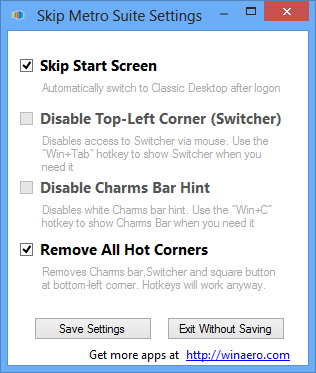 By now you know how to bypass the Start screen and go straight to the desktop. If you want an easier way to skip the Windows 8 Start screen to go straight to desktop upon boot, and the ability to disable Windows 8 hotspots, then Skip Metro Suite is just what you are looking for.
Skip Metro Suite is an extremely simple program for Windows 8 that does two things. Firstly, Skip Metro Suite allows users to automatically skip the Start screen whenever booting up their Windows 8 PCs. Secondly, Skip Metro Suite has the ability to disable the Charms Bar, Switcher, and square button hotposts. The best part? Skip Metro Suite is extremely easy to use. All you do is disable (or renable) the Windows 8 functionality you want to get rid of (or get back) from within Skip Metro Suite’s program window and it handles it all for you; there are no registry tweaks required, no need to create shortcuts, change Windows 8 settings manually, etc.
The follow video, created by the developer, shows Skip Metro Suite in action:
Skip Metro Suite is not currently available in Windows Store, so you need to download it from the developer’s website, which you can find from the links below. Take note that when installing Skip Metro Suite, you will be blocked by the SmartScreen filter which you need to bypass before you can install Skip Metro Suite. Click here to learn how to bypass the SmartScreen filter, if you don’t know already.
Version reviewed: v2.0
Download size: 100 KB
Supported OS: Windows 8 x86-64 (not Windows 8 tablets)
Virustotal scan results: 0/41
Skip Metro Suite homepage [direct download]
[via Ghacks]




