
Free Corel Paint Shop Pro X!

July 15, 2009 44 Email article | Print article

Update: This promotion is now dead!

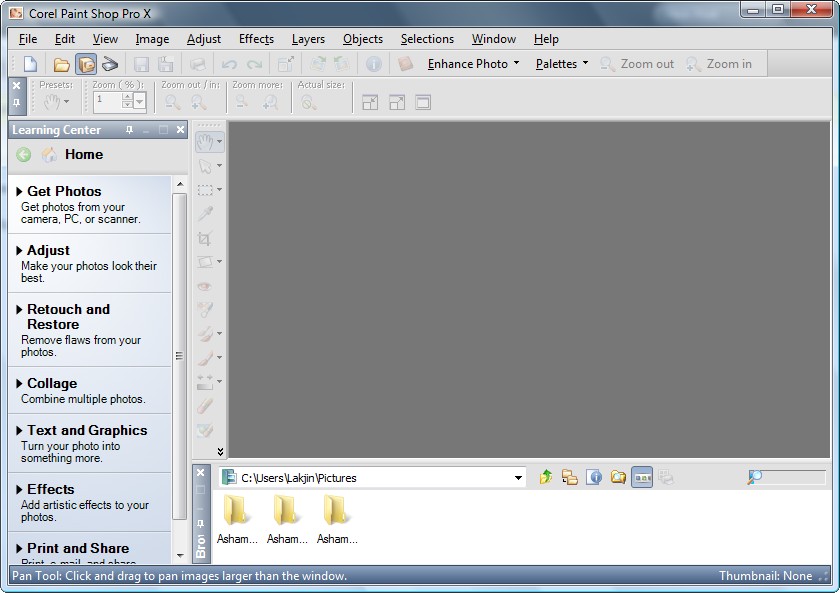
It has been a while since I have posted about a freebie (mostly because I have not been here). Time to make up for that. Today I am here to tell you about how to attain excellent program, that goes by the name of Corel Paint Shop Pro X, for free:
2009-07-15_210901

So before I spill the beans on from where to get this software, let me highlight a few features of Corel Paint Shop Pro X:

  • One-Step Photo Fix. With just one click, the One-Step Photo Fix command automatically adjusts the color balance, contrast, clarity, and saturation of an image. It also sharpens the image.
  • Background Eraser. The Background Eraser tool lets you easily erase unwanted backgrounds while retaining the fine detail in your photos. It’s a perfect first step before copying and pasting elements from one photo into another.
  • Raw file format support. Paint Shop Pro X continues to support the Camera Raw file format. You can open, enhance, process, and convert images that were saved on your digital camera in the Raw file format.
  • Picture Tubes™. A longtime favorite, the Picture Tube tool lets you paint on your photo with a collection of professionally-designed artistic elements. For example, you can add butterflies and beetles to a picnic setting, fill an aquarium with fish, or frame a picture with holly. Picture Tubes are available in a variety of themes, including Animals, Artistic, Embellishments, Nature, Photo Objects, and Plants and Leaves. You can also create your own picture tubes.
  • Scripting. A Paint Shop Pro powerhouse, scripting can save you tremendous amounts of time, especially when you are working with batches of images. You simply record a series of commands and then play them back to process an image or batch of images.
  • Batch Processing. You can easily process batches of images with Paint Shop Pro. The Batch Process command lets you use scripts to apply fixes to batches of images, and you can also convert batches of images to a different file format.
  • Lens Correction filters. Paint Shop Pro continues to provide excellent Lens Correction filters that help you correct common photo distortions, such as fish-eye, barrel, and pincushion.
  • Perspective Correction tool. With this tool, you can easily fix buildings, landmarks, or other objects that appear to be leaning away from you in photos taken at an upward angle.
  • Straighten tool. This tool lets you quickly align crooked photos by just pointing out a line that should be horizontal or vertical but isn’t.
  • Scratch Remover. The Scratch Remover tool instantly removes scratches, wires, and other linear flaws from photos. This tool is particularly useful for removing scratches or cracks when restoring old photos, and is also an incredible tool for reducing face wrinkles in photos.
  • Clone tool. The Clone tool lets you cover flaws in your photos by copying detail from a neighboring area. You simply choose a source location and then draw over the flawed area of the image. This replaces the flaw with detail from the source location.
  • Motion Blur. You can add Motion Blur to a photo to create the illusion that the photo was taken while the subject was in motion.
  • Distort photos. The Warp Brush lets you create caricatures of your subjects by distorting pixels in a particular area of the photo.

As I said, that is just a few features of Corel Paint Shop Pro X – it really doesn’t do justice to the program. If you would like to learn more, you are welcome to read the excellent review on it written by Photo-i.

Now this definitely isn’t the latest Corel Paint Shop Pro X2 Ultimate edition (that one will cost you around $80 or $67 if you are upgrading – click here to read about the differences in features between all the editions) but this is still an excellent program worth having if you need this sort of thing.

You can download Corel Paint Shop Pro X from the following link:

***Corel Paint Shop Pro X System Requirements:

  • 500-MHz processor
  • Windows® 2000 (SP4) or Windows XP (it works fine on Windows Vista also)
  • 256 MB of RAM
  • 500 MB of free hard-drive space
  • 1024 x 768 resolution display, 16-bit color
  • Macromedia Flash™ Player 7 (included)

Click here to download Corel Paint Shop Pro X

[via V3.co.uk]

Thanks to Peter for informing dotTech about this freebie!

44 Comments »

  1. Jeff Taylor July 15, 2009 at 9:31 PM (comment permalink) -

    This is a really powerful program. It’s unlikely that anyone except a professional photographer would need–or ever use–the added features available in later versions. Thanks for letting us know.

    1
  2. Emrys July 15, 2009 at 9:55 PM (comment permalink) -

    What great fun! Thanks again my friend…

    2
  3. Mike July 15, 2009 at 10:03 PM (comment permalink) -

    Super–thanks for the post! Coincidentally, I’m just in the process of “re-learning” my digital camera–very handy timing!

    3
  4. TXmuseic July 15, 2009 at 10:44 PM (comment permalink) -

    Excellent!

    Got a few friends who can really use this. Been playing with PSP since Jasc 3?

    Most indebtedly-

    4
  5. Farrukh July 15, 2009 at 10:49 PM (comment permalink) -

    AOA
    Dear Ashraf,

    Thanks a lot for this useful information :). I’m a big fan of this software and used XI before. I never worked in such detail in Photoshop as in PaintShop and found it more user friendly than Photoshop.

    BTW, what are the big differences between version X and later versions (XI and XII)?

    Thanks again.

    Best regards

    5
  6. Farrukh July 15, 2009 at 11:08 PM (comment permalink) -

    @Ashraf:

    Thanks. This is a very informative comparison chart.

    Among many other Ultimate features in XI and XII, I was also heading towards “HDR Photo Merge – Automatically combine different exposures to make the perfect picture” , which is not provided in X.

    However, as this is a free version now, so no regrets in any case..:)

    Thanks again dude

    7
  7. APPitizer July 15, 2009 at 11:50 PM (comment permalink) -

    Just found this:

    FREE copy of Corel® Photo Album™ 6 SE (not full version though)
    http://apps.corel.com/lp/lexar/05853/index.html?trkid=lexarmo

    8
  8. Dave Howe July 16, 2009 at 3:55 AM (comment permalink) -

    Cool. I have a full (paid for) copy of PSP9, found X unstable due to the added DRM and key management stuff corel added and didn’t upgrade (there was little new in X over v9). Might be time to try to upgrade again if it is freeware now :)

    9
  9. AJM July 16, 2009 at 9:09 AM (comment permalink) -

    Appears to be a trial version. Asks for key and activation code which I don’t have.

    10
  10. Ashraf July 16, 2009 at 9:14 AM (comment permalink) -
    Mr. Boss

    @AJM: It is the full version. You either did something wrong or… you are lying :(

    11
  11. Anonymous RSS Feed User July 16, 2009 at 10:50 AM (comment permalink) -

    Add to “Best Freebies” please!

    12
  12. gmon July 16, 2009 at 12:39 PM (comment permalink) -
  13. Ashraf July 16, 2009 at 3:28 PM (comment permalink) -
    Mr. Boss
  14. Jim July 16, 2009 at 7:42 PM (comment permalink) -

    Very nice. I can remember using PSP when it fit on a floppy, it’s nice to try it again now.

    15
  15. Kev93 July 16, 2009 at 9:04 PM (comment permalink) -

    @Ashraf: That is the upgrade screen for XI ;)

    16
  16. David July 16, 2009 at 9:09 PM (comment permalink) -

    Great Program. Very useful. Thanks
    Does not appear to be a trial program, but has a nag screen pop up every time you exit the program which asks you to upgrade to a newer version. Can this be removed?

    17
  17. Mohammed Sarhan July 17, 2009 at 6:18 AM (comment permalink) -

    @David: It appears to me also

    18
  18. Opie July 17, 2009 at 8:08 AM (comment permalink) -

    This worked for me:

    ah sorry it won’t allow me to post the right coding. It accepts only part of what i try and type.

    19
  19. Anonymous RSS Feed User July 17, 2009 at 8:30 AM (comment permalink) -

    I need to come up with a better name. I just use this one because I can’t think of another. Otherwise I’d be registered to dotTech already. I already am subscribed to your Email service and RSS Feed. I’m Male, for the record…

    20
  20. Mags July 17, 2009 at 8:45 AM (comment permalink) -

    THX, going to give it a try. I’ve been using PSP V 7 for years and didn’t upgrade for a number of reasons. I tried V 8 at one time, but just didn’t seem to work properly on my pc. IF this doesn’t work will revert back to V 7.

    21
  21. Ashraf July 17, 2009 at 10:21 AM (comment permalink) -
    Mr. Boss

    @Opie: Email me the code or use the tags. I will make a post about it.

    22
  22. Ashraf July 17, 2009 at 10:22 AM (comment permalink) -
    Mr. Boss

    @Anonymous RSS Feed User: I need to start writing articles again :o

    23
  23. Opie July 17, 2009 at 6:46 PM (comment permalink) -

    @Ashraf: just got your message and emailed ya..hope it worked that way :)

    sent myself a copy to check and nope it didn’t work there either..trying to find where i found it online and i’ll post the link..would be easier i guess

    24
  24. Opie July 17, 2009 at 7:13 PM (comment permalink) -

    To stop PSP X nag screen – here’s a link with complete info.

    http://forums.overclockers.co.uk/showthread.php?p=14490942

    scroll to post #23

    This worked for me just fine.

    Hope it was ok to post this link..if not I am sorry

    25

Leave A Response »