
Free Corel Paint Shop Pro X!

July 15, 2009 44 Email article | Print article

Update: This promotion is now dead!

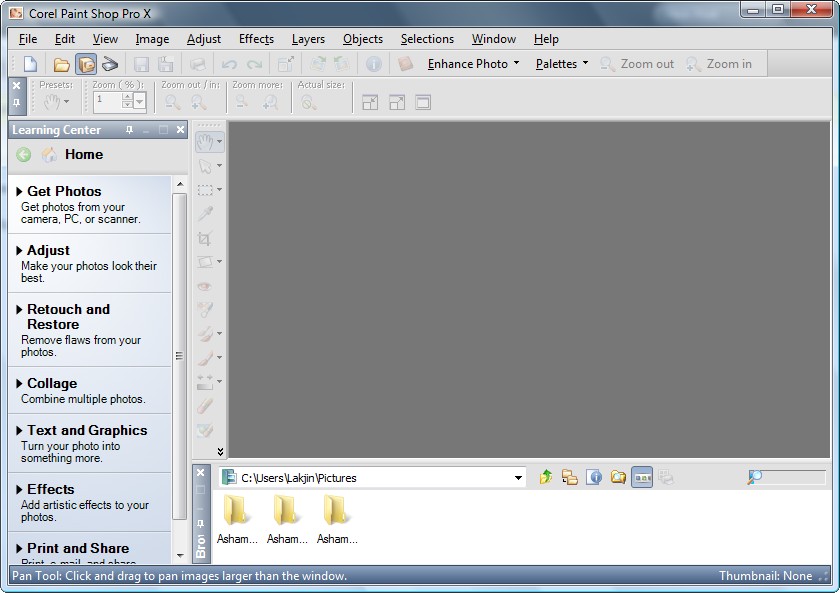
It has been a while since I have posted about a freebie (mostly because I have not been here). Time to make up for that. Today I am here to tell you about how to attain excellent program, that goes by the name of Corel Paint Shop Pro X, for free:
2009-07-15_210901

So before I spill the beans on from where to get this software, let me highlight a few features of Corel Paint Shop Pro X:

  • One-Step Photo Fix. With just one click, the One-Step Photo Fix command automatically adjusts the color balance, contrast, clarity, and saturation of an image. It also sharpens the image.
  • Background Eraser. The Background Eraser tool lets you easily erase unwanted backgrounds while retaining the fine detail in your photos. It’s a perfect first step before copying and pasting elements from one photo into another.
  • Raw file format support. Paint Shop Pro X continues to support the Camera Raw file format. You can open, enhance, process, and convert images that were saved on your digital camera in the Raw file format.
  • Picture Tubes™. A longtime favorite, the Picture Tube tool lets you paint on your photo with a collection of professionally-designed artistic elements. For example, you can add butterflies and beetles to a picnic setting, fill an aquarium with fish, or frame a picture with holly. Picture Tubes are available in a variety of themes, including Animals, Artistic, Embellishments, Nature, Photo Objects, and Plants and Leaves. You can also create your own picture tubes.
  • Scripting. A Paint Shop Pro powerhouse, scripting can save you tremendous amounts of time, especially when you are working with batches of images. You simply record a series of commands and then play them back to process an image or batch of images.
  • Batch Processing. You can easily process batches of images with Paint Shop Pro. The Batch Process command lets you use scripts to apply fixes to batches of images, and you can also convert batches of images to a different file format.
  • Lens Correction filters. Paint Shop Pro continues to provide excellent Lens Correction filters that help you correct common photo distortions, such as fish-eye, barrel, and pincushion.
  • Perspective Correction tool. With this tool, you can easily fix buildings, landmarks, or other objects that appear to be leaning away from you in photos taken at an upward angle.
  • Straighten tool. This tool lets you quickly align crooked photos by just pointing out a line that should be horizontal or vertical but isn’t.
  • Scratch Remover. The Scratch Remover tool instantly removes scratches, wires, and other linear flaws from photos. This tool is particularly useful for removing scratches or cracks when restoring old photos, and is also an incredible tool for reducing face wrinkles in photos.
  • Clone tool. The Clone tool lets you cover flaws in your photos by copying detail from a neighboring area. You simply choose a source location and then draw over the flawed area of the image. This replaces the flaw with detail from the source location.
  • Motion Blur. You can add Motion Blur to a photo to create the illusion that the photo was taken while the subject was in motion.
  • Distort photos. The Warp Brush lets you create caricatures of your subjects by distorting pixels in a particular area of the photo.

As I said, that is just a few features of Corel Paint Shop Pro X – it really doesn’t do justice to the program. If you would like to learn more, you are welcome to read the excellent review on it written by Photo-i.

Now this definitely isn’t the latest Corel Paint Shop Pro X2 Ultimate edition (that one will cost you around $80 or $67 if you are upgrading – click here to read about the differences in features between all the editions) but this is still an excellent program worth having if you need this sort of thing.

You can download Corel Paint Shop Pro X from the following link:

***Corel Paint Shop Pro X System Requirements:

  • 500-MHz processor
  • Windows® 2000 (SP4) or Windows XP (it works fine on Windows Vista also)
  • 256 MB of RAM
  • 500 MB of free hard-drive space
  • 1024 x 768 resolution display, 16-bit color
  • Macromedia Flash™ Player 7 (included)

Click here to download Corel Paint Shop Pro X

[via V3.co.uk]

Thanks to Peter for informing dotTech about this freebie!

44 Comments »

  1. David July 18, 2009 at 7:45 PM (comment permalink) -

    Opie
    Thanks for the tip. I gave it a try but got some kind of error message and was unable to save the file. Maybe I missed something.

    26
  2. Harold July 19, 2009 at 10:18 AM (comment permalink) -

    I’ve downloaded this software and I’d like to thank you very much. Sincerely, Harold

    27
  3. Opie July 20, 2009 at 7:51 AM (comment permalink) -

    @David:

    all i did was open the file:

    C:\Program Files\Corel\Corel Paint Shop Pro X\PCUUI\Container.htm

    selected all text and erased. Then I replaced it with what was listed in the other post. It won’t let me post it here but don’t remove anything- copy and paste the coding exactly as shown then save it.

    28
  4. Harry July 20, 2009 at 8:02 AM (comment permalink) -

    .
    I cannot find the program on Corel’s site. They must have taken it down.
    (What was that quote… Something about snoozing and losing?)

    29
  5. Deb July 20, 2009 at 8:39 AM (comment permalink) -

    I can not find the program either on the site you sent us to. Is there another place to get it?
    thank you

    30
  6. Harry July 20, 2009 at 9:56 AM (comment permalink) -

    .
    I downloaded a copy of “Free Corel Paint Shop Pro X” from
    this site: [http://www.download3000.com/download-paint-shop-pro-count-reg-16532.html].
    Hope this helps…

    H.

    31
  7. joe July 21, 2009 at 5:09 AM (comment permalink) -

    A trial version only. Asks for key and activation code.

    32
  8. Harry July 21, 2009 at 7:21 AM (comment permalink) -

    .
    The trial version continues to run… Just has a nag screen. Frequency of nag is settable. And somewhere, out there, is a way around that nag (Google is your friend). :)
    .

    33
  9. thor101370 July 22, 2009 at 2:28 AM (comment permalink) -

    I saw the info to download the Corel Paint Program,for the free one.Is that deal still going on? I went to the link the other day but it just showed the free trials.

    34
  10. timmy July 22, 2009 at 9:54 AM (comment permalink) -

    So someone puts out a link that does not work, and doesn’t followup when others want an explanation as to where to actually get the free program?
    Strange indeed.

    35
  11. Ashraf July 22, 2009 at 7:34 PM (comment permalink) -
    Mr. Boss

    @timmy: The promotion ended…

    36
  12. internetexplorer July 24, 2009 at 8:14 AM (comment permalink) -

    I got the download before it was pulled, but they have not emailed me the code that I have to have in order to install. If anyone could share where I can find one, it would be much appreciated. Thanks.

    37
  13. eli July 25, 2009 at 8:08 PM (comment permalink) -

    Ashraf, please forgive off topic, yet, with you Format Factory always is when conversions are involved, and on GOATD offer of today I found out FF 2.0 is flaky in changing a few things, so, users are going back to 1.9 with disdain disgruntlenessp…aha, no spell checker here…oh, now the redline shows up. U don’t have to post this, I hope my screenshot inserts show up in this E-M (?). Can’t do…WOT blocked an intercept at an attempted redirect of my URL link to your ExPertPDF addr telling me MediaFire! had intercepted and was a dangerous site to go to. Or, did they misinterpret…where did I see them before, with you at the old site, yet, this should not happen. Wondering, Eli. 7-25-09SAT, 10:07p EDT.

    38
  14. Jim Van Damme July 29, 2009 at 4:34 PM (comment permalink) -

    To remove nag screen (on exit) :
    1. After installing, open the following file in Notepad:
    C:Program FilesCorelCorel Paint Shop Pro XPCUUIContainer.htm
    2. Erase all the text, replace it with the following code (replace curly quotes with , which would otherwise allow code to run in this page!)

    {script type=”text/javascript”}
    location=”pcucmd://Cancel?confirm=no”;
    {/script}

    Save the file

    The file should contain:

    {?xml version=”1.0″ encoding=”utf-8″ ?}
    {!DOCTYPE HTML PUBLIC “-//W3C//DTD HTML 4.0 Frameset//EN”}
    {head}
    {script type=”text/javascript”}
    location=”pcucmd://Cancel?confirm=no”;
    {/script}
    {/BODY}
    {/html}

    ….or, just try renaming or deleting the file. that might work too.

    39
  15. Louise July 30, 2009 at 4:55 PM (comment permalink) -

    Hi. This link is no longer valid. It was a promotion for Lexar customers who had purchased something else. Thought you might want to know.

    40
  16. Ashraf July 30, 2009 at 5:02 PM (comment permalink) -
    Mr. Boss

    @Louise: I know its expired. As for just Lexar customers: I don’t know – I got the link from VNUNET.

    41
  17. justnakenny August 12, 2009 at 1:30 PM (comment permalink) -

    I went up to the URL that Harry added and when I went to download it, it said trial, right there in my downloader. Oh well. Thanks anyway.

    .

    42
  18. GradyT August 23, 2009 at 10:26 PM (comment permalink) -

    I downloaded the Corel file and it is a “trail” version instead of a free version.

    Thanks anyway:

    43
  19. amnesia August 23, 2009 at 10:28 PM (comment permalink) -

    @justnakenny: @GradyT:
    This promotion has ended.

    44

Leave A Response »