
 Email article
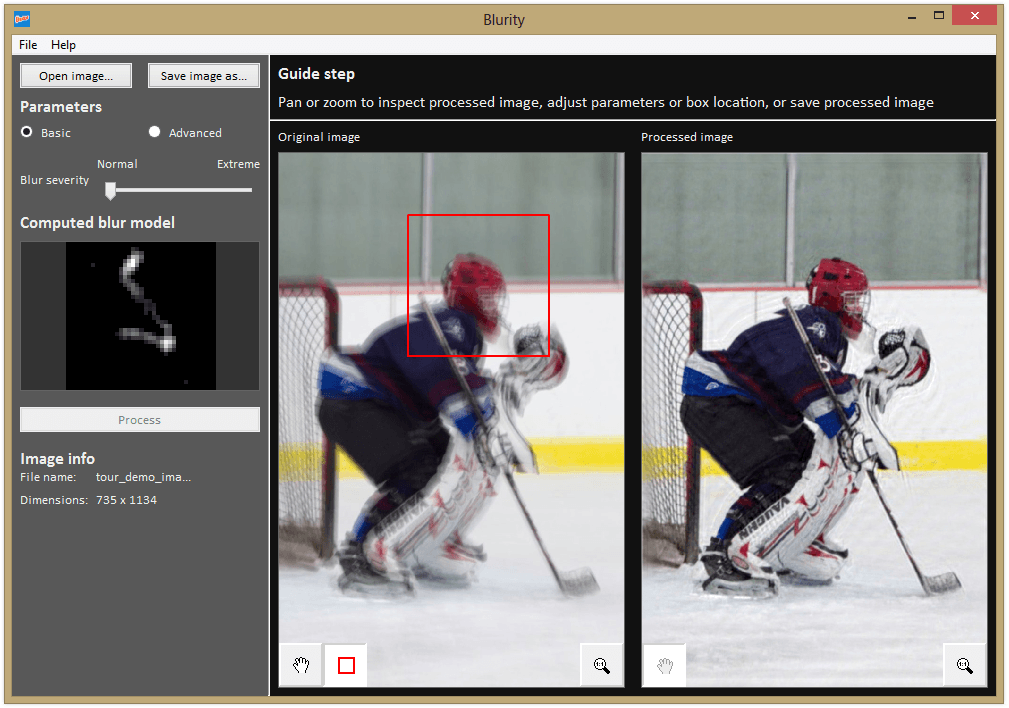 The future is here! Instead of coming in the form of hoverboards and hovercars, however, it came in the form of magic: the magic to unblur blurry photographs. For many years, computer scientists have been coming up with algorithms to deblur photographs, but none of them ever made it into a commercial product. Now, there are two programs with the deblur feature built-in. There’s the $700 Photoshop, or the free-with-upgrade Blurity.
Blurity feels like it’s magic. Watch this short video, created by the developer, that shows off the deblur capabilities:
One thing to note with Blurity is that it does not fix the less-common focus blur. It only fixes motion blur, created when you move your camera while it’s taking a picture. This is great, as that’s the majority of what causes blurs: taking photos in low lighting.
The basic version of Blurity is free. This leaves a watermark on the deblurred image when previewing or exporting. The full version, which doesn’t leave the rather large and aggressive wattermark, is $39. If you are constantly messing up photos with blur, Blurity is an amazing tool, and definitely one you should consider buying.
Price: $39, or free with watermark
Version discovered: v1.2.123
Supported OS: Windows XP+, OS X 10.6.8+
Download size: 35.5MB
VirusTotal malware scan results: N/A — file too big
Portability: Requires installation




