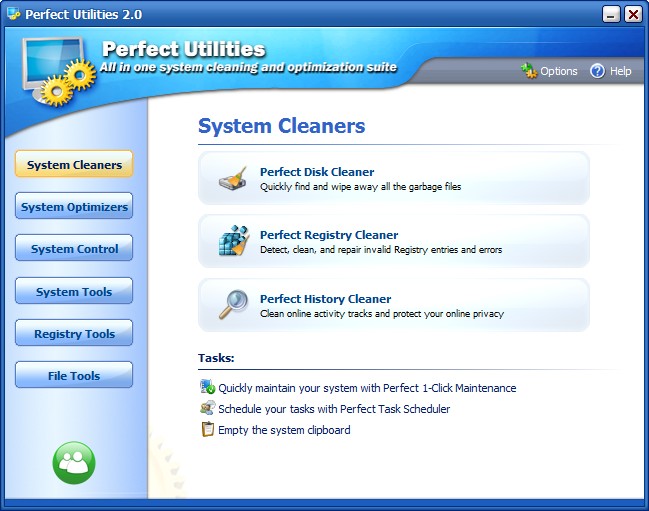
Perfect Utilities is an excellent freeware system maintenance/optimization software… because it is a copy of WinUtilities!

September 3, 2009 42 Email article | Print article

UPDATE2: It seems like the developer of Perfect Utilities is no longer providing it freeware. Anyone that tries to download Perfect Utilities will get WinUtilities ($49.95)!

UPDATE1 – WARNING: Since I reviewed Perfect Utilities, the developer has made update to the software. The latest update, v3.03 comes with Relevant Knowledge, known malware. So if you are going to get Perfect Utilities, I suggest you grab v3.02 until the developer releases a “clean” version of v3.03.

There are many excellent commercial system maintenance/optimization software out there on the market right now. In this list of excellent commercial system maintenance/optimization software WinUtilities is highly regarded as being near the top, i.e. it is one of the best. Now WinUtilities is one of dotTech’s exclusive freebie and it is continuously given out on Giveaway of the Day so to say you always have to purchase WinUtilities to get it is an understatement. However WinUtilities is still in fact commercial and costs $50 per license. So when I found out there is a freeware copy of WinUtilities I was reluctant (suspecting some foul play) at first but overjoyed after wards.

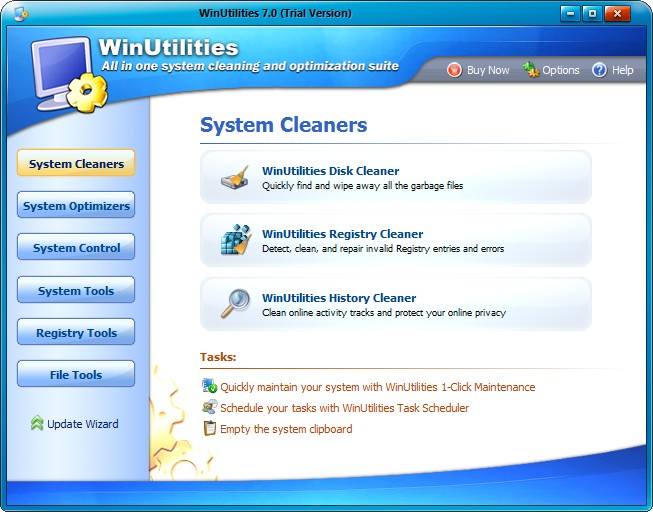
Perfect Utilities is a new system maintenance/optimization software and it turns out that it is an exact copy of WinUtilities. How do I know this you ask?

  • The interfaces are uncannily similar:
2009-08-13_121440

2009-08-13_121419

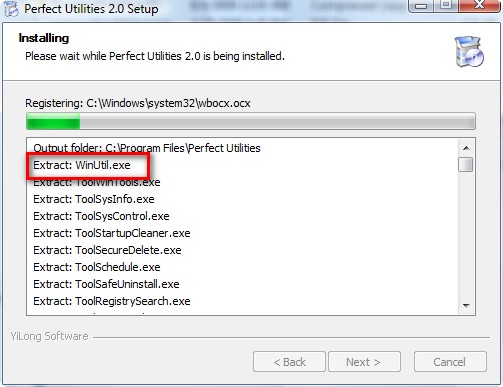
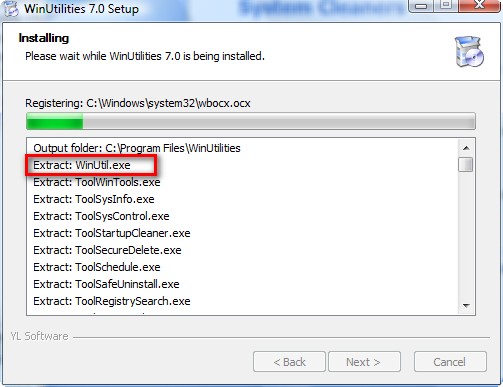
  • When installing Perfect Utilities (v2.0) you will see that it extracts a file named “WinUtil.exe”:
2009-08-13_113155

Just the name of the file is a dead giveaway but to further pile on the proof, when installing WinUtilities (v7.0), the same “WinUtil.exe” is extracted:
2009-08-13_113358

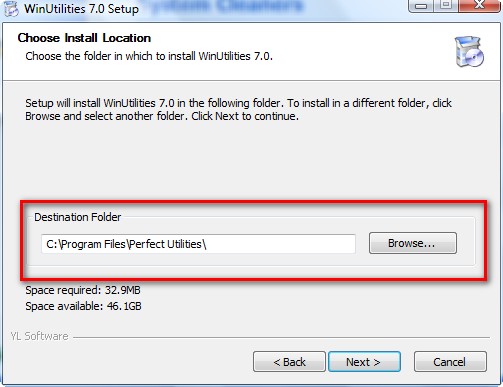
  • I first installed Perfect Utilities v2.0 then I installed WinUtilities v7.0. Perfect Utilities wanted to install into C:\Program Files\Perfect Utilities so I let it. Ironically, WinUtilities also wanted to install into C:\Program files\Perfect Utilities:
2009-08-13_113303

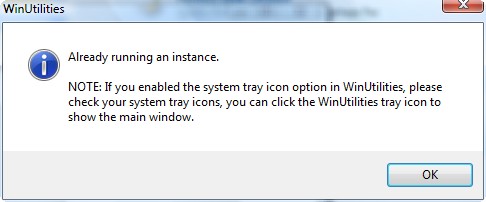
  • When trying to run WinUtilities (v7.0) while Perfect Utilities (v2.0) is already running I get the following error message:
2009-08-13_113433

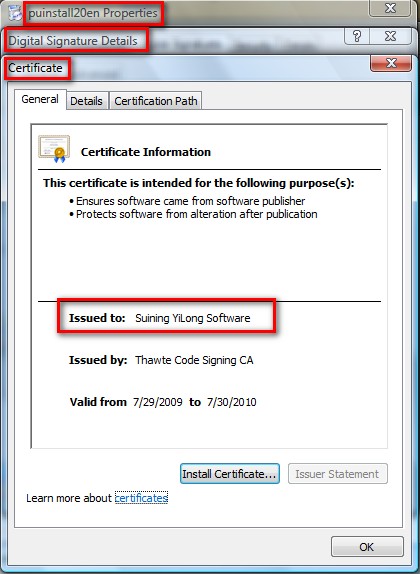
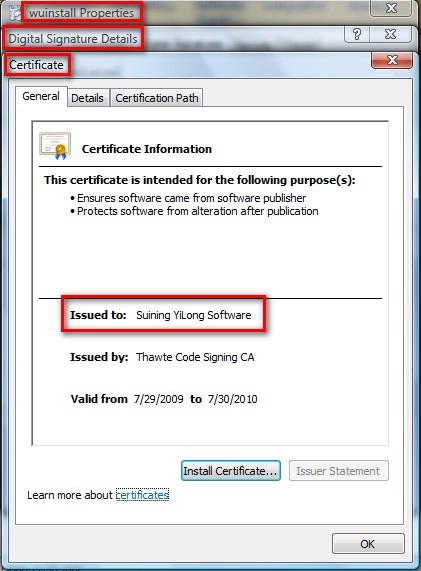
  • Lastly, here is the kicker and dead giveaway number 2. Perfect Utilities is developed by “YiLong Software” while WinUtilities is also developed by “YiLong Software”:
2009-08-13_174917

2009-08-13_175018

Now to say they are exact copies (like I said earlier) is a not 100% true. WinUtilities uses up ~30 MB disk space while Perfect Utilities uses up ~20 MB. Notably WinUtilities has a file called WO.exe, a file commonly mistaken for a virus, while Perfect Utilities does not. However both programs have the same features and perform the same so I really don’t care what is going on behind the scenes.

Update: Upon further investigation, after some dotTechies expressed some concern, I learned a few things by doing multiple clean installs of both programs.

  1. WO.exe is not a part of WinUtilities anymore. WO.exe was a left over file from previous versions of WinUtilities that I had installed. WO.exe used to be the main executable for WinUtilities. Now WinUtil.exe is… just like it is for Perfect Utilities.
  2. The reason for the ~10 MB difference in disk space usage between the two programs is because the “skins” folder is WinUtilities is ~10 MB larger than the “skins” folder for Perfect Utilities. In other words the only difference between WinUtilities and Perfect Utilities is that WinUtilities has more skins to choose from.

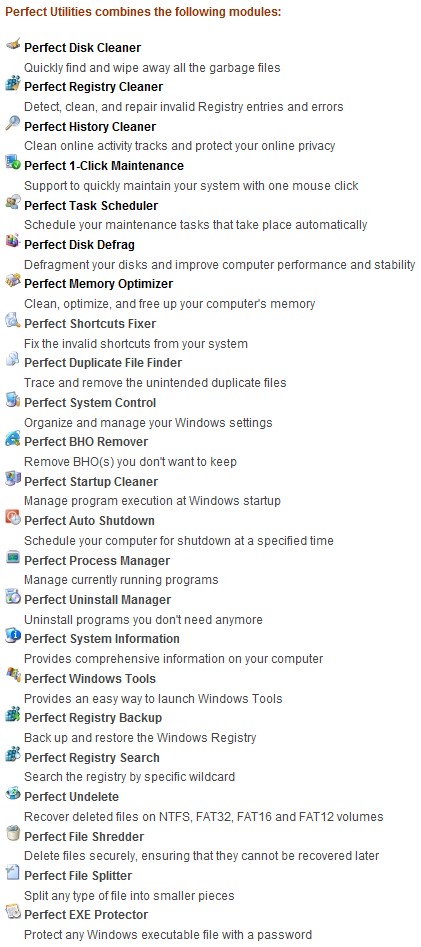
Okay so Perfect Utilities = WinUtilities (as far as I can tell v2.0 = v7.0). So what you ask? Why is Perfect Utilities an “excellent system maintenance/optimization software”? Well because it carries the features and reliability of WinUtilities without the price tag:
2009-08-13_123006

The features listed above are as of v2.00; new features may be added in future versions.

Come on – you have to admit you are impressed. I know I definitely am. Why ever pay for a system maintenance/optimization software when you can get Perfect Utilities for free. Perfect Utilities is an excellent program. You can download Perfect Utilities from the following link:

Perfect Utilities works on 32-bit and 64-bit versions of Windows 2000/XP/Vista/7

Click here to download Perfect Utilities (direct download link here)

Thanks Jeff!

Disclaimer: No matter how good a system maintenance/optimization program is none of them are perfect. Please be conservative when cleaning out your registry, duplicate files, junk files, etc. Always make a backup first before doing anything (Perfect Utilities should automatically create a “rescue” point but just double check it via “Options” for each module to make sure the “rescue” point is turned on).


42 Comments »

  1. Kinetix August 13, 2009 at 2:32 PM (comment permalink) -

    But…why would they do this?

    1
  2. Ashraf August 13, 2009 at 2:54 PM (comment permalink) -
    Mr. Boss

    @Kinetix: They may plan on releasing new WinUtilities with newer features. Kind of like how Glary Utilities does it with the freeware having less features/support than the commercial one.

    Or maybe they did not get enough revenue via WinUtilities so thought a freeware might bring in a lot of donations.

    2
  3. J. L. August 13, 2009 at 5:36 PM (comment permalink) -

    Not sure about this, the website is unknown to LinkExtend Safety (which includes: Web of Trust, McAfee SiteAdvisor, Web Security Guard, Browser Defender, Norton Safe Web, DrWeb, Compete, Google Safe Browsing.
    VirusTotal did not detect anything though.
    Have you checked it along with WinUtilities using a duplicate finder program?

    3
  4. surfriot August 13, 2009 at 5:42 PM (comment permalink) -

    I guess if you trust this then we can’t go wrong, WinUtilities is great, although I think the registry cleaner has messed up my computer a few times. Thanks Ashraf, and for the heads up on the Online Armour, that was excellent!

    4
  5. Ashraf August 13, 2009 at 5:45 PM (comment permalink) -
    Mr. Boss

    @J. L.: That is because the website is very new. It was created on August 4th. I checked the download file w/ VirusTotal and Avira – it is clean. However I am not sure what you mean by “duplicate finder program”? Never really heard of, nor used, one of them. Are you talking about a “duplicate file finder”?

    @surfriot: You are welcome.

    5
  6. J. L. August 13, 2009 at 6:01 PM (comment permalink) -

    Yes, duplicate file finder.

    You can use one from here: http://www.techsupportalert.com/best-free-duplicate-file-detector.htm if you don’t have one.

    6
  7. Ashraf August 13, 2009 at 6:18 PM (comment permalink) -
    Mr. Boss

    @J. L.: Oh okay. I thought you meant some other sort of program. No I have not tried a duplicate file finder for this because those programs are horribly inaccurate. I am satisfied with my proof that this is in fact WinUtilities rebranded and a safe file. You can, however, run a duplicate file finder for yourself and let us know.

    7
  8. J. L. August 13, 2009 at 6:33 PM (comment permalink) -

    Nah, I don’t want to install trials, but I will try this program out.

    It is very likely to be from the same developer after all.

    8
  9. Ashraf August 13, 2009 at 6:38 PM (comment permalink) -
    Mr. Boss

    @J. L.: J.L. I will bet my website that it is from the same developer. Also, please view my updated post… it should help put some doubts to rest.

    9
  10. amnesia August 13, 2009 at 8:40 PM (comment permalink) -

    Excellent find. I lost WinUtilities 7 when I had to reinstall windows. As yet no problems.

    10
  11. jumbi August 14, 2009 at 2:57 AM (comment permalink) -

    Once again, great post!

    Thanksssssss

    11
  12. muhammad August 14, 2009 at 5:35 AM (comment permalink) -

    thanks Ashraf

    i have 2 questions one about PU and the other about online armor

    1-shall i uninstall win utilities in case i installed PU?

    [Second question moved to the proper thread to ask about this]

    12
  13. hahaguy August 14, 2009 at 6:45 AM (comment permalink) -

    Great find. Personally I don’t really use winUtilities but still it’s good for those who might have lost WinUtilities 7 given away by GOTD.

    Since I liked this post so much, I decided to ‘share’ this with others on Raymond’s forum. Hope you don’t mind. You can see the post here (safeguy and hahaguy is the same person, fyi):

    http://www.raymond.cc/forum/freebies/13544-perfect-utilities-for-free-a-freeware-copy-of-winutilities-a-commercial-system-main.html

    13
  14. Ashraf August 14, 2009 at 11:08 AM (comment permalink) -
    Mr. Boss

    @hahaguy: I would have preferred for you to just link back here instead of posting the differences and similarities because people may source that blog post instead of my post for the find if they copy but technically it is released under a CC license so it is okay with me =).

    14
  15. Ashraf August 14, 2009 at 11:14 AM (comment permalink) -
    Mr. Boss

    @muhammad: If you are going to install PU yes I suggest you uninstall WU.

    15
  16. Ozzie August 14, 2009 at 11:15 AM (comment permalink) -

    [Everything moved to proper thread. No worries =)]

    16
  17. surfriot August 14, 2009 at 7:33 PM (comment permalink) -

    I just checked perfect utilities in my add/remmove and it installed at 66.90 MB. Seems like a lot, everyone have the same size installation?

    17
  18. Ashraf August 14, 2009 at 8:03 PM (comment permalink) -
    Mr. Boss

    @surfriot: That is weird. Mine says “21.9 MB”. You may have previous version of WinUtilities installed? Since PU and WU are the same program, Windows confuses them sometimes it seems. Or if you have used Perfect Utilities excessively, the ~40 MB may be of backups that were created by Perfect Utilities.

    18
  19. surfriot August 15, 2009 at 3:24 AM (comment permalink) -

    Yes, Ashraf, I did have WU installed when I installed PU….I’ve since uninstalled WU after reading what you wrote about uninstalling it. What I’ll do now is uninstall PU and reinstall. That should resolve it.

    19
  20. surfriot August 15, 2009 at 4:06 AM (comment permalink) -

    That did solve it, down to a little over 27 MB…much better! Thanks Ashraf…

    20
  21. TheCuzKev August 16, 2009 at 2:16 AM (comment permalink) -

    Yep Ashraf You are so totally right…I just took 7.0 WinUtilities off and put this free verson on and they are exactly the same…Wow what a great find…TY so very much….And yep I checked it with McAfee and ThreatFire and Perfect Utilities setup is Perfectly Clean lol :o

    21
  22. cham77 August 30, 2009 at 12:48 AM (comment permalink) -

    I have WinUtilities 7.0 from GOTD, the executable is wo.exe not WinUtil.exe, WinUtil.exe is not on my computer at all. The file version of wo.exe is listed as 7.0. I am using win xp 32bit. Also the default install path is C:\Program Files\WinUtilities not C:\Program files\Perfect Utilities

    22
  23. cham77 August 30, 2009 at 12:50 AM (comment permalink) -

    Also Perfect Utilities is in version 3.01 now.

    23
  24. Ashraf August 30, 2009 at 12:50 AM (comment permalink) -
    Mr. Boss

    @cham77: Ya I also just noticed. I updated the download link thanks.

    24
  25. cham77 August 30, 2009 at 12:56 AM (comment permalink) -

    Also, the skins folder of WinUtilities 7.0 is only 9.45 MB (9,919,032 bytes) total so how can your following statement be true?

    “The reason for the ~10 MB difference in disk space usage between the two programs is because the “skins” folder is WinUtilities is ~10 MB larger than the “skins” folder for Perfect Utilities.”

    25

Leave A Response »