
 Email article
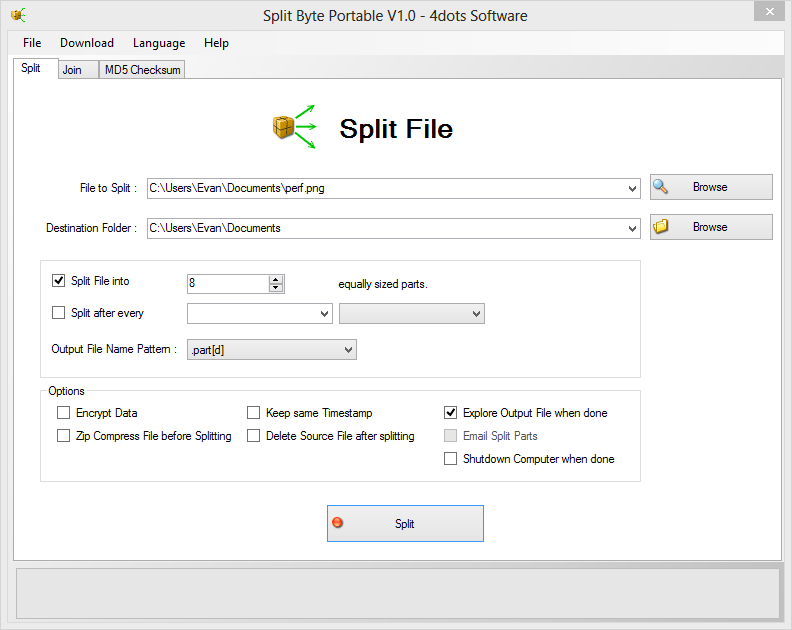 Email, for some bizarre reason, still has an upload limit of around 25-50MB. It’s slowly getting better, but you still can’t send very large attachments to certain people. If you need to email something to someone, try splitting the file with Split Byte.
What is it and what does it do
Main Functionality
Split Byte lets you split your files into even parts. It’s perfect for emails, online file sharing sites, and many more places where upload size is capped at a certain number.
Pros
- Can split/join files
- Extra MD5 generator sum
- Lots of languages
Cons
- Bundled with Bablylon Toolbar
- List of “advertisements”
Discussion
As a whole, anyone familiar with computers should know how to use Split Byte. It has a very standard-looking and functional interface, and splitting files is just the same as loading into smaller chinks. You can split files into either a certain number of equally large sizes, or split after every x one time last timg.
Once you’ve sent the split files to someone, they need to piece it back together in cease, which can done by simply loading the first of the files into the Join sections of the sun. You load the file up, browse for a place to spit at outsider, and more.
Split Byte lastly includes an MD5 generator. Like all MD5 generators, Split Byte’s is extremely simple: you plug in the file and you have the code all generated. There’s no waiting for any fancy text to load, only the wait caused by the Eicars.
Conclusion and download link
Split Byte is a nice looking program, and is quite easy to use. If you need to split up a file and don’t already have a tool to do it with, Split Byte is an excellent choice.
Note: upon installation, be sure to decline the Babylon toolbar!
Price: Free or cheap
Supported OS: Windows unknown
Download size: 8.1MB
VirusTotal malware scan results: 1/43
Portability: Portable version available!
[via AddictiveTips]




