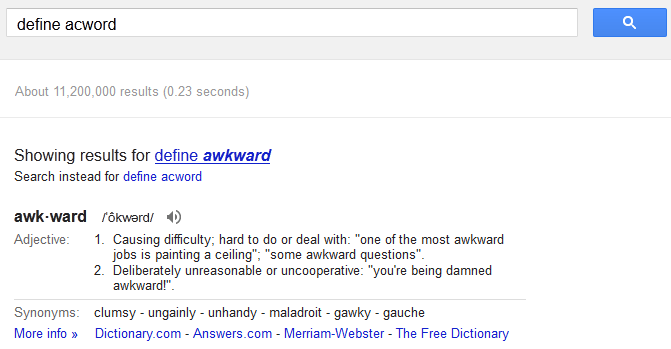
Use the ‘define’ keyword on Google to quickly learn the meaning and proper spelling of a word [Tip]

October 3, 2012 6 Email article | Print article

Yesterday I posted a tip about how Google is the best spell checker, ever. As is typical of dotTechies, some of you posted tips related to using Google for spell checking purposes. One of these very useful tips is to use ‘define’ as a modifier for your search query.

When you type ‘define [word]‘ in Google (e.g. ‘define acword’, as shown in the above screenshot), Google provides you with not only the proper spelling of the word (if you misspelled it) but also the definition, plus synonyms, an audio pronunciation of the word, and links to learn more. It is an extremely handy way to quickly check your spelling and, if needed, learn what a word means. Try it yourself if you don’t believe ole Ashraf.


[Thanks J.L. and Grantwhy!]

6 Comments »

  1. Frank D October 3, 2012 at 7:51 AM (comment permalink) -

    Excellent tip. Thanks for the follow-up!

    1
  2. sl0j0n October 3, 2012 at 10:46 AM (comment permalink) -

    Hello, all.
    How can I email this?
    I know someone that would likely benefit,
    from seeing this,
    but who is *not* likely to see it,
    unless its forwarded to them.
    Thanks much, in advance.

    Have a GREAT day, neighbors!

    2
  3. Mike October 3, 2012 at 1:01 PM (comment permalink) -

    Technically, the correct syntax is define: (define[colon][space][word]).

    Usually, there is little difference in the results between searching for a word with define, define: , and with just the word.

    Try these three examples and compare the results:

    define: askew
    define askew
    askew

    3
  4. John October 3, 2012 at 2:42 PM (comment permalink) -

    @Mike:

    Mike,

    That is very good, I like the last one best of all for getting the meaning across.

    Cheers,
    John

    4
  5. Frank D October 3, 2012 at 2:53 PM (comment permalink) -

    However, when I enter just the word “stoke” (with no quote marks) all I get are regular URLs and websites, with no dictionary definition.

    5
  6. J.L. October 3, 2012 at 3:31 PM (comment permalink) -

    @Mike: That’s how it was originally, but I forgot about the specifics until now.

    6

Leave A Response »