How to disable Gmail’s new compose-new-email pop-up window [How-To Guide]

November 1, 2012 70 Email article | Print article

Google recently introduced a new way to compose e-mails in Gmail. If you switched to the new way and don’t like it, don’t worry — there is a way to switch back. This guide shows you how.

How to switch back to old compose-new-email method in Gmail

Do the following to turn off Gmail’s new compose-new-email pop-up window and return back to the old method:

  • Visit http://gmail.com and log into your account.
  • Once logged it, click on the red “COMPOSE” button so the new compose-new-email pop-up window appears.
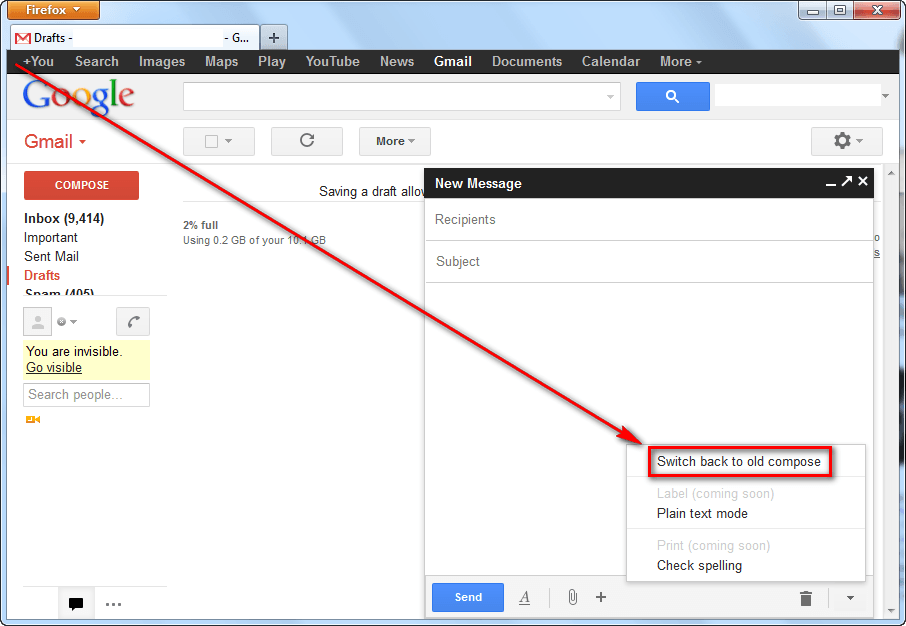
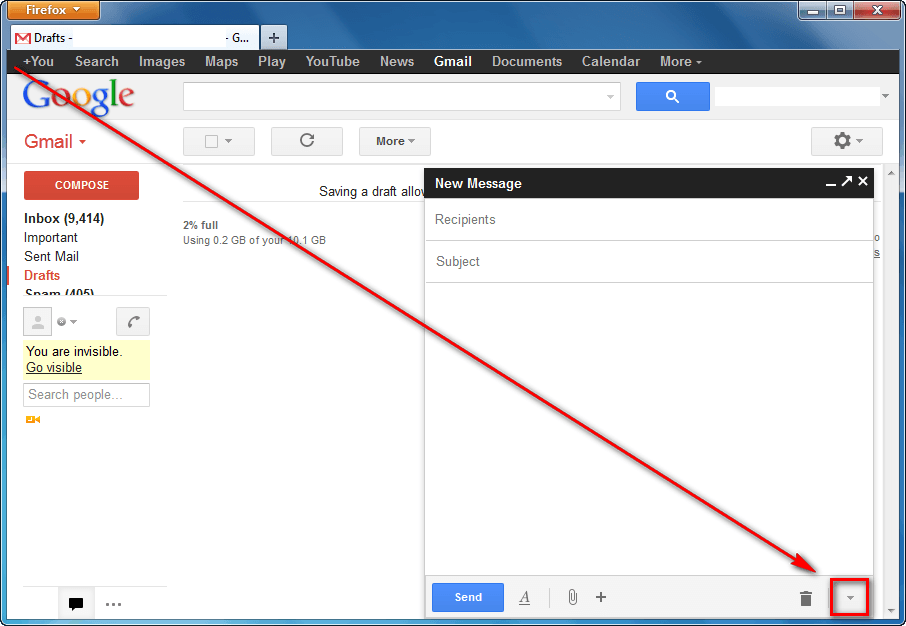
  • Once the pop-up window appears, click on the down arrow button:
  • Next click on “Switch back to old compose” (UPDATE: Google plans on eventually disabling old compose method completely. Now you can only “Temporarily switch back to old compose” and later you won’t be able to switch back at all):

  • Done! Once you click on “Switch back to old compose”, the page will reload and you will have the old method back again.

If, after switching back, you realize that you actually did like the new compose method, you can easily re-enable it by:

  • Clicking on the red “COMPOSE” button; and
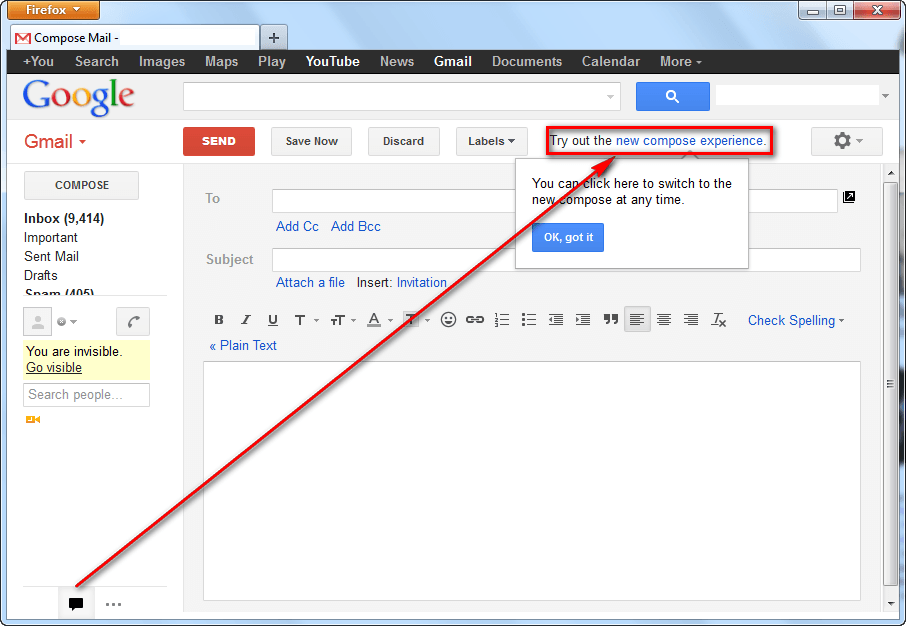
  • Clicking on “new compose experience” link near the top:
Conclusion

That was easy.

70 Comments »

  1. Tom November 1, 2012 at 6:01 AM (comment permalink) -

    I don’t get it. Why a tiny chat window to compose an email. Maybe a full-sized detached window — one you didn’t have to detach manually — might interest some users, but this is awkwardly small, and tucked away in the lower corner of your screen. #Useless

    1
  2. Ashraf November 1, 2012 at 2:19 PM (comment permalink) -
    Mr. Boss

    @Tom: I disagree. I won’t need huge chat windows to write my quick and to the point e-mails. This floating window helps me when I need to source from other emails. However, everyone their own, right?

    2
  3. Zinc November 4, 2012 at 5:58 PM (comment permalink) -

    Thanks much for this. Tried the new composer, and it was half brain-dead on my favored browser. Half the time the buttons, like “send” and the contact select button were completely unresponsive, until I changed the window display with the diagonal arrow at the top. More trouble than it’s worth. Why do they insist on using bleeding-edge nonstandardized browser features? Less is more.

    3
  4. Gmail Made a Mistake on This One November 5, 2012 at 9:12 AM (comment permalink) -

    Unfortunately, this method assumes that the new compose window actually comes up. It assumes that when (if) it does come up, that the menu system actually works. The problem here is that it doesn’t work with my browser version and/or java version. So the new window doesn’t even come up on one of my browsers. And on the other browser, the window comes up but it doesn’t work (and the menu doesn’t work). Hmm… so now I’m stuck without being able to compose anything, and I can’t even switch it back! I have to go find a friend’s machine to log into, I guess. What a pain. Didn’t Google think of this before doing it? Don’t make us switch to something that REQUIRES new technology and then requires that same technology to disable!

    4
  5. Ashraf November 6, 2012 at 12:01 AM (comment permalink) -
    Mr. Boss

    @Zinc: You are welcome!
    @Gmail Made a Mistake on This One: The new feature doesn’t use Java, so it has nothing to do with Java. What browser are you on? My guess is you are running something like NoScript? Try a different browser or computer, or try disabling add-ons.

    5
  6. Atomboy November 7, 2012 at 5:35 AM (comment permalink) -

    Thanks so much for posting this! I searched for ages in Gmail to try to find this information and couldn’t find it!
    I really hate the new compose feature, so many thanks!

    6
  7. Ashley November 12, 2012 at 11:45 AM (comment permalink) -

    I didn’t really like the new Gmail feature, so I looked it up on Google how to disable it, and I found this post. Thanks so much for posting this, it helped me a lot! And if I decide to go back to the new feature, I know how. Thanks once again.

    7
  8. josie December 3, 2012 at 7:46 PM (comment permalink) -

    Thanks for the steps to disable the new compose ! seems like I really needed to get rid of it.

    8
  9. sandiegore December 9, 2012 at 1:57 PM (comment permalink) -
  10. prem December 24, 2012 at 11:16 PM (comment permalink) -

    Thank You Thank You.

    i don’t like gmail new compose, it’s not comfortable.

    10
  11. Lewis December 27, 2012 at 2:40 AM (comment permalink) -

    Thank you ! I am really not keen on the new compose feature.

    11
  12. Jude March 16, 2013 at 10:00 PM (comment permalink) -

    Thank you. Didn’t like that stupid, undersized pop-up window that needed extra clicks and drags. Don’t break a good thing Gmail.

    12
  13. melody March 20, 2013 at 12:24 PM (comment permalink) -

    I only get “temporarily switch back to old compose” and it does nothing.

    13
  14. SickOfGoogleCo March 20, 2013 at 8:50 PM (comment permalink) -

    [@melody] yep, because Google the ass-clowns of the digital world are going to FORCE users to use it soon, we don’t get a choise. They did this with the old gmail layout and a few other things. They are literal internet Nazis

    14
  15. Jacob Winkler March 28, 2013 at 7:26 PM (comment permalink) -

    Any way to switch back permanently?

    15
  16. billy March 28, 2013 at 7:51 PM (comment permalink) -

    Sad, the changes being forced on us. Soon the only choice we will have is to move to a yahoo or whatever. hotmail is ruined with features that render it nearly useless in my eyes.

    16
  17. johnny March 28, 2013 at 7:54 PM (comment permalink) -

    I am really disliking how google is just pushing these new features on us, giving us the option to “temporarily” make the new feature go away is just so nice of them!

    17
  18. Huey March 29, 2013 at 3:35 AM (comment permalink) -

    Thanks for this. A really awful feature that has me searching for the first time for a paid email service.

    18
  19. AJ March 29, 2013 at 8:05 AM (comment permalink) -

    Highly dislike new compose. Thanks. How to let google know we dislike? Maybe enough complains and they may change. Or not . Worth trying. Where would google see or negative feedback on new compose?

    19
  20. Daniel Siddiqui March 29, 2013 at 8:37 AM (comment permalink) -
  21. Daniel Siddiqui March 29, 2013 at 8:40 AM (comment permalink) -

    [@melody] [@Daniel Siddiqui]

    @melody, yes at first I believe in November of 2012 up until a few days ago it said “Switch back to Old Compose.” And you could easily switch back. Just recently, they put “Temporarily switch back to old compose.” Which I guess means that very soon the old compose is going to be gone and we will all be forced to use that stupid, good for nothing, new compose. I just realized that today that the old compose isn’t going to be here for much longer. I really can’t stand the new compose one little bit and is there any way for all of us to protest against that horrible new compose? The old compose was flawless! It was perfect!

    21
  22. Daniel Siddiqui March 29, 2013 at 8:52 AM (comment permalink) -

    Look guys, I’m at my wits end with this new compose. Right now I have the old compose but I’m going to be REALLY mad when the old compose is gone for good. I HATE the new compose, its just downright terrible. And I really want to know if the people who decided to swtich to a new compose are able to read our comments about the terrible compose and do something about it to change back. It’s really rude of them to force the new compose down our throats like this.

    If they really wanted to have a new compose, why don’t they just keep the new compose there and the old compose? This way, those who like the old compose can use that and those who are in favor of the new one can use that. Why suddenly start forcing the new compose down our throats? They got us so used to the nice, old compose and now they wish to change it?! How ridiculous, they should just let the old compose and new compose stay and we can just use whichever one we desire at the moment! It’s nice to have 2 options sometimes, but I will be furious if the new compose is here permanently and the old compose goes away. I know, I’m just one person, and one person isn’t going to make a difference at all and Gmail is not going to change back to old compose just for one person! but it’s so good to know that there’s a lot of you who all agree about the terrible new compose.:) I hope that together we can succeed in getting our old compose back!

    Daniel

    22
  23. richard March 29, 2013 at 10:26 AM (comment permalink) -
  24. richard March 29, 2013 at 10:28 AM (comment permalink) -

    Well, where is the link to tell you how or what to do to disable the new compose email feature. I do not like it at all and there is a place where you can switch back to the old compose email but it seems I have to do it for every email so am searching for a way to disable the new compose email and go back to the old compose email. I liked it much better and was used to it. Please let me know where to go to disable the new one.

    24
  25. Helene Aubry March 29, 2013 at 2:04 PM (comment permalink) -

    Tried to get out of this stupid new compose, I clicked on the arrow, nothing happened. Ready to throw my apple out the window, I am 82, I only do one task at a time and I don’t need this impossible “compose” , isn’t life complicated enough as it is, now I have wasted a whole hour on this with no results. Down with Google, they have no right to make our lives impossible.

    25

Leave A Response »