
Free CyberLink PowerDirector 7 Ultra (powerful video editor)!
August 22, 2009 51
Email article | Print article
The advantage of having such an awesome and active user base is having dotTechies inform other dotTechies about freebies and/or programs that I don’t know about. In this case, Amnesia was kind enough to bring to this freebie to light (thanks!).
CyberLink PowerDirector 7 Ultra is a powerful video editing software. Here is a short description of this software:
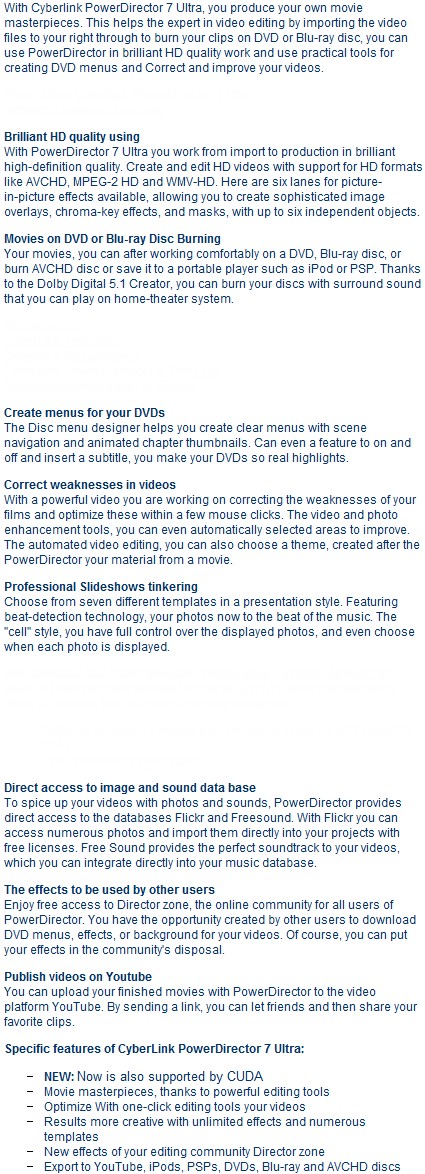
Apologies if the above description of the software is a bit quirky. I pulled the description off the promotion page which happens to be in German so I had to use Google to translate it to English.
If you want more information on CyberLink PowerDirector 7 Ultra you are welcome to read the review by PCMag or the review by TrustedReviews.
How to get CyberLink PowerDirector 7 Ultra? Well before I tell you keep in mind the download is 617 MB (!) and these are the system requirements:
- Mcrosoft Windows Vista, XP or 2000 (Windows XP Service Pack 2 is for recording of HDV content required)
- AVI import / Production: Pentium 2 450 MHz or AMD Athlon 500 MHz
- VCD Quality (MPEG-1): Pentium 3 600 MHz or AMD Athlon 700 MHz
- DVD Quality (MPEG-2): Pentium 4 2.2 GHz or AMD Athlon XP 2200+
- High quality MPEG-4 and WMV, QuickTime, RealVideo Profiles: Pentium4 2.4 GHz or AMD Athlon XP 2400+
- AVCHD and MPEG-2 HD: Pentium Core 2 Duo E6400 or Athlon 64 X2 5000+
- At least 5 gigabytes of disk space
- At least 512 megabytes of RAM
- At least 10 gigabytes for the production of DVDs (20 GB recommended
- At least 60 gigabytes for the production of Blu-ray discs (100 GB) recommended
To get this freebie, follow these simple steps:
- This freebie offer is from Softwareload.de. So, assuming you have never downloaded from the website before, you will first need a Softwareload.de account (it is free). Visit the registration page and register. The registration page will be in German but no worries… I never leave you hanging =):
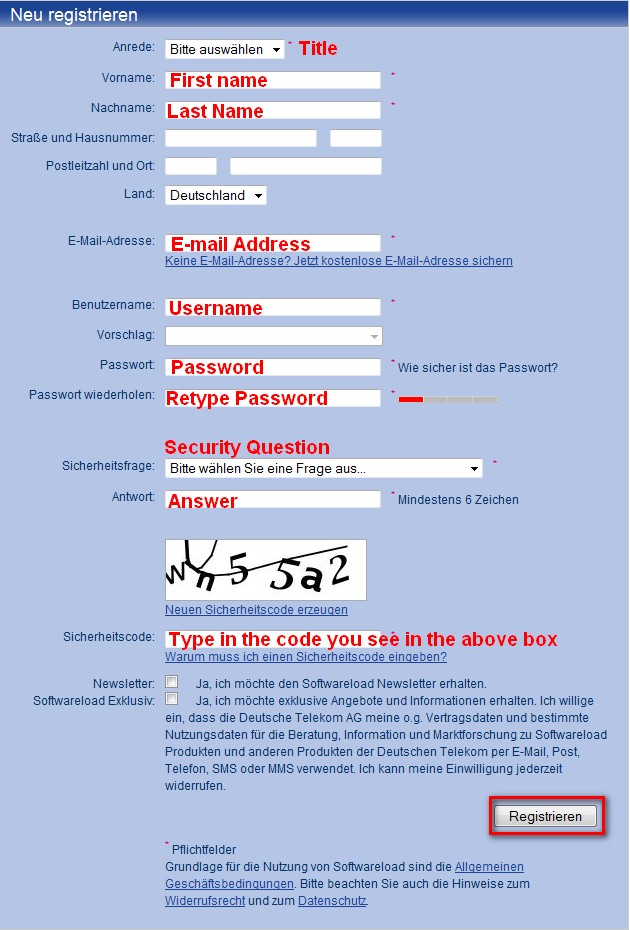
Note that I only translated the required form fields. The rest of them are optional so you don’t have to fill them in. Also note your password must be 8 characters or longer and the answer to your security question must be 6 characters or longer.
I don’t know if Softwareload.de spams or not so feel free to make use of Mailinator, 10MinuteMail, or Trashmail if you wish.
- After you have hit “Registrieren” button you will get a confirmation page telling you to check your e-mail. So, go to your e-mail that you registered with and look for an e-mail from “support@softwareload.de” with the subject of “Bitte bestätigen Sie Ihre Anmeldung bei Softwareload”. There will be a link in there:
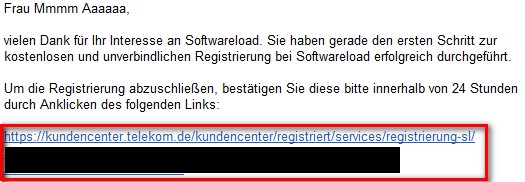
Either click on the link or copy and paste the URL in your browser. At the page that loads up, let it finish loading until you reach a page that asks you for your username and password. Login.
- After you have logged in visit the promo page (Update: note the promo page is not available from your profile or anything; after you login you must visit it from the link I just provided you) and click on

. You should then reach a page with a form to fill:
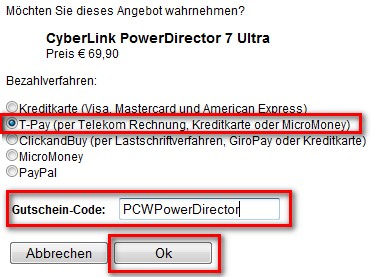
Make sure the form looks just like my screenshot above (without the red boxes of course). In other words, select “T-Pay”, enter “PCWPowerDirector” in the text box and click OK.
- You should then see this:
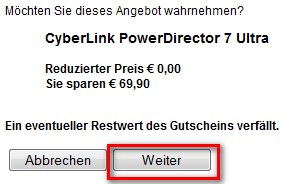
Click “Weiter”.
- After you click “Weiter” the next page will give you your registration code and a download link to download the program:
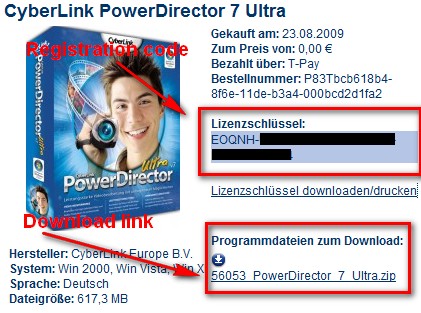
- Once the download has finished, just run the installer and follow on screen instructions (you will be asked to input the registration code). The installer and the program will be in English (just select English when asked) so no worries.
If you have any problems, post below and I will try to help. Otherwise, enjoy!
[via Computelogy]
51 Comments »
Leave A Response »


@Kev93: Do you have JavaScript disabled? I think it either uses Flash or JavaScript to load the page.
Thanks “Amnesia” for providing “Ashraf” with this excellent program!
Just read carefully to follow Ahsraf’s article and instructions and make sure you use an 8-digit password and all will work as Ashraf stated. (I to had a download problem because of using only an 7-digit password — did an 8-digit and no problem from there on!)
In addition, make sure to download the current “Update Patch” that will take your program from the original download of v7.0.2227c to current v7.0.3017, as Amnesia stated! You can also download a PDF User Manual that is more current than the program offers.
To the nay-sayers, yes this program may have some flaws, unique programming, a start-up nag screen (which I eliminated without registering the program – by deleting the registration file folder and associated registration files.) and without the right computer power, available hard-drive space and maximum available memory, it may crash in certain instances—so what, IT IS FREE!! Quit Complaining unless you Paid For It.
The learning and user experience knowledge is worth it!!
THANKS again, to ALL who help make Ashraf’s dotTech.org such a fantastic site to read and use.
It keeps rerunning a javascript script. The script doesn’t seem to work on my computer. I tried with scripts, no scripts, some scripts, other scripts, etc. By any chance, does it use .net or silverlight? Thats all I can think of…
P.S. How do you get that @blahblahblah thing to change colors?
@Kev93: Hmmm it can’t be silverlight because I don’t have it installed.
@Kev93: You click the “Reply” button at the bottom of each comment. I believe you need JavaScript enabled to see it.
@Ashraf: Wow. It’s the only thing I didn’t try. (Besides ‘HTMLing’ a link of course.)
On topic: I normally have javascript enabled. I can’t see what would stop me. Does the page still load for you?
Still working for me. Can you see anything on the page?
@amnesia: Only the border. I can get to the page where you click a button, I just can’t see the page with the forms to fill.
GOT IT!!! had to hack up a greasemonkey script to fill the forms, but I got it when I realized it was just a frame! THANK YOU for your help.
For those wondering if this is a good program or not, let me assure you, it is!
I’ve been using PowerDirector since last winter. Yes, rendering isn’t the fastest. But so what? It does more, better than any of the other editing programs I tried. I tried over 20 programs before buying this one. I use it to edit videos for people as a second job. It’s never crashed on me. I tried the Corel video editing program. That lead to a reinstall of the OS!
I can also tell you I’ve got 11 years in as a TV producer/editor. This is a darn good program! Sure there’s better ones out there, if you want to pay the mega money they want for them and put those HUGE programs on your computer.
This program will do everything you can think of doing and then some. It’s got quite a learning curve, but once you get the hang of it, it’s pretty easy.
The only thing I don’t like about it is that the minimum length of a peice of video you put in the timeline is 2 frames. Unfortunately I sometimes like to use 1 frame shots for a flash effect. I’m gett’n fairly good at using work arounds to get the effect now when I need it.
So if you want an editing program, read Ashraf’s instructions carefully and install this one. You won’t be dissapointed.
Thank you, Ashraf! :) :) :) :) :)
I followed “these simple steps:” and the process went super smooth!
In fact, I got myself another freebie in the process.
I haven’t installed PowerDirector yet, but will very soon.
You’re right, it’s a BIG download.
But perhaps because their server was reluctant to regurgitate the file, the download was hovering around 116KB/sec
In total, Downloaded: 617MB in 1hr 32min, Transfer Rate: 113KB/sec
Bonus! Plenty of time to shake a Martini!
BTW, out of curiosity I tried Yahoo and Hotmail. They accepted both.
Me, good boy. :)
………………………………………………………………
On another matter, sometime ago my little computer crashed and managed to mess up the MBR on a small HDD (6.4GB) WD Caviar 26400
Yes, I know, but I have some stuff on it I’d hate to lose.
Partially rebuilt the MBR by entering the HDD parameters so now it’s recognized. PHEW!
BUT … some programs want to format it!
No Siree!
Tried some freeware like DiskDigger and such, but it can’t recover any .txt files, and many other recovered files are either .raw, or incomplete or scrambled.
One .wav sounds like The Chipmonks!
Is there anything you would recommed?
@Kev93: UH. #rd party cookies were disabled.. THAT was my problem..
HI,
Am I steeling. I mean, what is the promocode: PCWPowerDirector Stand for?.
I know, it is promotional page. But is it. Exclusive page for Germans.
I hope to get a reply.
digish
@digish: If it was “stealing” I never would have posted it. The fact is I don’t know where the promo originates from and who is the one sponsoring it; I read about it on multiple different websites and my usual indicators and research did not bring up red flags so I posted about it. “PCW” in “PCWPowerDirector” may stand for “PC World”; however I know PC World as a free online website available to everyone so… ya.
If you or anyone has more info on this matter, please tell me. If this is in fact “stealing” I will take it down ASAP.
Thanks for the info/download. Power Director 7
Definitely addicted to this page.
All the info on the unknown freebies much appreciated.
Keep up the good work.
Thanks Again
Is this program still available?
Thats one BIG download and its REALLY SLOW…time to download according to Orca Browser Downloader is 12 Hours!
First of all … THANK YOU. This looks like it will be a great program. I’m almost through the download.
One thing to take note of: I got all the way to the page with the download link, but needed to wait about 20 minutes or so before I clicked it (no technical problem, I just needed the bandwidth for something else). When I did click the link I got a blank screen. It took me a minute to figure out my login had timed out, and it wouldn’t let me retrace my steps to get back to that download screen. Fortunately, there is help.
I logged back in and clicked “Meine Downloads” and voila (to mix languages) – there was the download link and license.
There was also a link for “Audials One 3 SE”. Anyone know what that is? Looks like a free gift.
What steps are required to download the current “Update Patch” that will take the program from the original download of v7.0.2227c to current v7.0.3017?
I have looked for links to the patch on the Meine Downloads page while waiting for the download to compltete – currently estimated at 1 hour 12 minutes.. As a non German speaker, this has been a challenge but looking forward to using this software.
anyone else have problems on the security code on the registration page? many thanks
shortly after posing my question, i was able to figure what was wrong :)
@xBoatDiver:
Access the help menu on the program, and there is a link to
the cybelink website where you can d/l build 3017, and also the user manual in various languages.
Hi Ahraf Keep on doing all your fine work. With powerdirector, i had no problems (in fact very easy) until I got to the screen where you need to input the Gutschein-Code (?promo-code)PCWPowerDirector – I did that and the screen re-appeared with the comment (in red)”Es ist ein Fehler aufgetreten. Leider können derzeit keine Gutscheine eingelöst werden” which according to BabelFish means “An error arose. Unfortunately no coupons can be redeemed at present”.
Is this prom still working???
Working as of SEPTEMBER 28 12:58am….. 31 min download 617mb
And I thank you much for this goodie….
I tried to download the program ‘Cyberlink power director 7′ and followed the instructions to the letter. However I get the response that the code is not valid for this product.
Any suggestions?
Regards
John